
Python package to generate app from mind map

Project description
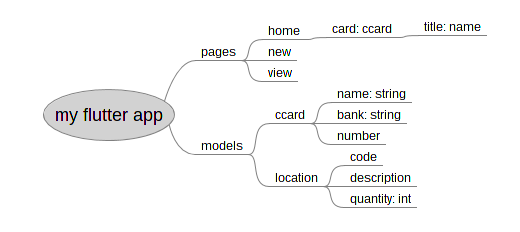
Python package to generate app.
Installation
pip install korapp
For App Creator
Introduction
A brain is an instruction to generate applications, you can generate any kind of application in any language depending on the brain. Download the brain that you want and put in the location ~/.brain
To create new application, use korapp new <appname>
Then cd into the new application folder
open file app.mm to examine and make modification
and run korapp gen
If you change the app.mm mind map, run korapp gen again to regenerate the related files. Note that KorApp will overwrite its generated files so whatever customization you make will be overwritten. So if you want to modify the file, you can use the generated file as template and copy to other file or inherit from them.
However, the files created by korapp new will only generate once and not overwritten.
Doc Server
The brain can behave differently from brain to brain. App Creator can learn how each brain work from the document server. To access the document for the brain. cd <brain_dir> korapp doc The document then can be access from http://127.0.0.1:8000/
For Brain Creator
The brain is also work from mind map as well. To create a brain
you need to write a mind map new.mm which will get run when app creator issue korapp new
put any script used by new.mm inside script/ directory
in the gen/ directory, write mind maps corresponding to the branch that the app creator will be used in the first level branch, i.e., models.mm will get run when they use model branch, pages.mm for pages branch, and so on.
put all the script files under same script/ directory.
Example of models.mm
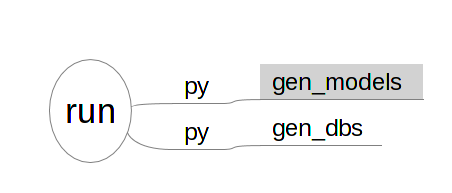
The other directory structure are not required by KorApp, it depends on the script to use them.
Korapp New
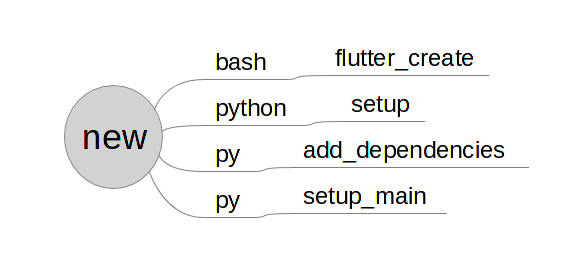
Korapp new
Korapp will first look into new.mm and execute each branch. The first level node is command which can be either bash or python (py is the same as python)
The second level branch is the script filename that is under script/ directory of the brain.
For bash, the script will run brain/script/<name>.sh, the extension .sh will be added automatically.
For python, the script will run brain/script/<name>.py, the extension .py will be added automatically.
Korapp Gen Parameters
for bash, will run with each node converted to snakecase arguments only first branch level
for other, will write node xml into .korapp/node_param.yaml and call as argument to script. The script can access node xml by using utils.get_node_param() like so
from korapp import utils

node_param = utils.get_node_param()
Korapp Doc
Each mind map (.mm files) can have accompanied document file in the format of markdown. The doc server will concatenate together README.md, new.md and all .md files in the gen/ directory
REFERENCE
Requirement
Python 3
Brain Location
default to ~/.brain
can be specified by -b or --brain korapp new my_app -b ~/brain0
Release history Release notifications | RSS feed


Download files
Download the file for your platform. If you're not sure which to choose, learn more about installing packages.
Source Distributions
Built Distribution
Filter files by name, interpreter, ABI, and platform.
If you're not sure about the file name format, learn more about wheel file names.
Copy a direct link to the current filters
File details
Details for the file korapp-0.1.5-py3-none-any.whl.
File metadata
- Download URL: korapp-0.1.5-py3-none-any.whl
- Upload date:
- Size: 11.6 kB
- Tags: Python 3
- Uploaded using Trusted Publishing? No
- Uploaded via: twine/1.13.0 pkginfo/1.5.0.1 requests/2.21.0 setuptools/41.0.0 requests-toolbelt/0.9.1 tqdm/4.31.1 CPython/3.6.7
File hashes
| Algorithm | Hash digest | |
|---|---|---|
| SHA256 |
fe3b3498762ab9217112e129fe62369519d390e143b2855159565ae5f5bcb487
|
|
| MD5 |
09f0bc8331ad5fc2859f502c352f4803
|
|
| BLAKE2b-256 |
aced342db42bc676b9829b06e7ce9c9598ce415d67c44ccaeee1d812173efc62
|






