
LASER embeddings




Out-of-the-box multilingual sentence embeddings.
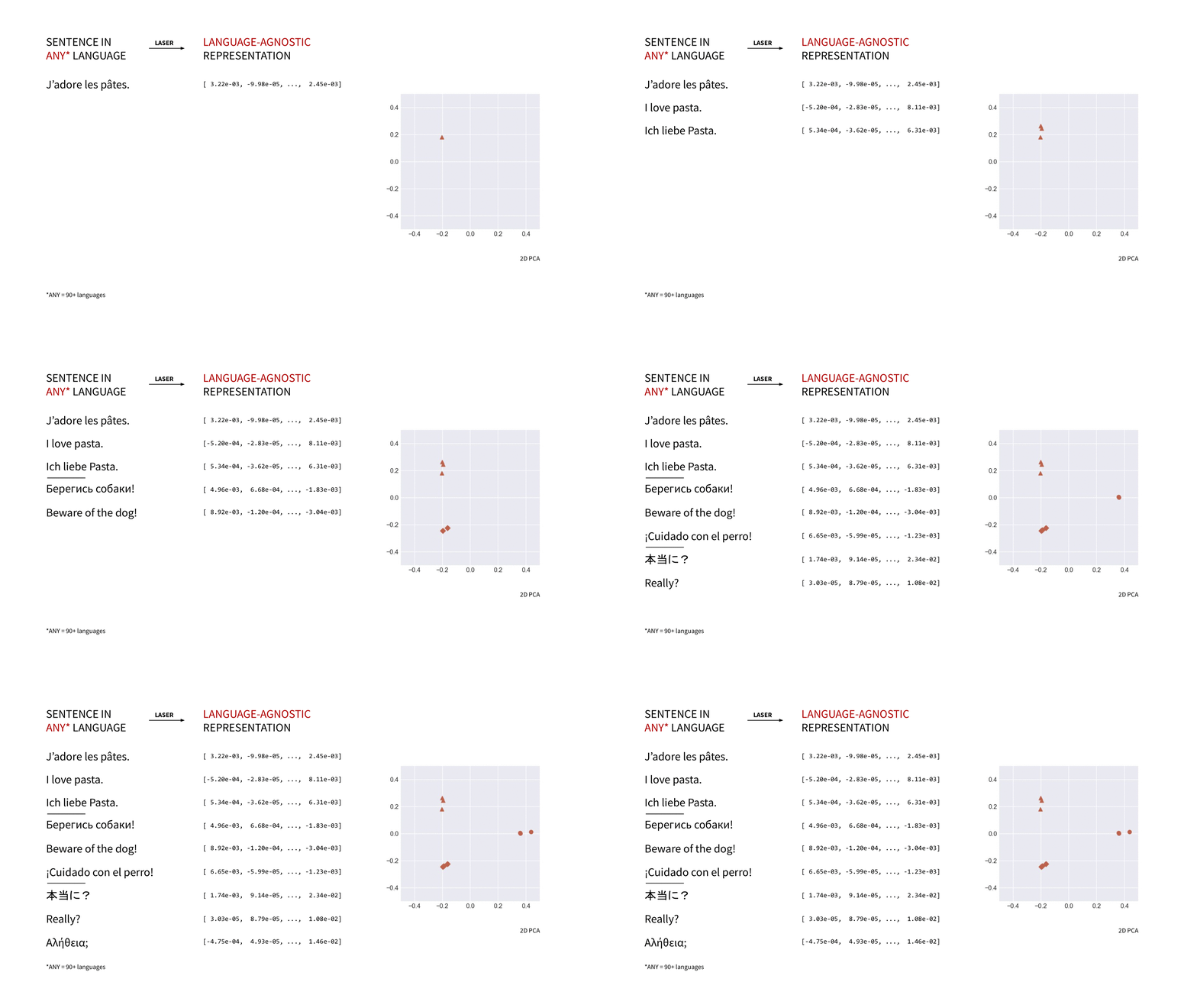
laserembeddings is a pip-packaged, production-ready port of Facebook Research's LASER (Language-Agnostic SEntence Representations) to compute multilingual sentence embeddings.
Have a look at the project's repo (master branch or this release) for the full documentation.
Getting started
Prerequisites
You'll need Python 3.6+ and PyTorch. Please refer to PyTorch installation instructions.
Installation
pip install laserembeddings
Chinese language
Chinese is not supported by default. If you need to embed Chinese sentences, please install laserembeddings with the "zh" extra. This extra includes jieba.
pip install laserembeddings[zh]
Japanese language
Japanese is not supported by default. If you need to embed Japanese sentences, please install laserembeddings with the "ja" extra. This extra includes mecab-python3 and the ipadic dictionary, which is used in the original LASER project.
If you have issues running laserembeddings on Japanese sentences, please refer to mecab-python3 documentation for troubleshooting.
pip install laserembeddings[ja]
Downloading the pre-trained models
python -m laserembeddings download-models
This will download the models to the default data directory next to the source code of the package. Use python -m laserembeddings download-models path/to/model/directory to download the models to a specific location.
Usage
from laserembeddings import Laser

laser = Laser()

# if all sentences are in the same language:

embeddings = laser.embed_sentences(
    ['let your neural network be polyglot',
     'use multilingual embeddings!'],
    lang='en')  # lang is only used for tokenization

# embeddings is a N*1024 (N = number of sentences) NumPy array
If the sentences are not in the same language, you can pass a list of language codes:
embeddings = laser.embed_sentences(
    ['I love pasta.',
     "J'adore les pâtes.",
     'Ich liebe Pasta.'],
    lang=['en', 'fr', 'de'])
If you downloaded the models into a specific directory:
from laserembeddings import Laser

path_to_bpe_codes = ...
path_to_bpe_vocab = ...
path_to_encoder = ...

laser = Laser(path_to_bpe_codes, path_to_bpe_vocab, path_to_encoder)

# you can also supply file objects instead of file paths
If you want to pull the models from S3:
from io import BytesIO, StringIO
from laserembeddings import Laser
import boto3

s3 = boto3.resource('s3')
MODELS_BUCKET = ...

f_bpe_codes = StringIO(s3.Object(MODELS_BUCKET, 'path_to_bpe_codes.fcodes').get()['Body'].read().decode('utf-8'))
f_bpe_vocab = StringIO(s3.Object(MODELS_BUCKET, 'path_to_bpe_vocabulary.fvocab').get()['Body'].read().decode('utf-8'))
f_encoder = BytesIO(s3.Object(MODELS_BUCKET, 'path_to_encoder.pt').get()['Body'].read())

laser = Laser(f_bpe_codes, f_bpe_vocab, f_encoder)
1 maintainer

Metadata
1 maintainer
Release files for laserembeddings 1.1.2
For a detailed explanation of source distributions (sdists) and built distributions (wheels), please see the package formats documentation.
Source distribution (sdist)
| File | Size | Uploaded | Provenance | Actions |
|---|---|---|---|---|
| laserembeddings-1.1.2.tar.gz | 12.8 kB | Without provenance | Details for laserembeddings-1.1.2.tar.gz |
Built distribution (wheel)
| File | Interpreter | ABI | Platform | Actions Reset |
|---|---|---|---|---|
| laserembeddings-1.1.2-py3-none-any.whl | Python 3 | none | any | Details for laserembeddings-1.1.2-py3-none-any.whl |
Total release size: 26.2 kB
Release files / laserembeddings-1.1.2.tar.gz
| Download URL | laserembeddings-1.1.2.tar.gz |
|---|---|
| Size | 12.8 kB |
| Tags | Source |
|
SHA-256 checksum How to use checksums |
1d0edf86c3ec800d9715d3dd530a04c1a4022ffc355b6d91d1ea6b23bd47a2fb
|
|
BLAKE2b-256 checksum How to use checksums |
d1d4334569ff2a318e8d587506d4dd1b54260b2391a5759e0614326bc17969bc
|
| Upload date | |
|
Uploaded using Trusted Publishing? What is trusted publishing? |
No |
| Uploaded via |
poetry/1.1.11 CPython/3.9.2 Darwin/21.1.0
|
Release files / laserembeddings-1.1.2-py3-none-any.whl
| Download URL | laserembeddings-1.1.2-py3-none-any.whl |
|---|---|
| Size | 13.4 kB |
| Tags | Python 3 |
|
SHA-256 checksum How to use checksums |
1504af7f2a3353b75cef9ce1f6ea4260779e434906fd1b002d671477216232f7
|
|
BLAKE2b-256 checksum How to use checksums |
bbc2d52b3171b53352ec5b67196b437d3fbf77b615d529ffa57b5772f84b2ad1
|
| Upload date | |
|
Uploaded using Trusted Publishing? What is trusted publishing? |
No |
| Uploaded via |
poetry/1.1.11 CPython/3.9.2 Darwin/21.1.0
|
Security for laserembeddings 1.1.2
Provenance
Provenance describes where a file came from. On PyPI, provenance is shared via attestations, which provide a verifiable record of the build or publishing details. View details, limitations and caveats.
No provenance found
None of the files in this release were uploaded with provenance metadata.
A note on package security
PyPI is a repository for distributing packages, not a service for auditing them. While third-party security researchers and our staff do their best to detect and remove malicious packages, PyPI cannot guarantee the quality, security or suitability of any given package.
To learn more about protecting yourself from malicious actors, visit our package security documentation.














