

LatexTools
latextools is a collection of tools for building, rendering, and converting Latex documents. Output objects integrate with Jupyter and display inline after a code cell allowing for quick design of many Latex diagrams like Tikz and qcircuit.
Install
latextools is available on PyPI:
python3 -m pip install latextools
Prerequisites
pdflatex
A distribution of LaTeX that provides the pdflatex command needs to be installed separately.
There are many options and instillation is platform-specific.
Below are some examples for installing TeX Live on Linux and MacTeX on macOS.
Ubuntu
sudo apt install texlive # Or texlive-latex-recommended, or texlive-latex-extra
macOS
Using homebrew:
brew cask install mactex # Or mactex-no-gui
Inkscape (optional)
Inkscape is used for conversions from PDF to other image formats.
Any OS
Download and run the installer from inkscape.org.
macOS
Using homebrew:
brew cask install inkscape
Drawsvg and Cairo (optional)
drawsvg and Cairo are used for some SVG conversion functions.
Ubuntu
sudo apt-get install libcairo2
python3 -m pip install "drawsvg[raster]~=2.0"
macOS
Using homebrew:
brew install cairo
python3 -m pip install "drawsvg[raster]~=2.0"
Examples
Easily render a bit of Latex code
import latextools
import random

numbers = [[random.randint(0, 10000) for x in range(4)]
          for y in range(5)]
row = ['&'.join('{}'.format(num) for num in row)
       for row in numbers]
table_body = ' \\\\\n\\hline\n    '.join(row)

pdf = latextools.render_snippet(r'''
\begin{tabular}{c|c|c|c}
    A & B & C & E \\
    \hline\hline
    ''' + table_body + ''' \\
\end{tabular}
'''.strip(),
    pad=1,
)
pdf.save('table.pdf')
pdf.rasterize('table.png', scale=2)
pdf.as_svg().as_drawing(scale=2).save_svg('table.svg')
pdf  # Show preview if this is in a Jupyter notebook

Draw a qcircuit diagram
import latextools

pdf = latextools.render_qcircuit(r'''
% qcircuit code from http://physics.unm.edu/CQuIC/Qcircuit/Qtutorial.pdf
& \ctrl{2} & \qw & \gate{H} & \ctrl{1} &\gate{H} & \qw \\
& \qw & \ctrl{1} & \gate{H} & \targ &\gate{H} & \qw \\
& \targ & \targ & \gate{Z} & \qw & \ctrl{-1} &\qw \gategroup{1}{4}{2}{6}{.7em}{--}
''')
pdf.save('qcircuit.pdf')
pdf.rasterize('qcircuit.png', scale=2)
pdf.as_svg().as_drawing(scale=2).save_svg('qcircuit.svg')
pdf  # Show preview if this is in a Jupyter notebook

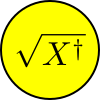
Embed latex in an SVG vector drawing
import latextools
import drawsvg as draw  # pip3 install drawsvg

# Render latex
latex_eq = latextools.render_snippet(
    r'$\sqrt{X^\dag}$',
    commands=[latextools.cmd.all_math])
svg_eq = latex_eq.as_svg()

# Use the rendered latex in a vector drawing
d = draw.Drawing(100, 100, origin='center')
d.append(draw.Circle(0, 0, 49, fill='yellow', stroke='black', stroke_width=2))
d.draw(svg_eq, x=0, y=0, center=True, scale=2.5)

d.save_svg('vector.svg')
d.save_png('vector.png')

# Display in Jupyter notebook
#d.rasterize()  # Display as PNG
d.display_inline()  # Display as SVG
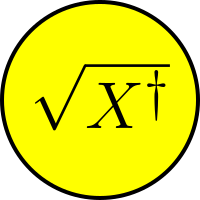
Render an SVG that contains text with LaTeX equations and macros
import latextools
import drawsvg as draw  # pip3 install drawsvg

# Create an SVG drawing with latex-formatted text
d = draw.Drawing(100, 100, origin='center')
d.append(draw.Circle(0, 0, 49, fill='yellow', stroke='black', stroke_width=2))
d.append(draw.Text(r'\Huge$\sqrt{X^\dag}$', 30, 0, 14, center=True))

# Render entire drawing as latex
pdf = latextools.render_svg(d)

pdf.save('vector2.pdf')
pdf.rasterize('vector2.png', scale=2)

# Display in Jupyter notebook
#pdf.rasterize(scale=2)  # Display as PNG
pdf  # Display as PDF
Build and render a full Latex project
import latextools

# Build a Latex document
packages = [
    latextools.pkg.qcircuit,
    latextools.LatexPackage('geometry', ('paperheight=2.5in','paperwidth=2.5in',
                                         'margin=0.1in','heightrounded')),
]
commands = [
    latextools.cmd.ceil,
]
config = latextools.DocumentConfig('article', ('',))

proj = latextools.LatexProject()
content = latextools.BasicContent(
    r'''%
\[
\Qcircuit @R=.1em @C=0.3em @!R {
&	\qw	&	\qw	&	\ctrl{2}	&	\qw	&	\qw	&	\qw	&	\qw	&	\qw	&	\qw	\\
&	\qw	&	\qw	&	\qw	&	\qw	&	\ctrl{1}	&	\qw	&	\qw	&	\qw	&	\qw	\\
&	\push{\ket{0}}\qw	&	\qw	&	\targ	&	\targ	&	\targ	&	\targ	&	\qw	&	\meter	&	\qw	\\
&	\qw	&	\qw	&	\targ	&	\ctrl{-1}	&	\qw	&	\qw	&	\qw	&	\qw	&	\qw	\\
&	\qw	&	\qw	&	\qw	&	\targ	&	\qw	&	\ctrl{-2}	&	\qw	&	\qw	&	\qw	\\
&	\push{\ket{0}}\qw	&	\gate{H}	&	\ctrl{-2}	&	\ctrl{-1}	&	\ctrl{1}	&	\ctrl{2}	&	\gate{H}	&	\meter	&	\qw	\\
&	\qw	&	\qw	&	\qw	&	\qw	&	\targ	&	\qw	&	\qw	&	\qw	&	\qw	\\
&	\qw	&	\qw	&	\qw	&	\qw	&	\qw	&	\targ	&	\qw	&	\qw	&	\qw	\\
}%
\]
''',
    packages, commands)
doc = content.as_document(path='figs/syndrome-circuit.tex',
                          config=config)
doc = latextools.LatexDocument(
    path='figs/syndrome-circuit.tex', config=config,
    contents=(
        latextools.BasicContent('\centering A qcircuit diagram:'),
        content,
    ))
proj.add_file(doc)

# Write Latex source code to current directory (maintains directory structure)
proj.write_src('.')

# Render Latex
proj.add_file(latextools.LatexDocument(
    path='main.tex', config=config, contents=doc.contents))
pdf = proj.compile_pdf()
# With additional command line arguments:
#pdf = proj.compile_pdf(options=['-halt-on-error', '-file-line-error',
#                                '-interaction', 'nonstopmode', '-shell-escape'])

pdf.save('figs/syndrome-circuit.pdf')
pdf  # Show preview if this is in a Jupyter notebook

1 maintainer

Release files for latextools 0.5.0
For a detailed explanation of source distributions (sdists) and built distributions (wheels), please see the package formats documentation.
Built distribution (wheel)
| File | Interpreter | ABI | Platform | Reset |
|---|---|---|---|---|
| latextools-0.5.0-py3-none-any.whl | Python 3 | none | any | Details |
Release files / latextools-0.5.0-py3-none-any.whl
| Download URL | latextools-0.5.0-py3-none-any.whl |
|---|---|
| Size | 27.3 kB |
| Tags | Python 3 |
|
SHA-256 checksum How to use checksums |
6e6bb6c8c98ca3e11a84da724c5c081cdc78ff29aaadbaadbe5ef66d327aa4bd
|
|
BLAKE2b-256 checksum How to use checksums |
099635c67a8a318c782a9d36ce6dae30c4f441aff1c4341040fa9a873e6fb216
|
| Upload date | |
|
Uploaded using Trusted Publishing? What is trusted publishing? |
No |
| Uploaded via |
twine/3.7.1 importlib_metadata/4.10.1 pkginfo/1.8.2 requests/2.26.0 requests-toolbelt/0.9.1 tqdm/4.62.3 CPython/3.10.4
|














