
An image segmentation GUI for generating ML ready mask tensors and annotations.

Project description


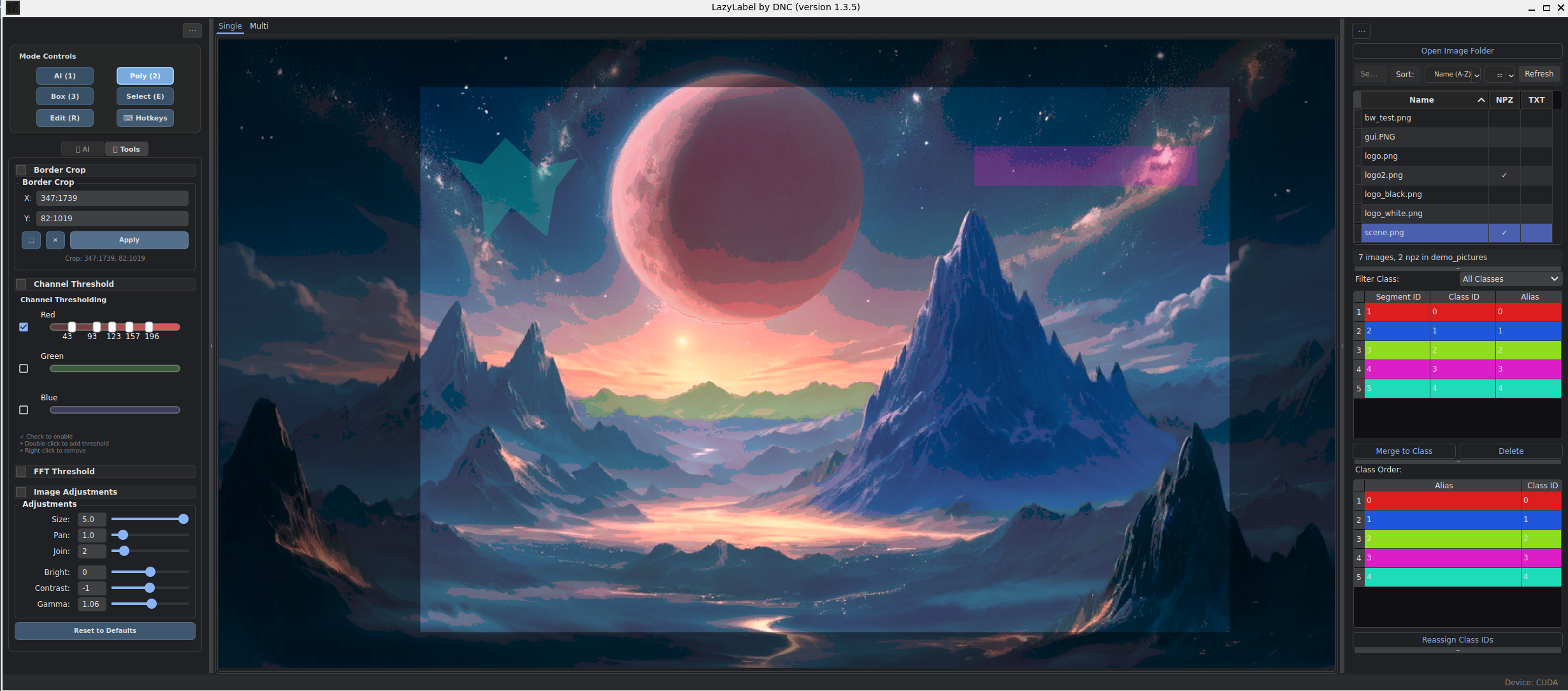
LazyLabel is an intuitive, AI-assisted image segmentation tool built with a modern, modular architecture. It uses Meta's Segment Anything Model (SAM) for quick, precise mask generation, alongside advanced polygon editing for fine-tuned control. Features comprehensive model management, customizable hotkeys, and outputs in clean, one-hot encoded .npz format for easy machine learning integration.
Inspired by LabelMe and Segment-Anything-UI.
✨ Core Features
AI-Powered Segmentation
- Generate masks with simple left-click (positive) and right-click (negative) interactions
- Multiple SAM model support with easy switching
- Custom model loading from any directory
Advanced Editing Tools
- Vector Polygon Tool: Full control to draw, edit, and reshape polygons
- Vertex Editing: Drag vertices or move entire shapes with precision
- Selection & Merging: Select, merge, and re-order segments intuitively
Professional Workflow
- Customizable Hotkeys: Personalize keyboard shortcuts for all functions
- Advanced Class Management: Assign multiple segments to single class IDs
- Smart I/O: Load existing
.npzmasks; save as clean, one-hot encoded outputs - Interactive UI: Color-coded segments, sortable lists, and hover highlighting
Modern Architecture
- Modular Design: Clean, maintainable codebase with separated concerns
- Model Management: Dedicated model storage and switching system
- Persistent Settings: User preferences saved between sessions
🚀 Getting Started
Prerequisites
Python 3.10+
Installation
For Users via PyPI
- Install LazyLabel directly:
pip install lazylabel-gui
- Run the application:
lazylabel-gui
For Developers (from Source)
- Clone the repository:
git clone https://github.com/dnzckn/LazyLabel.git
cd LazyLabel
- Install in editable mode:
pip install -e .
- Run the application:
lazylabel-gui
Model Management
- Default Storage: Models are stored in
src/lazylabel/models/directory - Custom Models: Click "Browse Models" to select custom model folders
- Model Switching: Use the dropdown to switch between available models
- Auto-Detection: Application automatically detects all
.pthfiles in selected directories
Note: On the first run, the application will automatically download the SAM model checkpoint (~2.5 GB) from Meta's repository to the models directory. This is a one-time download.
⌨️ Controls & Keybinds
💡 Tip: All hotkeys are fully customizable! Click the "Hotkeys" button in the control panel to personalize your shortcuts.
Modes
| Key | Action |
|---|---|
1 |
Enter Point Mode (for AI segmentation). |
2 |
Enter Polygon Drawing Mode. |
E |
Toggle Selection Mode to select existing segments. |
R |
Enter Edit Mode for selected polygons (drag shape or vertices). |
Q |
Toggle Pan Mode (click and drag the image). |
Actions
| Key(s) | Action |
|---|---|
L-Click |
Add positive point (Point Mode) or polygon vertex. |
R-Click |
Add negative point (Point Mode). |
Ctrl + Z |
Undo last point. |
Spacebar |
Finalize and save current AI segment. |
Enter |
Save final mask for the current image to a .npz file. |
M |
Merge selected segments into a single class. |
V / Delete / Backspace |
Delete selected segments. |
C |
Clear temporary points/vertices. |
W/A/S/D |
Pan image. |
Scroll Wheel |
Zoom-in or -out. |
📦 Output Format
LazyLabel saves your work as a compressed NumPy array (.npz) with the same name as your image file.
The file contains a single data key, 'mask', holding a one-hot encoded tensor with the shape (H, W, C):
H: Image height.W: Image width.C: Total unique classes.
Each channel is a binary mask for a class, combining all assigned segments into a clean, ML-ready output.
🏗️ Architecture
LazyLabel features a modern, modular architecture designed for maintainability and extensibility:
- Modular Design: Clean separation between UI, business logic, and configuration
- Signal-Based Communication: Loose coupling between components using PyQt signals
- Persistent Configuration: User settings and preferences saved between sessions
- Extensible Model System: Easy integration of new SAM models and types
For detailed technical documentation, see ARCHITECTURE.md.
⌨️ Hotkey Customization
LazyLabel includes a comprehensive hotkey management system:
- Full Customization: Personalize keyboard shortcuts for all 27+ functions
- Category Organization: Hotkeys organized by function (Modes, Actions, Navigation, etc.)
- Primary & Secondary Keys: Set multiple shortcuts for the same action
- Persistent Settings: Custom hotkeys saved between sessions
- Conflict Prevention: System prevents duplicate key assignments
For complete hotkey documentation, see HOTKEY_FEATURE.md.
☕ Support LazyLabel
If you found LazyLabel helpful, consider supporting the project!
Release history Release notifications | RSS feed


Download files
Download the file for your platform. If you're not sure which to choose, learn more about installing packages.
Source Distribution
Built Distribution
Filter files by name, interpreter, ABI, and platform.
If you're not sure about the file name format, learn more about wheel file names.
Copy a direct link to the current filters
File details
Details for the file lazylabel_gui-1.1.0.tar.gz.
File metadata
- Download URL: lazylabel_gui-1.1.0.tar.gz
- Upload date:
- Size: 41.1 kB
- Tags: Source
- Uploaded using Trusted Publishing? No
- Uploaded via: twine/6.1.0 CPython/3.10.11
File hashes
| Algorithm | Hash digest | |
|---|---|---|
| SHA256 |
03285e4f785cbe31f06ef8649be4ab678d16295c6e10fe1c42a97f1a627427c4
|
|
| MD5 |
b5a7eb1d7124fba79ea9a59bb6b96eba
|
|
| BLAKE2b-256 |
a1e36358c1056473e3d4e2f29e7d884217b3c4de836c31a47987030fc7cdd7a3
|
File details
Details for the file lazylabel_gui-1.1.0-py3-none-any.whl.
File metadata
- Download URL: lazylabel_gui-1.1.0-py3-none-any.whl
- Upload date:
- Size: 47.5 kB
- Tags: Python 3
- Uploaded using Trusted Publishing? No
- Uploaded via: twine/6.1.0 CPython/3.10.11
File hashes
| Algorithm | Hash digest | |
|---|---|---|
| SHA256 |
c1685f33a2bc2395fff53c7343250e321defcbe4e5f67538a63f200c0ce00af9
|
|
| MD5 |
d56c898cc7cdaffb1a2760883f6056d7
|
|
| BLAKE2b-256 |
5b5ba47a81923f67a61e37ba274070c2fbf29ba5e962cf1add1eaf5551e9f980
|






