
An image segmentation GUI for generating ML ready mask tensors and annotations.

Project description

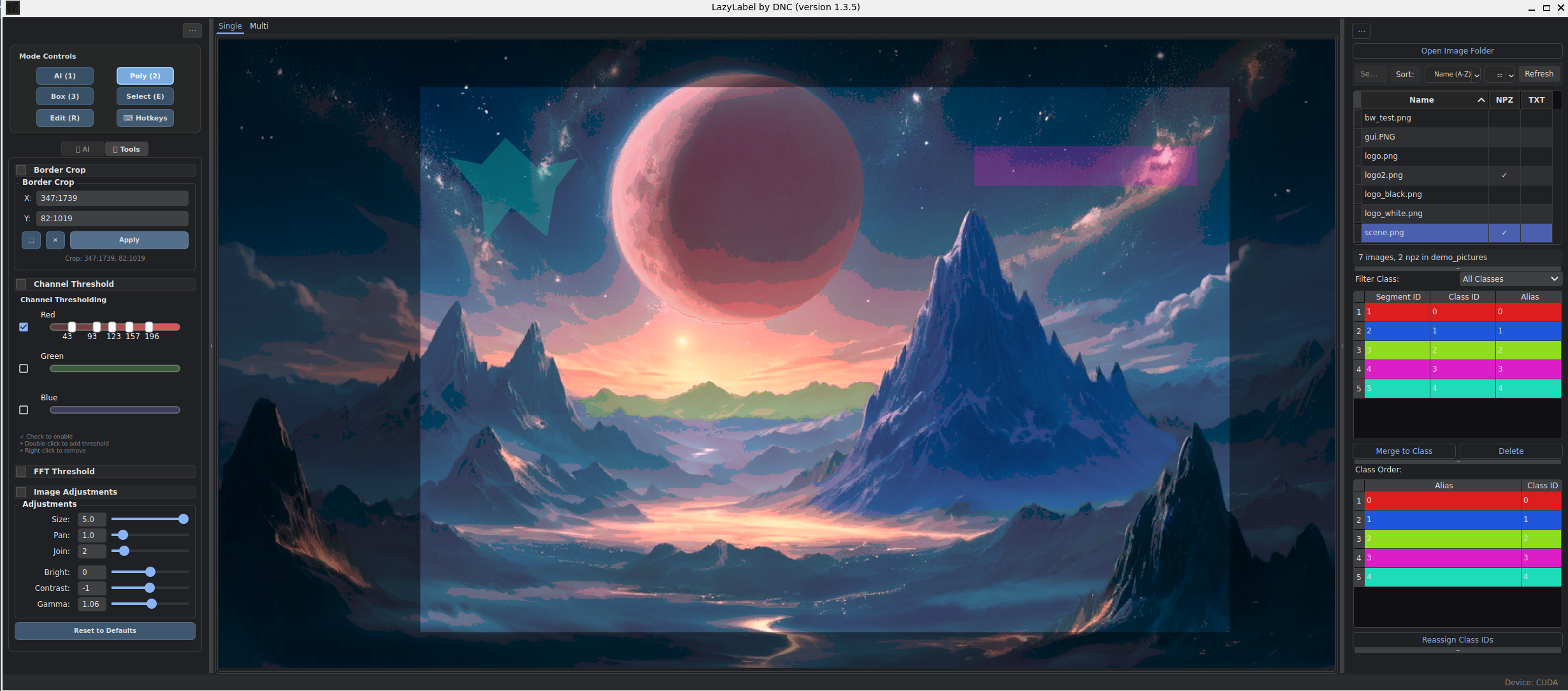
AI-Assisted Image Segmentation Made Simple
LazyLabel combines Meta's Segment Anything Model (SAM) with intuitive editing tools for fast, precise image labeling. Perfect for machine learning datasets, computer vision research, and annotation workflows.
🚀 Quick Start
Installation
pip install lazylabel-gui
lazylabel-gui
Usage
- Open Folder → Select your image directory
- Click on image → AI generates instant masks
- Fine-tune → Edit polygons, merge segments, adjust classes
- Export → Clean
.npzfiles ready for ML training
✨ Key Features
🧠 AI-Powered Segmentation
- One-click masking with Meta's SAM model
- Smart prompting via positive/negative points
- Fragment filtering to remove small artifacts
- Multiple model support (VIT-H, VIT-L, VIT-B)
🎨 Advanced Editing
- Polygon drawing with full vertex control
- Bounding box annotation mode
- Shape merging and class assignment
- Edit mode for precision adjustments
⚡ Productivity Tools
- Image adjustments (brightness, contrast, gamma)
- Customizable hotkeys for all functions
- Undo/redo with full history
- Auto-save and session persistence
📊 ML-Ready Outputs
- One-hot encoded
.npzformat - Clean class separation with shape
(H, W, Classes) - Batch processing support
- Existing mask loading for iterative work
⌨️ Essential Controls
| Mode | Key | Action |
|---|---|---|
| AI Segmentation | 1 |
Point mode for SAM |
Left Click |
Add positive point | |
Right Click |
Add negative point | |
Space |
Save segment | |
| Manual Drawing | 2 |
Polygon mode |
Left Click |
Add vertex | |
Enter |
Close polygon | |
| Editing | E |
Selection mode |
R |
Edit selected shapes | |
M |
Merge selected segments | |
| Navigation | Q |
Pan mode |
W/A/S/D |
Pan image | |
Scroll |
Zoom in/out |
💡 All hotkeys are customizable - Click "Hotkeys" button to personalize shortcuts
📦 Output Format
LazyLabel exports clean, ML-ready data:
import numpy as np

# Load your labeled data
data = np.load('your_image.npz')
mask = data['mask']  # Shape: (height, width, num_classes)

# Each channel is a binary mask for one class
class_0_mask = mask[:, :, 0]  # Binary mask for class 0
class_1_mask = mask[:, :, 1]  # Binary mask for class 1
# ... and so on
Perfect for:
- Semantic segmentation training
- Instance segmentation datasets
- Computer vision research
- Automated annotation pipelines
🛠️ Advanced Features
Image Enhancement
- Brightness/Contrast adjustment sliders
- Gamma correction for better visibility
- Live preview of adjustments
- SAM integration with adjusted images
Smart Filtering
- Fragment threshold removes small segments
- Size-based filtering (0-100% of largest segment)
- Quality control for clean annotations
Professional Workflow
- Class management with custom aliases
- Segment organization with sortable tables
- Batch export for large datasets
- Model switching without restart
🏗️ Development
Installation from Source
git clone https://github.com/dnzckn/LazyLabel.git
cd LazyLabel
pip install -e .
lazylabel-gui
Code Quality & Testing
# Linting & formatting
ruff check . && ruff format .

# Run tests with coverage
python -m pytest --cov=lazylabel --cov-report=html

# All tests pass with 60%+ coverage
Architecture
- Modular design with clean separation of concerns
- Signal-based communication between components
- Extensible model system for new SAM variants
- Comprehensive test suite with 95% speed optimization
📋 Requirements
- Python 3.10+
- OpenCV for image processing
- PyQt6 for GUI
- NumPy for data handling
- 2.5GB disk space for SAM model (auto-downloaded)
🤝 Contributing
LazyLabel welcomes contributions! Check out our:
- Architecture Guide for technical details
- Hotkey System for customization
- Issues page for feature requests and bug reports
🙏 Acknowledgments
LazyLabel was inspired by and builds upon the excellent work of:
- LabelMe - The pioneering open-source image annotation tool
- Segment-Anything-UI - Early SAM integration concepts
☕ Support
If LazyLabel saves you time on annotation tasks, consider supporting the project!
Made with ❤️ for the computer vision community
Release history Release notifications | RSS feed


Download files
Download the file for your platform. If you're not sure which to choose, learn more about installing packages.
Source Distribution
Built Distribution
Filter files by name, interpreter, ABI, and platform.
If you're not sure about the file name format, learn more about wheel file names.
Copy a direct link to the current filters
File details
Details for the file lazylabel_gui-1.1.9.tar.gz.
File metadata
- Download URL: lazylabel_gui-1.1.9.tar.gz
- Upload date:
- Size: 74.2 kB
- Tags: Source
- Uploaded using Trusted Publishing? No
- Uploaded via: twine/6.1.0 CPython/3.10.11
File hashes
| Algorithm | Hash digest | |
|---|---|---|
| SHA256 |
d2606a12b616857241c264b762cfd263ea9e6f8e648755d5069ab111bad6c9e1
|
|
| MD5 |
dc028cbc8c117b68094ffa7492473cbd
|
|
| BLAKE2b-256 |
725e008c8c6d4212792e95110814463bc1a3dde1ef0398ce6c2eba959171c384
|
File details
Details for the file lazylabel_gui-1.1.9-py3-none-any.whl.
File metadata
- Download URL: lazylabel_gui-1.1.9-py3-none-any.whl
- Upload date:
- Size: 83.4 kB
- Tags: Python 3
- Uploaded using Trusted Publishing? No
- Uploaded via: twine/6.1.0 CPython/3.10.11
File hashes
| Algorithm | Hash digest | |
|---|---|---|
| SHA256 |
6141719e64e93f54018a612a42022e6ca448640a4a4c092991e63ea278cccd7d
|
|
| MD5 |
d3b3fb951868984a592d769436cf0ab9
|
|
| BLAKE2b-256 |
ba3b6241dc7983dbb0f1bd37f76b44616a65835fef12632b0c203fea6e689286
|






