
An image segmentation GUI for generating ML ready mask tensors and annotations.

Project description


AI-Assisted Image Segmentation Made Simple
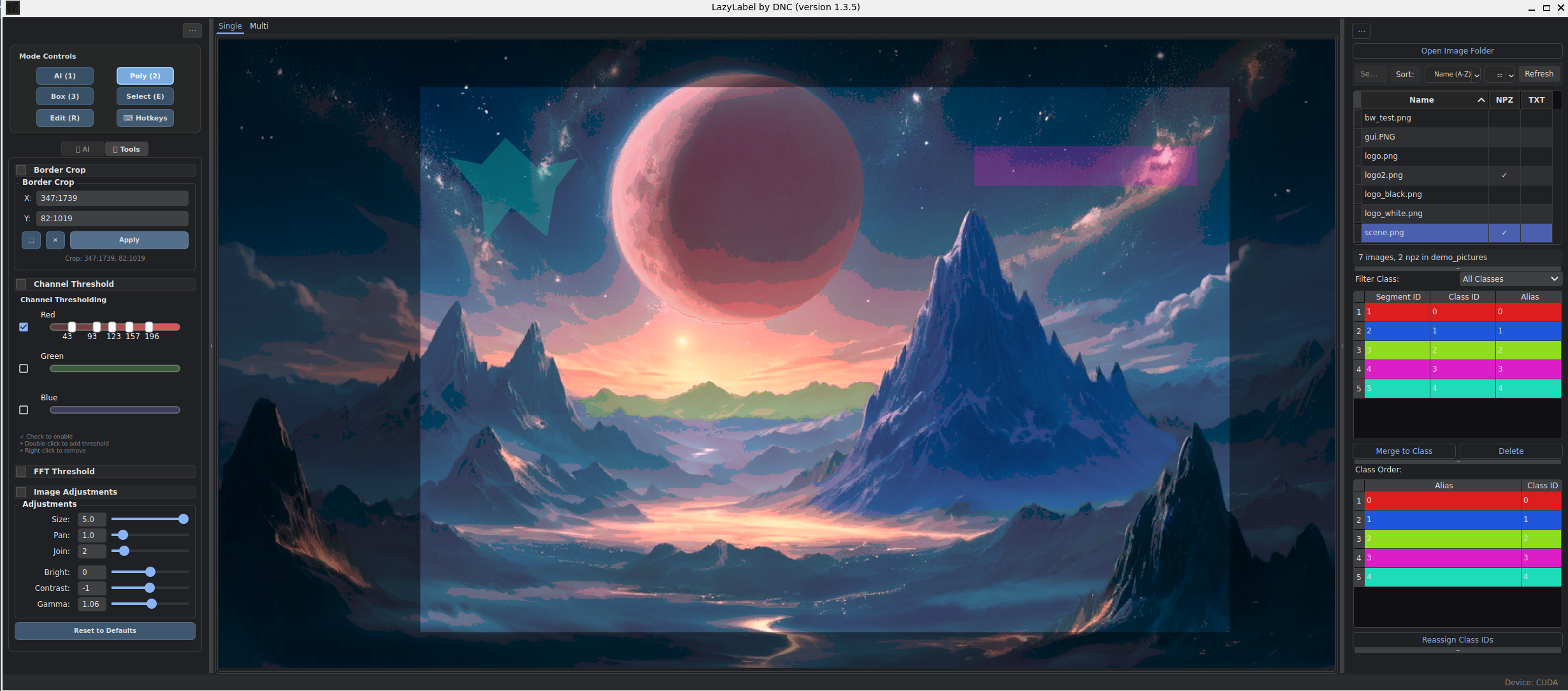
LazyLabel combines Meta's Segment Anything Model (SAM) with intuitive editing tools for fast, precise image labeling. Perfect for machine learning datasets and computer vision research.
🚀 Quick Start
Installation
pip install lazylabel-gui
lazylabel-gui
Optional: SAM-2 Support
For advanced SAM-2 models, install manually:
pip install git+https://github.com/facebookresearch/sam2.git
Note: SAM-2 is optional - LazyLabel works with SAM 1.0 models by default
Usage
- Open Folder → Select your image directory
- Click on image → AI generates instant masks
- Fine-tune → Edit polygons, merge segments
- Export → Clean
.npzfiles ready for ML training
✨ Key Features
- 🧠 One-click AI segmentation with Meta's SAM and SAM2 models
- 🎨 Manual polygon drawing with full vertex control
- ⚡ Smart editing tools - merge segments, adjust class names, and class order
- 📊 ML-ready exports - One-hot encoded
.npzformat and.jsonfor YOLO format - 🔧 Image enhancement - brightness, contrast, gamma adjustment
- 🔍 Image viewer - zoom, pan, brightness, contrast, and gamma adjustment
- ✂️ Edge cropping - define custom crop areas to focus on specific regions
- 🔄 Undo/Redo - full history of all actions
- 💾 Auto-saving - Automatic saving of your labels when navigating between images
- 🎛️ Advanced filtering - FFT thresholding and color channel thresholding
- ⌨️ Customizable hotkeys for all functions
⌨️ Essential Hotkeys
| Action | Key | Description |
|---|---|---|
| AI Mode | 1 |
Point-click segmentation |
| Draw Mode | 2 |
Manual polygon drawing |
| Edit Mode | E |
Select and modify shapes |
| Save Segment | Space |
Confirm current mask |
| Merge | M |
Combine selected segments |
| Pan | Q + drag |
Navigate large images |
| Positive Point | Left Click |
Add to segment |
| Negative Point | Right Click |
Remove from segment |
💡 All hotkeys customizable - Click "Hotkeys" button to personalize
📦 Output Format
Perfect for ML training - clean, structured data:
import numpy as np

# Load your labeled data
data = np.load('your_image.npz')
mask = data['mask']  # Shape: (height, width, num_classes)

# Each channel is a binary mask for one class
class_0_mask = mask[:, :, 0]  # Background
class_1_mask = mask[:, :, 1]  # Object type 1
class_2_mask = mask[:, :, 2]  # Object type 2
Ideal for:
- Semantic segmentation datasets
- Instance segmentation training
- Computer vision research
- Automated annotation pipelines
🛠️ Development
Requirements: Python 3.10+ 2.5GB disk space for SAM model (auto-downloaded)
Installation from Source
git clone https://github.com/dnzckn/LazyLabel.git
cd LazyLabel
pip install -e .
lazylabel-gui
Testing & Quality
# Run full test suite
python -m pytest --cov=lazylabel --cov-report=html

# Code formatting & linting
ruff check . && ruff format .
Architecture
- Modular design with clean component separation
- Signal-based communication between UI elements
- Extensible model system for new SAM variants
- Comprehensive test suite (150+ tests, 60%+ coverage)
🤝 Contributing
LazyLabel welcomes contributions! Check out:
- Architecture Guide for technical details
- Hotkey System for customization
- Issues page for feature requests and bug reports
🙏 Acknowledgments
☕ Support
If LazyLabel saves you time on annotation tasks, consider supporting the project!
Made with ❤️ for the computer vision community
Release history Release notifications | RSS feed


Download files
Download the file for your platform. If you're not sure which to choose, learn more about installing packages.
Source Distribution
Built Distribution
Filter files by name, interpreter, ABI, and platform.
If you're not sure about the file name format, learn more about wheel file names.
Copy a direct link to the current filters
File details
Details for the file lazylabel_gui-1.2.1.tar.gz.
File metadata
- Download URL: lazylabel_gui-1.2.1.tar.gz
- Upload date:
- Size: 78.6 kB
- Tags: Source
- Uploaded using Trusted Publishing? No
- Uploaded via: twine/6.1.0 CPython/3.10.11
File hashes
| Algorithm | Hash digest | |
|---|---|---|
| SHA256 |
107cac385f9ecffa0694d5ee0a3a0f8e294457a9715128245dcd0609130d68c0
|
|
| MD5 |
5670cfcc7c619ccff230fc4e092f77ab
|
|
| BLAKE2b-256 |
9152ed037d379378e6c99e8fdc31d9bba3f44dd5980a3dfa5b803e33b173106f
|
File details
Details for the file lazylabel_gui-1.2.1-py3-none-any.whl.
File metadata
- Download URL: lazylabel_gui-1.2.1-py3-none-any.whl
- Upload date:
- Size: 89.4 kB
- Tags: Python 3
- Uploaded using Trusted Publishing? No
- Uploaded via: twine/6.1.0 CPython/3.10.11
File hashes
| Algorithm | Hash digest | |
|---|---|---|
| SHA256 |
221d85d87cbce7aecea7d3a466b7c17c755478d794c1dfd253c5116a7a3ab287
|
|
| MD5 |
9b8f06c3eeec8766af14a3f5b2fea6cb
|
|
| BLAKE2b-256 |
722a7b33fbcdf480a70b9c1cbe639a486820e66ec7ad48ac3dafde6984082895
|






