
An image segmentation GUI for generating ML ready mask tensors and annotations.

Project description
LazyLabel

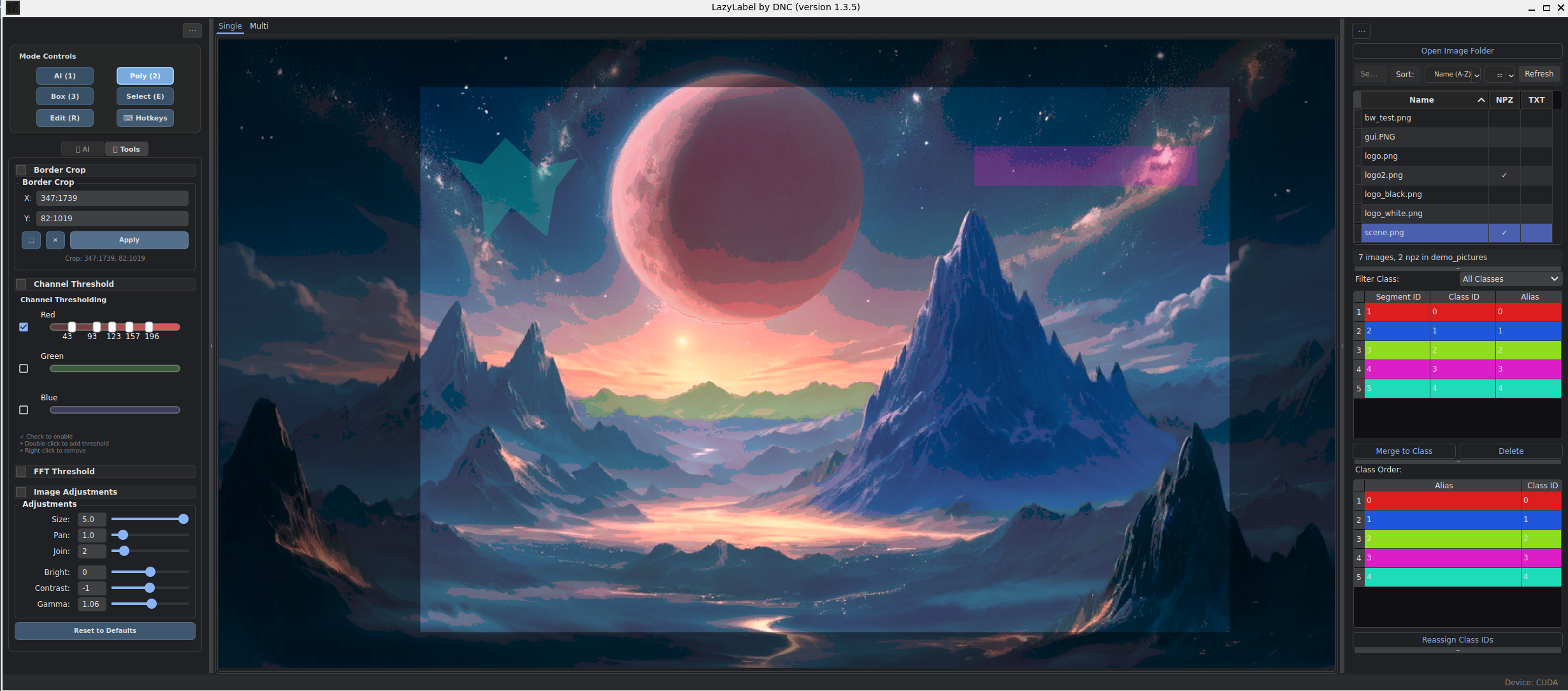
AI-Assisted Image Segmentation for Machine Learning Dataset Preparation
LazyLabel combines Meta's Segment Anything Model (SAM) with comprehensive manual annotation tools to accelerate the creation of pixel-perfect segmentation masks for computer vision applications.
Quick Start
pip install lazylabel-gui
lazylabel-gui
From source:
git clone https://github.com/dnzckn/LazyLabel.git
cd LazyLabel
pip install -e .
lazylabel-gui
Requirements: Python 3.10+, 8GB RAM, ~2.5GB disk space (for model weights)
Core Features
AI-Powered Segmentation
LazyLabel leverages Meta's SAM for intelligent object detection:
- Single-click object segmentation
- Interactive refinement with positive/negative points
- Support for both SAM 1.0 and SAM 2.1 models
- GPU acceleration with automatic CPU fallback
Manual Annotation Tools
When precision matters:
- Polygon drawing with vertex-level editing
- Bounding box annotations for object detection
- Edit mode for adjusting existing segments
- Merge tool for combining related segments
Image Processing & Filtering
Advanced preprocessing capabilities:
- FFT filtering: Remove noise and enhance edges
- Channel thresholding: Isolate objects by color
- Border cropping: Define crop regions that set pixels outside the area to zero in saved outputs
- View adjustments: Brightness, contrast, gamma correction
Multi-View Mode
Process multiple images efficiently:
- Annotate up to 4 images simultaneously
- Synchronized zoom and pan across views
- Mirror annotations to all linked images
Export Formats
NPZ Format (Semantic Segmentation)
One-hot encoded masks optimized for deep learning:
import numpy as np

data = np.load('image.npz')
mask = data['mask']  # Shape: (height, width, num_classes)

# Each channel represents one class
sky = mask[:, :, 0]
boats = mask[:, :, 1]
cats = mask[:, :, 2]
dogs = mask[:, :, 3]
YOLO Format (Object Detection)
Normalized polygon coordinates for YOLO training:
0 0.234 0.456 0.289 0.478 0.301 0.523 ...
1 0.567 0.123 0.598 0.145 0.612 0.189 ...
Class Aliases (JSON)
Maintains consistent class naming across datasets:
{
  "0": "background",
  "1": "person",
  "2": "vehicle"
}
Typical Workflow
- Open folder containing your images
- Click objects to generate AI masks (mode 1)
- Refine with additional points or manual tools
- Assign classes and organize in the class table
- Export as NPZ or YOLO format
Advanced Preprocessing Workflow
For challenging images:
- Apply FFT filtering to reduce noise
- Use channel thresholding to isolate color ranges
- Enable "Operate on View" to pass filtered images to SAM
- Fine-tune with manual tools
Advanced Features
Multi-View Mode
Access via the "Multi" tab to process multiple images:
- 2-view (side-by-side) or 4-view (grid) layouts
- Annotations mirror across linked views automatically
- Synchronized zoom maintains alignment
SAM 2.1 Support
LazyLabel supports both SAM 1.0 (default) and SAM 2.1 models. SAM 2.1 offers improved segmentation accuracy and better handling of complex boundaries.
To use SAM 2.1 models:
- Install the SAM 2 package:
pip install git+https://github.com/facebookresearch/sam2.git
- Download a SAM 2.1 model (e.g.,
sam2.1_hiera_large.pt) from the SAM 2 repository - Place the model file in LazyLabel's models folder:
- If installed via pip:
~/.local/share/lazylabel/models/(or equivalent on your system) - If running from source:
src/lazylabel/models/
- If installed via pip:
- Select the SAM 2.1 model from the dropdown in LazyLabel's settings
Note: SAM 1.0 models are automatically downloaded on first use.
Key Shortcuts
| Action | Key | Description |
|---|---|---|
| AI Mode | 1 |
SAM point-click segmentation |
| Draw Mode | 2 |
Manual polygon creation |
| Edit Mode | E |
Modify existing segments |
| Accept AI Segment | Space |
Confirm AI segment suggestion |
| Save | Enter |
Save annotations |
| Merge | M |
Combine selected segments |
| Pan Mode | Q |
Enter pan mode |
| Pan | WASD |
Navigate image |
| Delete | V/Delete |
Remove segments |
| Undo/Redo | Ctrl+Z/Y |
Action history |
Documentation
- Usage Manual - Comprehensive feature guide
- Architecture Guide - Technical implementation details
- GitHub Issues - Report bugs or request features
Release history Release notifications | RSS feed


Download files
Download the file for your platform. If you're not sure which to choose, learn more about installing packages.
Source Distribution
Built Distribution
Filter files by name, interpreter, ABI, and platform.
If you're not sure about the file name format, learn more about wheel file names.
Copy a direct link to the current filters
File details
Details for the file lazylabel_gui-1.3.7.tar.gz.
File metadata
- Download URL: lazylabel_gui-1.3.7.tar.gz
- Upload date:
- Size: 142.5 kB
- Tags: Source
- Uploaded using Trusted Publishing? No
- Uploaded via: twine/6.1.0 CPython/3.10.18
File hashes
| Algorithm | Hash digest | |
|---|---|---|
| SHA256 |
394075a1ad0e4a21d1296f8978685a74c3f764c90400c7fcb0588798b610e522
|
|
| MD5 |
b91c2556ec144cee3caa5e0aa16deac5
|
|
| BLAKE2b-256 |
7afeea434e60c2980a8a8411d2a73d0ebdffc56c400f757ee88d3a3eeeed227a
|
File details
Details for the file lazylabel_gui-1.3.7-py3-none-any.whl.
File metadata
- Download URL: lazylabel_gui-1.3.7-py3-none-any.whl
- Upload date:
- Size: 161.0 kB
- Tags: Python 3
- Uploaded using Trusted Publishing? No
- Uploaded via: twine/6.1.0 CPython/3.10.18
File hashes
| Algorithm | Hash digest | |
|---|---|---|
| SHA256 |
d9bd207dc0e43998b4caad2219ec9fc13a82b3b8c38b5602233dcc8b8f5b697a
|
|
| MD5 |
3abc7fea4469f69564ae850cd8d1e20b
|
|
| BLAKE2b-256 |
d8860800ce41e93962096e1b39aa370637fb125db9aec95f62724d2f09e40359
|






