
lazyplotly
A wrapper of interactive visualization package plotly. Sometimes we are just too lazy to make nested dictionary. Especially creating dropdown menus or slide bars is a way too exhuasting. Moreover, variables of different kind of chart are renamed into a single taxonomy.
What is simplified as easy as possible
- creating widgets such as dropdown menu or a slider bar
- combine different type of charts together into subplots
- automatically calculate grid rows and columns of subplots
- configuring different type of variable, using them in a single taxonomy
- initiate settings for jupyter notebook users
Installation
$ pip install plotly lazyplotly
Quick Start
import lazyplotly as lp

# using list data type to fit
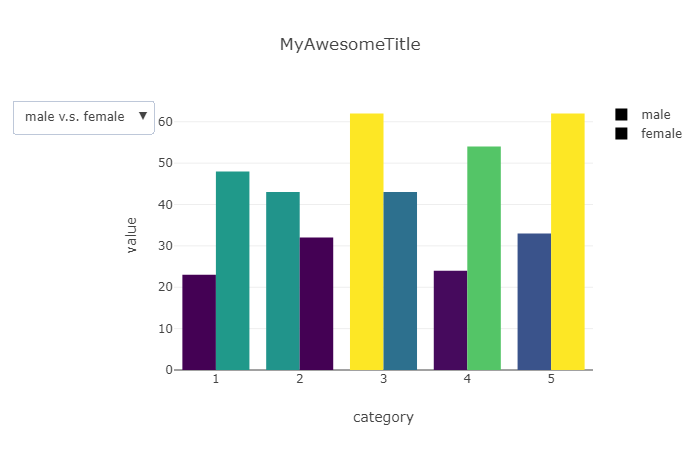
bar_1 = lp.bar(x=[1,2,3,4,5], y=[23,43,62,24,33], cmap=lp.cmap[16], name='male')

# using dataframe to fit
df = dict(x=[1,2,3,4,5],y=[48,32,43,54,62])
bar_2 = lp.bar(x='x', y='y', df=df, cmap=lp.cmap[16], name='female')

# combine all charts into dropdown menu, and save as a html file
lp.dropdown(
    datas = [[bar_1,bar_2],[bar_2, bar_1]],
    btn_labels = ['male v.s. female','female v.s. male'],
    xlabel = 'category', ylabel='value', title='MyAwesomeTitle',
    output = 'MyAwesomePlot.html'
)
Custom extension
# using dataframe object by setting xy variables with column name
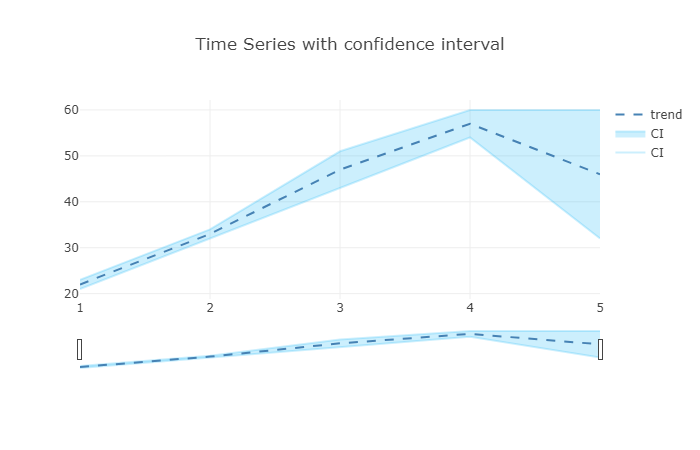
df = dict(order=[1,2,3,4,5],trend=[22,33,47,57,46],lower=[21,32,43,54,32],upper=[23,34,51,60,60])
area = lp.area(x='order', y='lower', y2='upper', df=df, color='rgba(0,176,246,0.2)', name='CI')
line = lp.line(x='order', y='trend', df=df)
line['line'] = dict(dash = 'dash', color='steelblue')

# add output variable to export as a html file
lp.plot(
    data = [area, line],
    rangeslider = True,
    layout = dict(title='Time Series with confidence interval'), # layout extension
    config = dict(displayModeBar=True), # util icons on right top side
)
Subplot
import numpy as np
import pandas as pd
df = pd.DataFrame(dict(
    monday = np.random.normal(5, 1, 100),
    tuesday = np.random.normal(5, 1.5, 100),
    wednesday = np.random.normal(5, 2, 100),
    thursday = np.random.normal(5, 2.5, 100),
    friday = np.random.normal(5, 3, 100),
    saturday = np.random.normal(5, 3.5, 100),
    sunday = np.random.normal(5, 4, 100),
))
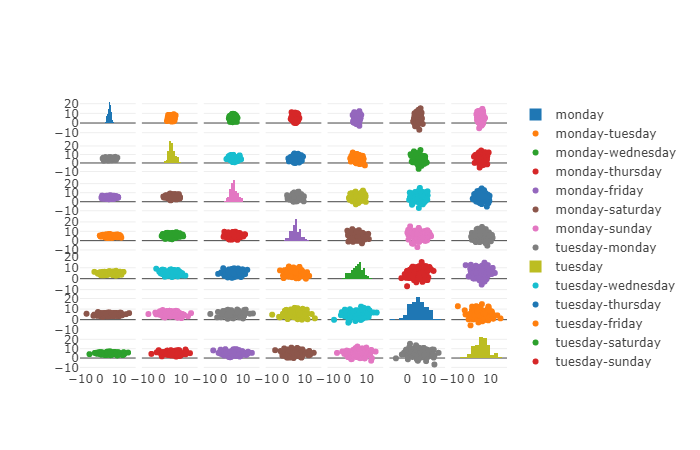
data = []
for x in df.columns:
    for y in df.columns:
        if x==y:
            data.append(lp.histogram(x=df[x], name=x))
        else:
            data.append(lp.scatter(x=df[x], y=df[y], name=f'{x}-{y}'))
# making subplot
lp.plot(data, rows=7)

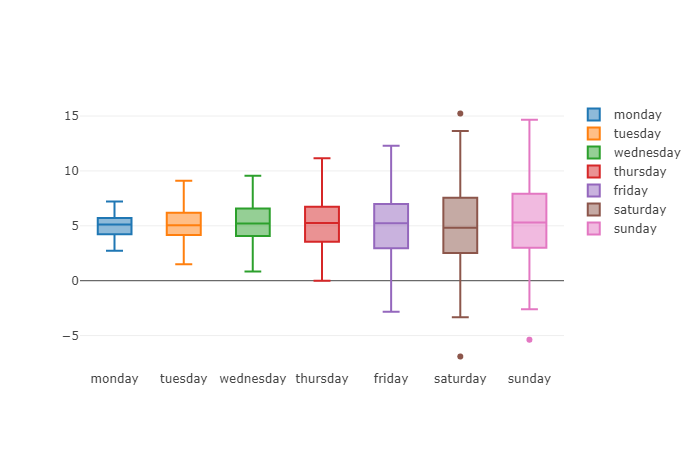
# or a boxplot collection
lp.plot([lp.box(y=df[col], name=col) for col in df.columns])
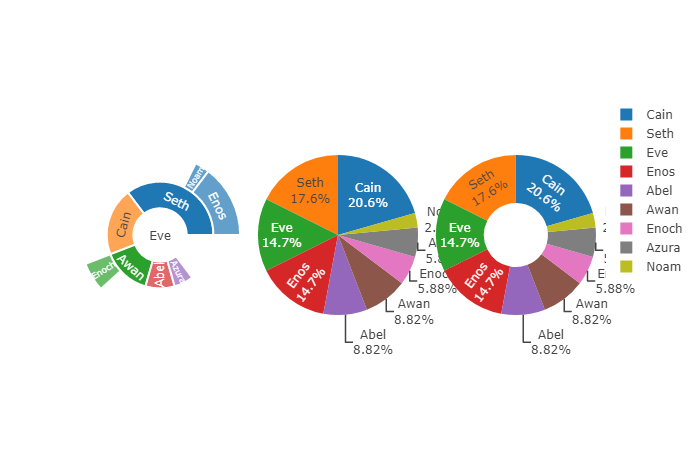
Sunburst, Pie, Donut
df = dict(
    parents = ['', 'Eve', 'Eve', 'Seth', 'Seth', 'Eve', 'Eve', 'Awan', 'Eve' ],
    labels = ['Eve', 'Cain', 'Seth', 'Enos', 'Noam', 'Abel', 'Awan', 'Enoch', 'Azura'],
    values = [10, 14, 12, 10, 2, 6, 6, 4, 4]
)
sunburst = lp.pie(x='parents',x2='labels',y='values', df=df)
pie = lp.pie(x='labels', y='values', df=df)
donut = lp.pie(x='labels', y='values', df=df, hole=0.4)
lp.plot([sunburst, pie, donut], cols=3)
3D scatter
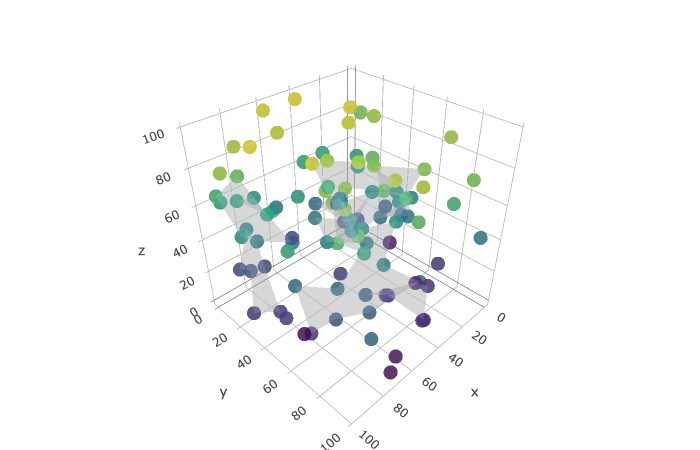
import numpy as np
df = dict(
    x=np.random.randint(100,size=100),
    y=np.random.randint(100,size=100),
    z=np.random.randint(100,size=100)
)
scatter3d = lp.scatter3d(x='x',y='y',z='z', df=df, cmap=lp.cmap[16])
mesh3d = lp.mesh3d(x='x',y='y',z='z', df=df, color=lp.color[0])
lp.plot([scatter3d,mesh3d], no_padding=True)
Sankey Diagram
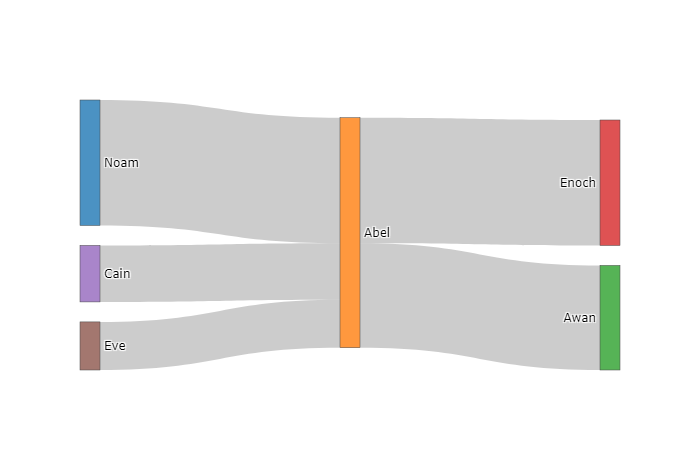
# sankey diagram
df = dict(
    origin=['Eve', 'Cain', 'Abel', 'Abel', 'Noam'],
    destin=['Abel', 'Abel', 'Awan', 'Enoch', 'Abel'],
    count=[23,27,50,60,60]
)
sankey = lp.sankey(x='origin', y='destin', z='count', df=df)
lp.plot(sankey)
Map
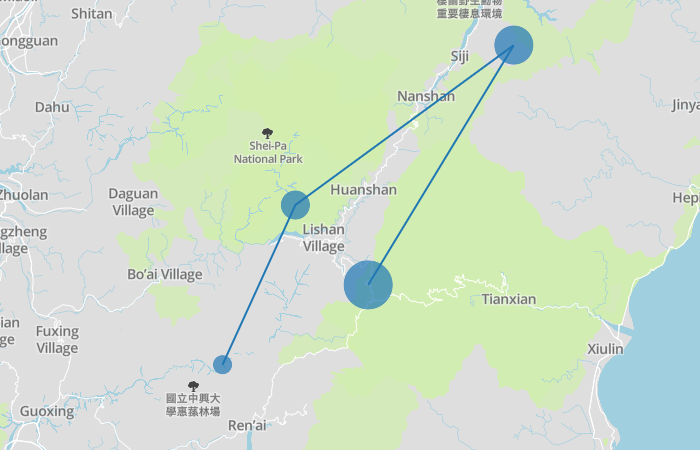
token = 'your mapbox api access token, get your own one at https://account.mapbox.com/'
df = dict(
    lon=[121.1,121.2,121.5,121.3],
    lat=[24.1,24.3,24.5,24.2],
    volume=[20,30,40,50],
    stop=['A','B','C','detail information about bus stop D']
)
scattermapbox = lp.scattermapbox(x='lon',y='lat',z='volume',tooltip='stop',name='bus route',df=df)
scattermapbox['mode'] = 'markers+lines'
lp.mapbox(scattermapbox,token=token,zoom=9)
APIs
lp.cmap     # show all colorscales available in plotly
lp.color    # show all defined css color name in plotly
plot(data=[], layout=dict, output=bool, config=dict,cols=int, rows=int,
    rangeslider=bool,no_padding=bool, title=str, xlabel=str, ylabel=str)
dropdown(datas=[[]], btn_labels=[], layout=dict, output=bool, config=dict,
    no_padding=bool, title=str, xlabel=str, ylabel=str)
slider(datas=[[]], prefix=str, layout=dict, output=bool, config=dict,
    no_padding=bool, title=str, xlabel=str, ylabel=str)
bar(x, y, df, name, color, cmap)
scatter(x, y, df, name, color)
scatter3d(x, y, z, df, name, color, cmap)
line(x, y, df, name, color)
line3d(x, y, z, df, name, color)
area(x, y, y2, df, name, color)
area3d(x, y, z, df, name, color)
mesh3d(x, y, z, df, name, color)
box(y, df, name, color)
histogram(x, df, name, color, <int>bins, <bool>cum, <bool>prob)
pie(x, x2, y, df, name, hole, color)
heatmap(df, cmap)
sankey(x, y, z, df)
scattermapbox(x, y, z, tooltip, df, name)
mapbox(data, token, zoom, output, config)
1 maintainer

Release files for lazyplotly 1.2
For a detailed explanation of source distributions (sdists) and built distributions (wheels), please see the package formats documentation.
Source distribution (sdist)
| File | Size | Uploaded | |
|---|---|---|---|
| lazyplotly-1.2.tar.gz | 7.1 kB | Details |
Built distribution (wheel)
| File | Interpreter | ABI | Platform | Reset |
|---|---|---|---|---|
| lazyplotly-1.2-py3-none-any.whl | Python 3 | none | any | Details |
Total release size: 14.0 kB
Release files / lazyplotly-1.2.tar.gz
| Download URL | lazyplotly-1.2.tar.gz |
|---|---|
| Size | 7.1 kB |
| Tags | Source |
|
SHA-256 checksum How to use checksums |
de6e4e74a165246ed0c6a6e17fea7a57195011a8c79b323814b43fa51071ce94
|
|
BLAKE2b-256 checksum How to use checksums |
3679df4df1eb9425fd46f6ee95f96f4ec8c702418674a4d65eab4815eff0c18e
|
| Upload date | |
|
Uploaded using Trusted Publishing? What is trusted publishing? |
No |
| Uploaded via |
twine/1.13.0 pkginfo/1.5.0.1 requests/2.22.0 setuptools/41.0.1 requests-toolbelt/0.9.1 tqdm/4.32.1 CPython/3.6.8
|
Release files / lazyplotly-1.2-py3-none-any.whl
| Download URL | lazyplotly-1.2-py3-none-any.whl |
|---|---|
| Size | 6.9 kB |
| Tags | Python 3 |
|
SHA-256 checksum How to use checksums |
df458733118765f974354e66a93fa8e176a56bb3793e9eb755af179da8d4d026
|
|
BLAKE2b-256 checksum How to use checksums |
02b6cf5f098b0b93a8c6f848ae536641e1250f01b8c648f9efda82e434a7eba5
|
| Upload date | |
|
Uploaded using Trusted Publishing? What is trusted publishing? |
No |
| Uploaded via |
twine/1.13.0 pkginfo/1.5.0.1 requests/2.22.0 setuptools/41.0.1 requests-toolbelt/0.9.1 tqdm/4.32.1 CPython/3.6.8
|














