

libcom: everything about image composition







Introduction
libcom (the library of image composition) is an image composition toolbox. The goal of image composition (object insertion) is inserting one foreground into a background image to get a realistic composite image, by addressing the inconsistencies (appearance, geometry, and semantic inconsistency) between foreground and background. Generally speaking, image composition could be used to combine the visual elements from different images.
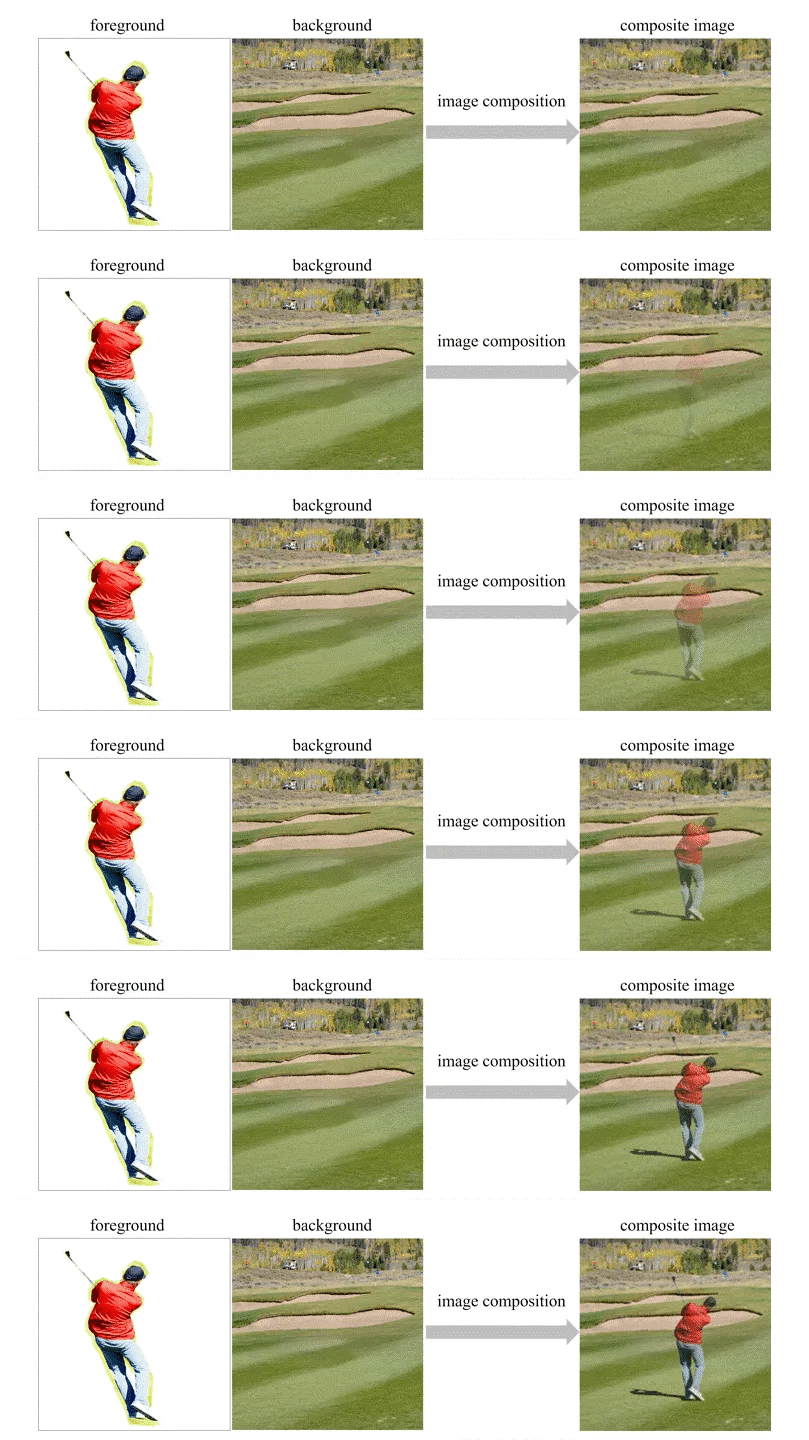
libcom covers a diversity of related tasks in the field of image composition, including image blending, standard/painterly image harmonization, shadow generation, reflection generation, object placement, generative composition, quality evaluation, etc. For each task, we integrate one or two selected methods considering both efficiency and effectiveness. The selected methods will be continuously updated upon the emergence of better methods.
The ultimate goal of this library is solving all the problems related to image composition with simple import libcom.
Welcome to follow WeChat public account "Newly AIGCer" or Zhihu Column "Newly CVer" to get the latest information about image composition!
We compare the performance of Libcom and Banana Pro across various image composition tasks and write a brief summary in English/Chinese.
Online Workbench
We have built the image composition workbench based on our Libcom toolbox. The interface is as follows:
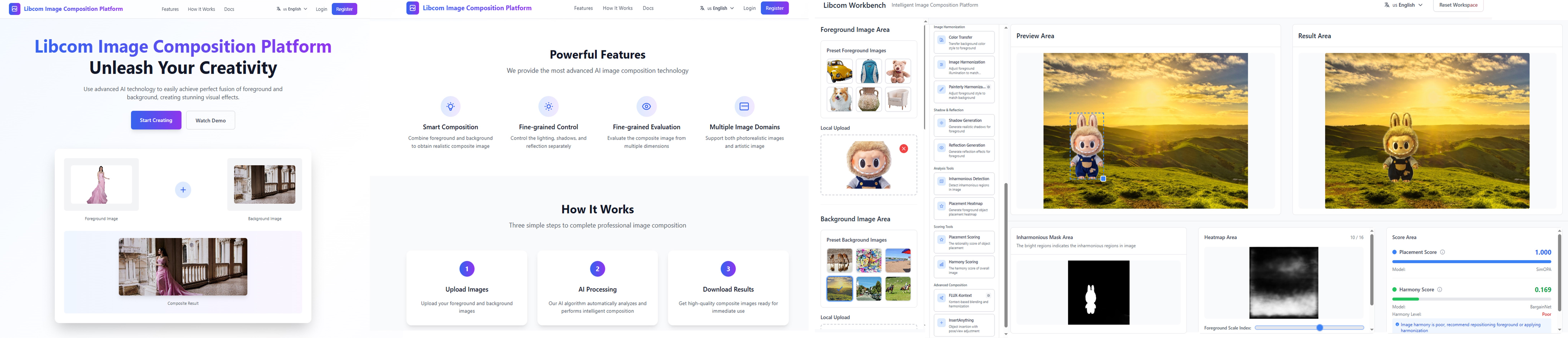
Main Functions
- get_composite_image generates composite images using naive copy-and-paste followed by image blending.
- OPAScoreModel [OPA] evaluates the rationality of foreground object placement in a composite image.
- FOPAHeatMapModel [FOPA] can predict the rationality scores for all locations/scales given a background-foreground pair, and output the composite image with optimal location/scale.
- color_transfer adjusts the foreground color to match the background using traditional color transfer method.
- ImageHarmonizationModel [PCTNet] [LBM] adjusts the foreground illumination to be compatible the background given photorealistic background and photorealistic foreground.
- PainterlyHarmonizationModel [PHDNet] [PHDiffusion] adjusts the foreground style to be compatible with the background given artistic background and photorealistic foreground.
- HarmonyScoreModel [BargainNet] evaluates the harmony level between foreground and background in a composite image.
- InharmoniousLocalizationModel [MadisNet] localizes the inharmonious region in a synthetic image.
- FOSScoreModel [DiscoFOS] evaluates the compatibility between foreground and background in a composite image in terms of geometry and semantics.
- ShadowGenerationModel [GPSDiffusion] generates plausible shadow for the inserted object in a composite image.
- ReflectionGenerationModel [RGDiffusion] generates plausible reflection for the inserted object in a composite image.
- KontextBlendingHarmonizationModel [FluxKontext] is a generative image composition model which inserts foreground into the specified bounding box in the background. The pose and view of foreground stay unchanged. The "blending" mode does not adjust the foreground illumination, while the "harmonization" mode adjusts the foreground illumination to make the composite image harmonious.
- OSInsertModel [OSInsert] is a generative image composition model which inserts foreground into the specified bounding box in the background. The "conservative" mode has weak ability to adjust the pose and view of foreground according to the background. The "aggressive" mode has stronger ability to adjust the pose and view of foreground according to the background.
For the detailed method descriptions, code examples, visualization results, and performance comments, please refer to our [documents]. If the model performance is not satisfactory, you can finetune the pretrained model on your own dataset using the source repository and replace the original model.
Requirements
The main branch is built on the Linux system with Python 3.10 and PyTorch>=2.6. For other dependencies, please refer to [requirements].
Get Started
Please refer to [Installation] for installation instructions and [documents] for user guidance.
Contributors
- Institution: Brain-like Computing and Machine Intelligence (BCMI) Lab.
- Project Initiator & Team Manager: Li Niu.
- Architect & Lead Developer: Bo Zhang, Yujie Zhou.
- Module Developers: Jiacheng Sui, Bingjie Gao, Lingxiao Lu, Xinhao Tao, Junyan Cao, Haonan Zhao, Jiaxuan Chen, Junqi You.
License
This project is released under the Apache 2.0 license.
Bibtex
If you use our toolbox, please cite our survey paper using the following BibTeX [arxiv]:
@article{niu2021making,
  title={Making images real again: A comprehensive survey on deep image composition},
  author={Niu, Li and Cong, Wenyan and Liu, Liu and Hong, Yan and Zhang, Bo and Liang, Jing and Zhang, Liqing},
  journal={arXiv preprint arXiv:2106.14490},
  year={2021}
}


Release files for libcom 0.1.7
For a detailed explanation of source distributions (sdists) and built distributions (wheels), please see the package formats documentation.
Source distribution (sdist)
| File | Size | Uploaded | |
|---|---|---|---|
| libcom-0.1.7.tar.gz | 433.9 kB | Details |
Built distribution (wheel)
| File | Interpreter | ABI | Platform | Reset |
|---|---|---|---|---|
| libcom-0.1.7-py3-none-manylinux1_x86_64.whl | Python 3 | none | Linux glibc 2.5+ x86-64 | Details |
Total release size: 963.4 kB
Release files / libcom-0.1.7.tar.gz
| Download URL | libcom-0.1.7.tar.gz |
|---|---|
| Size | 433.9 kB |
| Tags | Source |
|
SHA-256 checksum How to use checksums |
7fb5bc3f58e8abf062dedc00331132d0be18399dd79452aef3b7077eb0256185
|
|
BLAKE2b-256 checksum How to use checksums |
ea6ea6e9f37c8a7534589e24b37c1eed2cf568aad10a89c1778356ead576f5db
|
| Upload date | |
|
Uploaded using Trusted Publishing? What is trusted publishing? |
No |
| Uploaded via |
twine/6.2.0 CPython/3.10.20
|
Release files / libcom-0.1.7-py3-none-manylinux1_x86_64.whl
| Download URL | libcom-0.1.7-py3-none-manylinux1_x86_64.whl |
|---|---|
| Size | 529.4 kB |
| Tags | Linux glibc 2.5+ x86-64 Python 3 |
|
SHA-256 checksum How to use checksums |
9274d59fcb09b9e867ce8d630d558265ad2ed033b4a58eb8df5d67f7636fc78e
|
|
BLAKE2b-256 checksum How to use checksums |
09f6940b9f30c956748328b9c73efc62b05177e9b0531356cfc3322c806c1355
|
| Upload date | |
|
Uploaded using Trusted Publishing? What is trusted publishing? |
No |
| Uploaded via |
twine/6.2.0 CPython/3.10.20
|














