
LibraClient is a collection of tools which allows you interact whith Libra Network easily. It provides three ways to access Libra:
libra_shell, an interactive shell program. It is compatible with official Libra client. For beginners, it lets you get started directly to try your first transaction with libra without requiring time-consuming downloads and compiles the huge entire Libra project source code.libra, a command line tool. It has a modern colorful text interface and its output is the standard json format. So, it can be integrated to any programming language easily.python api, a collection of apis for client access to libra. For Python programmers, you can call this client side api to interact with Libra Network with more control than by usinglibracommand.
In following docuement, all command prefix with $ meants it is typed and run in standard linux shell; all command prefix with libra% meants it is typed and run in libra_shell.
For exmaple, $ libra meants run libra command in linux shell, which is different than libra%.
Installation
Require python 3.7 or above installed.
$ python3 -m pip install libra-client
If you had a problem during installation, following command should works anyway.
$ python3 -m pip install --index-url https://pypi.org/project/ --user libra-client
Usage of 'libra_shell'
To start 'libra_shell' and connect to a validator node running on the Libra testnet, just input the 'libra_shell' command on termial as shown below.
$ libra_shell
Once the client connects to a node on the testnet, you will see the following output. To quit the client at any time, use the quit command.
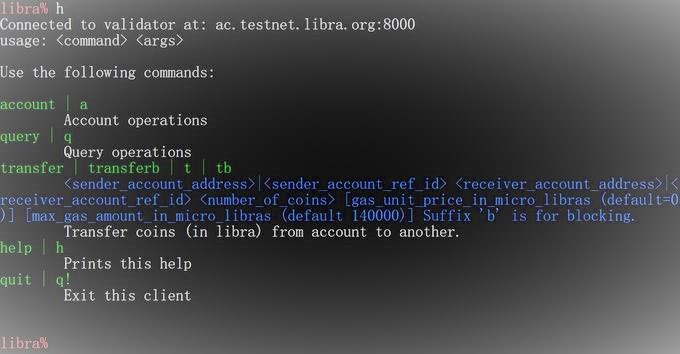
This document will guide you through executing your first transaction on the Libra Blockchain. We will walk you through creating accounts for two users.
Usage of 'libra' command
The command 'libra' contains four subcommands 'account', 'transaction', 'wallet' and 'ledger'. All subcommands have their own parameters.
Leger Time Example
For example, using 'ledger' command to query the ledger start time and latest transaction time of testnet:
$ libra ledger time
You will get the json output like this:
{
    "start_time": "2019-10-03T05:19:59",
    "latest_time": "2019-10-16T17:04:17"
}
Account Balance Example
To query the balance of some account by address,
$ libra account balance 000000000000000000000000000000000000000000000000000000000a550c18
You will get the balance of that address:
{
    "balance": 24075309756646968
}
Wallet Example
To query the total balance of a wallet,
$ libra wallet balance <some mnemonic file of the wallet>
You will get the total balance and balance of every accounts in that wallet:
{
    "7af57a0c206fbcc846532f75f373b5d1db9333308dbc4673c5befbca5db60e2f": 123,
    "f1f48f56c4deea75f4393e832edef247547eb76e1cd498c27cc972073ec4dbde": 0,
    "total_balance": 123
}
Help message of libra
If you input libra without any parameters as following,
$ libra
You will get the help message:
USAGE:
	libra [options] command [command parameters ...]

Optional arguments:

 -a | --host HOST  Host address/name to connect to. [default:testnet]
 -p | --port PORT  Admission Control port to connect to. [default: 8000]
 -v | --verbose Verbose output
 -V | --version Show program's version number and exit
 -h | --help Show this help message and exit

Use the following commands:

account | a
	Account query by address
transaction | t
	Transaction query
wallet | w
	show account information of a wallet derived from mnemonic file
ledger | lg
	show ledger info of Libra blockchain
Help message of subcommand
If you input the libra subcommand without any parameter, you will get the help message of that subcommand. For example:
$ libra wallet
You will get the help message:
USAGE:
        wallet <arg>

Use one of the following args for this command:

show | s <mnemonic_file_path>
        Show the mnemonic words, seed and addresses of a wallet
account | a <mnemonic_file_path>
        Show the keypair and address of accounts in a wallet
balance | b <mnemonic_file_path>
        Get the balance of all accounts in a wallet
create | c <mnemonic_file_path>
        create a new wallet and save the mnemonic file to <mnemonic_file_path>
More instructions can be found here libra command help.
Client side Libra API for python programmer
Wallet
You can create a wallet using WalletLibrary class. A wallet is like your masterkey and you can create almost infinitely many Libra accounts from it. Note that LibraClient's mnemonic scheme is compatible with that of Libra's CLI, so you can import mnemonic between the two libraries.
from libra_client import WalletLibrary

# Create a new random wallet
wallet = WalletLibrary.new()

# Create a new wallet from mnemonic words
wallet = WalletLibrary.new_from_mnemonic(mnemonic, child_count)

# Recover wallet from a offical Libra CLI backup file
wallet = WalletLibrary.recover(filename)
Account
An Account can be created by calling new_account function on a wallet, each Account has an integer index in wallet, start from zero. An Account contains its address, public_key, and private_key.
print(wallet.child_count)
account1 = wallet.new_account()
print(wallet.child_count)
print(account1.address)
print(account1.public_key)
print(account1.private_key)
Client
A Client must be created in order to send protobuf message to a Libra node. You can create a client with the following code.
from libra_client import Client

client1 = Client("testnet")  # Default client connecting to the official testnet
client2 = Client.new('localhost', 8000, "validator_file_path")  # Client connecting to a local node
Get Account Data of an Address
# An account stores its data in a directory structure, for example:
#   <Alice>/balance:   10
#   <Alice>/a/b/mymap: {"Bob" => "abcd", "Carol" => "efgh"}
#   <Alice>/a/myint:   20
#   <Alice>/c/mylist:  [3, 5, 7, 9]
#
# If someone needs to query the map above and find out what value associated with "Bob" is,
# `address` will be set to Alice and `path` will be set to "/a/b/mymap/Bob".
#
# On the other hand, if you want to query only <Alice>/a/*, `address` will be set to Alice and
# `path` will be set to "/a" and use the `get_prefix()` method from statedb
Get Account State Blob of an Address
No longer supported in json-rpc.
Get Account State of an Address
If the Account has been created, you can call get_account_state function which return a AccountState object with 'ordered_map' field; other wise, AccountError will be thrown.
client = Client("testnet")
amap = client.get_account_state(address)
Get Account Resource of an Address
If you want to get account balance / sequence / authentication_key etc from account state, you can calling get_account_resource function, which will deserialize the account resource from account state map.
client = Client("testnet")
resource = client.get_account_resource(address)
print(resource.sequence_number)
print(resource.balance)
print(resource.authentication_key)
Get Balance of an Address
If you just want to get the balance of an address, simply call get_balance function.
client = Client("testnet")
balance = client.get_balance(address)
Get Sequence Number of an Address
If you just want to get the sequence number of an address, simply call get_sequence_number function.
client = Client("testnet")
balance = client.get_sequence_number(address)
Mint Testnet Libra Token
You can mint testnet libra with mint_with_faucet function, which sends a HTTP POST request to http://faucet.testnet.libra.org.
c = Client("testnet")
c.mint_coins_with_faucet_service(address, 12345, is_blocking=True)
Creating a Transfer Transaction Script and Sending the Transaction
Note that in the official testnet, the Libra node ONLY allows sending the official transfer transaction script. In the future, this libra can be extended to support more transaction scripts as well!
wallet = WalletLibrary.recover('test.wallet')
a0 = wallet.accounts[0]
a1 = wallet.accounts[1]
ret = c.transfer_coin(a0, a1.address, 1234, is_blocking=True)
print(ret.ac_status.code)
When is_blocking param is False, the call will return as the transaction is submit to the validator node. When is_blocking param is True, the call will not return until the tranfer is actually executed or transaction waiting timeout.
Query Transactions
Get transaction by version:
c = Client("testnet")
signed_txn = c.get_transaction(1)
print(signed_txn.raw_txn)
above code get transaction no.1, the return type is a SignedTransaction.
class SignedTransaction(Struct):
    _fields = [
        ('raw_txn', RawTransaction),
        ('public_key', [Uint8, ED25519_PUBLIC_KEY_LENGTH]),
        ('signature', [Uint8, ED25519_SIGNATURE_LENGTH])
    ]
To get a list of transactions:
c = Client("testnet")
c.get_transactions(start_version, limit)
Query Events
To get the latest 2 events send by an address:
c = Client("testnet")
events = c.get_latest_events_sent(address, 2)
To get the latest 2 events received by an address:
c = Client("testnet")
events = c.get_latest_events_received(address, 2)
Query events sent from an address, start from start_sequence_number(count begin with 0), get limit number of events, direction is ascending/descending:
get_events_sent(self, address, start_sequence_number, ascending=True, limit=1)
Query events received from an address, start from start_sequence_number(count begin with 0), get limit number of events, direction is ascending/descending:
get_events_received(self, address, start_sequence_number, ascending=True, limit=1)
1 maintainer

Metadata
1 maintainer
Release files for libra-client 0.9.6
For a detailed explanation of source distributions (sdists) and built distributions (wheels), please see the package formats documentation.
Source distribution (sdist)
| File | Size | Uploaded | Provenance | Actions |
|---|---|---|---|---|
| libra-client-0.9.6.tar.gz | 34.5 kB | Without provenance | Details for libra-client-0.9.6.tar.gz |
Built distribution (wheel)
| File | Interpreter | ABI | Platform | Actions Reset |
|---|---|---|---|---|
| libra_client-0.9.6-py3-none-any.whl | Python 3 | none | any | Details for libra_client-0.9.6-py3-none-any.whl |
Total release size: 65.6 kB
Release files / libra-client-0.9.6.tar.gz
| Download URL | libra-client-0.9.6.tar.gz |
|---|---|
| Size | 34.5 kB |
| Tags | Source |
|
SHA-256 checksum How to use checksums |
19b6bc9989d42b39d4eca33aafd3a914619fafd3983c50ea9046dc07848e4307
|
|
BLAKE2b-256 checksum How to use checksums |
43e1ebdf2d84ba14c22a09ba04efb5b1c74fd98c9e5d3b2d5e1ac784fe8d885f
|
| Upload date | |
|
Uploaded using Trusted Publishing? What is trusted publishing? |
No |
| Uploaded via |
twine/3.1.1 pkginfo/1.5.0.1 requests/2.23.0 setuptools/46.2.0 requests-toolbelt/0.9.1 tqdm/4.44.1 CPython/3.7.5
|
Release files / libra_client-0.9.6-py3-none-any.whl
| Download URL | libra_client-0.9.6-py3-none-any.whl |
|---|---|
| Size | 31.1 kB |
| Tags | Python 3 |
|
SHA-256 checksum How to use checksums |
bcde6ae6aa8cd78a5ca55bae5f6c6d0e97e2ecf9a29830202f5e302d665a5ee0
|
|
BLAKE2b-256 checksum How to use checksums |
27f67e68960623f33f4877a515773cdfe7a22d59b24f1ac61e377b7624516187
|
| Upload date | |
|
Uploaded using Trusted Publishing? What is trusted publishing? |
No |
| Uploaded via |
twine/3.1.1 pkginfo/1.5.0.1 requests/2.23.0 setuptools/46.2.0 requests-toolbelt/0.9.1 tqdm/4.44.1 CPython/3.7.5
|
Security for libra-client 0.9.6
Provenance
Provenance describes where a file came from. On PyPI, provenance is shared via attestations, which provide a verifiable record of the build or publishing details. View details, limitations and caveats.
No provenance found
None of the files in this release were uploaded with provenance metadata.
A note on package security
PyPI is a repository for distributing packages, not a service for auditing them. While third-party security researchers and our staff do their best to detect and remove malicious packages, PyPI cannot guarantee the quality, security or suitability of any given package.
To learn more about protecting yourself from malicious actors, visit our package security documentation.














