

CLI tool for managing secret keys, tokens, sensitive and/or public key-value pairs. AKA "A glorified note-taking CLI tool with added security and complexity for listing key-value pairs."
Overview
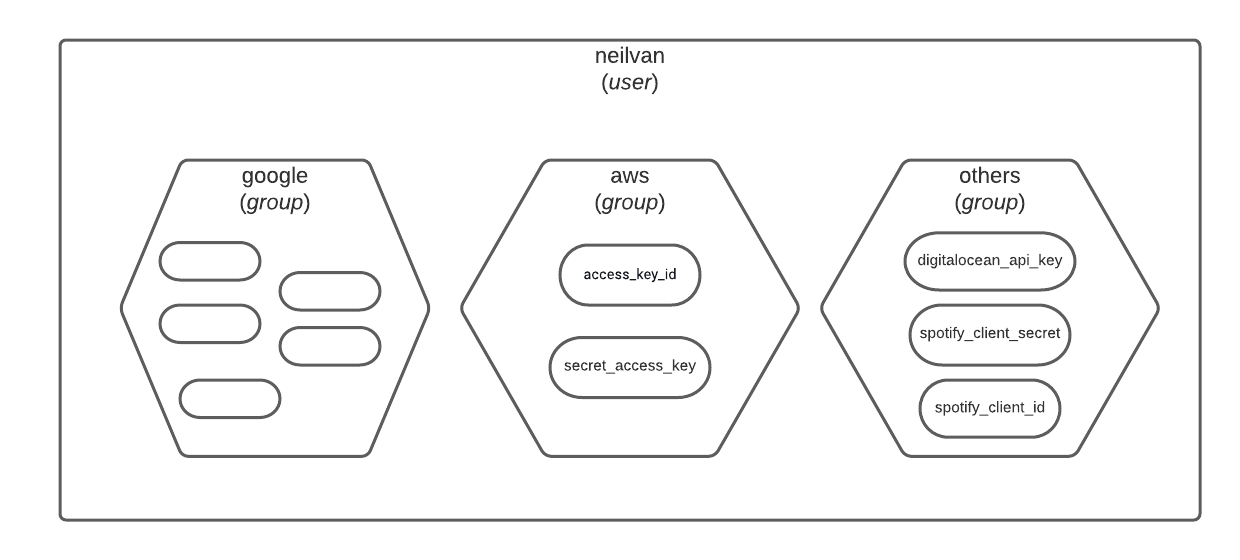
Lihim (Filipino word for secret) uses PyNaCl's SecretBox for secret key encryption, and stores the key-value pairs in an SQLite (PostgreSQL coming soon) database. Secret keys are managed according to users and groups. That is, each user has groups and these groups can contain several key-value pairs.
Installation
pip install lihim
Get Started
- Run
lihim initdbto create the database and tables, - Next,
lihim useradd [username]to add your first user. You may read Notes section > Re: Users' key for prompts to expect. - Then,
lihim login [username]to login. - Before you can add key-value pairs, you need a group. Run
lihim groupadd [group name]to create a group. - Now you can add a pair.
lihim pairaddcommand will prompt interactively for key, value, and group. - You just added your first key-val pair! Refer to Commands section below for more commands.
Commands
| Command | Description |
|---|---|
initdb |
One-off command to create the database and tables. |
users |
Check registered users. |
useradd [username] |
Create a new user with username of ____. |
login [username] |
Login as user with username of ____. |
logout |
Logout current user. |
check |
Check who is currently logged in. |
groups |
Display all the groups of current user. |
group [group name] |
Display all the keys of key-value pairs in the group with name of ____. |
groupadd [group name] |
Add new group with name of ____. |
groupdel [group name] |
Delete group with name of ____ |
pairs |
Display all the keys of available pairs of the current user. |
pair [key] |
Display the key-value pair with key of ____. |
pairadd |
Add a new key-value pair. Will prompt interactively for key, value, and group. |
pairdel [key] [group name] |
Delete pair with key ____ and within group ____. |
Notes
Re: User's "key"
As per PyNaCl's documentation:
The 32 bytes key given to
SecretBoxmust be kept secret. It is the combination to your “safe” and anyone with this key will be able to decrypt the data, or encrypt new data.
In Lihim, this "key" is generated when creating a new user. The key's path (where to put it) and name (unique, only you knows) are all up to the user. When creating a user by useradd [username], there will be prompts asking where and what to name the key. This is only for generating the key and the user can (absolutely) rename and/or move the key elsewhere anytime. The key's path and name are not stored in the database.
When logging in, there will be prompts asking where your key is and what is its name. This happens every login [username]. You must give the current key path and key name if you ever moved and/or renamed the key.
Re: SQLite3
The project currently uses sqlite. Postgresql option is on the roadmap. All values of key-value pairs are encrypted using PyNaCl's SecretBox.
Development
The project uses Poetry to package and manage dependencies:
poetry install
Run tests:
pytest
License
MIT License
Copyright (c) 2021 Neil Van
Permission is hereby granted, free of charge, to any person obtaining a copy of this software and associated documentation files (the "Software"), to deal in the Software without restriction, including without limitation the rights to use, copy, modify, merge, publish, distribute, sublicense, and/or sell copies of the Software, and to permit persons to whom the Software is furnished to do so, subject to the following conditions:
The above copyright notice and this permission notice shall be included in all copies or substantial portions of the Software.
THE SOFTWARE IS PROVIDED "AS IS", WITHOUT WARRANTY OF ANY KIND, EXPRESS OR IMPLIED, INCLUDING BUT NOT LIMITED TO THE WARRANTIES OF MERCHANTABILITY, FITNESS FOR A PARTICULAR PURPOSE AND NONINFRINGEMENT. IN NO EVENT SHALL THE AUTHORS OR COPYRIGHT HOLDERS BE LIABLE FOR ANY CLAIM, DAMAGES OR OTHER LIABILITY, WHETHER IN AN ACTION OF CONTRACT, TORT OR OTHERWISE, ARISING FROM, OUT OF OR IN CONNECTION WITH THE SOFTWARE OR THE USE OR OTHER DEALINGS IN THE SOFTWARE.
1 maintainer

Download files
Download the file for your platform. If you're not sure which to choose, learn more about installing packages.
Source Distribution
Built Distribution
Filter files by name, interpreter, ABI, and platform.
If you're not sure about the file name format, learn more about wheel file names.
Copy a direct link to the current filters
File details
Details for the file lihim-1.1.0.tar.gz.
File metadata
- Download URL: lihim-1.1.0.tar.gz
- Upload date:
- Size: 9.0 kB
- Tags: Source
- Uploaded using Trusted Publishing? No
- Uploaded via:
poetry/1.1.7 CPython/3.8.10 Linux/5.11.0-34-generic
File hashes
| Algorithm | Hash digest | |
|---|---|---|
| SHA256 |
6e66f723a5450335d4ea22227434a6bc361f82bfa1d0f8c645ec4ad857da6500
|
|
| MD5 |
c27f951498bb303c746b2f22fd64fa3c
|
|
| BLAKE2b-256 |
846a738d5c2c4c7966c73cfb78f769cf869d939168a9d189402c5d3399a907b0
|
File details
Details for the file lihim-1.1.0-py3-none-any.whl.
File metadata
- Download URL: lihim-1.1.0-py3-none-any.whl
- Upload date:
- Size: 8.7 kB
- Tags: Python 3
- Uploaded using Trusted Publishing? No
- Uploaded via:
poetry/1.1.7 CPython/3.8.10 Linux/5.11.0-34-generic
File hashes
| Algorithm | Hash digest | |
|---|---|---|
| SHA256 |
142deb7e3c02e9f621b0e1c9e5cb8a51741820aca19925d5280c9d9c36be763d
|
|
| MD5 |
4f71ec8124e9dc413afa4803b500cb3a
|
|
| BLAKE2b-256 |
28a6dc3cf5d41162baebebf518a11f96342ccb5d437a48588a0f443f785f88dd
|














