
LineUp.js as Jupyter Widget



LineUp is an interactive technique designed to create, visualize and explore rankings of items based on a set of heterogeneous attributes. This is a Jupyter Widget wrapper around the JavaScript library LineUp.js. Details about the LineUp visualization technique can be found at http://lineup.caleydo.org.
Installation
-
install Jupyter Widgets
pip install ipywidgets
jupyter nbextension enable --py widgetsnbextension
-
install library
pip install lineup_widget
jupyter nbextension enable --py --sys-prefix lineup_widget
-
OR directly via repository (requires node and npm to be installed):
pip install -e git+https://github.com/lineupjs/lineup_widget.git#egg=lineup_widget
jupyter nbextension enable --py --sys-prefix lineup_widget
-
Jupyterlab
jupyter labextension install @jupyter-widgets/jupyterlab-manager
jupyter labextension install lineup_widget
jupyter lab
Examples

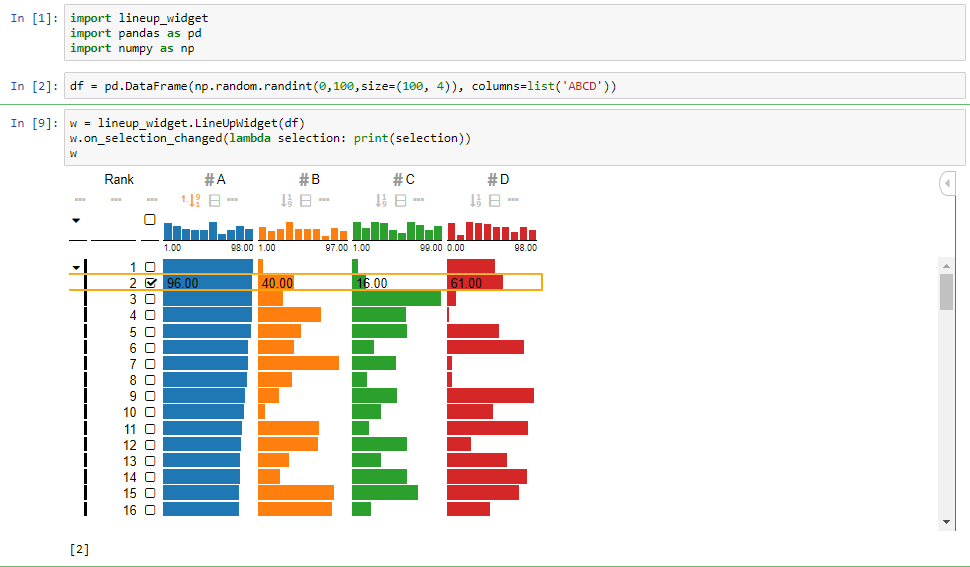
import lineup_widget
import pandas as pd
import numpy as np

df = pd.DataFrame(np.random.randint(0,100,size=(100, 4)), columns=list('ABCD'))

w = lineup_widget.LineUpWidget(df)
w.on_selection_changed(lambda selection: print(selection))
w
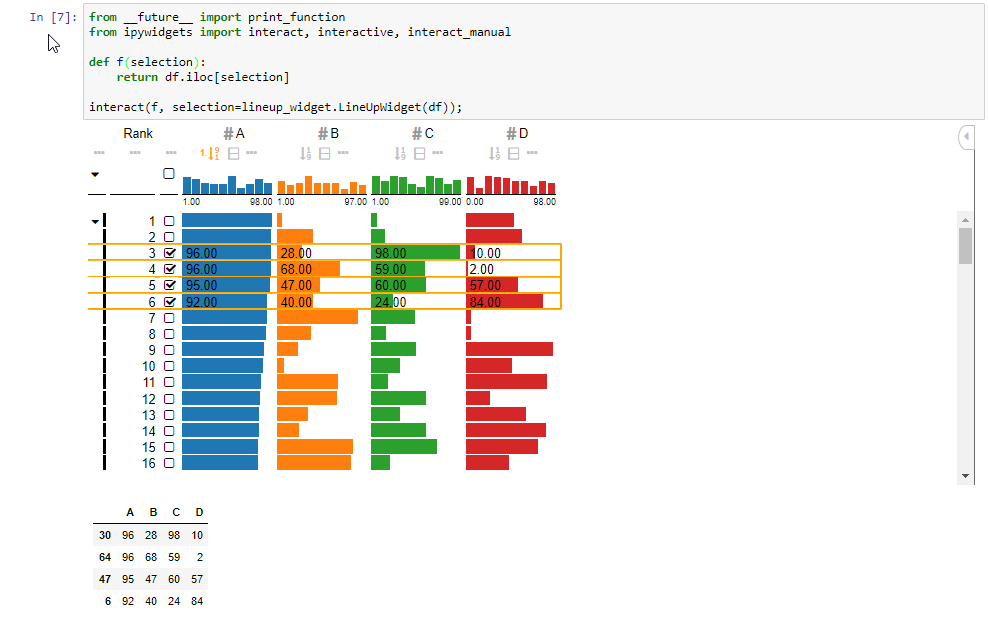
from __future__ import print_function
from ipywidgets import interact, interactive, interact_manual

def selection_changed(selection):
    return df.iloc[selection]

interact(selection_changed, selection=lineup_widget.LineUpWidget(df));
Hint:
In case you see scrollbars in each cell it is because of the font the cells are too narrow, you can specify a larger row height using
w = lineup_widget.LineUpWidget(df, options=dict(rowHeight=20))
Release Package
-
JavaScript NPM
cd js
npm install
npm publish
-
Python PyPi
pip install -U twine setuptools

python setup.py clean sdist bdist_wheel
twine upload dist/*
-
Git
git tag v<version>
git push --follow-tags
-
update versions edit the version in
js/package.jsonjs/lib/version.tslineup_widget/_version.py
Authors
- Samuel Gratzl (@sgratzl)
1 maintainer

Metadata
1 maintainer
Release files for lineup-widget 4.0.0
For a detailed explanation of source distributions (sdists) and built distributions (wheels), please see the package formats documentation.
Source distribution (sdist)
| File | Size | Uploaded | Provenance | |
|---|---|---|---|---|
| lineup_widget-4.0.0.tar.gz | 848.2 kB | Without provenance | Details |
Built distribution (wheel)
| File | Interpreter | ABI | Platform | Reset |
|---|---|---|---|---|
| lineup_widget-4.0.0-py2.py3-none-any.whl | Python 2, Python 3 | none | any | Details |
Total release size: 2.6 MB
Release files / lineup_widget-4.0.0.tar.gz
| Download URL | lineup_widget-4.0.0.tar.gz |
|---|---|
| Size | 848.2 kB |
| Tags | Source |
|
SHA-256 checksum How to use checksums |
41a0a2054903c626d1c31da94096784001d9474bcca17c193a7d9978c87e23ec
|
|
BLAKE2b-256 checksum How to use checksums |
a2ba13d9218135646704d31f952f5a2bca838b691a074a0e112780693d4c25b0
|
| Upload date | |
|
Uploaded using Trusted Publishing? What is trusted publishing? |
No |
| Uploaded via |
twine/3.1.1 pkginfo/1.5.0.1 requests/2.23.0 setuptools/47.1.1.post20200604 requests-toolbelt/0.9.1 tqdm/4.46.0 CPython/3.7.1
|
Release files / lineup_widget-4.0.0-py2.py3-none-any.whl
| Download URL | lineup_widget-4.0.0-py2.py3-none-any.whl |
|---|---|
| Size | 1.7 MB |
| Tags | Python 2 Python 3 |
|
SHA-256 checksum How to use checksums |
c06cbc10125f5f9cefd4df38c158418a9f60c9886ba0fe131a65f62c69734c7b
|
|
BLAKE2b-256 checksum How to use checksums |
949286404eac2840b0313e93fba7999de9174b3883245fc905836b26322dc180
|
| Upload date | |
|
Uploaded using Trusted Publishing? What is trusted publishing? |
No |
| Uploaded via |
twine/3.1.1 pkginfo/1.5.0.1 requests/2.23.0 setuptools/47.1.1.post20200604 requests-toolbelt/0.9.1 tqdm/4.46.0 CPython/3.7.1
|
Security for lineup-widget 4.0.0
Provenance
Provenance describes where a file came from. On PyPI, provenance is shared via attestations, which provide a verifiable record of the build or publishing details. View details, limitations and caveats.
No provenance found
None of the files in this release were uploaded with provenance metadata.
A note on package security
PyPI is a repository for distributing packages, not a service for auditing them. While third-party security researchers and our staff do their best to detect and remove malicious packages, PyPI cannot guarantee the quality, security or suitability of any given package.
To learn more about protecting yourself from malicious actors, visit our package security documentation.














