
LiteCam for Python
LiteCam is a lightweight, cross-platform library for capturing RGB frames from cameras and displaying them. Designed with simplicity and ease of integration in mind, LiteCam supports Windows, Linux and macOS platforms. It integrates easily with image processing frameworks like OpenCV, making it a versatile choice for developers.
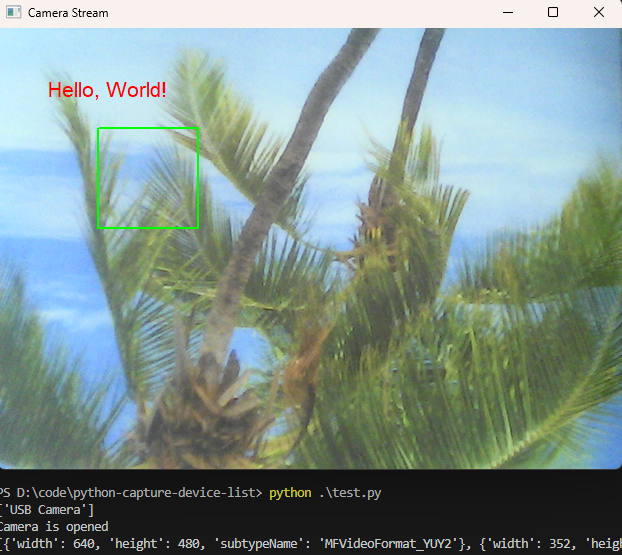
Features
- Capture RGB frames from video devices.
- Display live frames in a window.
- Draw contours and text directly on the displayed frames.
- Simple API for quick integration.
Supported Platforms
- Windows
- Linux
- macOS
How to Build the CPython Extension
-
Development Mode
python setup.py develop
-
Wheel Package
python setup.py bdist_wheel
-
Source Distribution
python setup.py sdist
Usage
Basic Example
import litecam

camera = litecam.PyCamera()

if camera.open(0):

    window = litecam.PyWindow(
        camera.getWidth(), camera.getHeight(), "Camera Stream")

    while window.waitKey('q'):
        frame = camera.captureFrame()
        if frame is not None:
            width = frame[0]
            height = frame[1]
            size = frame[2]
            data = frame[3]
            window.showFrame(width, height, data)

    camera.release()
API Overview
- getDeviceList(): Lists available video capture devices.
- saveJpeg(filename, width, height, rgbdata): Saves the frame as a JPEG image.
- savePng(filename, width, height, rgbdata): Saves the frame as a PNG image.
- saveJpegInMemory(width, height, rgbdata): Saves the frame as a JPEG image in memory.
- savePngInMemory(width, height, rgbdata): Saves the frame as a PNG image in memory.
PyCamera
- open(index): Opens the camera with the specified index.
- listMediaTypes(): Lists supported media types.
- setResolution(int width, int height): Sets the resolution for the camera.
- captureFrame()`: Captures a single RGB frame.
- release(): Closes the camera and releases resources.
- getWidth(): Returns the width of the frame.
- getHeight(): Returns the height of the frame.
PyWindow
- waitKey(key): Waits for user input; returns
falseif the specified key is pressed or the window is closed. - showFrame(width, height, rgbdata): Displays an RGB frame.
- drawContour(points): Draws contours on the frame.
- drawText(text, x, y, fontSize, color): Draws text on the frame.
1 maintainer

Metadata
1 maintainer
Release files for lite-camera 2.0.8
For a detailed explanation of source distributions (sdists) and built distributions (wheels), please see the package formats documentation.
Source distribution (sdist)
| File | Size | Uploaded | |
|---|---|---|---|
| lite_camera-2.0.8.tar.gz | 71.2 kB | Details |
Built distributions (wheels)
| File | Reset | |||
|---|---|---|---|---|
| lite_camera-2.0.8-cp313-cp313-win_amd64.whl | CPython 3.13 | CPython 3.13 | Windows x86-64 | Details |
| lite_camera-2.0.8-cp312-cp312-win_amd64.whl | CPython 3.12 | CPython 3.12 | Windows x86-64 | Details |
| lite_camera-2.0.8-cp311-cp311-win_amd64.whl | CPython 3.11 | CPython 3.11 | Windows x86-64 | Details |
| lite_camera-2.0.8-cp310-cp310-win_amd64.whl | CPython 3.10 | CPython 3.10 | Windows x86-64 | Details |
| lite_camera-2.0.8-cp39-cp39-win_amd64.whl | CPython 3.9 | CPython 3.9 | Windows x86-64 | Details |
| lite_camera-2.0.8-cp38-cp38-win_amd64.whl | CPython 3.8 | CPython 3.8 | Windows x86-64 | Details |
Total release size: 287.6 kB
Release files / lite_camera-2.0.8.tar.gz
| Download URL | lite_camera-2.0.8.tar.gz |
|---|---|
| Size | 71.2 kB |
| Tags | Source |
|
SHA-256 checksum How to use checksums |
27ed58e3832a5e7c5ff0b0ca0d6252b2db95811468f51bfdfd6c1ed8c76a56d3
|
|
BLAKE2b-256 checksum How to use checksums |
95d666acb7ca5672fe88daa47019d4395ee6c338a020884bc94e23bd9079bfee
|
| Upload date | |
|
Uploaded using Trusted Publishing? What is trusted publishing? |
No |
| Uploaded via |
twine/6.1.0 CPython/3.13.7
|
Release files / lite_camera-2.0.8-cp313-cp313-win_amd64.whl
| Download URL | lite_camera-2.0.8-cp313-cp313-win_amd64.whl |
|---|---|
| Size | 36.1 kB |
| Tags | CPython 3.13 Windows x86-64 |
|
SHA-256 checksum How to use checksums |
ebeae768ae4975b6edbbae66299b0507d6c00aac10b7a6aff5e851eb9f3b64b3
|
|
BLAKE2b-256 checksum How to use checksums |
0efaf4eb7e4b044b3b531de54d115697f7a695a9b8db231fd873bbf6a49fa4f3
|
| Upload date | |
|
Uploaded using Trusted Publishing? What is trusted publishing? |
No |
| Uploaded via |
twine/6.1.0 CPython/3.13.7
|
Release files / lite_camera-2.0.8-cp312-cp312-win_amd64.whl
| Download URL | lite_camera-2.0.8-cp312-cp312-win_amd64.whl |
|---|---|
| Size | 36.1 kB |
| Tags | CPython 3.12 Windows x86-64 |
|
SHA-256 checksum How to use checksums |
df35da0c82ca5744a8d6c6cd33c117114588cf9f95dce989dc361e6a9fc380c8
|
|
BLAKE2b-256 checksum How to use checksums |
da49a9544bd63c74b93bc5cc5a791d4937720bd516e10627b3778963b862c6cf
|
| Upload date | |
|
Uploaded using Trusted Publishing? What is trusted publishing? |
No |
| Uploaded via |
twine/6.1.0 CPython/3.13.7
|
Release files / lite_camera-2.0.8-cp311-cp311-win_amd64.whl
| Download URL | lite_camera-2.0.8-cp311-cp311-win_amd64.whl |
|---|---|
| Size | 36.1 kB |
| Tags | CPython 3.11 Windows x86-64 |
|
SHA-256 checksum How to use checksums |
27be0273439b36ab0bb24b43484876afeb5d600f0e1de96c8ff6f5ad08d013f0
|
|
BLAKE2b-256 checksum How to use checksums |
d5ae8e9845e0ca9bb32c1715a86352e4ff51a20520681b3818d88ce6e07c4257
|
| Upload date | |
|
Uploaded using Trusted Publishing? What is trusted publishing? |
No |
| Uploaded via |
twine/6.1.0 CPython/3.13.7
|
Release files / lite_camera-2.0.8-cp310-cp310-win_amd64.whl
| Download URL | lite_camera-2.0.8-cp310-cp310-win_amd64.whl |
|---|---|
| Size | 36.1 kB |
| Tags | CPython 3.10 Windows x86-64 |
|
SHA-256 checksum How to use checksums |
78db54acc450200468dff2e2a1d5508c8cb913d3e87a1cce052aa4c71622a507
|
|
BLAKE2b-256 checksum How to use checksums |
69b9f222bd1ad8a3157552a2bb25d1e972b76a8add31de1f0156e461cc16837a
|
| Upload date | |
|
Uploaded using Trusted Publishing? What is trusted publishing? |
No |
| Uploaded via |
twine/6.1.0 CPython/3.13.7
|
Release files / lite_camera-2.0.8-cp39-cp39-win_amd64.whl
| Download URL | lite_camera-2.0.8-cp39-cp39-win_amd64.whl |
|---|---|
| Size | 36.1 kB |
| Tags | CPython 3.9 Windows x86-64 |
|
SHA-256 checksum How to use checksums |
4a36cc00450ecf986623a19170fbb508fc1c7aee9a786619f31869fed784839e
|
|
BLAKE2b-256 checksum How to use checksums |
9b2a725b6d001bbbc6770467380721b24d06edf7c0f417130e7d2ccdef4bb2b8
|
| Upload date | |
|
Uploaded using Trusted Publishing? What is trusted publishing? |
No |
| Uploaded via |
twine/6.1.0 CPython/3.13.7
|
Release files / lite_camera-2.0.8-cp38-cp38-win_amd64.whl
| Download URL | lite_camera-2.0.8-cp38-cp38-win_amd64.whl |
|---|---|
| Size | 36.0 kB |
| Tags | CPython 3.8 Windows x86-64 |
|
SHA-256 checksum How to use checksums |
c46ce3b76009ea72e350a3f9d2aed177a31df6bff38a9334ff45a24d4820281c
|
|
BLAKE2b-256 checksum How to use checksums |
f3059c3e589193320530b9cba88a40309cbf2c85037b54ebe0448aef1e795e6f
|
| Upload date | |
|
Uploaded using Trusted Publishing? What is trusted publishing? |
No |
| Uploaded via |
twine/6.1.0 CPython/3.13.7
|














