
llm-term
Chat with LLM models directly from the command line.
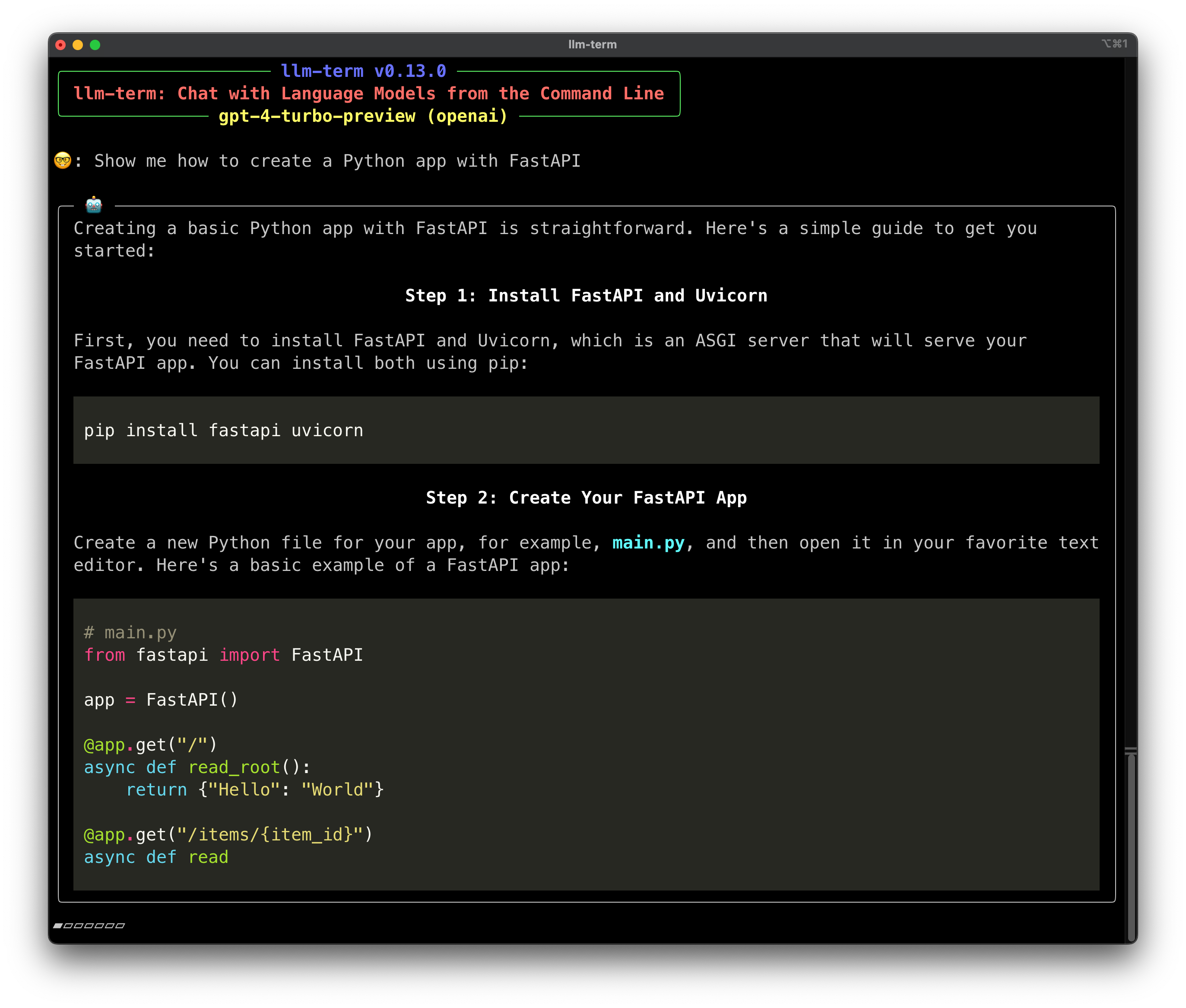







Screen Recording
https://github.com/juftin/llm-term/assets/49741340/c305f636-dfcf-4d6f-884f-81d378cf0684
Check Out the Docs
Installation
pipx install llm-term
Install with Extras
You can install llm-term with extra dependencies for different providers:
pipx install "llm-term[anthropic]"
pipx install "llm-term[mistralai]"
Or, you can install all the extras:
pipx install "llm-term[all]"
Usage
Then, you can chat with the model directly from the command line:
llm-term
llm-term works with multiple LLM providers, but by default it uses OpenAI.
Most providers require extra packages to be installed, so make sure you
read the Providers section below. To use a different provider, you
can set the --provider / -p flag:
llm-term --provider anthropic
If needed, make sure you have your LLM's API key set as an environment variable
(this can also set via the --api-key / -k flag in the CLI). If your LLM uses
a particular environment variable for its API key, such as OPENAI_API_KEY,
that will be detected automatically.
export LLM_API_KEY="xxxxxxxxxxxxxx"
Optionally, you can set a custom model. llm-term defaults
to gpt-4o (this can also set via the --model / -m flag in the CLI):
export LLM_MODEL="gpt-4o-mini"
Want to start the conversion directly from the command line? No problem,
just pass your prompt to llm-term:
llm-term show me python code to detect a palindrome
You can also set a custom system prompt. llm-term defaults to a reasonable
prompt for chatting with the model, but you can set your own prompt (this
can also set via the --system / -s flag in the CLI):
export LLM_SYSTEM_MESSAGE="You are a helpful assistant who talks like a pirate."
Providers
OpenAI
By default, llm-term uses OpenAI as your LLM provider. The default model is
gpt-4o and you can also use the OPENAI_API_KEY environment variable
to set your API key.
Anthropic
You can request access to Anthropic here. The
default model is claude-3-5-sonnet-20240620, and you can use the ANTHROPIC_API_KEY environment
variable. To use anthropic as your provider you must install the anthropic
extra.
pipx install "llm-term[anthropic]"
llm-term --provider anthropic
MistralAI
You can request access to the MistralAI
here. The default model is
mistral-small-latest, and you can use the MISTRAL_API_KEY environment variable.
pipx install "llm-term[mistralai]"
llm-term --provider mistralai
Ollama
Ollama is a an open source LLM provider. These models run locally on your
machine, so you don't need to worry about API keys or rate limits. The default
model is llama3, and you can see what models are available on the Ollama
Website. Make sure to
download Ollama first.
ollama pull llama3
llm-term --provider ollama --model llama3
1 maintainer

Metadata
1 maintainer
Release files for llm-term 0.14.0
For a detailed explanation of source distributions (sdists) and built distributions (wheels), please see the package formats documentation.
Source distribution (sdist)
| File | Size | Uploaded | Provenance | |
|---|---|---|---|---|
| llm_term-0.14.0.tar.gz | 153.0 kB | Without provenance | Details |
Built distribution (wheel)
| File | Interpreter | ABI | Platform | Reset |
|---|---|---|---|---|
| llm_term-0.14.0-py3-none-any.whl | Python 3 | none | any | Details |
Total release size: 162.2 kB
Release files / llm_term-0.14.0.tar.gz
| Download URL | llm_term-0.14.0.tar.gz |
|---|---|
| Size | 153.0 kB |
| Tags | Source |
|
SHA-256 checksum How to use checksums |
50cf719a566f136674532995e8d9ef4db9ed314ada29383765e394809a3eaa2c
|
|
BLAKE2b-256 checksum How to use checksums |
327731278afc8d4744d07c2b1377d539fb874b542a9782b50d792f5dba59d50e
|
| Upload date | |
|
Uploaded using Trusted Publishing? What is trusted publishing? |
Yes |
| Uploaded via |
twine/5.1.0 CPython/3.12.4
|
Release files / llm_term-0.14.0-py3-none-any.whl
| Download URL | llm_term-0.14.0-py3-none-any.whl |
|---|---|
| Size | 9.1 kB |
| Tags | Python 3 |
|
SHA-256 checksum How to use checksums |
cfad27a25fba9d782a4542f6e15a27ccc1461e5af87c0ac3f0a93fb75dd3cb3b
|
|
BLAKE2b-256 checksum How to use checksums |
456d43715bea59894a2d193c4f03a01fef294551f0b8c741f5d4f9eca62612b9
|
| Upload date | |
|
Uploaded using Trusted Publishing? What is trusted publishing? |
Yes |
| Uploaded via |
twine/5.1.0 CPython/3.12.4
|
Security for llm-term 0.14.0
Provenance
Provenance describes where a file came from. On PyPI, provenance is shared via attestations, which provide a verifiable record of the build or publishing details. View details, limitations and caveats.
No provenance found
None of the files in this release were uploaded with provenance metadata.
A note on package security
PyPI is a repository for distributing packages, not a service for auditing them. While third-party security researchers and our staff do their best to detect and remove malicious packages, PyPI cannot guarantee the quality, security or suitability of any given package.
To learn more about protecting yourself from malicious actors, visit our package security documentation.














