





👋 join us on Twitter, Discord and WeChat
News 🎉
- [2023/09] TurboMind supports Qwen-14B
- [2023/09] TurboMind supports InternLM-20B
- [2023/09] TurboMind supports all features of Code Llama: code completion, infilling, chat / instruct, and python specialist. Click here for deployment guide
- [2023/09] TurboMind supports Baichuan2-7B
- [2023/08] TurboMind supports flash-attention2.
- [2023/08] TurboMind supports Qwen-7B, dynamic NTK-RoPE scaling and dynamic logN scaling
- [2023/08] TurboMind supports Windows (tp=1)
- [2023/08] TurboMind supports 4-bit inference, 2.4x faster than FP16, the fastest open-source implementation🚀. Check this guide for detailed info
- [2023/08] LMDeploy has launched on the HuggingFace Hub, providing ready-to-use 4-bit models.
- [2023/08] LMDeploy supports 4-bit quantization using the AWQ algorithm.
- [2023/07] TurboMind supports Llama-2 70B with GQA.
- [2023/07] TurboMind supports Llama-2 7B/13B.
- [2023/07] TurboMind supports tensor-parallel inference of InternLM.
Introduction
LMDeploy is a toolkit for compressing, deploying, and serving LLM, developed by the MMRazor and MMDeploy teams. It has the following core features:
-
Efficient Inference Engine (TurboMind): Based on FasterTransformer, we have implemented an efficient inference engine - TurboMind, which supports the inference of LLaMA and its variant models on NVIDIA GPUs.
-
Interactive Inference Mode: By caching the k/v of attention during multi-round dialogue processes, it remembers dialogue history, thus avoiding repetitive processing of historical sessions.
-
Multi-GPU Model Deployment and Quantization: We provide comprehensive model deployment and quantification support, and have been validated at different scales.
-
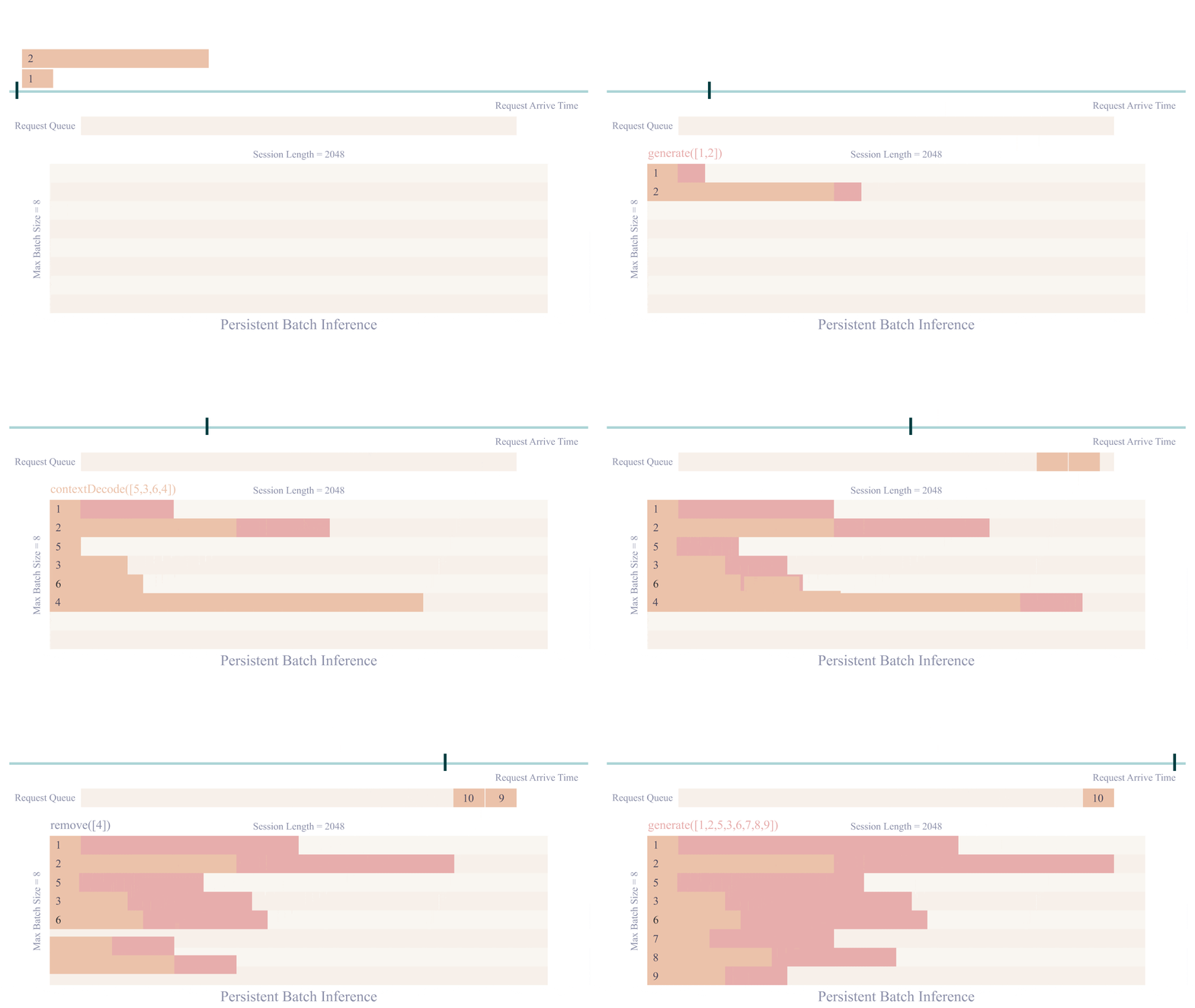
Persistent Batch Inference: Further optimization of model execution efficiency.
Supported Models
LMDeploy has two inference backends, Pytorch and TurboMind.
TurboMind
Note
W4A16 inference requires Nvidia GPU with Ampere architecture or above.
| Models | Tensor Parallel | FP16 | KV INT8 | W4A16 | W8A8 |
|---|---|---|---|---|---|
| Llama | Yes | Yes | Yes | Yes | No |
| Llama2 | Yes | Yes | Yes | Yes | No |
| SOLAR | Yes | Yes | Yes | Yes | No |
| InternLM-7B | Yes | Yes | Yes | Yes | No |
| InternLM-20B | Yes | Yes | Yes | Yes | No |
| QWen-7B | Yes | Yes | Yes | No | No |
| QWen-14B | Yes | Yes | Yes | No | No |
| Baichuan-7B | Yes | Yes | Yes | Yes | No |
| Baichuan2-7B | Yes | Yes | No | No | No |
| Code Llama | Yes | Yes | No | No | No |
Pytorch
| Models | Tensor Parallel | FP16 | KV INT8 | W4A16 | W8A8 |
|---|---|---|---|---|---|
| Llama | Yes | Yes | No | No | No |
| Llama2 | Yes | Yes | No | No | No |
| InternLM-7B | Yes | Yes | No | No | No |
Performance
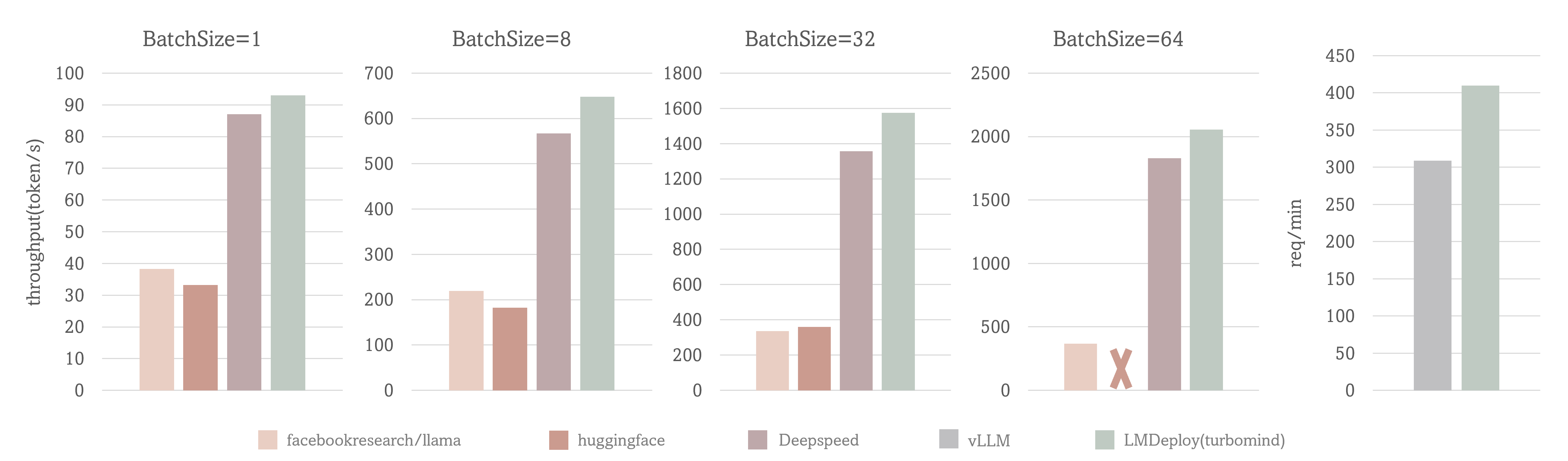
Case I: output token throughput with fixed input token and output token number (1, 2048)
Case II: request throughput with real conversation data
Test Setting: LLaMA-7B, NVIDIA A100(80G)
The output token throughput of TurboMind exceeds 2000 tokens/s, which is about 5% - 15% higher than DeepSpeed overall and outperforms huggingface transformers by up to 2.3x. And the request throughput of TurboMind is 30% higher than vLLM.
Quick Start
Installation
Install lmdeploy with pip ( python 3.8+) or from source
pip install lmdeploy
Deploy InternLM
Get InternLM model
# 1. Download InternLM model

# Make sure you have git-lfs installed (https://git-lfs.com)
git lfs install
git clone https://huggingface.co/internlm/internlm-chat-7b-v1_1 /path/to/internlm-chat-7b

# if you want to clone without large files – just their pointers
# prepend your git clone with the following env var:
GIT_LFS_SKIP_SMUDGE=1

# 2. Convert InternLM model to turbomind's format, which will be in "./workspace" by default
python3 -m lmdeploy.serve.turbomind.deploy internlm-chat-7b /path/to/internlm-chat-7b
Inference by TurboMind
python -m lmdeploy.turbomind.chat ./workspace
Note
When inferring with FP16 precision, the InternLM-7B model requires at least 15.7G of GPU memory overhead on TurboMind.
It is recommended to use NVIDIA cards such as 3090, V100, A100, etc. Disable GPU ECC can free up 10% memory, trysudo nvidia-smi --ecc-config=0and reboot system.
Note
Tensor parallel is available to perform inference on multiple GPUs. Add--tp=<num_gpu>onchatto enable runtime TP.
Serving with gradio
python3 -m lmdeploy.serve.gradio.app ./workspace

Serving with Restful API
Launch inference server by:
python3 -m lmdeploy.serve.openai.api_server ./workspace server_ip server_port --instance_num 32 --tp 1
Then, you can communicate with it by command line,
# restful_api_url is what printed in api_server.py, e.g. http://localhost:23333
python -m lmdeploy.serve.openai.api_client restful_api_url
or webui,
# restful_api_url is what printed in api_server.py, e.g. http://localhost:23333
# server_ip and server_port here are for gradio ui
# example: python -m lmdeploy.serve.gradio.app http://localhost:23333 localhost 6006 --restful_api True
python -m lmdeploy.serve.gradio.app restful_api_url server_ip --restful_api True
Refer to restful_api.md for more details.
Serving with Triton Inference Server
Launch inference server by:
bash workspace/service_docker_up.sh
Then, you can communicate with the inference server by command line,
python3 -m lmdeploy.serve.client {server_ip_addresss}:33337
or webui,
python3 -m lmdeploy.serve.gradio.app {server_ip_addresss}:33337
For the deployment of other supported models, such as LLaMA, LLaMA-2, vicuna and so on, you can find the guide from here
Inference with PyTorch
For detailed instructions on Inference pytorch models, see here.
Single GPU
python3 -m lmdeploy.pytorch.chat $NAME_OR_PATH_TO_HF_MODEL \
    --max_new_tokens 64 \
    --temperture 0.8 \
    --top_p 0.95 \
    --seed 0
Tensor Parallel with DeepSpeed
deepspeed --module --num_gpus 2 lmdeploy.pytorch.chat \
    $NAME_OR_PATH_TO_HF_MODEL \
    --max_new_tokens 64 \
    --temperture 0.8 \
    --top_p 0.95 \
    --seed 0
You need to install deepspeed first to use this feature.
pip install deepspeed
Quantization
Weight INT4 Quantization
LMDeploy uses AWQ algorithm for model weight quantization
Click here to view the test results for weight int4 usage.
KV Cache INT8 Quantization
Click here to view the usage method, implementation formula, and test results for kv int8.
Warning
runtime Tensor Parallel for quantized model is not available. Please setup--tpondeployto enable static TP.
Contributing
We appreciate all contributions to LMDeploy. Please refer to CONTRIBUTING.md for the contributing guideline.
Acknowledgement
License
This project is released under the Apache 2.0 license.
1 maintainer

Metadata
1 maintainer
Release files for lmdeploy 0.0.12
For a detailed explanation of source distributions (sdists) and built distributions (wheels), please see the package formats documentation.
Built distributions (wheels)
Total release size: 641.7 MB
Release files / lmdeploy-0.0.12-cp311-cp311-win_amd64.whl
| Download URL | lmdeploy-0.0.12-cp311-cp311-win_amd64.whl |
|---|---|
| Size | 55.8 MB |
| Tags | CPython 3.11 Windows x86-64 |
|
SHA-256 checksum How to use checksums |
b1d106ecd67bf329b68a1dfc90969eed6dad2d51997f289ba509ad1207979841
|
|
BLAKE2b-256 checksum How to use checksums |
45e78add65511126b2b86fa4090396808a40f68974809f4cd4171b71ef1f74f0
|
| Upload date | |
|
Uploaded using Trusted Publishing? What is trusted publishing? |
No |
| Uploaded via |
twine/4.0.2 CPython/3.8.18
|
Release files / lmdeploy-0.0.12-cp311-cp311-manylinux2014_x86_64.whl
| Download URL | lmdeploy-0.0.12-cp311-cp311-manylinux2014_x86_64.whl |
|---|---|
| Size | 104.7 MB |
| Tags | CPython 3.11 Linux glibc 2.17+ x86-64 |
|
SHA-256 checksum How to use checksums |
2ea8924788d7c5884af80a917ac2bd56d9806fdc0dec78c7a10cbbb3157d88a9
|
|
BLAKE2b-256 checksum How to use checksums |
01f309bfd38aab096f282c7e624b5636e48472c08b501ccba384407f22bf9182
|
| Upload date | |
|
Uploaded using Trusted Publishing? What is trusted publishing? |
No |
| Uploaded via |
twine/4.0.2 CPython/3.8.18
|
Release files / lmdeploy-0.0.12-cp310-cp310-win_amd64.whl
| Download URL | lmdeploy-0.0.12-cp310-cp310-win_amd64.whl |
|---|---|
| Size | 55.8 MB |
| Tags | CPython 3.10 Windows x86-64 |
|
SHA-256 checksum How to use checksums |
565fa35e1a05d30abdb17fc8841ec50bff2f7b2251570c4f3353bada87bb2df7
|
|
BLAKE2b-256 checksum How to use checksums |
1e8a83a8e9ff580c94f4b9be61c286e44c4262599f22ce845d567097d7b1ba9c
|
| Upload date | |
|
Uploaded using Trusted Publishing? What is trusted publishing? |
No |
| Uploaded via |
twine/4.0.2 CPython/3.8.18
|
Release files / lmdeploy-0.0.12-cp310-cp310-manylinux2014_x86_64.whl
| Download URL | lmdeploy-0.0.12-cp310-cp310-manylinux2014_x86_64.whl |
|---|---|
| Size | 104.7 MB |
| Tags | CPython 3.10 Linux glibc 2.17+ x86-64 |
|
SHA-256 checksum How to use checksums |
8984dd4a678658bd30e2b53d71c882de1a09fb89b22ca6918473afdb6b5c5b72
|
|
BLAKE2b-256 checksum How to use checksums |
683169aacd80c292e9c9392b446934a8ef8e0ce649edf0217b05bff272df49be
|
| Upload date | |
|
Uploaded using Trusted Publishing? What is trusted publishing? |
No |
| Uploaded via |
twine/4.0.2 CPython/3.8.18
|
Release files / lmdeploy-0.0.12-cp39-cp39-win_amd64.whl
| Download URL | lmdeploy-0.0.12-cp39-cp39-win_amd64.whl |
|---|---|
| Size | 55.8 MB |
| Tags | CPython 3.9 Windows x86-64 |
|
SHA-256 checksum How to use checksums |
1c4a19090fe9d6e31f9113b7ed2b224600c0448bcfdf524f35377ff9acd72dde
|
|
BLAKE2b-256 checksum How to use checksums |
18d611b87006a0b9a2fe26d2099827aa69180a7a072e3ba3b6efcc45c17540d6
|
| Upload date | |
|
Uploaded using Trusted Publishing? What is trusted publishing? |
No |
| Uploaded via |
twine/4.0.2 CPython/3.8.18
|
Release files / lmdeploy-0.0.12-cp39-cp39-manylinux2014_x86_64.whl
| Download URL | lmdeploy-0.0.12-cp39-cp39-manylinux2014_x86_64.whl |
|---|---|
| Size | 104.6 MB |
| Tags | CPython 3.9 Linux glibc 2.17+ x86-64 |
|
SHA-256 checksum How to use checksums |
d785c754bdb428d7ff6d7e776baacf47b8b4724ca61411887f219a092d4f29ff
|
|
BLAKE2b-256 checksum How to use checksums |
3534a232d9b9c37d3d8d53f604c15df30f91ea73d04a91e31abbdd2450d9cd79
|
| Upload date | |
|
Uploaded using Trusted Publishing? What is trusted publishing? |
No |
| Uploaded via |
twine/4.0.2 CPython/3.8.18
|
Release files / lmdeploy-0.0.12-cp38-cp38-win_amd64.whl
| Download URL | lmdeploy-0.0.12-cp38-cp38-win_amd64.whl |
|---|---|
| Size | 55.8 MB |
| Tags | CPython 3.8 Windows x86-64 |
|
SHA-256 checksum How to use checksums |
132a601d7ea888891b4397bd6d7dbf05bd053e1d09a757944f809a83dbfb6ec5
|
|
BLAKE2b-256 checksum How to use checksums |
cdbe0a7bd6681d8a68fbc5e911d52a79967d1352779c05399d5a2810a83ac0f7
|
| Upload date | |
|
Uploaded using Trusted Publishing? What is trusted publishing? |
No |
| Uploaded via |
twine/4.0.2 CPython/3.8.18
|
Release files / lmdeploy-0.0.12-cp38-cp38-manylinux2014_x86_64.whl
| Download URL | lmdeploy-0.0.12-cp38-cp38-manylinux2014_x86_64.whl |
|---|---|
| Size | 104.7 MB |
| Tags | CPython 3.8 Linux glibc 2.17+ x86-64 |
|
SHA-256 checksum How to use checksums |
9261bddf897eee2168482aec5ab002f7b7066e2015561a93cc03c11eac9bd9ac
|
|
BLAKE2b-256 checksum How to use checksums |
b502384f64a86e65624a8c58a8a10807ef09c90175e3b869e0c5e2b10689511f
|
| Upload date | |
|
Uploaded using Trusted Publishing? What is trusted publishing? |
No |
| Uploaded via |
twine/4.0.2 CPython/3.8.18
|
Security for lmdeploy 0.0.12
Provenance
Provenance describes where a file came from. On PyPI, provenance is shared via attestations, which provide a verifiable record of the build or publishing details. View details, limitations and caveats.
No provenance found
None of the files in this release were uploaded with provenance metadata.
A note on package security
PyPI is a repository for distributing packages, not a service for auditing them. While third-party security researchers and our staff do their best to detect and remove malicious packages, PyPI cannot guarantee the quality, security or suitability of any given package.
To learn more about protecting yourself from malicious actors, visit our package security documentation.














