
l-space
a cli ebook manager built around isbnlib
on import, lspace tries to find isbns in the files metadata and in the text. with the isbn it tries to fetch metadata about the book from google books and openlibrary. if no isbn is found, it queries metadata based on the filename.
after this, your properly renamed files will be stored in your library folder.
currently supports epub and pdf.


requirements
python >=3.5 and pip
installation
from pypi (latest release)
pip install lspace
from github (probably-not-so-stable-dev-stuff)
pip install git+https://github.com/puhoy/lspace.git
setup
after installation, you should run
lspace init
this will setup a new configuration file, which you can edit to specify the structure of your library, for example.
a default config file would look like this:
database_path: sqlite:////home/USER/.config/lspace/lspace.db
file_format: '{SHELF}/{AUTHORS}_{TITLE}'
library_path: ~/library
loglevel: error
default_shelf: misc
default_author: no author
default_language: no language
default_publisher: no publisher
database path
path to your database. the project uses sqlalchemy, so all databases supported by sqlalchemy should be fine.
file_format
template string for storing the plain files in the library.
{SHELF}/{AUTHORS}_{TITLE} would produce files like scifi/cixin-liu_three-body-problem.epub
author and title will be automatically slugified for this.
possible variables to use are: AUTHORS, TITLE, SHELF, YEAR, LANGUAGE, PUBLISHER
library path
where the imported files are stored
loglevel
the default python loglevels (debug, info, error, exception)
default_{shelf, author, language, publisher}
the default field names, in case nothing is specified in import
usage
importing
lspace import path/to/ebook.epub
lspace import path/to/folder/*
if you already have a folder you are happy with and, for example, just want to use it to serve your books or search through your files, you can add the --inplace switch on import, which will not copy them over to your library folder, but instead keep the book as an "external" reference.
lspace import --inplace path/to/ebook.epub
import from calibre library
lspace import path/to/calibre_library/metadata.db
import from lspace api
lspace import http://<some-address>/api/v1/
the web interface (lspace web - scroll down a bit!) generates import strings based on your search!
searching your library
lspace list QUERY [--path]
for example,
lspace list programming --path
would return something like
/home/USER/library/donald-e-knuth/art-of-computer-programming-volume-2.pdf
/home/USER/library/donald-e-knuth/the-art-of-computer-programming-volume-1-fascicle-1.pdf
and
lspace list dwarf
would return return
Peter Tyson - Getting Started With Dwarf Fortress
removing stuff
lspace remove QUERY
this command will ask you before it actually deletes stuff :)
Peter Tyson - Getting Started With Dwarf Fortress
/home/USER/library/peter-tyson/getting-started-with-dwarf-fortress.epub
delete this book from library? [y/N]:
exporting books
lspace export QUERY ~/some/folder/ --format mobi
would convert all books matching on QUERY to 'mobi' and export them to ~/some/folder
to actually export to another format, you need "ebook-convert", which is part of calibre!
browse & share your books via webserver
lspace web --host 0.0.0.0 --port 5000
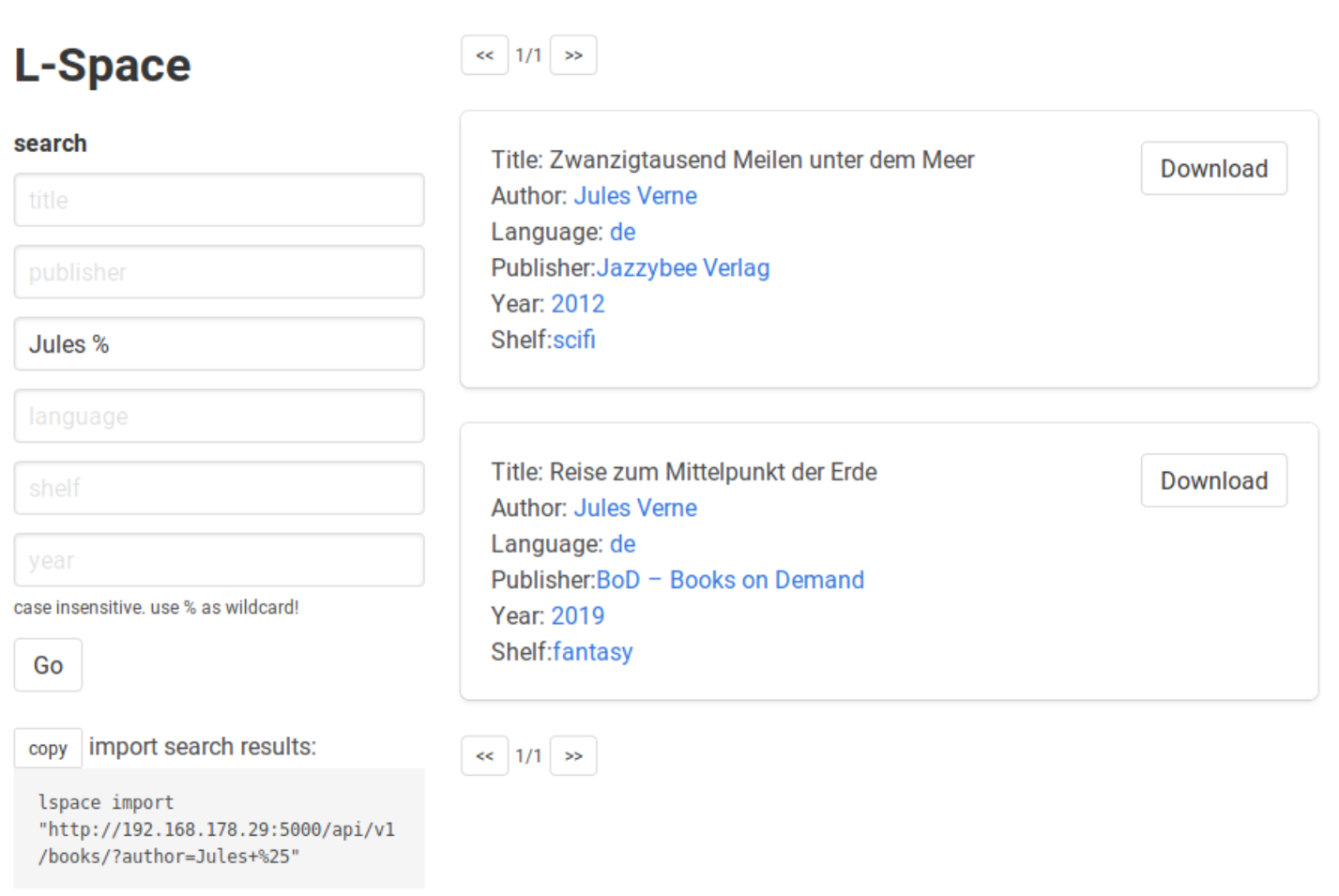
this also gives you the import command for your current search results!
(or you can just download them manually..)
setting up a dev env
1. clone this repo
2. make a virtualenv and activate it
python -m venv env

source env/bin/activate  # for bash

# or
#. env/bin/activate.fish  # for fish
3. install requirements
pip install -e .[dev]
4. set up a separate config to not mess up your regular installation
# initialize a new config file at a separate path
LSPACE_CONFIG=~/.config/lspace_dev/config.yml lspace init

# change the database and library path! (otherwise it would still use the regular db)
sed -i 's/lspace\/lspace.db/lspace_dev\/lspace.db/g' ~/.config/lspace_dev/config.yml
sed -i 's/~\/library/~\/library_dev/g' ~/.config/lspace_dev/config.yml

# also, if you want, set the loglevel to something else
after this, just set LSPACE_CONFIG to your new config file before you start to try new stuff
export LSPACE_CONFIG=~/.config/lspace_dev/config.yml  # bash
set -gx LSPACE_CONFIG ~/.config/lspace_dev/config.yml  # fish
migrations
the db command is available when running in dev mode.
create a new migration with LSPACE_DEV=1 lspace db migrate
afterwards, running any lspace command will automatically update the database
making a release
commands to build, test-release and release are wrapped in a doit script dodo.py.
bumping is requires bump2version, twine is used for uploading to pypi.
why "L-space"?
its named after discworlds library-space dimension :)
1 maintainer

Metadata
1 maintainer
Release files for lspace 0.4.8
For a detailed explanation of source distributions (sdists) and built distributions (wheels), please see the package formats documentation.
Source distribution (sdist)
| File | Size | Uploaded | Provenance | Actions |
|---|---|---|---|---|
| lspace-0.4.8.tar.gz | 76.5 kB | Without provenance | Details for lspace-0.4.8.tar.gz |
Built distribution (wheel)
| File | Interpreter | ABI | Platform | Actions Reset |
|---|---|---|---|---|
| lspace-0.4.8-py3-none-any.whl | Python 3 | none | any | Details for lspace-0.4.8-py3-none-any.whl |
Total release size: 170.5 kB
Release files / lspace-0.4.8.tar.gz
| Download URL | lspace-0.4.8.tar.gz |
|---|---|
| Size | 76.5 kB |
| Tags | Source |
|
SHA-256 checksum How to use checksums |
044311ba450b7e8b152fe3810f2e4188e973eeb35163e98401aee6e10ee885f5
|
|
BLAKE2b-256 checksum How to use checksums |
707be1d81f28de68d7cf2c2eb8dae8fa8264b265ac0f60194157c8b517950535
|
| Upload date | |
|
Uploaded using Trusted Publishing? What is trusted publishing? |
No |
| Uploaded via |
twine/5.1.1 CPython/3.12.4
|
Release files / lspace-0.4.8-py3-none-any.whl
| Download URL | lspace-0.4.8-py3-none-any.whl |
|---|---|
| Size | 94.0 kB |
| Tags | Python 3 |
|
SHA-256 checksum How to use checksums |
c53292a4e4de0ad891a9f2b5cda0555459a8cfb63c0d50af35172331514f2268
|
|
BLAKE2b-256 checksum How to use checksums |
3dd96f6fa58ba9ef6918eebdd59e3742a1f3449bbb38b894509c01ef7f81c1a0
|
| Upload date | |
|
Uploaded using Trusted Publishing? What is trusted publishing? |
No |
| Uploaded via |
twine/5.1.1 CPython/3.12.4
|
Security for lspace 0.4.8
Provenance
Provenance describes where a file came from. On PyPI, provenance is shared via attestations, which provide a verifiable record of the build or publishing details. View details, limitations and caveats.
No provenance found
None of the files in this release were uploaded with provenance metadata.
A note on package security
PyPI is a repository for distributing packages, not a service for auditing them. While third-party security researchers and our staff do their best to detect and remove malicious packages, PyPI cannot guarantee the quality, security or suitability of any given package.
To learn more about protecting yourself from malicious actors, visit our package security documentation.














