
MagellanMapper
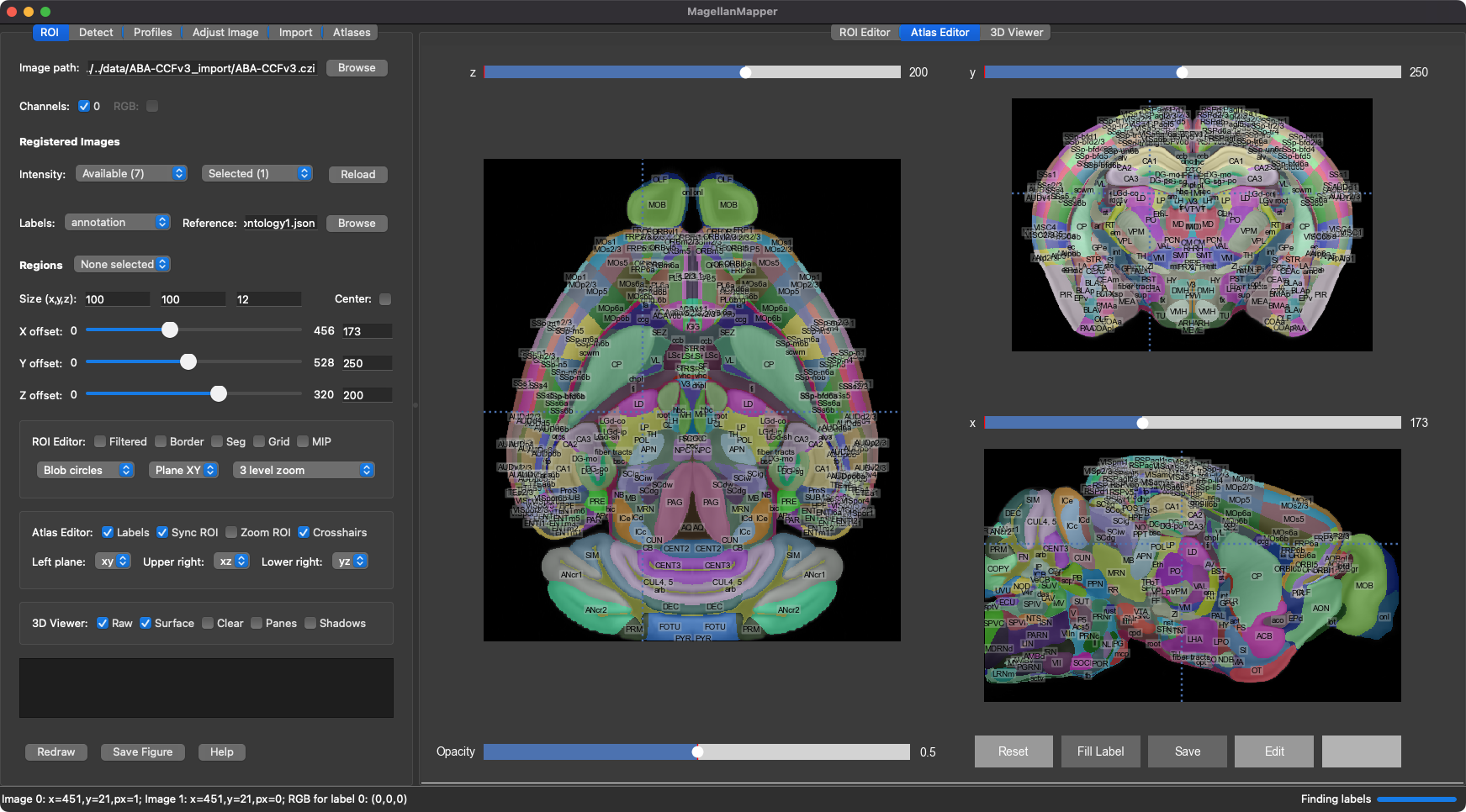
MagellanMapper is a graphical imaging informatics suite for 3D reconstruction and automated analysis of whole specimens and atlases. Its design philosophy is to make the raw 3D images as accessible as possible, simplify annotation from nuclei to atlases, and scale from the laptop or desktop to the cloud in cross-platform environments.

Quick Reference
- Docs are now on ReadTheDocs!
- NEW: Vignette of pipelines
- Installation (more details)
- Intro to running MagellanMapper
- Using the viewers
- Command-line interface
- Configuration and settings
- Publications
Quick Install
Install MagellanMapper with its graphical interface and registration tools:
pip install "magellanmapper[gui,itk]"
Then launch MagellanMapper:
mm
Full Install
Alternatively, Conda can be used to install MagellanMapper along with support for importing proprietary image file formats (note: not currently working on Apple Silicon (Mac M-chip) platforms):
conda env create -n mag -f https://raw.githubusercontent.com/sanderslab/magellanmapper/master/envs/environment_rel.yml
Then activate the environment (mag) and run MagellanMapper:
conda activate mag
mm
If you have Java, you can do the same through Pip:
pip install "magellanmapper[most]" --extra-index-url https://pypi.fury.io/dd8/
The extra index accesses a few customized dependencies for MagellanMapper.
For the latest updates and fixes, download from Git and install:
git clone https://github.com/sanderslab/magellanmapper.git
cd magellanmapper
conda env create -n mag -f environment.yml
python run.py
Or for Pip, replace the conda line with:
pip install -e ".[most]" --extra-index-url https://pypi.fury.io/dd8/
More ways to install and run
See the install docs for more details, including:
- Installer scripts, which install Miniconda and MagellanMapper without requiring command-line usage
- Installer packages, for point-and-click installation
Using MagellanMapper
MagellanMapper consists of a graphical user interface (GUI), command-line interface (CLI), and application programming interface (API) for Python programmatic access. See the GUI docs for graphical usage and the CLI docs for scripting.
For automated tasks, see the sample_cmds_bash.ipynb Jupyter Notebook (or the older sample_cmds.sh script) that shows examples of running the CLI and exploring images in the GUI. See ReadTheDocs for more details, including viewer shortcuts and customizing settings for your image analysis.
Have a question? Found a bug? Want a feature? Please ask!
Image file import
Large images or proprietary microscopy formats such as CZI can be imported by MagellanMapper into NumPy format, which allows on-the-fly loading to reduce memory requirements and initial loading time. In the "Import" tab, you can select files, view and update metadata, and import the files.
Medical imaging formats such as .mha (or .mhd/.raw) and .nii (or .nii.gz) can be opened with the SimpleITK/SimpleElastix library and do not require separate import.
Sample 3D data
To try out functions with sample images, download any of these files:
- Sample region of nuclei at 4x (
sample_region.zip) - Sample downsampled tissue cleared whole brain (
sample_brain.zip) - Allen Developing Mouse Brain Atlas E18.5 (
ADMBA-E18pt5.zip)
Related publications and datasets
- For more information on the methods used for 3D atlas construction, please see: https://elifesciences.org/articles/61408
- For step-by-step instructions on using v1.3.x of the software, please see: https://currentprotocols.onlinelibrary.wiley.com/doi/abs/10.1002/cpns.104 (now open access on PubMed!); see ReadTheDocs for ongoing updates
- The 3D reconstructed versions of the Allen Developing Mouse Brain Atlas: https://search.kg.ebrains.eu/instances/Project/b8a8e2d3-4787-45f2-b010-589948c33f20
- Sample wild-type whole mouse brains at age P0: https://search.kg.ebrains.eu/instances/Dataset/2423e103-35e9-40cf-ab0c-0e3d08d24d5a
Licensed under the open-source BSD-3 license
Author: David Young, 2017, 2025
1 maintainer

Metadata
1 maintainer
Release files for magellanmapper 1.6.0
For a detailed explanation of source distributions (sdists) and built distributions (wheels), please see the package formats documentation.
Source distribution (sdist)
| File | Size | Uploaded | |
|---|---|---|---|
| magellanmapper-1.6.0.tar.gz | 455.8 kB | Details |
Built distribution (wheel)
| File | Interpreter | ABI | Platform | Reset |
|---|---|---|---|---|
| magellanmapper-1.6.0-py3-none-any.whl | Python 3 | none | any | Details |
Total release size: 949.0 kB
Release files / magellanmapper-1.6.0.tar.gz
| Download URL | magellanmapper-1.6.0.tar.gz |
|---|---|
| Size | 455.8 kB |
| Tags | Source |
|
SHA-256 checksum How to use checksums |
c3bc0e84168c37cab442e31dccc95c3cc521c3c94d0e8faeacf4b49f12dbb144
|
|
BLAKE2b-256 checksum How to use checksums |
ed7471ee4a2770a1451838ea445e336cc36c4381439ad76662f9987ed17c8d9d
|
| Upload date | |
|
Uploaded using Trusted Publishing? What is trusted publishing? |
No |
| Uploaded via |
twine/6.1.0 CPython/3.9.13
|
Release files / magellanmapper-1.6.0-py3-none-any.whl
| Download URL | magellanmapper-1.6.0-py3-none-any.whl |
|---|---|
| Size | 493.2 kB |
| Tags | Python 3 |
|
SHA-256 checksum How to use checksums |
b80dceffb4ac94a3f249c07387e67e3d6051fcf0cdf809e85c83547292aaa279
|
|
BLAKE2b-256 checksum How to use checksums |
86f2da8c8f3cd3bf0872ddae6380f2777309d4bba515f638e7b4e566f30eead0
|
| Upload date | |
|
Uploaded using Trusted Publishing? What is trusted publishing? |
No |
| Uploaded via |
twine/6.1.0 CPython/3.9.13
|














