
Manga109 API


Simple python API to read annotation data of Manga109.
Manga109 is the largest dataset for manga (Japanese comic) images, that is made publicly available for academic research purposes with proper copyright notation.
To download images/annotations of Manga109, please visit here and send an application via the form. After that, you will receive the password for downloading images (109 titles of manga as jpeg files) and annotations (bounding box coordinates of face, body, frame, and speech balloon with texts, in the form of XML).
This package provides a simple Python API to read annotation data (i.e., parsing XML) with some utility functions such as reading an image.
News
- [Oct 6, 2020]: v0.3.0 is now available. We added a tag-order-preserving option for
get_annotation. See (4) in the Example section for instructions. - [Aug 28, 2020]: v0.2.0 is out. The API is drastically improved, thanks for @i3ear!
- [Aug 28, 2020]: The repository is moved to manga109 organization
Links
- Manga109
- Details of annotation data
- [Matsui+, MTAP 2017]: The original paper for Manga109. Please cite this if you use manga109 images
- [Aizawa+, IEEE MultiMedia 2020]: The paper introducing (1) the annotation data and (2) a few examples of multimedia processing applications (detection, retrieval, and generation). Please cite this if you use manga109 annotation data
Installing
You can install the package via pip. The library works with Python 3.6+ on linux/MacOS
pip install manga109api
Example
import manga109api
from pprint import pprint

# (0) Instantiate a parser with the root directory of Manga109
manga109_root_dir = "YOUR_DIR/Manga109_2017_09_28"
p = manga109api.Parser(root_dir=manga109_root_dir)


# (1) Book titles
print(p.books)
# Output: ['ARMS', 'AisazuNihaIrarenai', 'AkkeraKanjinchou', 'Akuhamu', ...


# (2) Path to an image (page).
print(p.img_path(book="ARMS", index=3))  # the 4th page of "ARMS"
# Output (str): YOUR_DIR/Manga109_2017_09_28/images/ARMS/003.jpg


# (3) The main annotation data
annotation = p.get_annotation(book="ARMS")

# annotation is a dictionary. Keys are "title", "character", and "page":
# - annotation["title"] : (str) Title
# - annotation["character"] : (list) Characters who appear in the book
# - annotation["page"] : (list) The main annotation data for each page

# (3-a) title
print(annotation["title"])  # Output (str): ARMS

# (3-b) character
pprint(annotation["character"])
# Output (list):
# [{'@id': '00000003', '@name': '女1'},
#  {'@id': '00000010', '@name': '男1'},
#  {'@id': '00000090', '@name': 'ロボット1'},
#  {'@id': '000000fe', '@name': 'エリー'},
#  {'@id': '0000010a', '@name': 'ケイト'}, ... ]

# (3-c) page
# annotation["page"] is the main annotation data (list of pages)
pprint(annotation["page"][3])  # the data of the 4th page of "ARMS"
# Output (dict):
# {'@height': 1170,    <- Height of the img
#  '@index': 3,        <- The page number
#  '@width': 1654,     <- Width of the img
#  'body': [{'@character': '00000003',     <- Character body annotations
#            '@id': '00000006',
#            '@xmax': 1352,
#            '@xmin': 1229,
#            '@ymax': 875,
#            '@ymin': 709},
#           {'@character': '00000003',   <- character ID
#            '@id': '00000008',          <- annotation ID (unique)
#            '@xmax': 1172,
#            '@xmin': 959,
#            '@ymax': 1089,
#            '@ymin': 820}, ... ],
#  'face': [{'@character': '00000003',     <- Character face annotations
#            '@id': '0000000a',
#            '@xmax': 1072,
#            '@xmin': 989,
#            '@ymax': 941,
#            '@ymin': 890},
#           {'@character': '00000003',
#            '@id': '0000000d',
#            '@xmax': 453,
#            '@xmin': 341,
#            '@ymax': 700,
#            '@ymin': 615}, ... ],
#  'frame': [{'@id': '00000009',        <- Frame annotations
#             '@xmax': 1170,
#             '@xmin': 899,
#             '@ymax': 1085,
#             '@ymin': 585},
#            {'@id': '0000000c',
#             '@xmax': 826,
#             '@xmin': 2,
#             '@ymax': 513,
#             '@ymin': 0}, ... ],
#  'text': [{'#text': 'キャーッ',     <- Speech annotations
#            '@id': '00000005',
#            '@xmax': 685,
#            '@xmin': 601,
#            '@ymax': 402,
#            '@ymin': 291},
#           {'#text': 'はやく逃げないとまきぞえくっちゃう',   <- Text data
#            '@id': '00000007',
#            '@xmax': 1239,
#            '@xmin': 1155,
#            '@ymax': 686,
#            '@ymin': 595} ... ]}

# (4) Preserve the raw tag ordering in the output annotation data
annotation_ordered = p.get_annotation(book="ARMS", separate_by_tag=False)

# In the raw XML in the Manga109 dataset, the bounding box data in the
# `page` tag is not sorted by its annotation type, and each bounding
# box type appears in an arbitrary order. When the `separate_by_tag=False`
# option is set, the output will preserve the ordering of each
# bounding box tag in the raw XML data, mainly for data editing purposes.
# Note that the ordering of the bounding box tags does not carry any
# useful information about the contents of the data.

# Caution: Due to the aforementioned feature, the format of the output
# dictionary will differ slightly comapred to when the option is not set.

# Here is an example output of the ordered data:
pprint(annotation_ordered["page"][3])  # the data of the 4th page of "ARMS"
# Output (dict):
# {'@height': 1170,
#  '@index': 3,
#  '@width': 1654,
#  'contents': [{'#text': 'キャーッ',
#                '@id': '00000005',
#                '@xmax': 685,
#                '@xmin': 601,
#                '@ymax': 402,
#                '@ymin': 291,
#                'type': 'text'},
#               {'@character': '00000003',
#                '@id': '00000006',
#                '@xmax': 1352,
#                '@xmin': 1229,
#                '@ymax': 875,
#                '@ymin': 709,
#                'type': 'body'},
#               {'#text': 'はやく逃げないとまきぞえくっちゃう',
#                '@id': '00000007',
#                '@xmax': 1239,
#                '@xmin': 1155,
#                '@ymax': 686,
#                '@ymin': 595,
#                'type': 'text'}, ... ]}
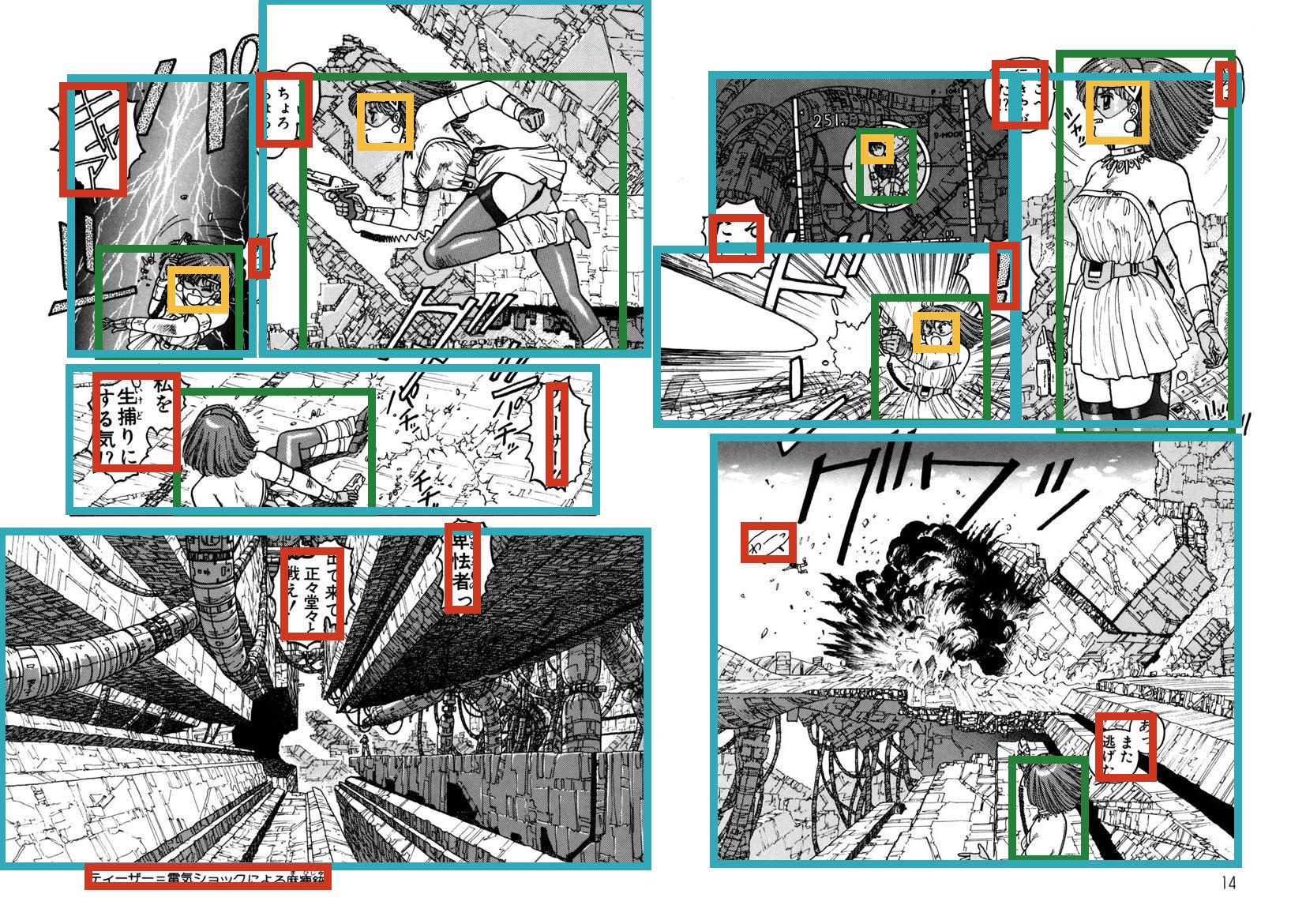
Demo of visualization
import manga109api
from PIL import Image, ImageDraw

def draw_rectangle(img, x0, y0, x1, y1, annotation_type):
    assert annotation_type in ["body", "face", "frame", "text"]
    color = {"body": "#258039", "face": "#f5be41",
             "frame": "#31a9b8", "text": "#cf3721"}[annotation_type]
    draw = ImageDraw.Draw(img)
    draw.rectangle([x0, y0, x1, y1], outline=color, width=10)

if __name__ == "__main__":
    manga109_root_dir = "YOUR_DIR/Manga109_2017_09_28"
    book = "ARMS"
    page_index = 6

    p = manga109api.Parser(root_dir=manga109_root_dir)
    annotation = p.get_annotation(book=book)
    img = Image.open(p.img_path(book=book, index=page_index))

    for annotation_type in ["body", "face", "frame", "text"]:
        rois = annotation["page"][page_index][annotation_type]
        for roi in rois:
            draw_rectangle(img, roi["@xmin"], roi["@ymin"], roi["@xmax"], roi["@ymax"], annotation_type)

    img.save("out.jpg")
Maintainers
Citation
When you make use of images in Manga109, please cite the following paper:
@article{mtap_matsui_2017,
    author={Yusuke Matsui and Kota Ito and Yuji Aramaki and Azuma Fujimoto and Toru Ogawa and Toshihiko Yamasaki and Kiyoharu Aizawa},
    title={Sketch-based Manga Retrieval using Manga109 Dataset},
    journal={Multimedia Tools and Applications},
    volume={76},
    number={20},
    pages={21811--21838},
    doi={10.1007/s11042-016-4020-z},
    year={2017}
}
When you use annotation data of Manga109, please cite this:
@article{multimedia_aizawa_2020,
    author={Kiyoharu Aizawa and Azuma Fujimoto and Atsushi Otsubo and Toru Ogawa and Yusuke Matsui and Koki Tsubota and Hikaru Ikuta},
    title={Building a Manga Dataset ``Manga109'' with Annotations for Multimedia Applications},
    journal={IEEE MultiMedia},
    volume={27},
    number={2},
    pages={8--18},
    doi={10.1109/mmul.2020.2987895},
    year={2020}
}
1 maintainer

Metadata
1 maintainer
Release files for manga109api 0.3.1
For a detailed explanation of source distributions (sdists) and built distributions (wheels), please see the package formats documentation.
Source distribution (sdist)
| File | Size | Uploaded | Provenance | Actions |
|---|---|---|---|---|
| manga109api-0.3.1.tar.gz | 8.0 kB | Without provenance | Details for manga109api-0.3.1.tar.gz |
Built distribution (wheel)
| File | Interpreter | ABI | Platform | Actions Reset |
|---|---|---|---|---|
| manga109api-0.3.1-py3-none-any.whl | Python 3 | none | any | Details for manga109api-0.3.1-py3-none-any.whl |
Total release size: 16.5 kB
Release files / manga109api-0.3.1.tar.gz
| Download URL | manga109api-0.3.1.tar.gz |
|---|---|
| Size | 8.0 kB |
| Tags | Source |
|
SHA-256 checksum How to use checksums |
88d49b14d00f74521390441f0b7cc8cdc4ebe08987e6a0268f570a7db653d453
|
|
BLAKE2b-256 checksum How to use checksums |
6529177cb6ac17ef5435cfc7e1a5f0ff229a12286964d63d46175fae2090d002
|
| Upload date | |
|
Uploaded using Trusted Publishing? What is trusted publishing? |
No |
| Uploaded via |
twine/3.2.0 pkginfo/1.5.0.1 requests/2.24.0 setuptools/50.3.0.post20201006 requests-toolbelt/0.9.1 tqdm/4.50.0 CPython/3.7.9
|
Release files / manga109api-0.3.1-py3-none-any.whl
| Download URL | manga109api-0.3.1-py3-none-any.whl |
|---|---|
| Size | 8.5 kB |
| Tags | Python 3 |
|
SHA-256 checksum How to use checksums |
203e9a4fb83ffc3bc8f0dcf1e39b373525972a4d19894238729a60e76c9d3fa0
|
|
BLAKE2b-256 checksum How to use checksums |
8111eb22e1c5400a2d8080638bba59e0b0562300b7037d5ebf13a99c390da9a5
|
| Upload date | |
|
Uploaded using Trusted Publishing? What is trusted publishing? |
No |
| Uploaded via |
twine/3.2.0 pkginfo/1.5.0.1 requests/2.24.0 setuptools/50.3.0.post20201006 requests-toolbelt/0.9.1 tqdm/4.50.0 CPython/3.7.9
|
Security for manga109api 0.3.1
Provenance
Provenance describes where a file came from. On PyPI, provenance is shared via attestations, which provide a verifiable record of the build or publishing details. View details, limitations and caveats.
No provenance found
None of the files in this release were uploaded with provenance metadata.
A note on package security
PyPI is a repository for distributing packages, not a service for auditing them. While third-party security researchers and our staff do their best to detect and remove malicious packages, PyPI cannot guarantee the quality, security or suitability of any given package.
To learn more about protecting yourself from malicious actors, visit our package security documentation.














