




mangadex-downloader


A command-line tool to download manga from MangaDex, written in Python.
Table of Contents
Key Features
- Download manga, cover manga, chapter, or list directly from MangaDex
- Download manga or list from user library
- Find and download MangaDex URLs from MangaDex forums (https://forums.mangadex.org/)
- Download manga in each chapters, each volumes, or wrap all chapters into single file
- Search (with filters) and download manga
- Filter chapters with scalantion groups or users
- Manga tags, groups, and users blacklist support
- Batch download support
- Authentication (with cache) support
- Control how many chapters and pages you want to download
- Multi languages support
- Legacy MangaDex url support
- Save as raw images, EPUB, PDF, Comic Book Archive (.cbz or .cb7)
- Respect API rate limit
And ability to not download oneshot chapter
Supported formats
Read here for more info.
Installation
What will you need:
- Python 3.10.x or up with Pip (if you are in Windows, you can download bundled executable. See this instructions how to install it)
That's it.
Python Package Index (PyPI)
Installing mangadex-downloader is easy, as long as you have requirements above.
# For Windows
py -3 -m pip install mangadex-downloader

# For Linux / Mac OS
python3 -m pip install mangadex-downloader
You can also install optional dependencies
Or you can install all optional dependencies
# For Windows
py -3 -m pip install mangadex-downloader[optional]

# For Mac OS / Linux
python3 -m pip install mangadex-downloader[optional]
There you go, easy ain't it ?.
Bundled executable
NOTE: This installation only apply to Windows.
Because this is bundled executable, Python are not required to install.
Steps:
- Download latest version here -> https://github.com/mansuf/mangadex-downloader/releases
- Extract it.
- That's it ! You have successfully install mangadex-downloader. See this instructions to run mangadex-downloader
Docker
Available at:
- https://hub.docker.com/r/mansuf/mangadex-downloader
- https://gallery.ecr.aws/mansuf/mangadex-downloader
# Dockerhub
docker pull mansuf/mangadex-downloader

# AWS ECR (Alternative)
docker pull public.ecr.aws/mansuf/mangadex-downloader
If you want to get optional features such as EPUB support, cb7 support, etc.
You can use tag ending with -optional
# Dockerhub
docker pull mansuf/mangadex-downloader:latest-optional
docker pull mansuf/mangadex-downloader:v3.1.4-optional

# AWS ECR (Alternative)
docker pull public.ecr.aws/mansuf/mangadex-downloader:latest-optional
docker pull public.ecr.aws/mansuf/mangadex-downloader:v3.1.4-optional
NOTE: If you're wondering why optional tags doesn't have arm/v6 platform support.
That's because some dependencies (most notably orjson) require rust compiler
and i give up installing rust compiler in arm/v6 platform, there is too much errors for me.
Development version
NOTE: You must have git installed. If you don't have it, install it from here https://git-scm.com/.
git clone https://github.com/mansuf/mangadex-downloader.git
cd mangadex-downloader
python setup.py install # or "pip install ."
Usage
PyPI version
mangadex-dl "insert MangaDex URL here"
# or
mangadex-downloader "insert MangaDex URL here"

# Use this if "mangadex-dl" or "mangadex-downloader" didn't work

# For Windows
py -3 -m mangadex_downloader "insert MangaDex URL here"

# For Linux / Mac OS
python3 -m mangadex_downloader "insert MangaDex URL here"
Bundled executable version
- Navigate to folder where you downloaded mangadex-downloader
- Open "start cmd.bat" (don't worry it's not a virus, it will open a command prompt)
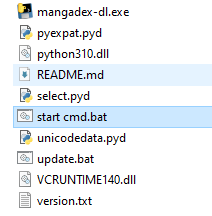
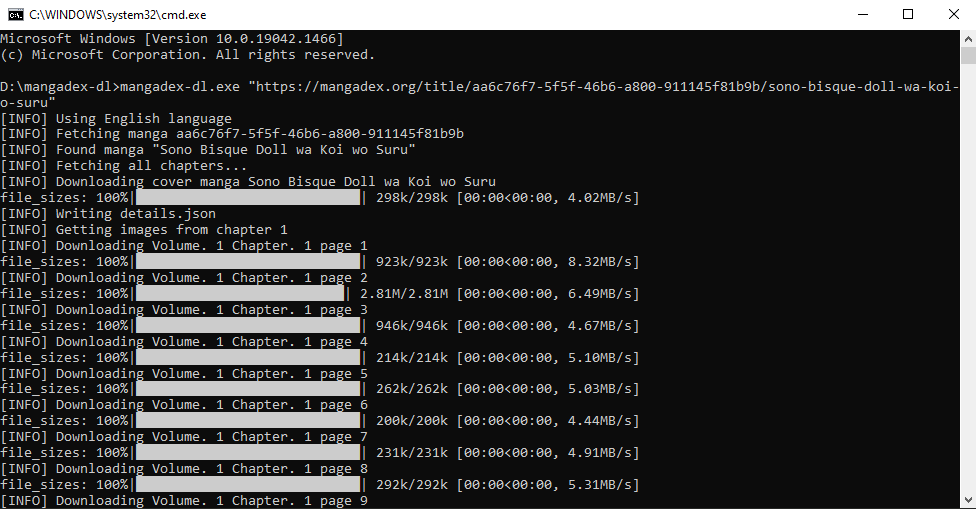
- And then start using mangadex-downloader, see example below:
mangadex-dl.exe "insert MangaDex URL here"
Docker version
The downloaded files in the container are stored in /downloads directory
# Dockerhub
docker run --rm -v /home/sussyuser/sussymanga:/downloads mansuf/mangadex-downloader "insert MangaDex URL"

# AWS ECR (alternative)
docker run --rm -v /home/sussyuser/sussymanga:/downloads public.ecr.aws/mansuf/mangadex-downloader "insert MangaDex URL"
For more example usage, you can read here
For more info about CLI options, you can read here
Contributing
See CONTRIBUTING.md for more info
Donation
If you like this project, please consider donate to one of these websites:
Any donation amount will be appreciated 💖
Support
Need help ? Have questions or you just wanna chat ?
Please note, that the Discord server is really new and it doesn't have anything on it. So please be respect and kind.
Links
Disclaimer
mangadex-downloader are not affiliated with MangaDex. Also, the current maintainer (@mansuf) is not a MangaDex dev
1 maintainer

Release files for mangadex-downloader 3.1.4
For a detailed explanation of source distributions (sdists) and built distributions (wheels), please see the package formats documentation.
Source distribution (sdist)
| File | Size | Uploaded | |
|---|---|---|---|
| mangadex_downloader-3.1.4.tar.gz | 3.0 MB | Details |
Built distribution (wheel)
| File | Interpreter | ABI | Platform | Reset |
|---|---|---|---|---|
| mangadex_downloader-3.1.4-py3-none-any.whl | Python 3 | none | any | Details |
Total release size: 6.1 MB
Release files / mangadex_downloader-3.1.4.tar.gz
| Download URL | mangadex_downloader-3.1.4.tar.gz |
|---|---|
| Size | 3.0 MB |
| Tags | Source |
|
SHA-256 checksum How to use checksums |
eb9de51d840f159dc8f7e6ea311c46712c89bf5304a8fbd86db5f48ff4804f2a
|
|
BLAKE2b-256 checksum How to use checksums |
19da5633336c7803c7b509b9eae49c8e96848b86c2a77f944143b20c06653902
|
| Upload date | |
|
Uploaded using Trusted Publishing? What is trusted publishing? |
No |
| Uploaded via |
twine/6.1.0 CPython/3.9.22
|
Release files / mangadex_downloader-3.1.4-py3-none-any.whl
| Download URL | mangadex_downloader-3.1.4-py3-none-any.whl |
|---|---|
| Size | 3.1 MB |
| Tags | Python 3 |
|
SHA-256 checksum How to use checksums |
66d7587cb12358d1f8555bab28f569d8bf0c895a0659c8e203af8ac1313b0982
|
|
BLAKE2b-256 checksum How to use checksums |
652a3ecb3edf72d0f46a0ef0fc9f7b3383c30fea73055e3c474f28311c2a6b39
|
| Upload date | |
|
Uploaded using Trusted Publishing? What is trusted publishing? |
No |
| Uploaded via |
twine/6.1.0 CPython/3.9.22
|














