
Mara page




Minimal API for defining pages of Flask-based backends independently from the actual backend infrastructure.
When a web app is spread across many independent Flask blueprints, then this library can be used to add
- navigation entries
- page titles
- resource-based ACL protection
- page-specific CSS and JS files
without having access to a global layout or the Flask app.
The library provides a drop-in werkzeug Response class that is enriched with additional information that a
backend can use to render the final html page.
Example
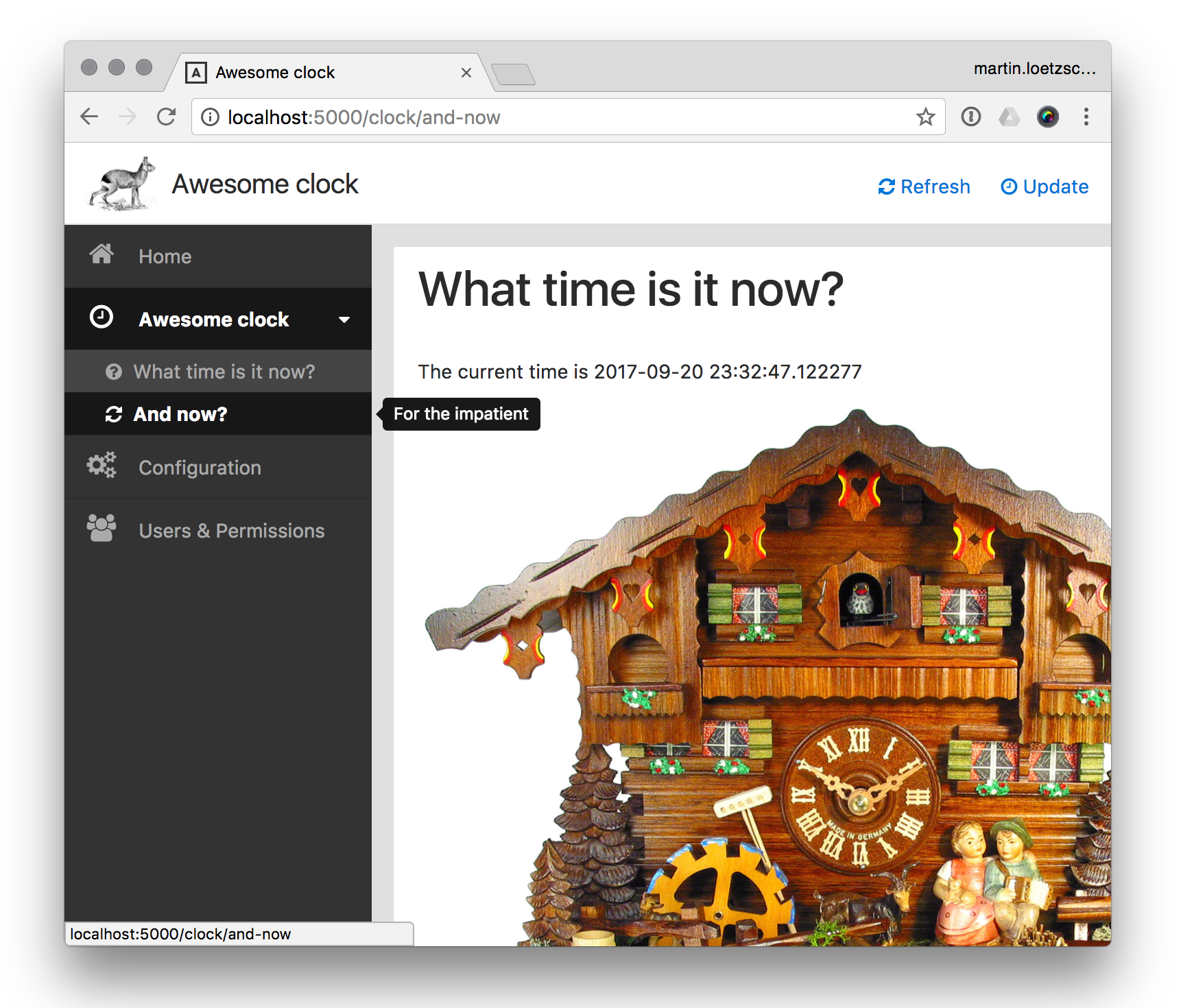
This is a simple web ui for displaying the current time:
"""Clock UI"""

import flask
from awesome_clock import clock
from mara_page import acl, navigation, response, bootstrap, _

# The flask blueprint that handles
blueprint = flask.Blueprint('awesome_clock', __name__, url_prefix='/clock', static_folder='static')

# Defines an ACL resource (needs to be handled by the application)
acl_resource = acl.AclResource('Clock')


def navigation_entry():
    """Defines a part of the navigation tree (needs to be handled by the application)"""
    return navigation.NavigationEntry(
        label='Awesome clock', icon='clock-o', description='Something that tells the time',
        children=[
            navigation.NavigationEntry(
                label='What time is it now?',
                uri_fn=lambda: flask.url_for('awesome_clock.clock_page', when='now'),
                icon='question-circle', description='Should be able to display the current time'),

            navigation.NavigationEntry(
                label='And now?', icon='refresh', description='For the impatient',
                uri_fn=lambda: flask.url_for('awesome_clock.clock_page', when='and-now'))
        ])


@blueprint.route('/<string:when>')
@acl.require_permission(acl_resource)  # Requires permission to the `'Clock'` resource
def clock_page(when: str):
    """Defines the `/clock` page"""
    return response.Response(
        # The actual page content (can be also a call to `flask.render_template`
        # or anything else that produces a string)
        html=bootstrap.card(header_left=_.h1['What time is it now?'],
                            body=[_.p['The current time is ', str(clock.what_time_is_it_now())],
                                  _.img(src=flask.url_for('awesome_clock.static', filename='cuckoo-clock.jpg'),
                                        style='max-width:100%')]),
        # The page title
        title='Awesome clock',

        # Action buttons
        action_buttons=[
            response.ActionButton('javascript:location.reload()', 'Refresh', 'Refresh clock', 'refresh'),
            response.ActionButton('javascript:location.reload()', 'Update', 'Refresh clock', 'clock-o')
        ]
    )
It is up to the actual Flask app to define how to render such a response and what to do with the ACL resources and navigation entries. The mara app will render the response like this:
Links
- Documentation: https://mara-page.readthedocs.io/
- Changes: https://mara-page.readthedocs.io/en/latest/changes.html
- PyPI Releases: https://pypi.org/project/mara-page/
- Source Code: https://github.com/mara/mara-page
- Issue Tracker: https://github.com/mara/mara-page/issues
2 maintainers


Release files for mara-page 1.7.0
For a detailed explanation of source distributions (sdists) and built distributions (wheels), please see the package formats documentation.
Source distribution (sdist)
| File | Size | Uploaded | |
|---|---|---|---|
| mara-page-1.7.0.tar.gz | 10.2 kB | Details |
Built distribution (wheel)
| File | Interpreter | ABI | Platform | Reset |
|---|---|---|---|---|
| mara_page-1.7.0-py3-none-any.whl | Python 3 | none | any | Details |
Total release size: 20.8 kB
Release files / mara-page-1.7.0.tar.gz
| Download URL | mara-page-1.7.0.tar.gz |
|---|---|
| Size | 10.2 kB |
| Tags | Source |
|
SHA-256 checksum How to use checksums |
cf1c2657d63360c9853c3e79c0dccb551d3d19f0fdff0ba3a9209f1fdc7a29f7
|
|
BLAKE2b-256 checksum How to use checksums |
8beb7753f7c9c4d788cf7e3cf31f604c490d2200906812ca8457b35bd1a551ae
|
| Upload date | |
|
Uploaded using Trusted Publishing? What is trusted publishing? |
No |
| Uploaded via |
twine/4.0.2 CPython/3.9.2
|
Release files / mara_page-1.7.0-py3-none-any.whl
| Download URL | mara_page-1.7.0-py3-none-any.whl |
|---|---|
| Size | 10.6 kB |
| Tags | Python 3 |
|
SHA-256 checksum How to use checksums |
a8df2da1a933623ca05cb775eb3eb64befe981fb450945ff85aebb6d8bd4490d
|
|
BLAKE2b-256 checksum How to use checksums |
ee6df52495dd388ccc3a76781065854d32619b858b0d650a6a677b372aa2f57c
|
| Upload date | |
|
Uploaded using Trusted Publishing? What is trusted publishing? |
No |
| Uploaded via |
twine/4.0.2 CPython/3.9.2
|














