
Django Markdown Editor

Project description
martor 






📖 Documentation: https://django-markdown-editor.readthedocs.io
Martor is a Markdown Editor plugin for Django, supported for Bootstrap, Semantic-UI & Tailwind CSS.
Features
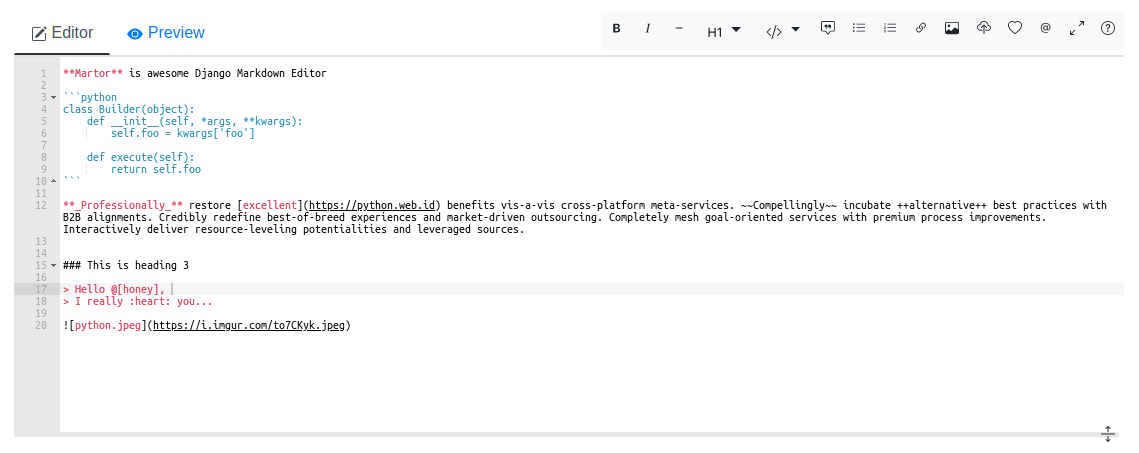
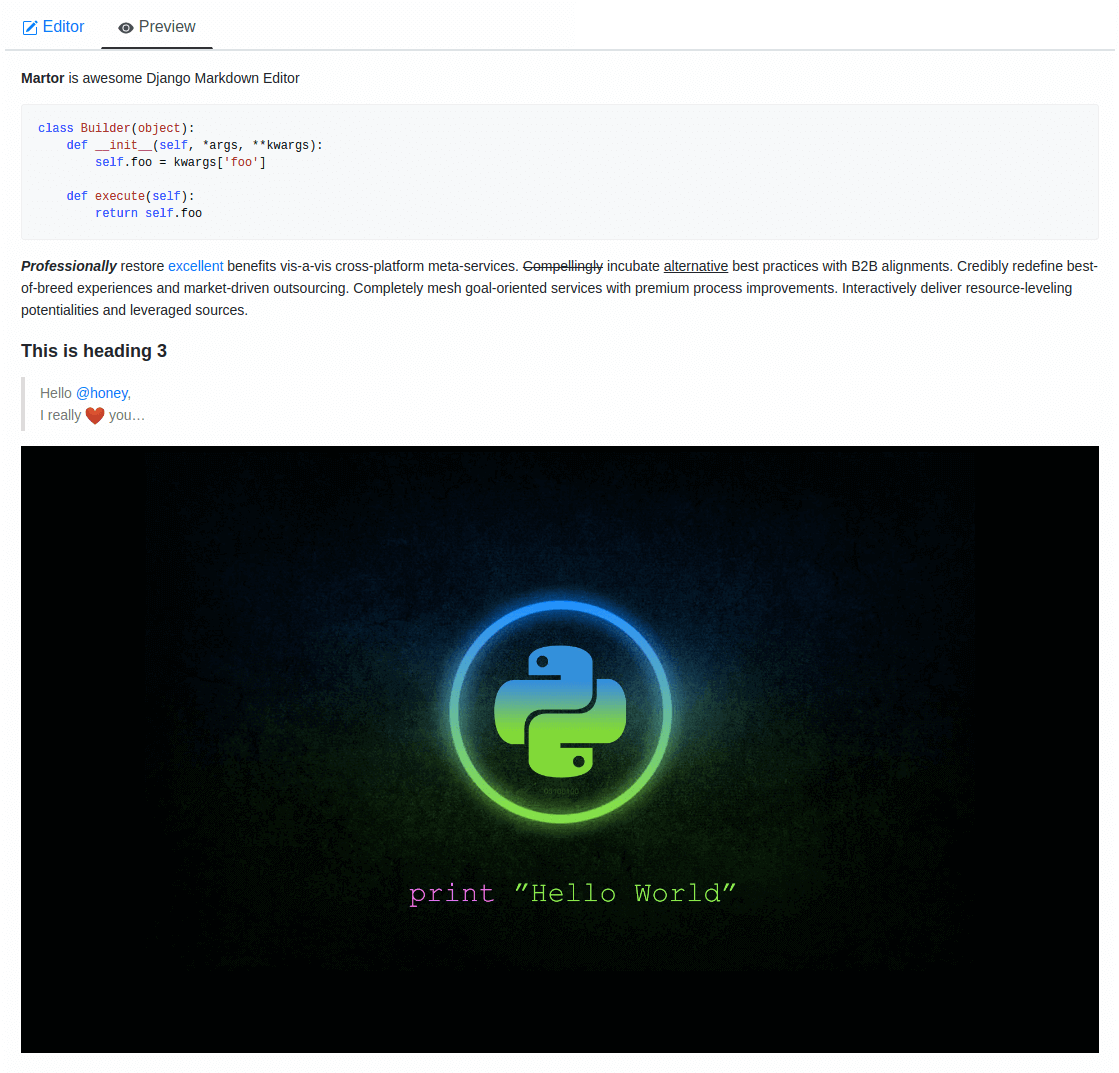
- Live Preview
- Integrated with Ace Editor
- Supported with Bootstrap, Semantic-UI and Tailwind CSS
- Supported Multiple Fields fixed this issue
- Upload Images to imgur.com (via API) and custom uploader
- Direct Mention users
@[username]- (requires user to logged in). - Supports embed/iframe video from (Youtube, Vimeo, Dailymotion, Yahoo, Veoh, & Metacafe)
- Spellchecking (only supports US English at this time)
- Emoji
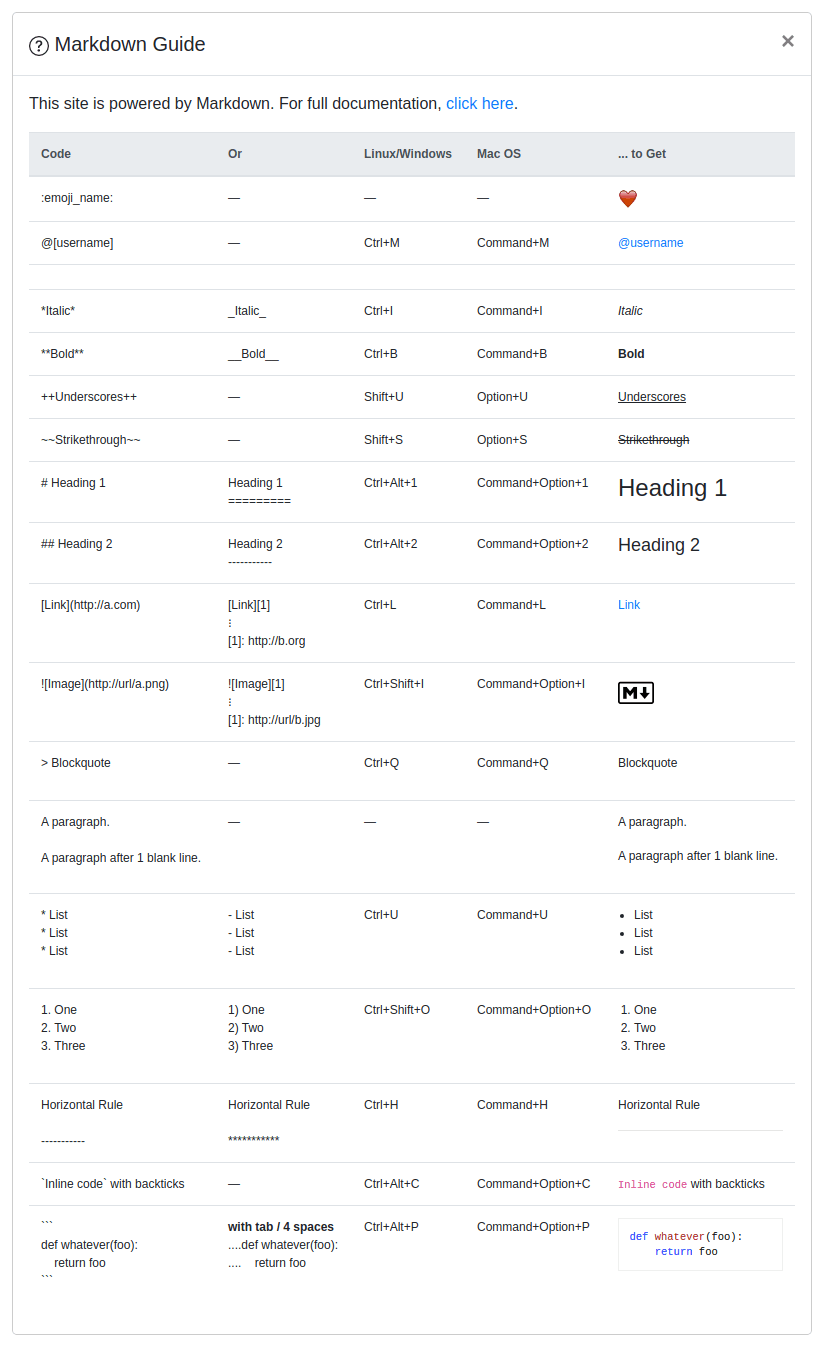
:emoji_name:+ Cheat sheets - Martor Commands Reference
- Supports Django Admin
- Toolbar Buttons
- Highlight
pre - Custom ID Attributes (Add custom IDs to any text element using
{#custom-id}syntax, e.g.,# Heading1 {#my-h1-id}, for easy linking and navigation.
Preview
Requirements
Django>=3.2Markdown>=3.0requests>=2.12.4bleach
Installation
Martor is available directly from PyPI:
1. Installing the package.
$ pip install martor
2. Don't forget to add 'martor' to your 'INSTALLED_APPS' setting (without migrations).
# settings.py
INSTALLED_APPS = [
    ....
    'martor',
]
3. Add url pattern to your urls.py.
# urls.py
urlpatterns = [
    ...
    path('martor/', include('martor.urls')),
]
4. Collect martor's static files in your STATIC_ROOT folder.
./manage.py collectstatic
Setting Configurations settings.py
Please register your application at https://api.imgur.com/oauth2/addclient
to get IMGUR_CLIENT_ID and IMGUR_API_KEY.
# Choices are: "semantic", "bootstrap", "tailwind"
MARTOR_THEME = 'bootstrap'

# Global martor settings
# Input: string boolean, `true/false`
MARTOR_ENABLE_CONFIGS = {
    'emoji': 'true',        # to enable/disable emoji icons.
    'imgur': 'true',        # to enable/disable imgur/custom uploader.
    'mention': 'false',     # to enable/disable mention
    'jquery': 'true',       # to include/revoke jquery (require for admin default django)
    'living': 'false',      # to enable/disable live updates in preview
    'spellcheck': 'false',  # to enable/disable spellcheck in form textareas
    'hljs': 'true',         # to enable/disable hljs highlighting in preview
}

# To show the toolbar buttons
MARTOR_TOOLBAR_BUTTONS = [
    'bold', 'italic', 'horizontal', 'heading', 'pre-code',
    'blockquote', 'unordered-list', 'ordered-list',
    'link', 'image-link', 'image-upload', 'emoji',
    'direct-mention', 'toggle-maximize', 'help'
]

# To setup the martor editor with title label or not (default is False)
MARTOR_ENABLE_LABEL = False

# Disable admin style when using custom admin interface e.g django-grappelli (default is True)
MARTOR_ENABLE_ADMIN_CSS = True

# Imgur API Keys
MARTOR_IMGUR_CLIENT_ID = 'your-client-id'
MARTOR_IMGUR_API_KEY   = 'your-api-key'

# Markdownify
MARTOR_MARKDOWNIFY_FUNCTION = 'martor.utils.markdownify' # default
MARTOR_MARKDOWNIFY_URL = '/martor/markdownify/' # default

# Delay in milliseconds to update editor preview when in living mode.
MARTOR_MARKDOWNIFY_TIMEOUT = 0 # update the preview instantly
# or:
MARTOR_MARKDOWNIFY_TIMEOUT = 1000 # default

# Markdown extensions (default)
MARTOR_MARKDOWN_EXTENSIONS = [
    'markdown.extensions.extra',
    'markdown.extensions.nl2br',
    'markdown.extensions.smarty',
    'markdown.extensions.fenced_code',
    'markdown.extensions.sane_lists',

    # Custom markdown extensions.
    'martor.extensions.urlize',
    'martor.extensions.del_ins',      # ~~strikethrough~~ and ++underscores++
    'martor.extensions.mention',      # to parse markdown mention
    'martor.extensions.emoji',        # to parse markdown emoji
    'martor.extensions.mdx_video',    # to parse embed/iframe video
    'martor.extensions.escape_html',  # to handle the XSS vulnerabilities
    "martor.extensions.mdx_add_id",  # to parse id like {#this_is_id}
]

# Markdown Extensions Configs
MARTOR_MARKDOWN_EXTENSION_CONFIGS = {}

# Markdown urls
MARTOR_UPLOAD_URL = '' # Completely disable the endpoint
# or:
MARTOR_UPLOAD_URL = '/martor/uploader/' # default

MARTOR_SEARCH_USERS_URL = '' # Completely disables the endpoint
# or:
MARTOR_SEARCH_USERS_URL = '/martor/search-user/' # default

# Markdown Extensions
# MARTOR_MARKDOWN_BASE_EMOJI_URL = 'https://www.webfx.com/tools/emoji-cheat-sheet/graphics/emojis/'     # from webfx
MARTOR_MARKDOWN_BASE_EMOJI_URL = 'https://github.githubassets.com/images/icons/emoji/'                  # default from github
# or:
MARTOR_MARKDOWN_BASE_EMOJI_URL = ''  # Completely disables the endpoint
MARTOR_MARKDOWN_BASE_MENTION_URL = 'https://python.web.id/author/'                                      # please change this to your domain

# If you need to use your own themed "bootstrap" or "semantic ui" dependency
# replace the values with the file in your static files dir
MARTOR_ALTERNATIVE_JS_FILE_THEME = "semantic-themed/semantic.min.js"   # default None
MARTOR_ALTERNATIVE_CSS_FILE_THEME = "semantic-themed/semantic.min.css" # default None
MARTOR_ALTERNATIVE_JQUERY_JS_FILE = "jquery/dist/jquery.min.js"        # default None

# URL schemes that are allowed within links
ALLOWED_URL_SCHEMES = [
    "file", "ftp", "ftps", "http", "https", "irc", "mailto",
    "sftp", "ssh", "tel", "telnet", "tftp", "vnc", "xmpp",
]

# https://gist.github.com/mrmrs/7650266
ALLOWED_HTML_TAGS = [
    "a", "abbr", "b", "blockquote", "br", "cite", "code", "command",
    "dd", "del", "dl", "dt", "em", "fieldset", "h1", "h2", "h3", "h4", "h5", "h6",
    "hr", "i", "iframe", "img", "input", "ins", "kbd", "label", "legend",
    "li", "ol", "optgroup", "option", "p", "pre", "small", "span", "strong",
    "sub", "sup", "table", "tbody", "td", "tfoot", "th", "thead", "tr", "u", "ul"
]

# https://github.com/decal/werdlists/blob/master/html-words/html-attributes-list.txt
ALLOWED_HTML_ATTRIBUTES = [
    "alt", "class", "color", "colspan", "datetime",  # "data",
    "height", "href", "id", "name", "reversed", "rowspan",
    "scope", "src", "style", "title", "type", "width"
]
Check this setting is not set else csrf will not be sent over ajax calls:
CSRF_COOKIE_HTTPONLY = False
Usage
Model
from django.db import models
from martor.models import MartorField

class Post(models.Model):
    description = MartorField()
Form
from django import forms
from martor.fields import MartorFormField

class PostForm(forms.Form):
    description = MartorFormField()
Admin
from django.db import models
from django.contrib import admin

from martor.widgets import AdminMartorWidget

from yourapp.models import YourModel

class YourModelAdmin(admin.ModelAdmin):
    formfield_overrides = {
        models.TextField: {'widget': AdminMartorWidget},
    }

admin.site.register(YourModel, YourModelAdmin)
Template Renderer
Simply safely parse markdown content as html output by loading templatetags from martor/templatetags/martortags.py.
{% load martortags %}
{{ field_name|safe_markdown }}

# example
{{ post.description|safe_markdown }}
Don't miss to include the required css & js files before use.
You can take a look at this folder martor_demo/app/templates for more details.
The below example is a one of the way to implement it when you choose the MARTOR_THEME = 'bootstrap':
{% extends "bootstrap/base.html" %}
{% load static %}
{% load martortags %}

{% block css %}
  <link href="{% static 'plugins/css/ace.min.css' %}" type="text/css" media="all" rel="stylesheet" />
  <link href="{% static 'martor/css/martor.bootstrap.min.css' %}" type="text/css" media="all" rel="stylesheet" />
{% endblock %}

{% block content %}
  <div class="martor-preview">
    <h1>Title: {{ post.title }}</h1>
    <p><b>Description:</b></p>
    <hr />
    {{ post.description|safe_markdown }}
  </div>
{% endblock %}

{% block js %}
  <script type="text/javascript" src="{% static 'plugins/js/highlight.min.js' %}"></script>
  <script>
    $('.martor-preview pre').each(function(i, block){
        hljs.highlightBlock(block);
    });
  </script>
{% endblock %}
Template Editor Form
Different with Template Renderer, the Template Editor Form have more css & javascript dependencies.
{% extends "bootstrap/base.html" %}
{% load static %}

{% block css %}
  <link href="{% static 'plugins/css/ace.min.css' %}" type="text/css" media="all" rel="stylesheet" />
  <link href="{% static 'martor/css/martor.bootstrap.min.css' %}" type="text/css" media="all" rel="stylesheet" />
{% endblock %}

{% block content %}
  <form class="form" method="post">{% csrf_token %}
    <div class="form-group">
      {{ form.title }}
    </div>
    <div class="form-group">
      {{ form.description }}
    </div>
    <div class="form-group">
      <button class="btn btn-success">
        <i class="save icon"></i> Save Post
      </button>
    </div>
  </form>
{% endblock %}

{% block js %}
  <script type="text/javascript" src="{% static 'plugins/js/ace.js' %}"></script>
  <script type="text/javascript" src="{% static 'plugins/js/mode-markdown.js' %}"></script>
  <script type="text/javascript" src="{% static 'plugins/js/ext-language_tools.js' %}"></script>
  <script type="text/javascript" src="{% static 'plugins/js/theme-github.js' %}"></script>
  <script type="text/javascript" src="{% static 'plugins/js/typo.js' %}"></script>
  <script type="text/javascript" src="{% static 'plugins/js/spellcheck.js' %}"></script>
  <script type="text/javascript" src="{% static 'plugins/js/highlight.min.js' %}"></script>
  <script type="text/javascript" src="{% static 'plugins/js/emojis.min.js' %}"></script>
  <script type="text/javascript" src="{% static 'martor/js/martor.bootstrap.min.js' %}"></script>
{% endblock %}
Tailwind CSS Theme
When using MARTOR_THEME = 'tailwind', include the required CSS and JavaScript files:
Template Renderer (Tailwind):
{% extends "base.html" %}
{% load static %}
{% load martortags %}

{% block css %}
  <link href="{% static 'plugins/css/ace.min.css' %}" type="text/css" media="all" rel="stylesheet" />
  <link href="{% static 'plugins/css/tailwind.min.css' %}" type="text/css" media="all" rel="stylesheet" />
  <link href="{% static 'martor/css/martor.tailwind.min.css' %}" type="text/css" media="all" rel="stylesheet" />
{% endblock %}

{% block content %}
  <div class="container mx-auto px-4 py-8">
    <div class="martor-preview bg-white rounded-lg shadow-sm p-6">
      <h1 class="text-3xl font-bold text-gray-900 mb-4">{{ post.title }}</h1>
      <div class="prose prose-sm max-w-none">
        {{ post.description|safe_markdown }}
      </div>
    </div>
  </div>
{% endblock %}

{% block js %}
  <script type="text/javascript" src="{% static 'plugins/js/highlight.min.js' %}"></script>
  <script>
    document.querySelectorAll('.martor-preview pre code').forEach((block) => {
      hljs.highlightBlock(block);
    });
  </script>
{% endblock %}
Template Editor Form (Tailwind):
{% extends "base.html" %}
{% load static %}

{% block css %}
  <link href="{% static 'plugins/css/ace.min.css' %}" type="text/css" media="all" rel="stylesheet" />
  <link href="{% static 'plugins/css/tailwind.min.css' %}" type="text/css" media="all" rel="stylesheet" />
  <link href="{% static 'martor/css/martor.tailwind.min.css' %}" type="text/css" media="all" rel="stylesheet" />
{% endblock %}

{% block content %}
  <div class="container mx-auto px-4 py-8">
    <form class="bg-white rounded-lg shadow-sm p-6" method="post">{% csrf_token %}
      <div class="mb-6">
        <label class="block text-sm font-medium text-gray-700 mb-2">{{ form.title.label }}</label>
        {{ form.title }}
      </div>
      <div class="mb-6">
        <label class="block text-sm font-medium text-gray-700 mb-2">{{ form.description.label }}</label>
        {{ form.description }}
      </div>
      <div class="flex justify-end">
        <button class="bg-blue-600 hover:bg-blue-700 text-white font-medium py-2 px-4 rounded-md transition-colors">
          Save Post
        </button>
      </div>
    </form>
  </div>
{% endblock %}

{% block js %}
  <script type="text/javascript" src="{% static 'plugins/js/ace.js' %}"></script>
  <script type="text/javascript" src="{% static 'plugins/js/mode-markdown.js' %}"></script>
  <script type="text/javascript" src="{% static 'plugins/js/ext-language_tools.js' %}"></script>
  <script type="text/javascript" src="{% static 'plugins/js/theme-github.js' %}"></script>
  <script type="text/javascript" src="{% static 'plugins/js/typo.js' %}"></script>
  <script type="text/javascript" src="{% static 'plugins/js/spellcheck.js' %}"></script>
  <script type="text/javascript" src="{% static 'plugins/js/highlight.min.js' %}"></script>
  <script type="text/javascript" src="{% static 'plugins/js/emojis.min.js' %}"></script>
  <script type="text/javascript" src="{% static 'martor/js/martor.tailwind.min.js' %}"></script>
{% endblock %}
Custom Uploader
If you want to save the images uploaded to your storage, Martor also provides a way to handle this. Please checkout this WIKI
Test Martor from this Repository
Assuming you are already setup with a virtual environment (virtualenv):
$ git clone https://github.com/agusmakmun/django-markdown-editor.git
$ cd django-markdown-editor/ && pip install -e .
$ cd martor_demo/
$ python manage.py makemigrations && python manage.py migrate
$ python manage.py runserver
Checkout at http://127.0.0.1:8000/simple-form/ on your browser.
Documentation
Complete documentation is available online at: https://django-markdown-editor.readthedocs.io/
Running Documentation Locally
To build and view the documentation locally:
1. Clone the repository and set up your environment:
$ git clone https://github.com/agusmakmun/django-markdown-editor.git
$ cd django-markdown-editor/
$ python -m venv venv
$ source venv/bin/activate  # On Windows: venv\Scripts\activate
2. Install documentation dependencies:
$ pip install -r docs/requirements.txt
3. Build the documentation:
$ cd docs/
$ sphinx-build -b html . _build/html
Or using the included Makefile:
$ cd docs/
$ make html
4. Open the documentation in your browser:
$ open _build/html/index.html  # On macOS
# Or on Linux/Windows, navigate to docs/_build/html/index.html
Alternatively, serve the documentation with a local HTTP server:
$ make serve
# Then open http://localhost:8000 in your browser
The documentation includes:
- Installation and quickstart guides
- Complete configuration reference
- Usage examples for models, forms, widgets, and admin
- API documentation
- Troubleshooting and FAQ
Contributing to Documentation
The documentation is built with Sphinx and uses reStructuredText format. To contribute:
- Edit the
.rstfiles in thedocs/directory - Build the docs locally to test your changes
- Submit a pull request with your improvements
Martor Commands Reference
Notes
Martor was inspired by these great projects: django-markdownx, Python Markdown and Online reStructuredText editor.
Release history Release notifications | RSS feed


Download files
Download the file for your platform. If you're not sure which to choose, learn more about installing packages.
Source Distribution
Built Distribution
Filter files by name, interpreter, ABI, and platform.
If you're not sure about the file name format, learn more about wheel file names.
Copy a direct link to the current filters
File details
Details for the file martor-1.8.1.tar.gz.
File metadata
- Download URL: martor-1.8.1.tar.gz
- Upload date:
- Size: 1.5 MB
- Tags: Source
- Uploaded using Trusted Publishing? No
- Uploaded via: python-httpx/0.28.1
File hashes
| Algorithm | Hash digest | |
|---|---|---|
| SHA256 |
0444ba6ceeccd3bbeeba9212a0758d573e06f5d07f57ff3dab0297c0c06fd95c
|
|
| MD5 |
9018d646ab744b4786ffaad50260e292
|
|
| BLAKE2b-256 |
3654281f6c544533ae40e382a05367df40bf1ae6d97f17dc90278b21ea5e03e6
|
File details
Details for the file martor-1.8.1-py3-none-any.whl.
File metadata
- Download URL: martor-1.8.1-py3-none-any.whl
- Upload date:
- Size: 1.6 MB
- Tags: Python 3
- Uploaded using Trusted Publishing? No
- Uploaded via: python-httpx/0.28.1
File hashes
| Algorithm | Hash digest | |
|---|---|---|
| SHA256 |
5e0ca8c9de388eef1f4a9866d7003c1651958cb50987506d09f24d61e709843f
|
|
| MD5 |
e77ead7e5dbb48b40a23b1508a339e4b
|
|
| BLAKE2b-256 |
5ec6408ddf3ec12983794c13a044acb20ddf0b7830d041c473746222adcc38ec
|






