
Model Compression Toolkit (MCT) Quantizers
The MCT Quantizers library is an open-source library developed by researchers and engineers working at Sony Semiconductor Solutions.
It provides tools for easily representing a quantized neural network in both Keras and PyTorch. The library offers researchers, developers, and engineers a set of useful quantizers, along with a simple interface for implementing new custom quantizers.
High level description:
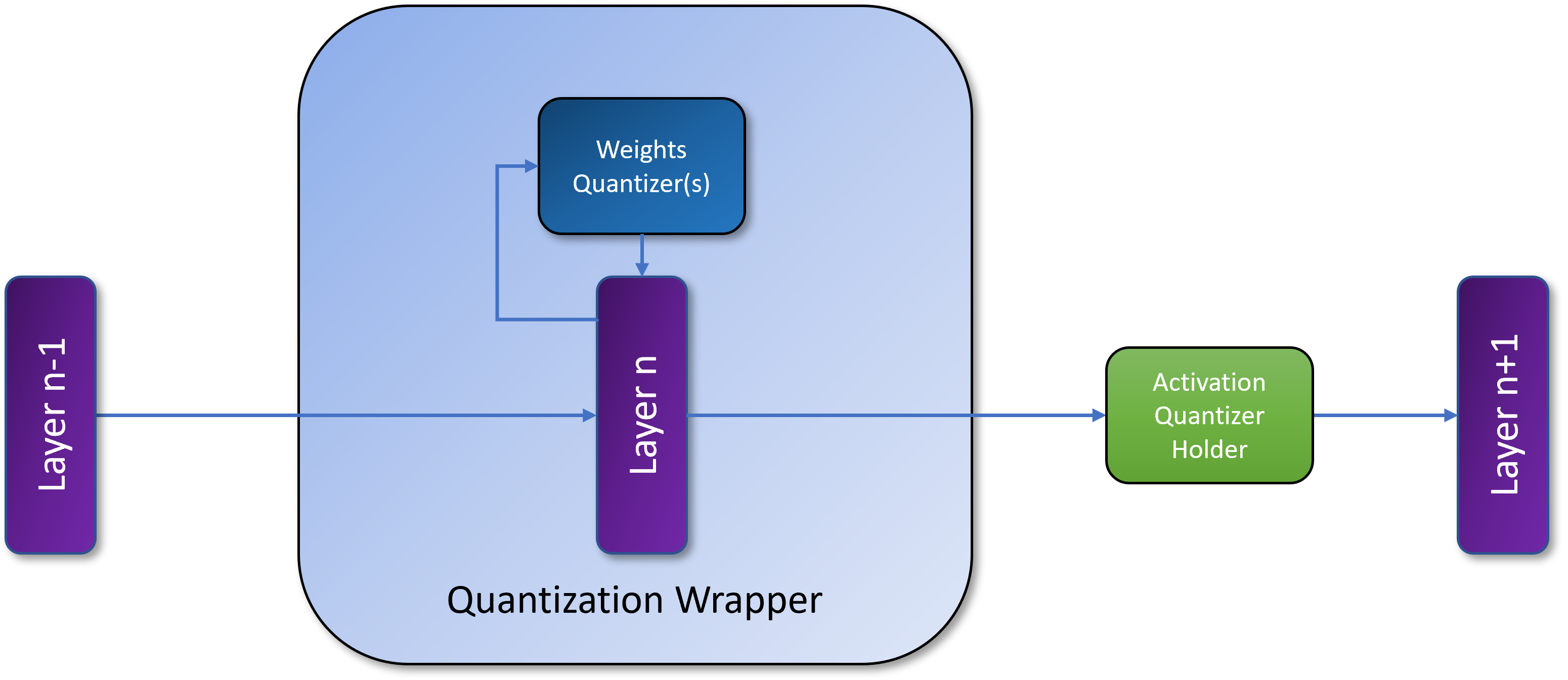
The library's quantizers interface consists of two main components:
QuantizationWrapper: This object takes a layer with weights and a set of weight quantizers to infer a quantized layer.ActivationQuantizationHolder: An object that holds an activation quantizer to be used during inference.
Users can set the quantizers and all the quantization information for each layer by initializing the weights_quantizer and activation_quantizer API.
Please note that the quantization wrapper and the quantizers are framework-specific.
Quantizers:
The library provides the "Inferable Quantizer" interface for implementing new quantizers.
This interface is based on the BaseInferableQuantizer class, which allows the definition of quantizers used for emulating inference-time quantization.
On top of BaseInferableQuantizer the library defines a set of framework-specific quantizers for both weights and activations:
The mark_quantizer Decorator
The @mark_quantizer decorator is used to assign each quantizer with static properties that define its task compatibility. Each quantizer class should be decorated with this decorator, which defines the following properties:
QuantizationTarget: An Enum that indicates whether the quantizer is intended for weights or activations quantization.QuantizationMethod: A list of quantization methods (Uniform, Symmetric, etc.).identifier: A unique identifier for the quantizer class. This is a helper property that allows the creation of advanced quantizers for specific tasks.
Getting Started
This section provides a quick guide to getting started. We begin with the installation process, either via source code or the pip server. Then, we provide a short example of usage.
Installation
From PyPi - mct-quantizers package
To install the latest stable release of MCT Quantizer from PyPi, run the following command:
pip install mct-quantizers
From Source
To work with the MCT Quantizers source code, follow these steps:
git clone https://github.com/SonySemiconductorSolutions/mct-quantization-layers.git
cd mct-quantization-layers
python setup.py install
Requirements
To use MCT Quantizers, you need to have one of the supported frameworks, Tensorflow or PyTorch, installed.
For use with Tensorflow, please install the following package: tensorflow,
For use with PyTorch, please install the following package: torch
You can also use the requirements file to set up your environment.
License
1 maintainer

Metadata
1 maintainer
Release files for mct-quantizers 1.7.0
For a detailed explanation of source distributions (sdists) and built distributions (wheels), please see the package formats documentation.
Source distribution (sdist)
| File | Size | Uploaded | Provenance | |
|---|---|---|---|---|
| mct_quantizers-1.7.0.tar.gz | 48.5 kB | Without provenance | Details |
Built distribution (wheel)
| File | Interpreter | ABI | Platform | Reset |
|---|---|---|---|---|
| mct_quantizers-1.7.0-py3-none-any.whl | Python 3 | none | any | Details |
Total release size: 156.7 kB
Release files / mct_quantizers-1.7.0.tar.gz
| Download URL | mct_quantizers-1.7.0.tar.gz |
|---|---|
| Size | 48.5 kB |
| Tags | Source |
|
SHA-256 checksum How to use checksums |
d624cf47b8f7aeec371b071339d83b3888419e4c794e6825472a8f33e62dbee2
|
|
BLAKE2b-256 checksum How to use checksums |
890efdcf2b13e76c513e97ff2b19cd043bd6d86d4773838209369eb1feddd832
|
| Upload date | |
|
Uploaded using Trusted Publishing? What is trusted publishing? |
No |
| Uploaded via |
twine/6.2.0 CPython/3.11.14
|
Release files / mct_quantizers-1.7.0-py3-none-any.whl
| Download URL | mct_quantizers-1.7.0-py3-none-any.whl |
|---|---|
| Size | 108.1 kB |
| Tags | Python 3 |
|
SHA-256 checksum How to use checksums |
ef2a88bfa16a19a85b32bf4b893936f6939ab33ac1c79a2e518a601f5cc084aa
|
|
BLAKE2b-256 checksum How to use checksums |
be8640a33ba8136feff50a77f6345d390fde966fe8111ffe0e5e4d1afae384f7
|
| Upload date | |
|
Uploaded using Trusted Publishing? What is trusted publishing? |
No |
| Uploaded via |
twine/6.2.0 CPython/3.11.14
|
Security for mct-quantizers 1.7.0
Provenance
Provenance describes where a file came from. On PyPI, provenance is shared via attestations, which provide a verifiable record of the build or publishing details. View details, limitations and caveats.
No provenance found
None of the files in this release were uploaded with provenance metadata.
A note on package security
PyPI is a repository for distributing packages, not a service for auditing them. While third-party security researchers and our staff do their best to detect and remove malicious packages, PyPI cannot guarantee the quality, security or suitability of any given package.
To learn more about protecting yourself from malicious actors, visit our package security documentation.














