
MeetEval
A meeting transcription evaluation toolkit


Features
Metrics for meeting transcription evaluation
- Standard WER for single utterances (Called SISO WER in MeetEval)
meeteval-wer wer -r ref -h hyp - Concatenated minimum-Permutation Word Error Rate (cpWER)
meeteval-wer cpwer -r ref.stm -h hyp.stm - Optimal Reference Combination Word Error Rate (ORC WER)
meeteval-wer orcwer -r ref.stm -h hyp.stm - Fast Greedy Approximation of Optimal Reference Combination Word Error Rate (greedy ORC WER)
meeteval-wer greedy_orcwer -r ref.stm -h hyp.stm - Multi-speaker-input multi-stream-output Word Error Rate (MIMO WER)
meeteval-wer mimower -r ref.stm -h hyp.stm - Time-Constrained Multi-speaker-input multi-stream-output Word Error Rate (tcMIMO WER)
meeteval-wer tcmimower -r ref.stm -h hyp.stm --collar 5 - Time-Constrained minimum-Permutation Word Error Rate (tcpWER)
meeteval-wer tcpwer -r ref.stm -h hyp.stm --collar 5 - Time-Constrained Optimal Reference Combination Word Error Rate (tcORC WER)
meeteval-wer tcorcwer -r ref.stm -h hyp.stm --collar 5 - Fast Greedy Approximation of Time-Constrained Optimal Reference Combination Word Error Rate (greedy tcORC WER)
meeteval-wer greedy_tcorcwer -r ref.stm -h hyp.stm --collar 5 - Diarization-Invariant cpWER (DI-cpWER)
meeteval-wer greedy_dicpwer -r ref.stm -h hyp.stm - Diarization Error Rate (DER) by wrapping mdeval like dscore (see https://github.com/fgnt/meeteval/issues/97#issuecomment-2508140402)
meeteval-der dscore -r ref.stm -h hyp.stm --collar .25 - Diarization Error Rate (DER) by wrapping mdeval
meeteval-der md_eval_22 -r ref.stm -h hyp.stm --collar .25
Error visualization
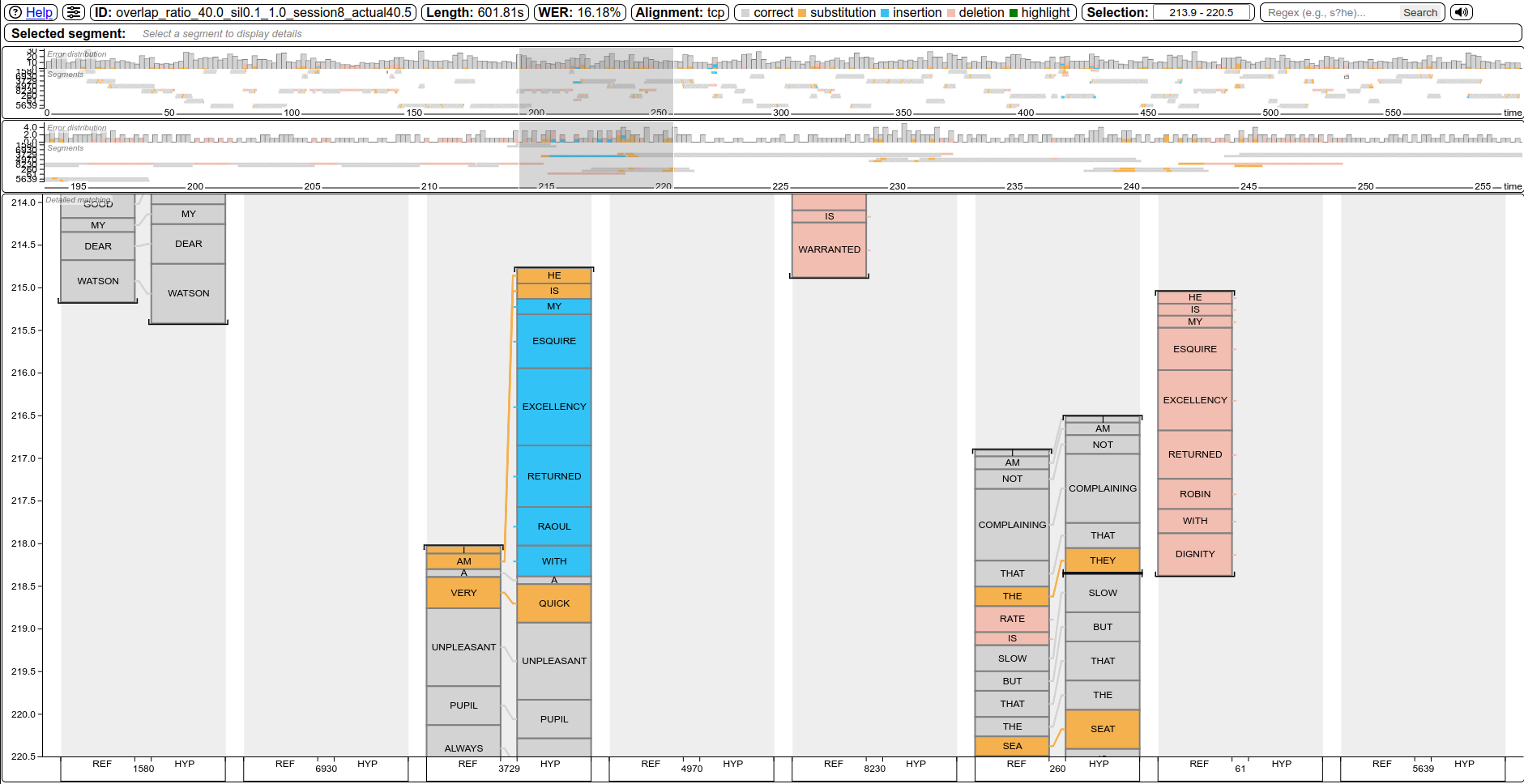
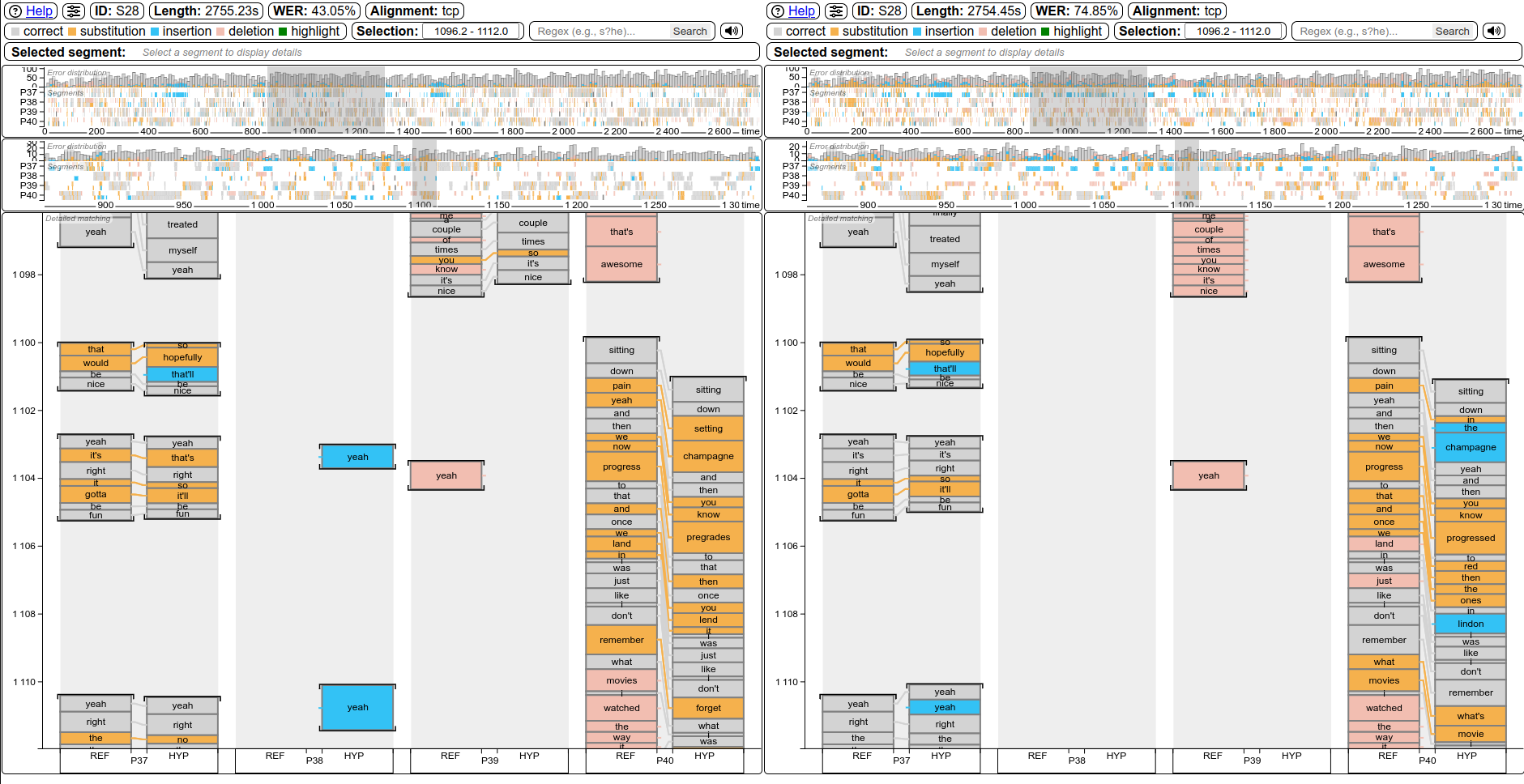
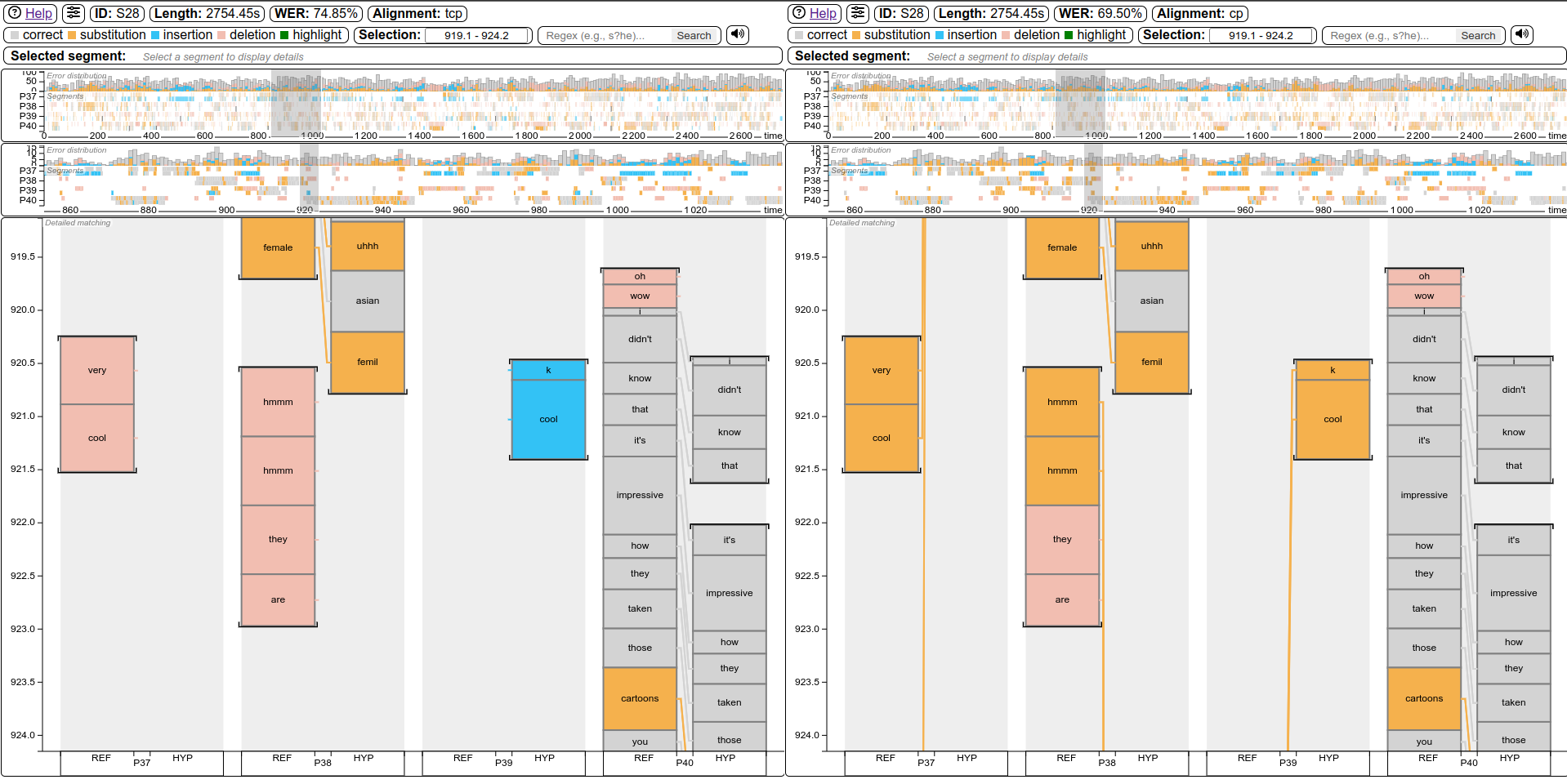
An alignment visualization tool for system analysis. Supports most WER definitions from above. Helpful for spotting errors. View examples!
File format conversion
MeetEval's meeteval-io command converts between all supported file types. See docs below.
Installation
From PyPI
pip install meeteval
From source
git clone https://github.com/fgnt/meeteval
pip install -e ./meeteval
Command-line interface
MeetEval supports the following file formats as input:
- Segmental Time Mark (
STM) - Time Marked Conversation (
CTM) - SEGment-wise Long-form Speech Transcription annotation (
SegLST), the file format used in the CHiME challenges - Rich Transcription Time Marked (
RTTM) files (only for Diarization Error Rate)
Conversion between formats is supported via the meeteval-io command.
The command-line interface is available as meeteval-wer or python -m meeteval.wer with the following signature:
python -m meeteval.wer [orcwer|mimower|cpwer|tcpwer|tcorcwer] -h example_files/hyp.stm -r example_files/ref.stm
# or
meeteval-wer [orcwer|mimower|cpwer|tcpwer|tcorcwer] -h example_files/hyp.stm -r example_files/ref.stm
You can add --help to any command to get more information about the available options.
The command name orcwer, mimower, cpwer and tcpwer selects the metric to use.
By default, the hypothesis files is used to create the template for the average
(e.g. hypothesis.json) and per_reco hypothesis_per_reco.json file.
They can be changed with --average-out and --per-reco-out.
.json and .yaml are the supported suffixes.
More examples can be found in tests/test_cli.py.
File Formats
SEGment-wise Long-form Speech Transcription annotation (SegLST)
The SegLST format was used in the CHiME-7 challenge and is the default format for MeetEval.
The SegLST format is stored in JSON format and contains a list of segments.
Each segment should have a minimum set of keys "session_id" and "words".
Depending on the metric, additional keys may be required ("speaker", "start_time", "end_time").
An example is shown below:
[
    {
        "session_id": "recordingA", # Required
        "words": "The quick brown fox jumps over the lazy dog", # Required for WER metrics
        "speaker": "Alice", # Required for metrics that use speaker information (cpWER, ORC WER, MIMO WER)
        "start_time": 0,    # Required for time-constrained metrics (tcpWER, tcORC-WER, DER, ...)
        "end_time": 1,      # Required for time-constrained metrics (tcpWER, tcORC-WER, DER, ...)
        "audio_path": "path/to/recordingA.wav"  # Any additional keys can be included
    },
    ...
]
Another example can be found here.
Segmental Time Mark (STM)
Each line in an STM file represents one "utterance" and is defined as
STM :== <filename> <channel> <speaker_id> <begin_time> <end_time> <transcript>
where
filename: name of the recordingchannel: ignored by MeetEvalspeaker_id: ID of the speaker or system output stream/channel (not microphone channel)begin_time: in seconds, used to find the order of the utterancesend_time: in secondstranscript: space-separated list of words
for example:
recording1 1 Alice 0 0 Hello Bob.
recording1 1 Bob 1 0 Hello Alice.
recording1 1 Alice 2 0 How are you?
recording2 1 Alice 0 0 Hello Carol.
;; ...
An example STM file can be found in here.
Time Marked Conversation (CTM)
The CTM format is defined as
CTM :== <filename> <channel> <begin_time> <duration> <word> [<confidence>]
for the hypothesis (one file per speaker).
You have to supply one CTM file for each system output channel using multiple -h arguments since CTM files don't encode speaker or system output channel information (the channel field has a different meaning: left or right microphone).
For example:
meeteval-wer orcwer -h hyp1.ctm -h hyp2.ctm -r reference.stm
File format conversion
MeetEval's meeteval-io command converts between all supported file types, for example:
meeteval-io seglst2stm example_files/hyp.seglst.json -meeteval-io stm2rttm example_files/hyp.stm -(words are omitted)meeteval-io ctm2stm example_files/hyp*.ctm -(caution: one segment is created for every word!)
meeteval-io --help lists all supported conversions. shell_aliases contains a set of aliases for faster access to these commands.
Copy what you need into your .bashrc or .zshrc.
In Python code, you can modify the data however you like and convert to a different file format in a few lines:
import meeteval
data = meeteval.io.load('example_files/hyp.stm').to_seglst()

for s in data:
  # Add or modify the data in-placee
  s['speaker'] = ...

# Dump in any format
meeteval.io.dump(data, 'hyp.rttm')
Python interface
For all metrics a Low-level and high-level interface is available.
Low-level interface
All WERs have a low-level interface in the meeteval.wer module that allows computing the WER for single examples.
The functions take the reference and hypothesis as input and return an ErrorRate object.
The ErrorRate bundles statistics (errors, total number of words) and potential auxiliary information (e.g., assignment for ORC WER) together with the WER.
import meeteval

# SISO WER
wer = meeteval.wer.wer.siso.siso_word_error_rate(
    reference='The quick brown fox jumps over the lazy dog',
    hypothesis='The kwick brown fox jump over lazy '
)
print(wer)
# ErrorRate(error_rate=0.4444444444444444, errors=4, length=9, insertions=0, deletions=2, substitutions=2)

# cpWER
wer = meeteval.wer.wer.cp.cp_word_error_rate(
    reference=['The quick brown fox', 'jumps over the lazy dog'],
    hypothesis=['The kwick brown fox', 'jump over lazy ']
)
print(wer)
# CPErrorRate(error_rate=0.4444444444444444, errors=4, length=9, insertions=0, deletions=2, substitutions=2, missed_speaker=0, falarm_speaker=0, scored_speaker=2, assignment=((0, 0), (1, 1)))

# ORC-WER
wer = meeteval.wer.wer.orc.orc_word_error_rate(
    reference=['The quick brown fox', 'jumps over the lazy dog'],
    hypothesis=['The kwick brown fox', 'jump over lazy ']
)
print(wer)
# OrcErrorRate(error_rate=0.4444444444444444, errors=4, length=9, insertions=0, deletions=2, substitutions=2, assignment=(0, 1))
The input format can be a (list of) strings or an object representing a file format from meeteval.io:
import meeteval
wer = meeteval.wer.wer.cp.cp_word_error_rate(
    reference = meeteval.io.STM.parse('recordingA 1 Alice 0 1 The quick brown fox jumps over the lazy dog'),
    hypothesis = meeteval.io.STM.parse('recordingA 1 spk-1 0 1 The kwick brown fox jump over lazy ')
)
print(wer)
# CPErrorRate(error_rate=0.4444444444444444, errors=4, length=9, insertions=0, deletions=2, substitutions=2, reference_self_overlap=SelfOverlap(overlap_rate=Decimal('0'), overlap_time=0, total_time=Decimal('1')), hypothesis_self_overlap=SelfOverlap(overlap_rate=Decimal('0'), overlap_time=0, total_time=Decimal('1')), missed_speaker=0, falarm_speaker=0, scored_speaker=1, assignment=(('Alice', 'spk-1'), ))
All low-level interfaces come with a single-example function (as show above) and a batch function that computes the WER for multiple examples at once.
The batch function is postfixed with _multifile and is similar to the high-level interface without fancy input format handling.
To compute the average over multiple ErrorRates, use meeteval.wer.combine_error_rates.
Note that the combined WER is not the average over the error rates, but the error rate that results from combining the errors and lengths of all error rates.
combine_error_rates also discards any information that cannot be aggregated over multiple examples (such as the ORC WER assignment).
For example with the cpWER:
import meeteval.wer.wer.siso

wers = meeteval.wer.wer.cp.cp_word_error_rate_multifile(
    reference={
        'recordingA': {'speakerA': 'First example', 'speakerB': 'First example second speaker'},
        'recordingB': {'speakerA': 'Second example'},
    },
    hypothesis={
        'recordingA': ['First example with errors', 'First example second speaker'],
        'recordingB': ['Second example', 'Overestimated speaker'],
    }
)
print(wers)
# {
#   'recordingA': CPErrorRate(error_rate=0.3333333333333333, errors=2, length=6, insertions=2, deletions=0, substitutions=0, missed_speaker=0, falarm_speaker=0, scored_speaker=2, assignment=(('speakerA', 0), ('speakerB', 1))),
#   'recordingB': CPErrorRate(error_rate=1.0, errors=2, length=2, insertions=2, deletions=0, substitutions=0, missed_speaker=0, falarm_speaker=1, scored_speaker=1, assignment=(('speakerA', 0), (None, 1)))
# }

# Use combine_error_rates to compute an "overall" WER over multiple examples
avg = meeteval.wer.combine_error_rates(wers)
print(avg)
# CPErrorRate(error_rate=0.5, errors=4, length=8, insertions=4, deletions=0, substitutions=0, missed_speaker=0, falarm_speaker=1, scored_speaker=3)
High-level interface
All WERs have a high-level Python interface available directly in the meeteval.wer module that mirrors the Command-line interface and accepts the formats from meeteval.io as input.
All of these functions require the input format to contain a session-ID and output a dict mapping from session-ID to the result of that session
import meeteval

# File Paths
wers = meeteval.wer.tcpwer('example_files/ref.stm', 'example_files/hyp.stm', collar=5)

# Loaded files
wers = meeteval.wer.tcpwer(meeteval.io.load('example_files/ref.stm'), meeteval.io.load('example_files/hyp.stm'), collar=5)

# Objects
wers = meeteval.wer.tcpwer(
    reference=meeteval.io.STM.parse('''
        recordingA 1 Alice 0 1 The quick brown fox jumps over the lazy dog
        recordingB 1 Bob 0 1 The quick brown fox jumps over the lazy dog
    '''),
    hypothesis=meeteval.io.STM.parse('''
        recordingA 1 spk-1 0 1 The kwick brown fox jump over lazy
        recordingB 1 spk-1 0 1 The kwick brown fox jump over lazy
    '''),
    collar=5,
)
print(wers)
# {
#     'recordingA': CPErrorRate(error_rate=0.4444444444444444, errors=4, length=9, insertions=0, deletions=2, substitutions=2, reference_self_overlap=SelfOverlap(overlap_rate=Decimal('0'), overlap_time=0, total_time=Decimal('1')), hypothesis_self_overlap=SelfOverlap(overlap_rate=Decimal('0'), overlap_time=0, total_time=Decimal('1')), missed_speaker=0, falarm_speaker=0, scored_speaker=1, assignment=(('Alice', 'spk-1'),)),
#     'recordingB': CPErrorRate(error_rate=0.4444444444444444, errors=4, length=9, insertions=0, deletions=2, substitutions=2, reference_self_overlap=SelfOverlap(overlap_rate=Decimal('0'), overlap_time=0, total_time=Decimal('1')), hypothesis_self_overlap=SelfOverlap(overlap_rate=Decimal('0'), overlap_time=0, total_time=Decimal('1')), missed_speaker=0, falarm_speaker=0, scored_speaker=1, assignment=(('Bob', 'spk-1'),))
# }

avg = meeteval.wer.combine_error_rates(wers)
print(avg)
# CPErrorRate(error_rate=0.4444444444444444, errors=8, length=18, insertions=0, deletions=4, substitutions=4, reference_self_overlap=SelfOverlap(overlap_rate=Decimal('0'), overlap_time=0, total_time=Decimal('2')), hypothesis_self_overlap=SelfOverlap(overlap_rate=Decimal('0'), overlap_time=0, total_time=Decimal('2')), missed_speaker=0, falarm_speaker=0, scored_speaker=2)
Aligning sequences
Sequences can be aligned, similar to kaldialign.align, using the tcpWER matching:
import meeteval
meeteval.wer.wer.time_constrained.align([{'words': 'a b', 'start_time': 0, 'end_time': 1}], [{'words': 'a c', 'start_time': 0, 'end_time': 1}, {'words': 'd', 'start_time': 2, 'end_time': 3}], collar=5)
alignment = meeteval.wer.wer.time_constrained.align([{'words': 'a b', 'start_time': 0, 'end_time': 1}], [{'words': 'a c', 'start_time': 0, 'end_time': 1}, {'words': 'd', 'start_time': 2, 'end_time': 3}], collar=5)
print(alignment)
# [('a', 'a'), ('b', 'c'), ('*', 'd')]
meeteval.wer.wer.time_constrained.print_alignment pretty prints an an alignment with timestmaps:
import meeteval
alignment = meeteval.wer.wer.time_constrained.align(
  [
    {"words": "hi", "start_time": 0.93, "end_time": 2.03},
    {"words": "good how are you", "start_time": 3.15, "end_time": 5.36},
    {"words": "i'm leigh adams", "start_time": 7.24, "end_time": 8.36},
    {"words": "pretty good now and you", "start_time": 9.44, "end_time": 12.27},
    {"words": "yeah", "start_time": 15.49, "end_time": 16.95},
  ],
  [
    {"words": "hi", "start_time": 0.93, "end_time": 2.03},
    {"words": "are you", "start_time": 3.15, "end_time": 5.36},
    {"words": "leigh adams", "start_time": 7.24, "end_time": 8.36},
    {"words": "good now and", "start_time": 9.44, "end_time": 12.27},
    {"words": "yep", "start_time": 15.49, "end_time": 16.95},
  ],
  style='seglst',
  collar=5,
)

meeteval.wer.wer.time_constrained.print_alignment(alignment)
#  0.93  2.03     hi - hi     1.48  1.48
#  3.15  3.83   good + *
#  3.83  4.34    how + *
#  4.34  4.85    are - are    3.70  3.70
#  4.85  5.36    you - you    4.81  4.81
#  7.24  7.50    i'm + *
#  7.50  7.93  leigh - leigh  7.52  7.52
#  7.93  8.36  adams - adams  8.08  8.08
#  9.44 10.33 pretty + *
# 10.33 10.93   good - good  10.01 10.01
# 10.93 11.38    now - now   11.00 11.00
# 11.38 11.82    and - and   11.85 11.85
# 11.82 12.27    you + yep   16.22 16.22
# 15.49 16.95   yeah + *
You can use meeteval.wer.wer.time_constrained.format_alignment to obtain a formatted string without printing.
Visualization
Command-line interface
| Description | Preview |
|---|---|
Standard callmeeteval-viz html --alignment tcp -r ref.stm -h hyp.stmReplace tcp with cp, orc, greedy_orc, tcorc, greedy_tcorc, greedy_dicp, or greedy_ditcp to use another WER for the alignment. |
 |
| Synced side-by-side system comparison Same reference, but different hypothesis meeteval-viz html --alignment tcp -r ref.stm -h hyp1.stm -h hyp2.stm |
 |
Synced side-by-side alignment comparisonmeeteval-viz html --alignment tcp cp -r ref.stm -h hyp.stm |
 |
| Session browser will be created with each call | 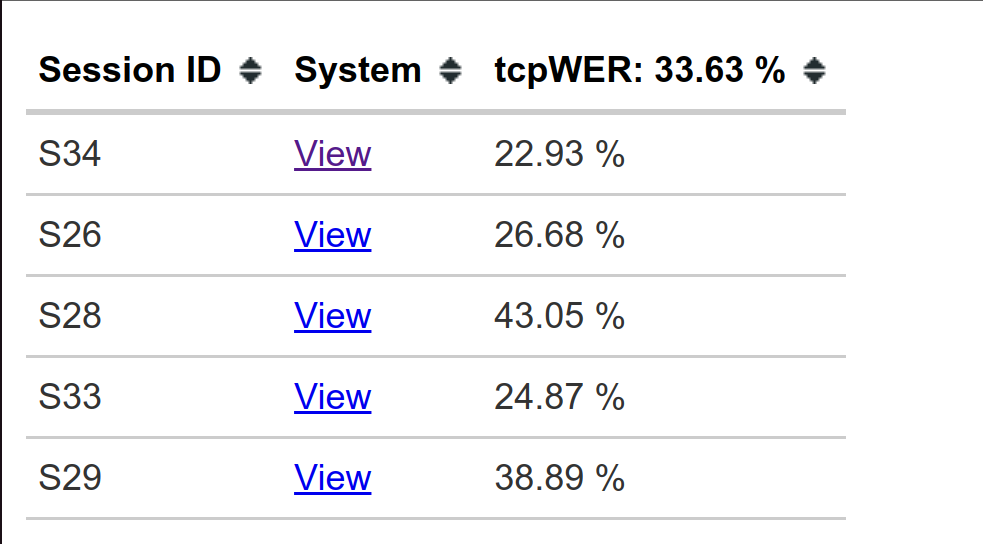 |
Each command will generate a viz folder (customize with -o OUT), that contains an index.html (session browser), side_by_side_sync.html (used by index.html, can be ignored) and for each session, system and alignment a standalone/shareable HTML file.
Python / Jupyter interface
import meeteval
from meeteval.viz.visualize import AlignmentVisualization

folder = r'https://raw.githubusercontent.com/fgnt/meeteval/main/'
av = AlignmentVisualization(
    meeteval.io.load(folder + 'example_files/ref.stm').groupby('filename')['recordingA'],
    meeteval.io.load(folder + 'example_files/hyp.stm').groupby('filename')['recordingA']
)

# display(av)  # Jupyter
# av.dump('viz.html')  # Create standalone HTML file
Cite
The toolkit and the tcpWER were presented at the CHiME-2023 workshop (Computational Hearing in Multisource Environments) with the paper "MeetEval: A Toolkit for Computation of Word Error Rates for Meeting Transcription Systems".


@InProceedings{MeetEval23,
  author    = {von Neumann, Thilo and Boeddeker, Christoph and Delcroix, Marc and Haeb-Umbach, Reinhold},
  title     = {{MeetEval}: A Toolkit for Computation of Word Error Rates for Meeting Transcription Systems},
  year      = {2023},
  booktitle = {Proc. 7th International Workshop on Speech Processing in Everyday Environments (CHiME 2023)},
  pages     = {27--32},
  doi       = {10.21437/CHiME.2023-6}
}
The MIMO WER and efficient implementation of ORC WER are presented in the paper "On Word Error Rate Definitions and their Efficient Computation for Multi-Speaker Speech Recognition Systems".


@InProceedings{MIMO23,
  author       = {von Neumann, Thilo and Boeddeker, Christoph and Kinoshita, Keisuke and Delcroix, Marc and Haeb-Umbach, Reinhold},
  title        = {On Word Error Rate Definitions and their Efficient Computation for Multi-Speaker Speech Recognition Systems},
  booktitle    = {ICASSP 2023 - 2023 IEEE International Conference on Acoustics, Speech and Signal Processing (ICASSP)},
  year         = {2023},
  doi          = {10.1109/ICASSP49357.2023.10094784}
}
1 maintainer

Metadata
1 maintainer
Release files for meeteval 0.4.3
For a detailed explanation of source distributions (sdists) and built distributions (wheels), please see the package formats documentation.
Source distribution (sdist)
| File | Size | Uploaded | |
|---|---|---|---|
| meeteval-0.4.3.tar.gz | 843.6 kB | Details |
Release files / meeteval-0.4.3.tar.gz
| Download URL | meeteval-0.4.3.tar.gz |
|---|---|
| Size | 843.6 kB |
| Tags | Source |
|
SHA-256 checksum How to use checksums |
02d3a359f375d39c67dfb8fe1c061e7dac19d6fc1fb89ee72d793a5813dafeb2
|
|
BLAKE2b-256 checksum How to use checksums |
d41310edb36a8881b24690e27213bfb2395e8857a70eeef61d241a463cb5522c
|
| Upload date | |
|
Uploaded using Trusted Publishing? What is trusted publishing? |
Yes |
| Uploaded via |
twine/6.1.0 CPython/3.13.7
|
Provenance
Provenance describes where a file came from. On PyPI, provenance is shared via attestations, which provide a verifiable record of the build or publishing details. View details, limitations and caveats.


PyPI Publish Attestation
PyPI verified that this artifact, at this checksum, originated from the publisher listed below.
Signed by GitHub Actions, verified by PyPI on Sep 8, 2025.
Transparency log













