
Python MeshCom-Client for udp communication with MeshCom nodes

Project description
MeshCom-Client
A MeshCom-Client, written in Python, for using with MeshCom (https://icssw.org/meshcom/) Nodes
What is this about?
This is a MeshCom-Client, that is written in Python for simple usage on a compatible computer system. Initially it is with very basic functionality but I think it will grow up over the next weeks :-)
How to start
- Install python3 and fullfill requirements by installing all missing libraries.
- Connect your MeshCom-Node to your serial terminal and issue the following commands, to start the node to transfer data via udp to your computer:
- --extudpip [ip of your computer]
- --extudp on
- Go to Settings and put in the new destination ip address = ip of your node.
Now it should be running!
Key features
- Grouping messages into tabs by destination (GRC or callsign)
- Alerting sound for new message
- Watchlist and alerting sound for callsigns in watchlist
- Restoring of chat-history on reopening chat-tabs
- Reopen specific chat on demand
- Delete complete chat history (also from restoring-source)
- Multiple languages (actually German and English)
Functional areas
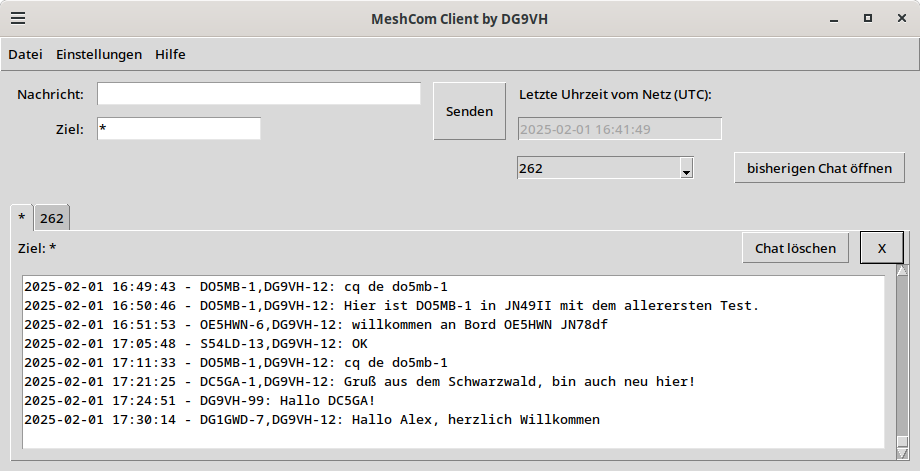
Message area upper left
This is the place where you type your message and give the target group id or callsign. With a click on the send-button your message would be transfered via Lora to the next node and maybe to the internet server.
Timestamp upper right
Within this box the timestamp transfered by the network every 5 minutes is shown. This is used as an indicator that the network is still alive.
reopen previous chat upper left
As the MeshCom-Client is saving chat-history you are able to reopen chat-tabs and reload the content. With the selectbox you can select any stored chat-history and with the button you can reopen and reload the chat-history of this chat.
chat message tabs in the lower half
This is the area where each group chat is grouped into a single tab per target. you can easily switch between the chats by selecting another tab. If there is any new message within a chat, it would be shown with a (new)-label on the tab-rider.
There are also two buttons: delete chat deletes the chat (and it's stored history) and X closes only the tab (to be reopened, if a message comes in or if you reopen it manually).
If you click on the target label, the (new)-marker would disappear in the opened tab, same if you switch over to another tab, then the label there would disappear.
Using Watchlist
via Settings - Watchlist you can configure your personal watchlist. Here you add callsigns without SSID to be alerted with alert.wav-sound (you can replace individually to your favor).
Easy Installation and Upgrade
Easiest way to install this is to use pipx install MeshCom_Client.
If you have a previous installation done with pipx you just have to use pipx upgrade MeshCom_Client for getting the lastest version. Maybe you have to do this more than once till it says that meshcom-client is already at latest version.
If you want to know, how to install pipx on your system, consult GitHub - pypa/pipx: Install and Run Python Applications in Isolated Environments
After installation, you can simply start the client running MeshCom-Client from console.
Settings-file and chat-log could be found at .local/pipx/venvs/meshcom-client/lib/python3.11/site-packages/MeshCom_Client/ or similar.
Troubles?
If you have issues with emojis under linux, you could try sudo apt-get install fonts-noto* to install needed fonts
ToDos
- View counter of new messages in tab
- Integration in "flutter"(Android and iOS-compatibility)
- Displaying positions of stations (when receiving a pos-message) on a map (OSM)
Contributions
Sound Effect by freesound_community from Pixabay
Sound Effect by Rescopic Sound from Pixabay
Release history Release notifications | RSS feed


Download files
Download the file for your platform. If you're not sure which to choose, learn more about installing packages.
Source Distribution
Built Distribution
Filter files by name, interpreter, ABI, and platform.
If you're not sure about the file name format, learn more about wheel file names.
Copy a direct link to the current filters
File details
Details for the file meshcom_client-1.0.13.tar.gz.
File metadata
- Download URL: meshcom_client-1.0.13.tar.gz
- Upload date:
- Size: 410.6 kB
- Tags: Source
- Uploaded using Trusted Publishing? No
- Uploaded via: twine/6.1.0 CPython/3.11.2
File hashes
| Algorithm | Hash digest | |
|---|---|---|
| SHA256 |
9bd284c565ddb904a7a39a72f360bf5e684b713b5ecb4bb561291491e9cb83ea
|
|
| MD5 |
6aafe8e952458ccc008316c5b56bed6b
|
|
| BLAKE2b-256 |
dbaf1118d02da5bac15010a3ca5c241e47d4f4840a5f51da7d5b34abf4c3ffb9
|
File details
Details for the file meshcom_client-1.0.13-py3-none-any.whl.
File metadata
- Download URL: meshcom_client-1.0.13-py3-none-any.whl
- Upload date:
- Size: 417.1 kB
- Tags: Python 3
- Uploaded using Trusted Publishing? No
- Uploaded via: twine/6.1.0 CPython/3.11.2
File hashes
| Algorithm | Hash digest | |
|---|---|---|
| SHA256 |
6aea4440efe668d4946e4239d7bc7189063bd704c938e555515e7a375d504319
|
|
| MD5 |
c91ddd0f7e93c3980987ca318f3fa070
|
|
| BLAKE2b-256 |
f7da45fd4c7909246e4b95f189372f2782ed5b25e65d50cc2455d5de968abf80
|






