
MFEM + PyMFEM (finite element method library)

Project description



MFEM + PyMFEM (FEM library)
This repository provides Python binding for MFEM. MFEM is a high performance parallel finite element method (FEM) library (http://mfem.org/).
Installer (setup.py) builds both MFEM and binding together. By default, "pip install mfem" downloads and builds the serial version of MFEM and PyMFEM. Additionally, the installer supports building MFEM with specific options together with other external libraries, including MPI version.
Requirement
numpy, swig + mpi4py (for --with-parallel)
Install
pip install mfem                    # binary install is available only on linux platforms (Py36-310)
pip install mfem --no-binary mfem   # install serial MFEM + wrapper from source
Using additional features (MPI, GPU, GPU-Hypre, GSLIB, SuiteSparse)
The setup script accept various options. TO use it, one can either use --install-option flag with pip, or download the package manually and run the script. For example, this below download and build parallel version of MFEM library (linked with Metis and Hypre) and install under /mfem. See also, docs/install.txt
### Using pip
$ pip install mfem --install-option="--with-parallel" [--verbose]

### Runnig setup.py
$ pip download mfem --no-binary mfem (expand tar.gz file and move to the downloaded directory)
$ python setup.py install --with-parallel # it download and build metis/hypre/mfem

### Verbose output
$ python setup.py install --vv # SWIG output and CMAKE_VERBOSE_MAKEFILE is on

### Cleaning
$ python setup.py clean --all # clean external dependencies + wrapper code
Build with MFEM master in Github
$ pip install mfem --install-option="--with-parallel" --install-option="mfem-branch=master"[--verbose]
(or)
$ python setup.py install  --with-parallel --mfem-branch='master'
Choosing compiler
$ python setup.py install --with-parallel --CC=icc --CXX=icpc --MPICC=mpiicc --MPICXX=mpiicpc

### Other options
For other configurations, see docs/install.txt or help
$ python setup.py install --help
Install from github source
# Clone this repo
git clone https://github.com/mfem/PyMFEM.git

# (Optional) Clean dependencies
cd PyMFEM; python setup.py clean --all;cd ..

# Build & Install
pip install ./PyMFEM --verbosel # build both MFEM and PyMFEM
  *or*
cd PyMFEM
python setup.py install # build both MFEM and PyMFEM

# Run test
cd test
python test_examples.py -serial
Usage
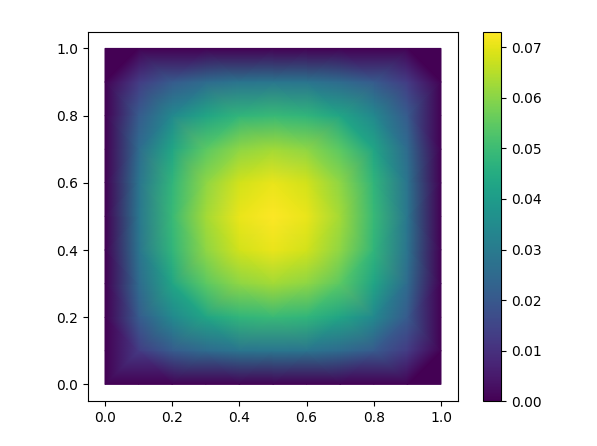
Here is an example to solve div(grad(f)) = 1 in a square and to plot the result with matplotlib (modified from ex1.cpp). Use the badge above to open this in Binder.
import mfem.ser as mfem

# create sample mesh for square shape
mesh = mfem.Mesh(10, 10, "TRIANGLE")

# create finite element function space
fec = mfem.H1_FECollection(1, mesh.Dimension())   # H1 order=1
fespace = mfem.FiniteElementSpace(mesh, fec)

#
ess_tdof_list = mfem.intArray()
ess_bdr = mfem.intArray([1]*mesh.bdr_attributes.Size())
fespace.GetEssentialTrueDofs(ess_bdr, ess_tdof_list)

# constant coefficient
one = mfem.ConstantCoefficient(1.0)

# define Bilinear and Linear operator
a = mfem.BilinearForm(fespace)
a.AddDomainIntegrator(mfem.DiffusionIntegrator(one))
a.Assemble()
b = mfem.LinearForm(fespace)
b.AddDomainIntegrator(mfem.DomainLFIntegrator(one))
b.Assemble()

# create gridfunction, which is where the solution vector is stored
x = mfem.GridFunction(fespace);
x.Assign(0.0)

# form linear equation (AX=B)
A = mfem.OperatorPtr()
B = mfem.Vector()
X = mfem.Vector()
a.FormLinearSystem(ess_tdof_list, x, b, A, X, B);
print("Size of linear system: " + str(A.Height()))

# solve it using PCG solver and store the solution to x
AA = mfem.OperatorHandle2SparseMatrix(A)
M = mfem.GSSmoother(AA)
mfem.PCG(AA, M, B, X, 1, 200, 1e-12, 0.0)
a.RecoverFEMSolution(X, b, x)

# extract vertices and solution as numpy array
verts = mesh.GetVertexArray()
sol = x.GetDataArray()

# plot solution using Matplotlib

import matplotlib.pyplot as plt
import matplotlib.tri as tri

triang = tri.Triangulation(verts[:,0], verts[:,1])

fig1, ax1 = plt.subplots()
ax1.set_aspect('equal')
tpc = ax1.tripcolor(triang, sol, shading='gouraud')
fig1.colorbar(tpc)
plt.show()
License
PyMFEM is licensed under BSD-3. Please refer the developers' web sites for the external libraries
Release history Release notifications | RSS feed


Download files
Download the file for your platform. If you're not sure which to choose, learn more about installing packages.
Source Distribution
Built Distributions
Filter files by name, interpreter, ABI, and platform.
If you're not sure about the file name format, learn more about wheel file names.
Copy a direct link to the current filters
File details
Details for the file mfem-4.5.0.1rc11.tar.gz.
File metadata
- Download URL: mfem-4.5.0.1rc11.tar.gz
- Upload date:
- Size: 380.8 kB
- Tags: Source
- Uploaded using Trusted Publishing? No
- Uploaded via: twine/4.0.2 CPython/3.7.16
File hashes
| Algorithm | Hash digest | |
|---|---|---|
| SHA256 |
570d99b947e86909b183a7ee342db441eef753e33722c73e4a19a717d07eb3f0
|
|
| MD5 |
c018d7d9a7daf65e9e5f2b4f2ede2e65
|
|
| BLAKE2b-256 |
fbfbcbc8c7564e250fe4f103a84544d14f15ae18c0092d590e80c55cef717946
|
File details
Details for the file mfem-4.5.0.1rc11-cp310-cp310-manylinux_2_24_x86_64.whl.
File metadata
- Download URL: mfem-4.5.0.1rc11-cp310-cp310-manylinux_2_24_x86_64.whl
- Upload date:
- Size: 43.9 MB
- Tags: CPython 3.10, manylinux: glibc 2.24+ x86-64
- Uploaded using Trusted Publishing? No
- Uploaded via: twine/4.0.2 CPython/3.10.9
File hashes
| Algorithm | Hash digest | |
|---|---|---|
| SHA256 |
ebbb6d383d106f3446f6603ec0ea5c82b90f4a1c798a4d5e215239ddcaa6e332
|
|
| MD5 |
37c807ca97ce840ba19713a62ba2229f
|
|
| BLAKE2b-256 |
98bea5e9d19237e1183c9807491642a25394e617f952b6827a479a73a320da24
|
File details
Details for the file mfem-4.5.0.1rc11-cp39-cp39-manylinux_2_17_x86_64.manylinux2014_x86_64.whl.
File metadata
- Download URL: mfem-4.5.0.1rc11-cp39-cp39-manylinux_2_17_x86_64.manylinux2014_x86_64.whl
- Upload date:
- Size: 58.3 MB
- Tags: CPython 3.9, manylinux: glibc 2.17+ x86-64
- Uploaded using Trusted Publishing? No
- Uploaded via: twine/4.0.2 CPython/3.9.16
File hashes
| Algorithm | Hash digest | |
|---|---|---|
| SHA256 |
bbcaa62c2b50e2d47c9ca0b64e3e9a2ba30c0e48fecede3de232fad7a62767be
|
|
| MD5 |
36460c760a66f9a676f7f4f5b5614ca6
|
|
| BLAKE2b-256 |
f97005099a909adef40e24ffef86b9fe73ed608a8bfc953d4c67bccf332fec3c
|
File details
Details for the file mfem-4.5.0.1rc11-cp38-cp38-manylinux_2_17_x86_64.manylinux2014_x86_64.whl.
File metadata
- Download URL: mfem-4.5.0.1rc11-cp38-cp38-manylinux_2_17_x86_64.manylinux2014_x86_64.whl
- Upload date:
- Size: 58.2 MB
- Tags: CPython 3.8, manylinux: glibc 2.17+ x86-64
- Uploaded using Trusted Publishing? No
- Uploaded via: twine/4.0.2 CPython/3.8.16
File hashes
| Algorithm | Hash digest | |
|---|---|---|
| SHA256 |
7be0b97caeb966f57de4645edec1ca4d6c6ca4bfc99fb693500e885f063ed576
|
|
| MD5 |
cf53d15c023629549758a7280bf50f29
|
|
| BLAKE2b-256 |
5529d63ba586e75e650d0d93e5028573f8cba53777c1c02eae7b71694cb53862
|
File details
Details for the file mfem-4.5.0.1rc11-cp37-cp37m-manylinux_2_17_x86_64.manylinux2014_x86_64.whl.
File metadata
- Download URL: mfem-4.5.0.1rc11-cp37-cp37m-manylinux_2_17_x86_64.manylinux2014_x86_64.whl
- Upload date:
- Size: 57.9 MB
- Tags: CPython 3.7m, manylinux: glibc 2.17+ x86-64
- Uploaded using Trusted Publishing? No
- Uploaded via: twine/4.0.2 CPython/3.7.16
File hashes
| Algorithm | Hash digest | |
|---|---|---|
| SHA256 |
a425c8280427e6c1c532c8c3535c4cd81d75f1f3aaceb73bb300479d9b34fd2b
|
|
| MD5 |
4cb1f47c76e100121755ebf1ccc10063
|
|
| BLAKE2b-256 |
cb9231ed01073c475aed392a71be0177f9ee70c7441ba61c65c712879c70d4ed
|






