
@[TOC]
esp32使用MicroPython驱动oled屏显示中文和英文
本文博客链接:http://blog.csdn.net/jdh99,作者:jdh,转载请注明.
欢迎前往社区交流:海萤物联网社区
介绍
手边有个0.96寸的oled屏,驱动芯片是ssd1306,分辨率是128x64,支持ic接口。准备用esp32开发板驱动它。
在网上查了一圈,使用MicroPython驱动oled屏,大都是用官方库ssd1306驱动。官方库只支持8x8显示英文字符,屏幕上显示太小了,看起来太吃力。于是写了个库micropython-ssd1306py,支持中英文显示,并支持不同字号。
安装
输入命令下载包到指定目录:
pip install --target=d:/package micropython-ssd1306py
下载后目录:
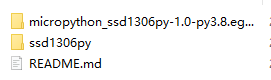
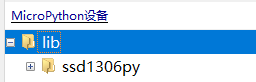
删除掉无关文件README和egg-info,将ssd1306py文件夹放在设备的lib目录下。注意:必须放在lib目录下
在设备中的目录:
特点
- 支持英文字号8x8,16x16,24x24,32x32
- 支持中文字号16x16,24x24,32x32
- 封装lcd操作常用接口
开源
硬件连接
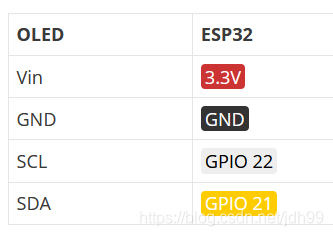
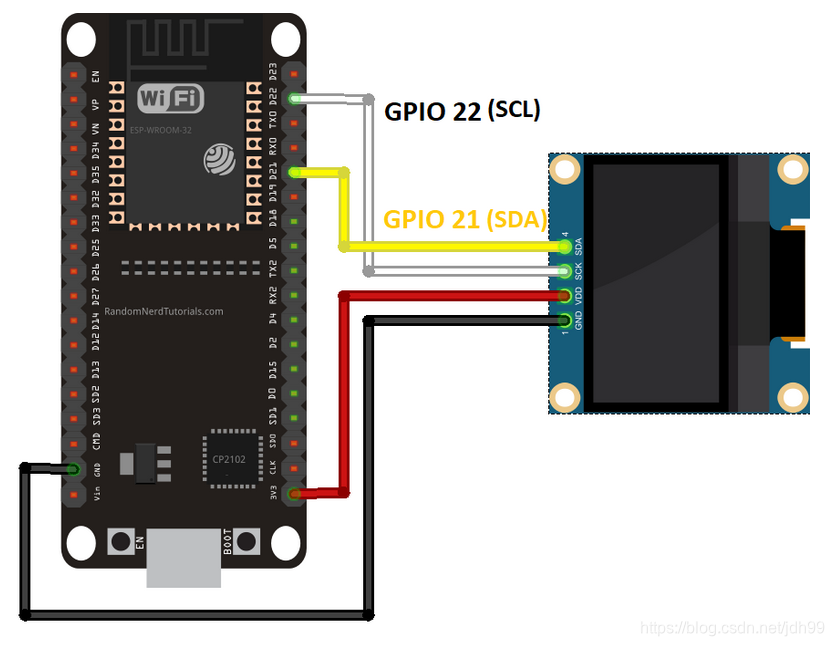
API
def init_i2c(scl, sda, width, height):
    """
    初始化i2c接口
    :param scl: i2c的时钟脚
    :param sda: i2c的数据脚
    :param width: oled屏幕的宽度像素
    :param height: oled屏幕的高度像素
    """

def clear():
    """清除屏幕"""

def show():
    """屏幕刷新显示"""

def pixel(x, y):
    """画点"""

def text(string, x_axis, y_axis, font_size):
    """显示字符串.注意字符串必须是英文或者数字"""

def set_font(font, font_size):
    """
    设置中文字库.允许设置多个不同大小的字库
    字库必须是字典,格式示例:
    font = {
    0xe4bda0:
        [0x08, 0x08, 0x08, 0x11, 0x11, 0x32, 0x34, 0x50, 0x91, 0x11, 0x12, 0x12, 0x14, 0x10, 0x10, 0x10, 0x80, 0x80,
         0x80, 0xFE, 0x02, 0x04, 0x20, 0x20, 0x28, 0x24, 0x24, 0x22, 0x22, 0x20, 0xA0, 0x40],  # 你
    0xe5a5bd:
        [0x10, 0x10, 0x10, 0x10, 0xFC, 0x24, 0x24, 0x25, 0x24, 0x48, 0x28, 0x10, 0x28, 0x44, 0x84, 0x00, 0x00, 0xFC,
         0x04, 0x08, 0x10, 0x20, 0x20, 0xFE, 0x20, 0x20, 0x20, 0x20, 0x20, 0x20, 0xA0, 0x40]  # 好
    }
    """

def text_cn(string, x_axis, y_axis, font_size):
    """显示中文字符.注意字符必须是utf-8编码"""
示例
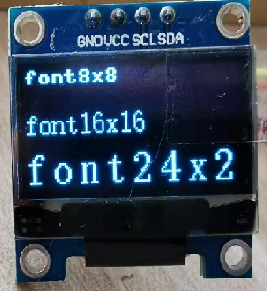
显示英文字符
import ssd1306py as lcd


lcd.init_i2c(22, 21, 128, 64)
lcd.text('font8x8', 0, 0, 8)
lcd.text('font16x16', 0, 20, 16)
lcd.show()
显示效果:
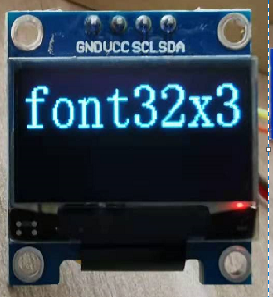
import ssd1306py as lcd


lcd.init_i2c(22, 21, 128, 64)
lcd.text('font32x32', 0, 0, 32)
lcd.show()
显示汉字
汉字字库较大,单一字号的字库就需要几M字节,所以没有放在库中。需要自己将需要显示的汉字做成字库传入到库中。
制作字库可以使用工具PCtoLCD2002,百度网盘下载链接,提取码:z4tf
使用方法可参考:如何使用PCtoLCD2002取模(汉字、ASCII字符集)
提取的汉字字库做成字典格式供程序使用,字典的键是汉字的utf-8编码值。可以使用python获取python的utf-8值,比如:
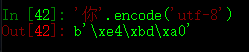
也可以使用在线转换工具查询:http://www.mytju.com/classcode/tools/encode_utf8.asp
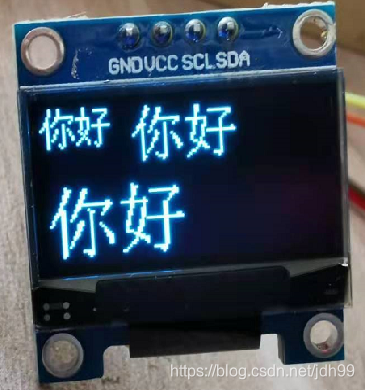
比如以下示例,显示汉字“你好”。
import ssd1306py as lcd

lcd.init_i2c(22, 21, 128, 64)

font16 = {
    0xe4bda0:
        [0x08, 0x08, 0x08, 0x11, 0x11, 0x32, 0x34, 0x50, 0x91, 0x11, 0x12, 0x12, 0x14, 0x10, 0x10, 0x10, 0x80, 0x80,
         0x80, 0xFE, 0x02, 0x04, 0x20, 0x20, 0x28, 0x24, 0x24, 0x22, 0x22, 0x20, 0xA0, 0x40],  # 你
    0xe5a5bd:
        [0x10, 0x10, 0x10, 0x10, 0xFC, 0x24, 0x24, 0x25, 0x24, 0x48, 0x28, 0x10, 0x28, 0x44, 0x84, 0x00, 0x00, 0xFC,
         0x04, 0x08, 0x10, 0x20, 0x20, 0xFE, 0x20, 0x20, 0x20, 0x20, 0x20, 0x20, 0xA0, 0x40]  # 好
}

font24 = {
    0xe4bda0:
        [0x00, 0x01, 0x01, 0x03, 0x03, 0x02, 0x04, 0x04, 0x0E, 0x1C, 0x14, 0x24, 0x44, 0x04, 0x04, 0x04, 0x04, 0x04,
         0x04, 0x05, 0x04, 0x06, 0x04, 0x00,
         0x00, 0x00, 0x8C, 0x0C, 0x08, 0x18, 0x1F, 0x30, 0x21, 0x41, 0x41, 0x91, 0x19, 0x11, 0x31, 0x21, 0x41, 0x41,
         0x81, 0x01, 0x11, 0x0F, 0x02, 0x00,
         0x00, 0x00, 0x00, 0x00, 0x00, 0x00, 0xFC, 0x0C, 0x10, 0x00, 0x00, 0x00, 0x20, 0x10, 0x18, 0x0C, 0x0C, 0x06,
         0x04, 0x00, 0x00, 0x00, 0x00, 0x00],  # 你
    0xe5a5bd:
        [0x00, 0x00, 0x06, 0x06, 0x06, 0x04, 0x04, 0x7F, 0x0C, 0x0C, 0x08, 0x08, 0x08, 0x18, 0x10, 0x11, 0x0D, 0x03,
         0x02, 0x04, 0x18, 0x20, 0x40, 0x00,
         0x00, 0x00, 0x00, 0x00, 0x1F, 0x00, 0x00, 0xC0, 0x40, 0x40, 0xC0, 0x80, 0xBF, 0x80, 0x80, 0x00, 0x00, 0x80,
         0xC0, 0x60, 0x00, 0x07, 0x01, 0x00,
         0x00, 0x00, 0x00, 0x00, 0xF8, 0x18, 0x20, 0x40, 0x80, 0x80, 0x80, 0x84, 0xFE, 0x80, 0x80, 0x80, 0x80, 0x80,
         0x80, 0x80, 0x80, 0x80, 0x00, 0x00]  # 好
}

font32 = {
    0xe4bda0:
        [0x00, 0x00, 0x00, 0x00, 0x00, 0x00, 0x00, 0x00, 0x01, 0x01, 0x03, 0x03, 0x07, 0x0D, 0x09, 0x11, 0x11, 0x21,
         0x01, 0x01, 0x01, 0x01, 0x01, 0x01,
         0x01, 0x01, 0x01, 0x01, 0x01, 0x01, 0x01, 0x00, 0x00, 0x00, 0x40, 0x70, 0x60, 0xE0, 0xC0, 0xC1, 0x81, 0x03,
         0x03, 0x86, 0x84, 0x8C, 0x88, 0x90,
         0x81, 0x83, 0x83, 0x83, 0x86, 0x86, 0x8C, 0x88, 0x90, 0x90, 0xA0, 0x80, 0x80, 0x80, 0x00, 0x00, 0x00, 0x00,
         0x00, 0x60, 0xE0, 0xC0, 0xC0, 0x80,
         0x80, 0xFF, 0x00, 0x10, 0x0C, 0x08, 0x08, 0x08, 0x88, 0x88, 0x08, 0x08, 0x08, 0x08, 0x08, 0x08, 0x08, 0x08,
         0x08, 0x08, 0xF8, 0x38, 0x10, 0x00,
         0x00, 0x00, 0x00, 0x00, 0x00, 0x00, 0x00, 0x00, 0x18, 0xFC, 0x18, 0x30, 0x20, 0x40, 0x00, 0x00, 0x00, 0x80,
         0x40, 0x20, 0x30, 0x18, 0x1C, 0x0C,
         0x0C, 0x0C, 0x00, 0x00, 0x00, 0x00, 0x00, 0x00],  # 你
    0xe5a5bd:
        [0x00, 0x00, 0x01, 0x01, 0x01, 0x01, 0x01, 0x01, 0x03, 0x3F, 0x03, 0x03, 0x02, 0x06, 0x06, 0x04, 0x04, 0x0C,
         0x0C, 0x08, 0x08, 0x0E, 0x01, 0x00,
         0x00, 0x01, 0x03, 0x04, 0x08, 0x30, 0x00, 0x00, 0x00, 0x00, 0x00, 0xC0, 0x80, 0x81, 0x80, 0x00, 0x08, 0xFC,
         0x08, 0x08, 0x18, 0x18, 0x18, 0x18,
         0x17, 0x30, 0x30, 0x30, 0x60, 0x60, 0xC0, 0xF0, 0xBC, 0x8C, 0x04, 0x00, 0x00, 0x00, 0x00, 0x00, 0x00, 0x00,
         0x00, 0x00, 0x00, 0xFF, 0x00, 0x00,
         0x00, 0x01, 0x06, 0x06, 0x06, 0x06, 0x06, 0x06, 0xFF, 0x06, 0x06, 0x06, 0x06, 0x06, 0x06, 0x06, 0x06, 0x06,
         0x06, 0x06, 0xFC, 0x1C, 0x08, 0x00,
         0x00, 0x00, 0x00, 0x00, 0x20, 0xF0, 0x70, 0xC0, 0x80, 0x00, 0x00, 0x00, 0x00, 0x00, 0x00, 0x18, 0xFC, 0x00,
         0x00, 0x00, 0x00, 0x00, 0x00, 0x00,
         0x00, 0x00, 0x00, 0x00, 0x00, 0x00, 0x00, 0x00]  # 好
}

lcd.init_i2c(22, 21, 128, 64)
lcd.set_font(font16, 16)
lcd.set_font(font24, 24)
lcd.set_font(font32, 32)
lcd.text_cn('你好', 0, 0, 16)
lcd.text_cn('你好', 40, 00, 24)
lcd.text_cn('你好', 0, 30, 32)
lcd.show()
参考链接
1 maintainer

Metadata
1 maintainer
Release files for micropython-ssd1306py 3.1
For a detailed explanation of source distributions (sdists) and built distributions (wheels), please see the package formats documentation.
Source distribution (sdist)
| File | Size | Uploaded | Provenance | |
|---|---|---|---|---|
| micropython-ssd1306py-3.1.tar.gz | 16.2 kB | Without provenance | Details |
Release files / micropython-ssd1306py-3.1.tar.gz
| Download URL | micropython-ssd1306py-3.1.tar.gz |
|---|---|
| Size | 16.2 kB |
| Tags | Source |
|
SHA-256 checksum How to use checksums |
1e62557f17c6f0424ac4381d351e0be14683330604b7fa2156302824f1c155db
|
|
BLAKE2b-256 checksum How to use checksums |
4a2a14018bd10325ca9e94278efede407d6ee9734542eed5977acac9d0d61066
|
| Upload date | |
|
Uploaded using Trusted Publishing? What is trusted publishing? |
No |
| Uploaded via |
twine/3.3.0 pkginfo/1.7.0 requests/2.25.1 setuptools/49.2.1 requests-toolbelt/0.9.1 tqdm/4.57.0 CPython/3.8.7
|
Security for micropython-ssd1306py 3.1
Provenance
Provenance describes where a file came from. On PyPI, provenance is shared via attestations, which provide a verifiable record of the build or publishing details. View details, limitations and caveats.
No provenance found
None of the files in this release were uploaded with provenance metadata.
A note on package security
PyPI is a repository for distributing packages, not a service for auditing them. While third-party security researchers and our staff do their best to detect and remove malicious packages, PyPI cannot guarantee the quality, security or suitability of any given package.
To learn more about protecting yourself from malicious actors, visit our package security documentation.














