
midi2sc
Installation
You can install midi2sc with easy_install:
$ easy_install midi2sc
However, you also need to install pkaudio and its dependencies.
Usage
midi2sc allows you to assign MIDI controllers to SuperCollider SynthDefs.
Configuration
An example configuration:
[SOSkick]
midi_channel = 01
001 = amp_mul=            AbsoluteControl(min=0.0, max=1.27, start_vel=100.0)
106 = mod_freq=           IDC(min=2.0, max=20.0, steps=50, value=2.0)
107 = mod_index=          IDC(min=2.0, max=20.0, steps=50, value=2.0)
108 = beater_noise_level= IDC(min=2.0, max=20.0, steps=50, value=18.0)
109 = decay=              IDC(min=0.05, max=1.0, steps=70, value=0.3)
noteon_args = out=18
This configuration will create and assign 7 controls: one of type AbsoluteControl, four of type IDC (IncDecControl). The two controls implicitly created are a NoteOnControl and a NoteOffControl.
The 001 midi controller is usually the modulation wheel. Here it’s bound to the amp_mul parameter of an SOSkick SynthDef. min is the value sent to the SuperCollider Synth when the wheel is at its lowest position, max the value at its highest position.
The 106 midi controller is bound to an endless encoder that sends relative values between 01 to 64 for increment and 127 to 065 for decrement. There’s 50 steps between the min and max value. And the value at which we start is 2.0. This corresponds to what the M-Audio Axiom User Guide calls 2's Complement from 0 / Relative (2's Complement).
There’s also dedicated controls for pitch bend and after touch.
SuperCollider
This is how a SynthDef could look like that uses the configuration from before:
SynthDef("SOSkick", {
  arg out = 0, freq = 50, mod_freq = 6.5, mod_index = 19.5,
  decay = 0.1, amp = 0.8, beater_noise_level = 0.001, amp_mul = 1.0;
  var x;

  // do stuff...
  Out.ar(out, x);
});
Make sure you have your SuperCollider server up and SynthDefs loaded before you start midi2sc.
Starting midi2sc
On the command-line, midi2sc is run like this:
$ midi2sc
This assumes that you have a midi2sc.ini configuration file in the current working directory. You can also provide this filename as an option on the command-line. Refer to the built-in help for more options:
$ midi2sc --help
midi2sc will ask you for a MIDI port to bind to, and then it’ll start a GUI that shows sliders for all controls and finally drop you into an interactive shell with access to variables like dictionary of control handlers and the save_presets and load_presets functions. To save presets (values from all controllers) from a file on the Python shell and then load them again later, you write:
>>> save_presets('presets1.pickle', midi_in)
>>> # ... time passes
>>> load_presets('presets0.pickle', midi_in)
You can also load a new midi2sc.ini configuration:
>>> handlers.update(configure.read('midi2sc2.ini'))
Screenshot
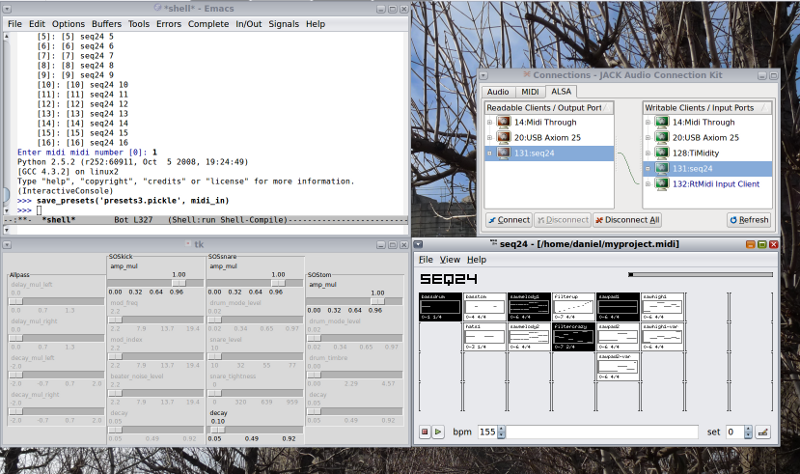
The top left window is the midi2sc Python shell. Below is the midi2sc GUI with a column of sliders for each synth. On the right are QJackCtl connections and Seq24:
Development Status
midi2sc is somewhat mature, and I use it. At the same time it’s a big hack and probably not thread-safe.
Change Log
0.1 - 2009-06-30
First release.
1 maintainer

Metadata
1 maintainer
Release files for midi2sc 0.1
For a detailed explanation of source distributions (sdists) and built distributions (wheels), please see the package formats documentation.
Source distribution (sdist)
| File | Size | Uploaded | |
|---|---|---|---|
| midi2sc-0.1.tar.gz | 12.2 kB | Details |
Release files / midi2sc-0.1.tar.gz
| Download URL | midi2sc-0.1.tar.gz |
|---|---|
| Size | 12.2 kB |
| Tags | Source |
|
SHA-256 checksum How to use checksums |
cce902ac23b1d75253e863097fea3962491fe7bad09033b16c3e0467c057f196
|
|
BLAKE2b-256 checksum How to use checksums |
c214e425a42df1d2ab94d84ce7a6b57d5b43531086b9fe30e49d48514e545508
|
| Upload date | |
|
Uploaded using Trusted Publishing? What is trusted publishing? |
No |













