
defense
This is under review.

DOI: https://doi.org/10.24433/CO.7896039.v1
This is under review.
The goal of this project is to visualize military spending of countries.
Using a SIPRI dataset, milspend can visualize military spending of up to four countries.
The SIPRI dataset is downloadable from:
https://sipri.org/sites/default/files/SIPRI-Milex-data-1949-2020_0.xlsx
or the latest dataset from:
https://www.sipri.org/sites/default/files/SIPRI-Milex-data-1949-2022.xlsx
The number of the vertical axis indicates the US dollars in millions.
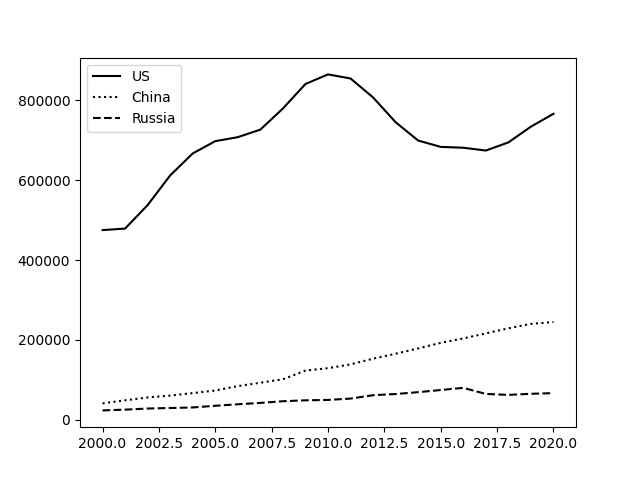
How to install milspend on Linux, MacOS, or WSL on Windows
You may need matplotlib library.
$ pip install matplotlib
$ pip install -U milspend
How to install milspend if you have a trouble.
$ pip install milspend --force-reinstall --no-cache-dir --no-binary :all:
How to run milspend
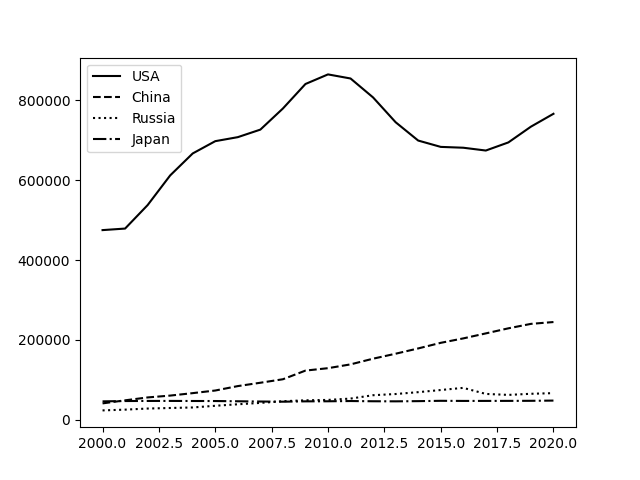
Milspend program allows user to specify up to four countries to plot military spending of the specified countries. For example, the following command can display military spending of the US, China, Russia and Japan in the graph.
For 0.0.1 and 0.0.2 with 1949-2020 dataset: Seperate countries with spaces.
$ milspend USA China Russia Japan
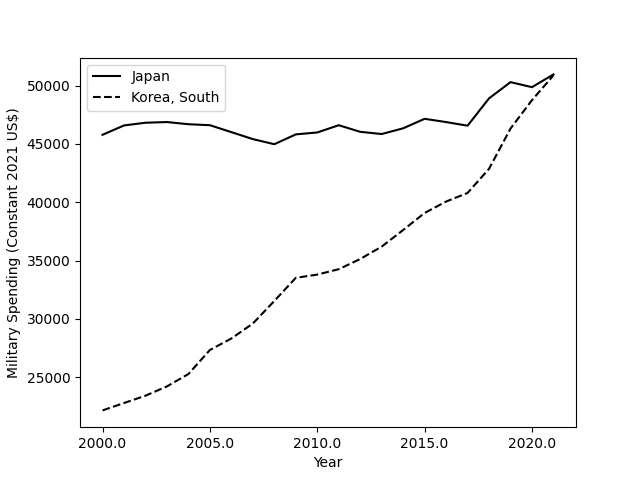
 The following command can display military spending of Japan and South Korea.
For 0.0.3 with with 1949-2022: Enclose up to four countries in single quotes and separate them with colons.
$ milspend 'Japan:Korea, South'
1 maintainer

Metadata
1 maintainer
Release files for milspend 0.0.5
For a detailed explanation of source distributions (sdists) and built distributions (wheels), please see the package formats documentation.
Source distribution (sdist)
| File | Size | Uploaded | Provenance | |
|---|---|---|---|---|
| milspend-0.0.5.tar.gz | 2.9 kB | Without provenance | Details |
Built distribution (wheel)
| File | Interpreter | ABI | Platform | Reset |
|---|---|---|---|---|
| milspend-0.0.5-py3-none-any.whl | Python 3 | none | any | Details |
Total release size: 6.1 kB
Release files / milspend-0.0.5.tar.gz
| Download URL | milspend-0.0.5.tar.gz |
|---|---|
| Size | 2.9 kB |
| Tags | Source |
|
SHA-256 checksum How to use checksums |
bd6f69c29e2c6ea85396ead7f8396bb24b419affa608bf71e69125fbe32ff67d
|
|
BLAKE2b-256 checksum How to use checksums |
6ddfcd1ce08aa888cc04c5f9d7782df5a0a25b16e81bcafb10c09d098807ec10
|
| Upload date | |
|
Uploaded using Trusted Publishing? What is trusted publishing? |
No |
| Uploaded via |
twine/5.0.0 CPython/3.8.12
|
Release files / milspend-0.0.5-py3-none-any.whl
| Download URL | milspend-0.0.5-py3-none-any.whl |
|---|---|
| Size | 3.2 kB |
| Tags | Python 3 |
|
SHA-256 checksum How to use checksums |
a6fb04c06438940749ec8b9508267f8b8b8d045b330abe01dcf413d0fde43667
|
|
BLAKE2b-256 checksum How to use checksums |
1741a94420673b8f54d531f79be4a05a3d7598b0ed04cc7fa55a56b79f2fc85b
|
| Upload date | |
|
Uploaded using Trusted Publishing? What is trusted publishing? |
No |
| Uploaded via |
twine/5.0.0 CPython/3.8.12
|
Security for milspend 0.0.5
Provenance
Provenance describes where a file came from. On PyPI, provenance is shared via attestations, which provide a verifiable record of the build or publishing details. View details, limitations and caveats.
No provenance found
None of the files in this release were uploaded with provenance metadata.
A note on package security
PyPI is a repository for distributing packages, not a service for auditing them. While third-party security researchers and our staff do their best to detect and remove malicious packages, PyPI cannot guarantee the quality, security or suitability of any given package.
To learn more about protecting yourself from malicious actors, visit our package security documentation.














