
Lightweight Distributed ML Experiments Management 🛠️








Coming up with the right hypothesis is hard - testing it should be easy.
ML researchers need to coordinate different types of experiments on separate remote resources. The Machine Learning Experiment (MLE)-Toolbox is designed to facilitate the workflow by providing a simple interface, standardized logging, many common ML experiment types (multi-seed/configurations, grid-searches and hyperparameter optimization pipelines). You can run experiments on your local machine, high-performance compute clusters (Slurm and Sun Grid Engine) as well as on cloud VMs (GCP). The results are archived (locally/GCS bucket) and can easily be retrieved or automatically summarized/reported.
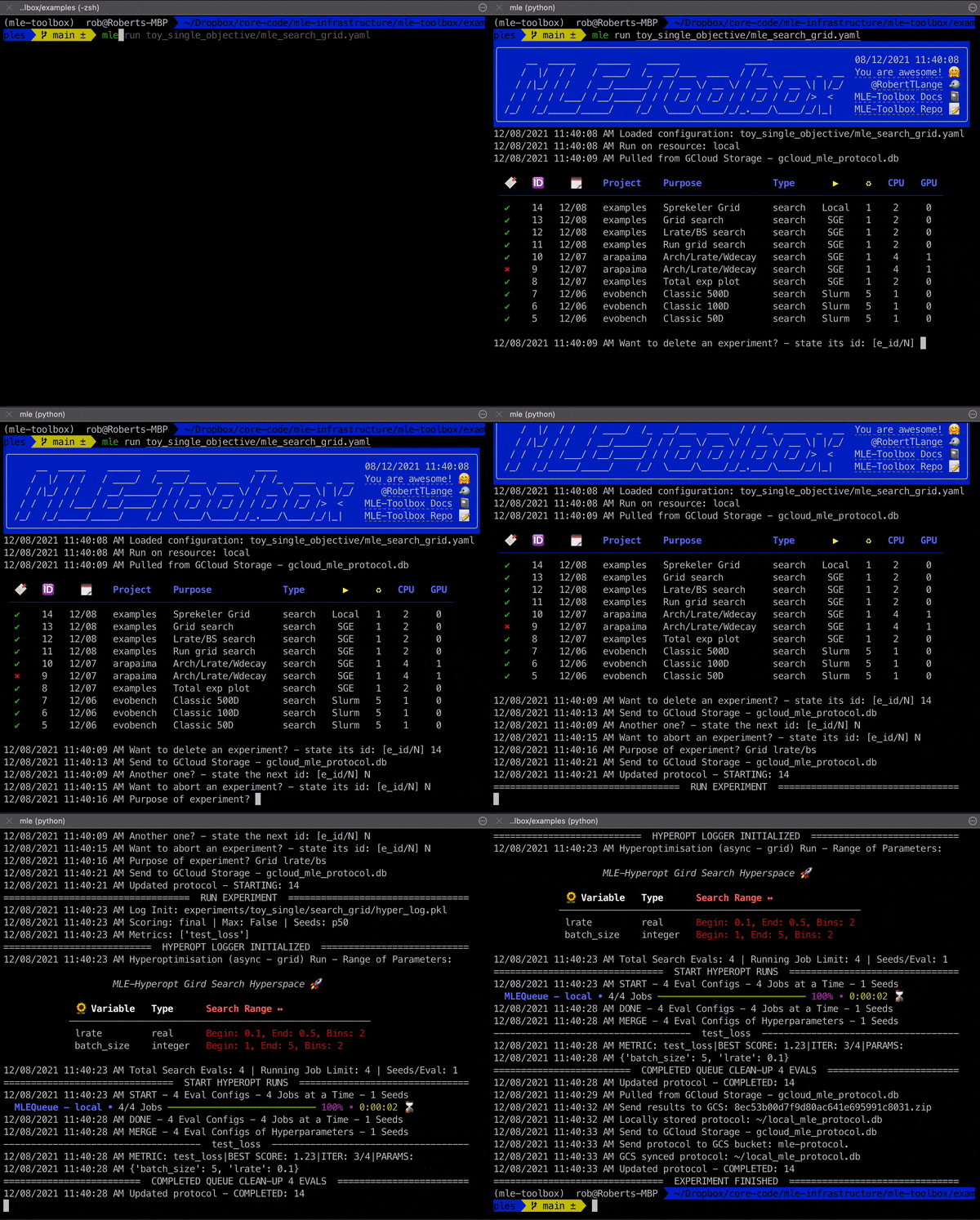
What Does The mle-toolbox Provide? 🧑🔧
- API for launching jobs on cluster/cloud computing platforms (Slurm, GridEngine, GCP).
- Common machine learning research experiment setups:
- Launching and collecting multiple random seeds in parallel/batches or async.
- Hyperparameter searches: Random, Grid, SMBO, PBT, Nevergrad, etc.
- Pre- and post-processing pipelines for data preparation/result visualization.
- Automated report generation for hyperparameter search experiments.
- Storage/retrieval of results and database in Google Cloud Storage Bucket.
- Resource monitoring with dashboard visualization.
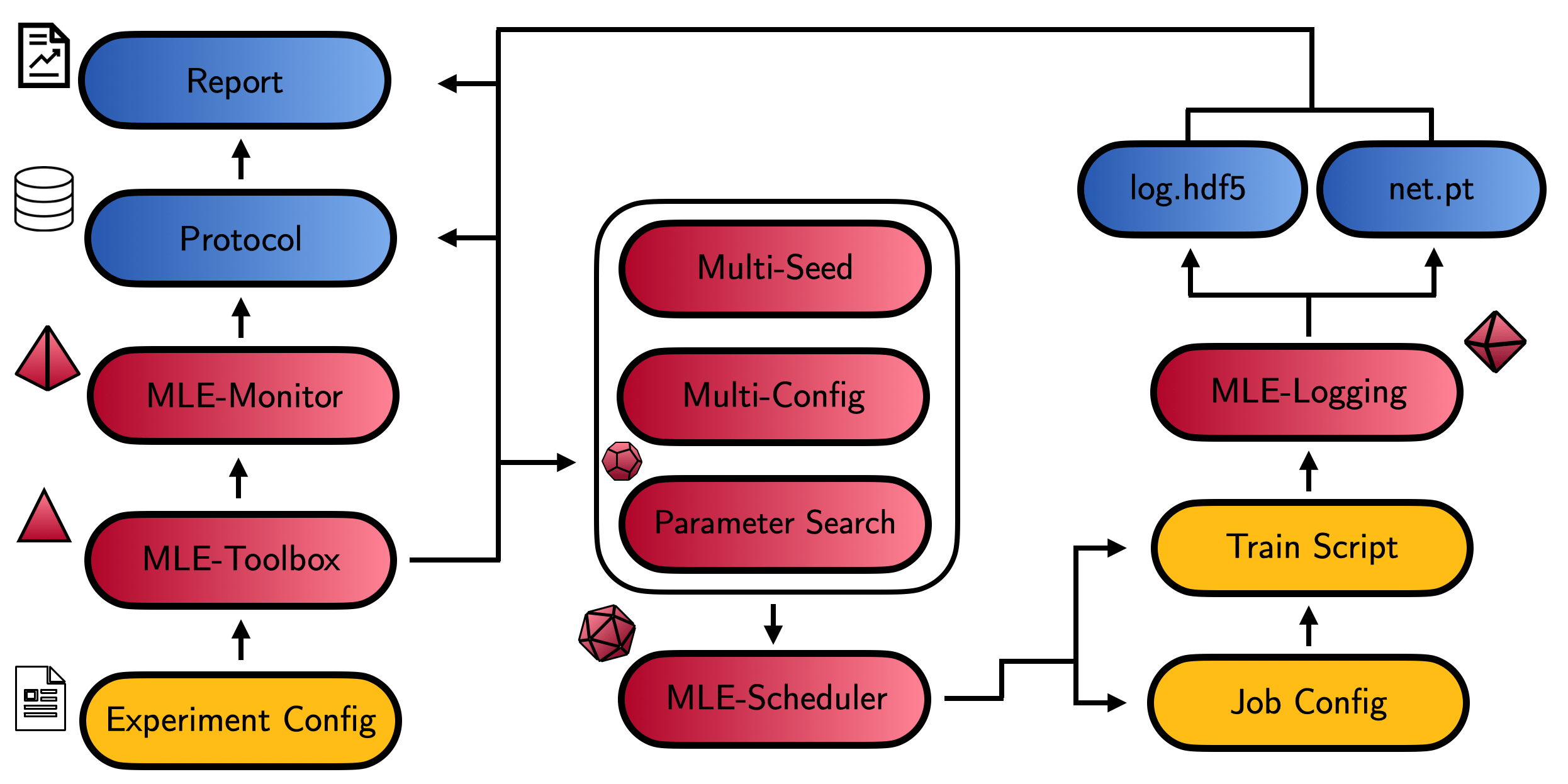
The 4 Step mle-toolbox Cooking Recipe 🍲
- Follow the instructions below to install the
mle-toolboxand set up your credentials/configuration. - Learn more about the individual infrastructure subpackages with the dedicated tutorial.
- Read the docs explaining the pillars of the toolbox & the experiment meta-configuration job
.yamlfiles . - Check out the example workflows 📄 to get started.
- Run your own experiment using the template files/project and
mle run.
Installation ⏳
If you want to use the toolbox on your local machine follow the instructions locally. Otherwise do so on your respective cluster resource (Slurm/SGE). A PyPI installation is available via:
pip install mle-toolbox
If you want to get the most recent commit, please install directly from the repository:
pip install git+https://github.com/mle-infrastructure/mle-toolbox.git@main
The Core Toolbox Subcommands 🌱
You are now ready to dive deeper into the specifics of experiment configuration and can start running your first experiments from the cluster (or locally on your machine) with the following commands:
| Command | Description | |
|---|---|---|
| 🚀 | mle run |
Start up an experiment (multi-config/seeds, search). |
| 🖥️ | mle monitor |
Monitor resource utilisation (mle-monitor wrapper). |
| 📥 | mle retrieve |
Retrieve experiment result from GCS/cluster. |
| 💌 | mle report |
Create an experiment report with figures. |
| ⏳ | mle init |
Setup of credentials & toolbox settings. |
| 🔄 | mle sync |
Extract all GCS-stored results to your local drive. |
| 🗂 | mle project |
Initialize a new project by cloning mle-project. |
| 📝 | mle protocol |
List a summary of the most recent experiments. |
You can find more documentation for each subcommand here.
Examples 📄 & Notebook Walkthroughs 📓
| Job Types | Description | |
|---|---|---|
| 📄 Single-Objective | multi-configs, hyperparameter-search |
Core experiment types. |
| 📄 Multi-Objective | hyperparameter-search |
Multi-objective tuning. |
| 📄 Multi Bash | multi-configs |
Bash-based jobs. |
| 📄 Quadratic PBT | hyperparameter-search |
PBT on toy quadratic surrogate. |
| 📄 Hyperband | hyperparameter-search |
Hyperband on toy polynomial problem. |
| Description | Colab | |
|---|---|---|
| 📓 Getting Started | Get started with the toolbox. | |
| 📓 Subpackages | Get started with the toolbox subpackages. | |
📓 MLExperiment |
Introduction to MLExperiment wrapper. |
|
| 📓 Evaluation | Evaluation of gridsearch results. | |
| 📓 GIF Animations | Walk through a set of animation helpers. | |
| 📓 Testing | Perform hypothesis tests on logs. | |
Acknowledgements & Citing the MLE-Infrastructure ✏️
If you use parts the mle-toolbox in your research, please cite it as follows:
@software{mle_infrastructure2021github,
  author = {Robert Tjarko Lange},
  title = {{MLE-Infrastructure}: A Set of Lightweight Tools for Distributed Machine Learning Experimentation},
  url = {http://github.com/mle-infrastructure},
  year = {2021},
}
Development 👷
You can run the test suite via python -m pytest -vv tests/. If you find a bug or are missing your favourite feature, feel free to create an issue and/or start contributing 🤗.
1 maintainer

Release files for mle-toolbox 0.3.5
For a detailed explanation of source distributions (sdists) and built distributions (wheels), please see the package formats documentation.
Source distribution (sdist)
| File | Size | Uploaded | |
|---|---|---|---|
| mle_toolbox-0.3.5.tar.gz | 56.8 kB | Details |
Built distribution (wheel)
| File | Interpreter | ABI | Platform | Reset |
|---|---|---|---|---|
| mle_toolbox-0.3.5-py3-none-any.whl | Python 3 | none | any | Details |
Total release size: 127.4 kB
Release files / mle_toolbox-0.3.5.tar.gz
| Download URL | mle_toolbox-0.3.5.tar.gz |
|---|---|
| Size | 56.8 kB |
| Tags | Source |
|
SHA-256 checksum How to use checksums |
cba71799d948d5ae2c566be3234c7622e8efe1d58e6c28004e83dc50c6e2476b
|
|
BLAKE2b-256 checksum How to use checksums |
940c6815f7d238193e47a0cd369453fb3bc9471bed2770c27993241156d14cf0
|
| Upload date | |
|
Uploaded using Trusted Publishing? What is trusted publishing? |
No |
| Uploaded via |
twine/5.1.1 CPython/3.12.5
|
Release files / mle_toolbox-0.3.5-py3-none-any.whl
| Download URL | mle_toolbox-0.3.5-py3-none-any.whl |
|---|---|
| Size | 70.6 kB |
| Tags | Python 3 |
|
SHA-256 checksum How to use checksums |
236a0f14dde7627504086dcb6ba6865c5252c30c8c7544a30fd2018764160dfc
|
|
BLAKE2b-256 checksum How to use checksums |
86bcf2ee3323b274a1fbd43822f8b010a17fece3aa5aeb8e5ea21effec7b5f34
|
| Upload date | |
|
Uploaded using Trusted Publishing? What is trusted publishing? |
No |
| Uploaded via |
twine/5.1.1 CPython/3.12.5
|














