
mocr





Meaningful Optical Character Recognition from identity cards with Deep Learning.
Introduction
mocr is a library that can be used to detect meaningful optical characters from identity cards. Code base is pure Python and works with 3.x versions. It has some low level dependencies such as Tesseract. mocr uses a pre-trained east detector with OpenCV and applies it’s Deep Learning techniques.
It has a pre-trained east detector inside the module and a custom trained model can be given as a parameter.
Prerequisites
Tessaract must be installed on your computer before using OCR. Please check installation link for details.
The other dependencies are listed on requirements.txt and will be installed when you install with pip.
Installation
From source
Install module using pip:
$ pip install mocr
Download the latest mocr library from: https://github.com/verifid/mocr
Install module using pip:
$ pip install -e .
Extract the source distribution and run:
$ python setup.py build
$ python setup.py install
Running Tests
The test suite can be run against a single Python version which requires pip install pytest and optionally pip install pytest-cov (these are included if you have installed dependencies from requirements.testing.txt)
To run the unit tests with a single Python version:
$ py.test -v
to also run code coverage:
$ py.test -v --cov-report html --cov=mocr
To run the unit tests against a set of Python versions:
$ tox
Sample Usage
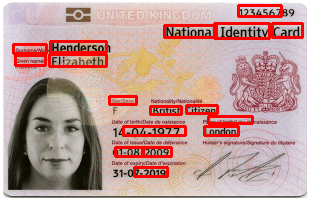
text_recognition Initiating the TextRecognizer with identity image and then finding the texts with their frames:
import os
from mocr import TextRecognizer

image_path = os.path.join('tests', 'data/sample_uk_identity_card.png')
east_path = os.path.join('mocr', 'model/frozen_east_text_detection.pb')

text_recognizer = TextRecognizer(image_path, east_path)
(image, _, _) = text_recognizer.load_image()
(resized_image, ratio_height, ratio_width, _, _) = text_recognizer.resize_image(image, 320, 320)
(scores, geometry) = text_recognizer.geometry_score(east_path, resized_image)
boxes = text_recognizer.boxes(scores, geometry)
results = text_recognizer.get_results(boxes, image, ratio_height, ratio_width)

# results: Meaningful texts with bounding boxesface_detection:
from mocr import face_detection

image_path = 'YOUR_IDENTITY_IMAGE_PATH'
face_image = face_detection.detect_face(image_path)
# face_image is the byte array detected and cropped image from original image
from mocr import face_detection
video_path = 'YOUR_IDENTITY_VIDEO_PATH'
face_image = face_detection.detect_face_from_video(video_path)
# face_image is the byte array detected and cropped image from original videoCLI
Sample command line usage
Optical Character Recognition
python -m mocr --image tests/data/sample_uk_identity_card.png --east tests/model/frozen_east_text_detection.pbFace detection from image file
python -m mocr --image-face 'tests/data/sample_de_identity_card.jpg'Face detection from video file
python -m mocr --video-face 'tests/data/face-demographics-walking.mp4'Screenshots
Before
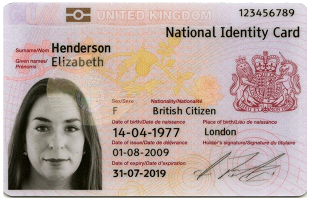
After
1 maintainer

Metadata
1 maintainer
Release files for mocr 0.4.0
For a detailed explanation of source distributions (sdists) and built distributions (wheels), please see the package formats documentation.
Built distribution (wheel)
| File | Interpreter | ABI | Platform | Reset |
|---|---|---|---|---|
| mocr-0.4.0-py3-none-any.whl | Python 3 | none | any | Details |
Release files / mocr-0.4.0-py3-none-any.whl
| Download URL | mocr-0.4.0-py3-none-any.whl |
|---|---|
| Size | 146.4 kB |
| Tags | Python 3 |
|
SHA-256 checksum How to use checksums |
93cd61f801d9089b17e197343fc76812490244d48e4985d591c8f572f6a31c40
|
|
BLAKE2b-256 checksum How to use checksums |
2fb6ab8b28447d353361c446b7a89228e0f9b004b56a3161012470e5678c9e63
|
| Upload date | |
|
Uploaded using Trusted Publishing? What is trusted publishing? |
No |
| Uploaded via |
twine/3.1.1 pkginfo/1.5.0.1 requests/2.24.0 setuptools/41.0.1 requests-toolbelt/0.9.1 tqdm/4.32.1 CPython/3.7.3
|














