
Model Card Toolkit


Project description
Model Card Toolkit
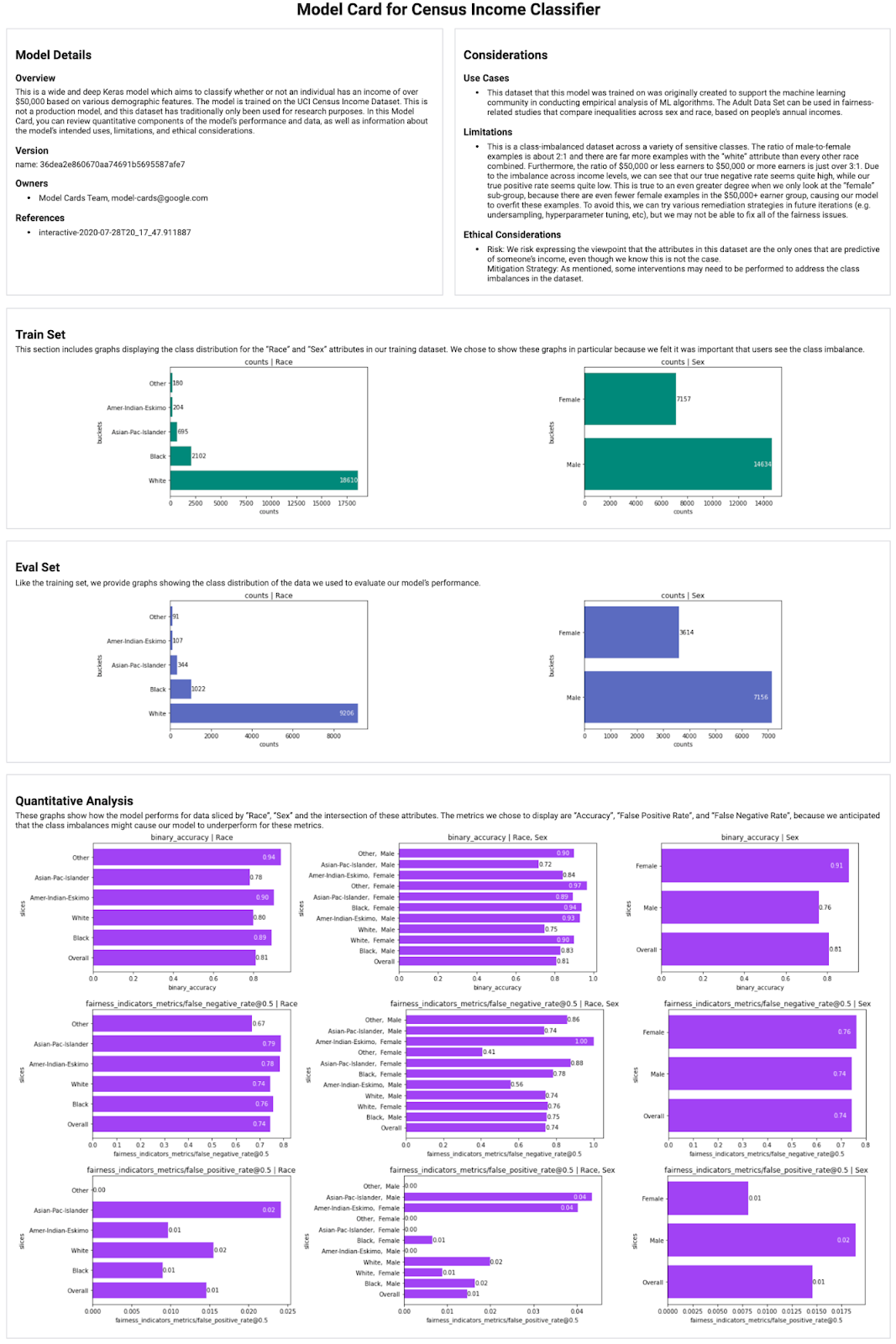
The Model Card Toolkit (MCT) streamlines and automates generation of Model Cards [1], machine learning documents that provide context and transparency into a model's development and performance. Integrating the MCT into your ML pipeline enables the sharing model metadata and metrics with researchers, developers, reporters, and more.
Some use cases of model cards include:
- Facilitating the exchange of information between model builders and product developers.
- Informing users of ML models to make better-informed decisions about how to use them (or how not to use them).
- Providing model information required for effective public oversight and accountability.
Installation
The Model Card Toolkit is hosted on PyPI, and can be installed with pip install model-card-toolkit (or pip install model-card-toolkit --use-deprecated=legacy-resolver for versions of pip starting with 20.3). See the installation guide for more details.
Getting Started
import model_card_toolkit

# Initialize the Model Card Toolkit with a path to store generate assets
model_card_output_path = ...
mct = model_card_toolkit.ModelCardToolkit(model_card_output_path)

# Initialize the model_card_toolkit.ModelCard, which can be freely populated
model_card = mct.scaffold_assets()
model_card.model_details.name = 'My Model'

# Write the model card data to a JSON file
mct.update_model_card_json(model_card)

# Return the model card document as an HTML page
html = mct.export_format()
Automatic Model Card Generation
If your machine learning pipeline uses the TensorFlow Extended (TFX) platform or ML Metadata, you can automate model card generation. See this demo notebook for a demonstration of how to integrate the MCT into your pipeline.
Schema
Model cards are stored in JSON as an intermediate format. You can see the model card JSON schema in the schema directory. Note that this is not a finalized path and may be hosted elsewhere in the future.
References
Release history Release notifications | RSS feed


Download files
Download the file for your platform. If you're not sure which to choose, learn more about installing packages.
Source Distribution
Built Distribution
Filter files by name, interpreter, ABI, and platform.
If you're not sure about the file name format, learn more about wheel file names.
Copy a direct link to the current filters
File details
Details for the file model-card-toolkit-1.2.0.tar.gz.
File metadata
- Download URL: model-card-toolkit-1.2.0.tar.gz
- Upload date:
- Size: 49.3 kB
- Tags: Source
- Uploaded using Trusted Publishing? No
- Uploaded via: twine/3.4.1 importlib_metadata/4.5.0 pkginfo/1.7.0 requests/2.25.1 requests-toolbelt/0.9.1 tqdm/4.61.1 CPython/3.9.9
File hashes
| Algorithm | Hash digest | |
|---|---|---|
| SHA256 |
ac6521d7df30a374fadd7716c326d1b02d1be388565d8060a07777ede87940a0
|
|
| MD5 |
55cae72189af73520d21881f416d067b
|
|
| BLAKE2b-256 |
7697d577593eba1ed186ac6b469a788501c9ee59917e8c7f000ec6fd3fa43a03
|
File details
Details for the file model_card_toolkit-1.2.0-py3-none-any.whl.
File metadata
- Download URL: model_card_toolkit-1.2.0-py3-none-any.whl
- Upload date:
- Size: 67.0 kB
- Tags: Python 3
- Uploaded using Trusted Publishing? No
- Uploaded via: twine/3.4.1 importlib_metadata/4.5.0 pkginfo/1.7.0 requests/2.25.1 requests-toolbelt/0.9.1 tqdm/4.61.1 CPython/3.9.9
File hashes
| Algorithm | Hash digest | |
|---|---|---|
| SHA256 |
b2e85510e42ac3a099653565722c896d48e41fea0c66d2d0265bf2ba6281a49c
|
|
| MD5 |
27357ff2ef9b9907bce37225307e01b5
|
|
| BLAKE2b-256 |
5bffef4b59889769aa142a8ba76db9250dbf8b9e06dd181aae2b9bd82834b3b1
|






