
First of All
The awareness of low-level implementation details brings the appreciation of an abstraction and the intuitive explanation for it.
This is a saying from my idol in the field of Programming Language.
I present it here, in case anyone prejudging the reliability of this project.
THIS PROJECT SHOULD WORK PERFECTLY UNDER ANY SUPPPORTED PYTHON VERSION(>=3.5), FOR ALL 3-RD PARTY LIBRARIES SUPPORTED IN ANY RELIABLE CPYTHON DISTRIBUTION.
There is no hack but simple static code analyses and ast transformations, and a hack usually contains inspect.* that I'll never use in this project.
Moshmosh



An advanced syntax extension system implemented in pure python.
pip install -U moshmosh-base --no-compile
Note that --no-compile is required.
Preview
Working with IPython
You should copy moshmosh_ipy.py
to $USER/.ipython/profile_default/startup/.
If this directory does not exist, use command ipython profile create to instantiate.
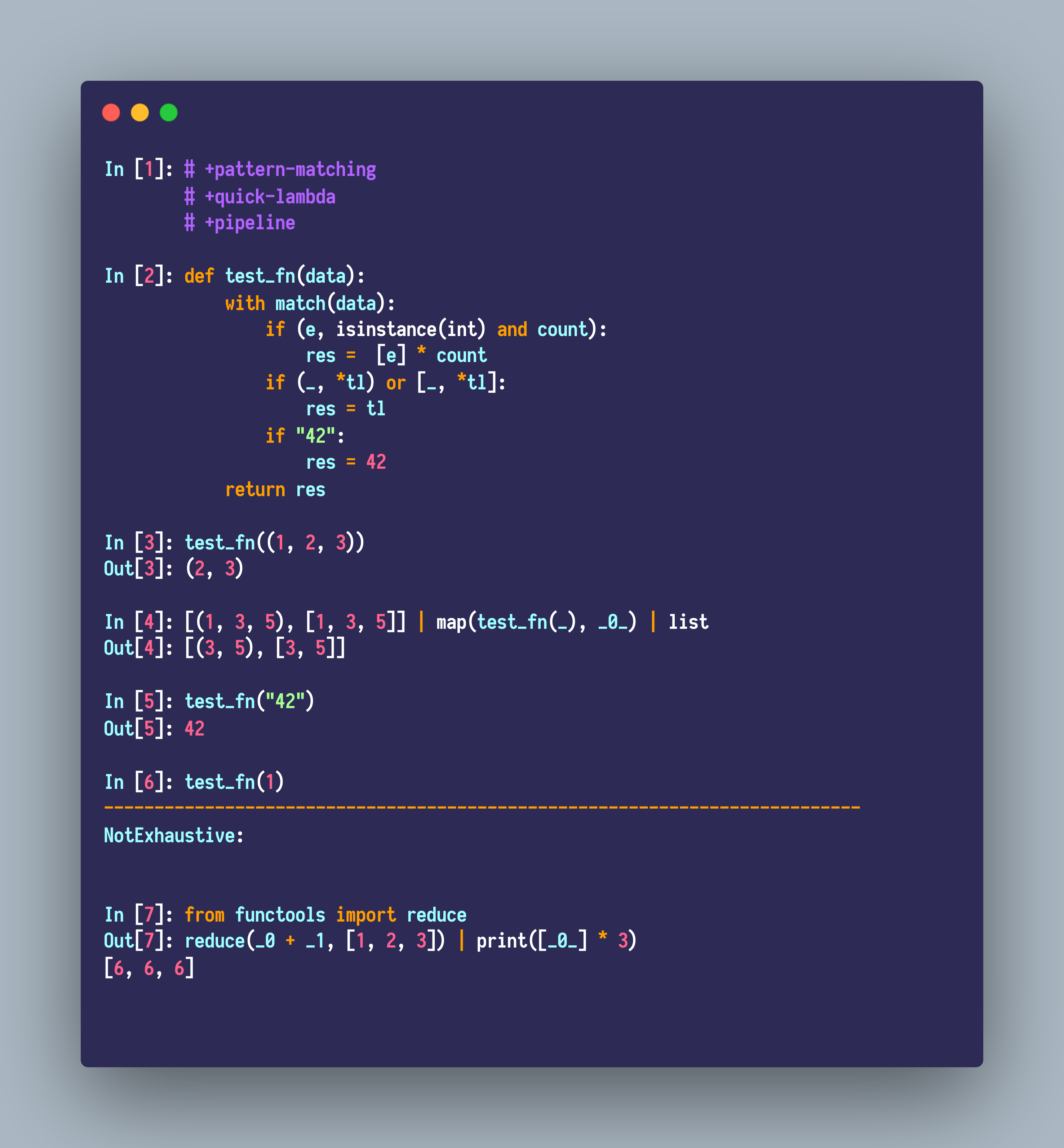
Some examples about pattern matching, pipelines and quick lambdas:
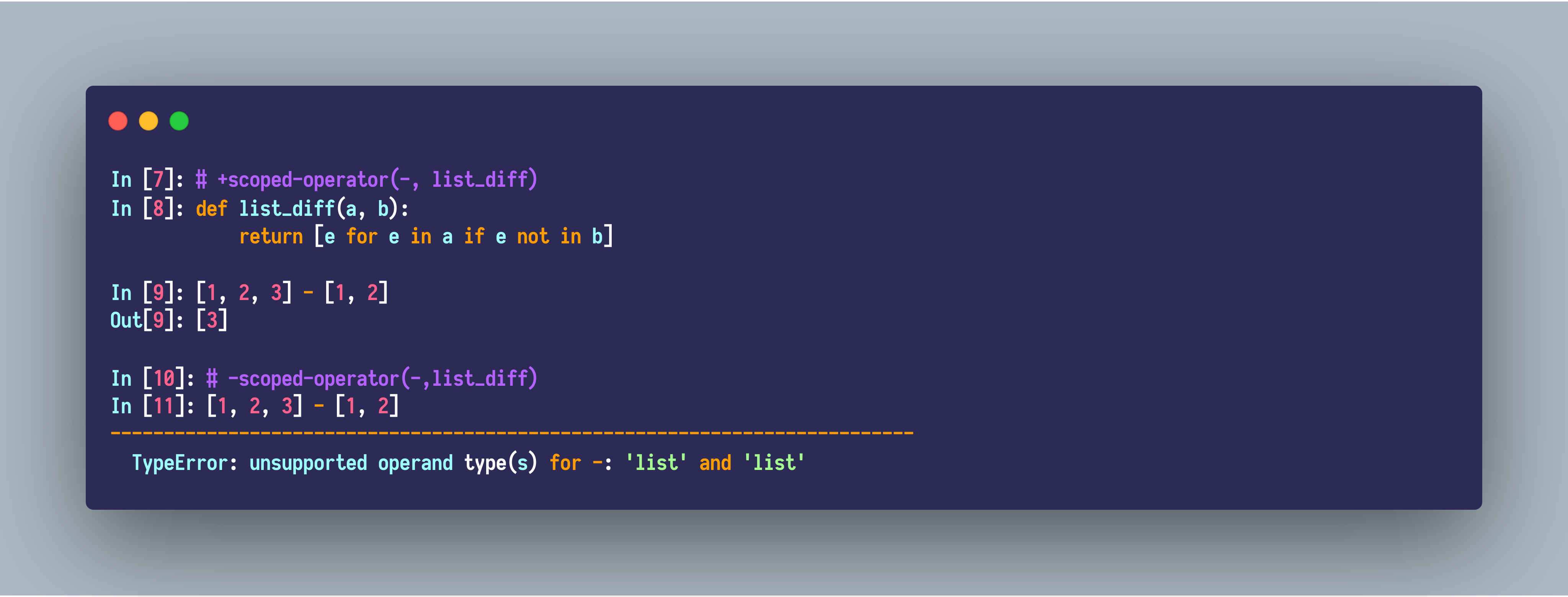
Some examples about the scoped operators:
Working with regular Python files
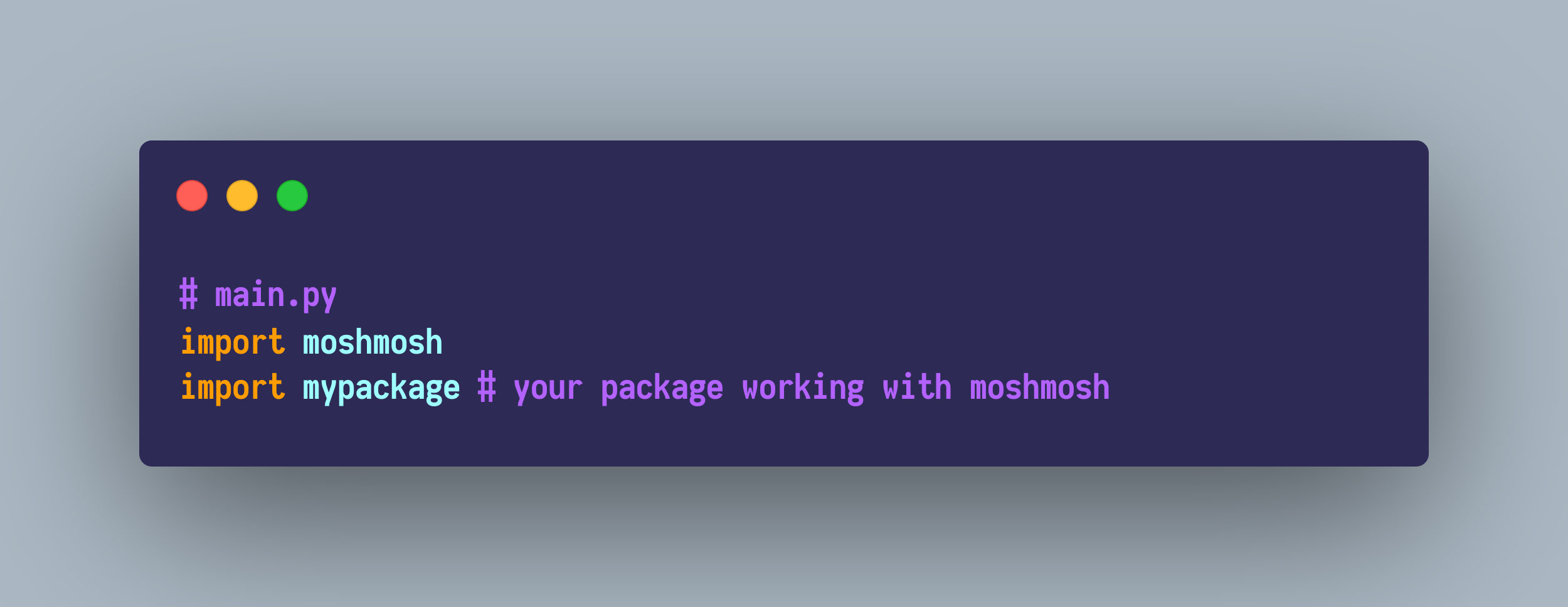
Import moshmosh in your main module:
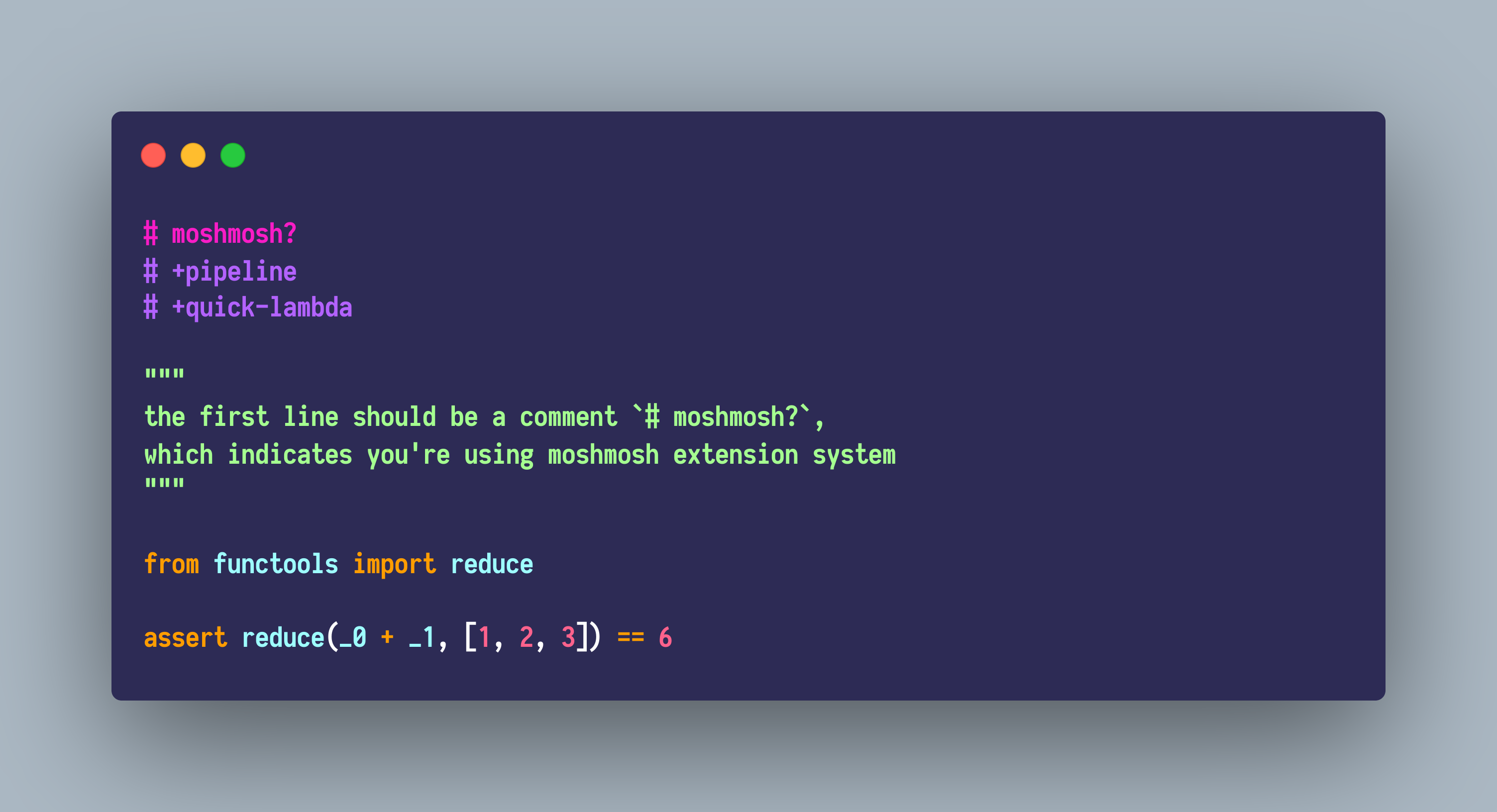
Then, in mypackage.py, start coding with a pragma comment # moshmosh?, then you can use moshmosh extension system.
Case Study : Pattern Matching
The matching protocol which stems from Python-ideas mailing list is introduced in, which means you can define your own patterns conveniently. The link is here.
# moshmosh?
# +pattern-matching

class GreaterThan:
    def __init__(self, v):
        self.v = v

    def __match__(self, cnt: int, to_match):
        if isinstance(to_match, int) and cnt is 0 and to_match > self.v:
            return () # matched
        # 'return None' indicates 'unmatched'

with match(114, 514):
    if (GreaterThan(42)() and a, b):
        print(b, a)
# 514 114
Note that the matching clauses should be exhaustive,
otherwise, a moshmosh.extensions.pattern_matching.runtime.NotExhaustive
might get raised.
The supported Patterns are listed here, which is of course much more powerful than most programming languages.
- And pattern:
pat1 and pat2 and pat3 ... - Or pattern:
pat1 or pat2 or pat3... - Pin pattern:
pin(value), this is quite useful. See Elixir Pin Operator - Literal pattern:
1, "str", 1+2j, (1, 2) - As pattern:
a, var - Wildcard:
_ - Guard:
when(cond1, cond2, cond3) - Nested patterns:
- Tuple:
(pat1, pat2, pat3), (pat1, *pat2, pat3) - List:
[pat1, pat2, pat3], [pat1, *pat2, pat3] - Recogniser:
Cons(pat1, pat2, pat3), note that, the functionCons.__match__(<n arg>, value_to_match)is exact the protocol.
- Tuple:
The pattern matching should be more efficient than those hand-written codes without ugly optimizations.
Besides, Moshmosh's pattern matching is orders of magnitude faster than any other alternatives.
Case Study : Template-Python
This is relatively a simple quasiquote implementation, inspired by MetaOCaml. It does not support manual splices or nested quotations, but the function arguments are automatically spliced.
# moshmosh?
# +template-python

@quote
def f(x):
    x + 1
    x = y + 1

from moshmosh.ast_compat import ast
from astpretty import pprint

stmts = f(ast.Name("a"))
pprint(ast.fix_missing_locations(stmts[0]))
pprint(ast.fix_missing_locations(stmts[1]))

# =>
Expr(
    lineno=7,
    col_offset=4,
    value=BinOp(
        lineno=7,
        col_offset=4,
        left=Name(lineno=7, col_offset=4, id='a', ctx=Load()),
        op=Add(),
        right=Num(lineno=7, col_offset=8, n=1),
    ),
)
Assign(
    lineno=8,
    col_offset=4,
    targets=[Name(lineno=8, col_offset=4, id='a', ctx=Store())],
    value=BinOp(
        lineno=8,
        col_offset=8,
        left=Name(lineno=8, col_offset=8, id='y', ctx=Load()),
        op=Add(),
        right=Num(lineno=8, col_offset=12, n=1),
    ),
)
Case Study: Lazy Import
# moshmosh?
# +lazy-import
import numpy as np
# -lazy-import

# in fact numpy is not imported here,
# and once you use it, it gets imported.

def arr10():
    # The first time call
    # arr10 will enforce the import of numpy.
    return np.zeros(10)
After the lazy modules are actually imported, there's no overhead to access their members.
However, please only import modules when using lazy-import.
The use case is about the necessary cross-import when you want to organise your codebase in a more fine-grained way.
Acknowledgements
- future-fstrings
- Pattern matching in Python
- older implementations
- search "pattern matching" at Python-ideas.
1 maintainer

Metadata
1 maintainer
Release files for moshmosh-base 0.3.4
For a detailed explanation of source distributions (sdists) and built distributions (wheels), please see the package formats documentation.
Source distribution (sdist)
| File | Size | Uploaded | |
|---|---|---|---|
| moshmosh-base-0.3.4.zip | 41.4 kB | Details |
Release files / moshmosh-base-0.3.4.zip
| Download URL | moshmosh-base-0.3.4.zip |
|---|---|
| Size | 41.4 kB |
| Tags | Source |
|
SHA-256 checksum How to use checksums |
1da2796e8444f83b27f5b73f9dbe21276bba7f86267f2fd753b566bb4cb26346
|
|
BLAKE2b-256 checksum How to use checksums |
fc279cbae686caeb0a9dad592db452d752f24b010176a6d1583d2c472aa4d6c4
|
| Upload date | |
|
Uploaded using Trusted Publishing? What is trusted publishing? |
No |
| Uploaded via |
twine/3.1.1 pkginfo/1.5.0.1 requests/2.22.0 setuptools/41.4.0 requests-toolbelt/0.9.1 tqdm/4.36.1 CPython/3.7.4
|














