
MSColorLog
A highly customizable package that can ouput colored logs to the console.
Usage:
Importing the package:
import mscolorlog as cl
Initializing the logger:
logger = cl.Logging([LOGGING LEVEL], [LOGGING ELEMENT1], [LOGGING ELEMENT2], ...)
Logging Levels:
- Logging.DEBUG
- Logging.INFO
- Logging.WARNING
- Logging.ERROR
- Logging.CRITICAL
NOTICE that the Logger will only output logs that are equal to or higher than the logging level.
Logging Elements:
Format: "&MODE:BACKGROUND:FOREGROUND:$VALUE" or "&MODE:BACKGROUND:FOREGROUND:TEXT"
Modes:
- default
- highlight
- underline
- blink
- reverse
- invisible
NOTICE that the modes may not compatible for all consoles
Leave blank to use default mode
Back/Foreground colors:
- black
- red
- green
- yellow
- blue
- purple
- cyan
- white
Leave blank to use default color
Values:
- $info.processName
- $info.pid
- $info.time
- $type.type (Log level name)
- $message.message (Log message)
Next, more values will be updated
You can also put your own text in the value section and the logger will output the text instead of the value.
NOTICE that "$" means the value is a variable, and the logger will output the value of the variable. and "$$" means a "$" sign.
Also, color section can be omitted, and the logger will use the default color.
For example:
&underline::yellow:$$123
&::red:$$123
&:::$$123
$$123
The logger will output: $123 but with different colors and patterns.
Change the color of log level:
The Color of the Log Level can be changed by: If the function isn't called, the logger will use the default color.
logger.setColor(MODE=PATTERN, MODEMsgToo=True/False, ...)
The PATTERN can be any color in the color list above, the format is the same as the logging elements.
The MODEMsgToo means whether the logger will change the pattern of the log message too.
For example:
logger.setColor(info="&::red:", infoMsgToo=True)
The logger will change the color of the log level INFO to red, and the color of the log message to red too. If you have set the color of the log message, this will override the previous setting. You can call the function multiple times.
Change the level of logger:
You can use the following code to change the level of the logger:
logger.setMode(MODE)
Output Log Messages:
Use the following code to output log messages:
logger.pdebug(MESSAGE)
logger.pinfo(MESSAGE)
logger.pwarning(MESSAGE)
logger.perror(MESSAGE)
logger.pcritical(MESSAGE)
Example:
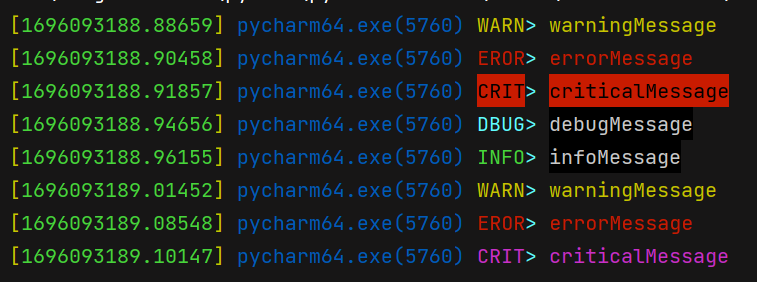
Use the following code to output log messages like the image above:
import mscolorlog as cl

if __name__ == "__main__":
    log = cl.Logging(cl.Logging.WARNING,
                     "&::yellow:[", "&::green:$info.time", "&::yellow:] ",
                     "&::blue:$info.processName",
                     "&::blue:(", "&::blue:$info.pid", "&::blue:) ",
                     "$type.type", "&::cyan:> ", "&:black:white:$message.message")

    log.pdebug("debugMessage")
    log.pinfo("infoMessage")
    log.pwarning("warningMessage")
    log.perror("errorMessage")
    log.pcritical("criticalMessage")

    log.setMode(cl.Logging.DEBUG)
    log.setColor(critical="&::purple:", criticalMsgToo=False)

    log.pdebug("debugMessage")
    log.pinfo("infoMessage")
    log.pwarning("warningMessage")
    log.perror("errorMessage")
    log.pcritical("criticalMessage")
Life is short, I use Python.
HAVE FUN!
1 maintainer

Release files for mscolorlog 1.0.1
For a detailed explanation of source distributions (sdists) and built distributions (wheels), please see the package formats documentation.
Source distribution (sdist)
| File | Size | Uploaded | |
|---|---|---|---|
| mscolorlog-1.0.1.tar.gz | 79.9 kB | Details |
Built distribution (wheel)
| File | Interpreter | ABI | Platform | Reset |
|---|---|---|---|---|
| mscolorlog-1.0.1-py3-none-any.whl | Python 3 | none | any | Details |
Total release size: 90.2 kB
Release files / mscolorlog-1.0.1.tar.gz
| Download URL | mscolorlog-1.0.1.tar.gz |
|---|---|
| Size | 79.9 kB |
| Tags | Source |
|
SHA-256 checksum How to use checksums |
3414b0dd869460102f3f082966ef490663cfc5c817f16cb1c415ebd021c9bfde
|
|
BLAKE2b-256 checksum How to use checksums |
4f14484df9a3add790b2aaa33b7b733064c87bb4cf16a42f04fbd60aaf860381
|
| Upload date | |
|
Uploaded using Trusted Publishing? What is trusted publishing? |
No |
| Uploaded via |
twine/4.0.2 CPython/3.8.6
|
Release files / mscolorlog-1.0.1-py3-none-any.whl
| Download URL | mscolorlog-1.0.1-py3-none-any.whl |
|---|---|
| Size | 10.3 kB |
| Tags | Python 3 |
|
SHA-256 checksum How to use checksums |
3d747317cd886f032d4fcd44608027dbfc5c02060e6109ec825e410faa132fdc
|
|
BLAKE2b-256 checksum How to use checksums |
fb2e6a337b4744625345c58edf5ceef685d2723be95abc8bd2fe5ebced62c1be
|
| Upload date | |
|
Uploaded using Trusted Publishing? What is trusted publishing? |
No |
| Uploaded via |
twine/4.0.2 CPython/3.8.6
|













