
multiplex
View output of multiple processes, in parallel, in the console, with an interactive TUI
Installation
pip install multiplex
# or better yet
pipx install multiplex
Python 3.7 or greater is required.
Examples
Parallel Execution Of Commands
mp \
    './some-long-running-process.py --zone z1' \
    './some-long-running-process.py --zone z2' \
    './some-long-running-process.py --zone z3'
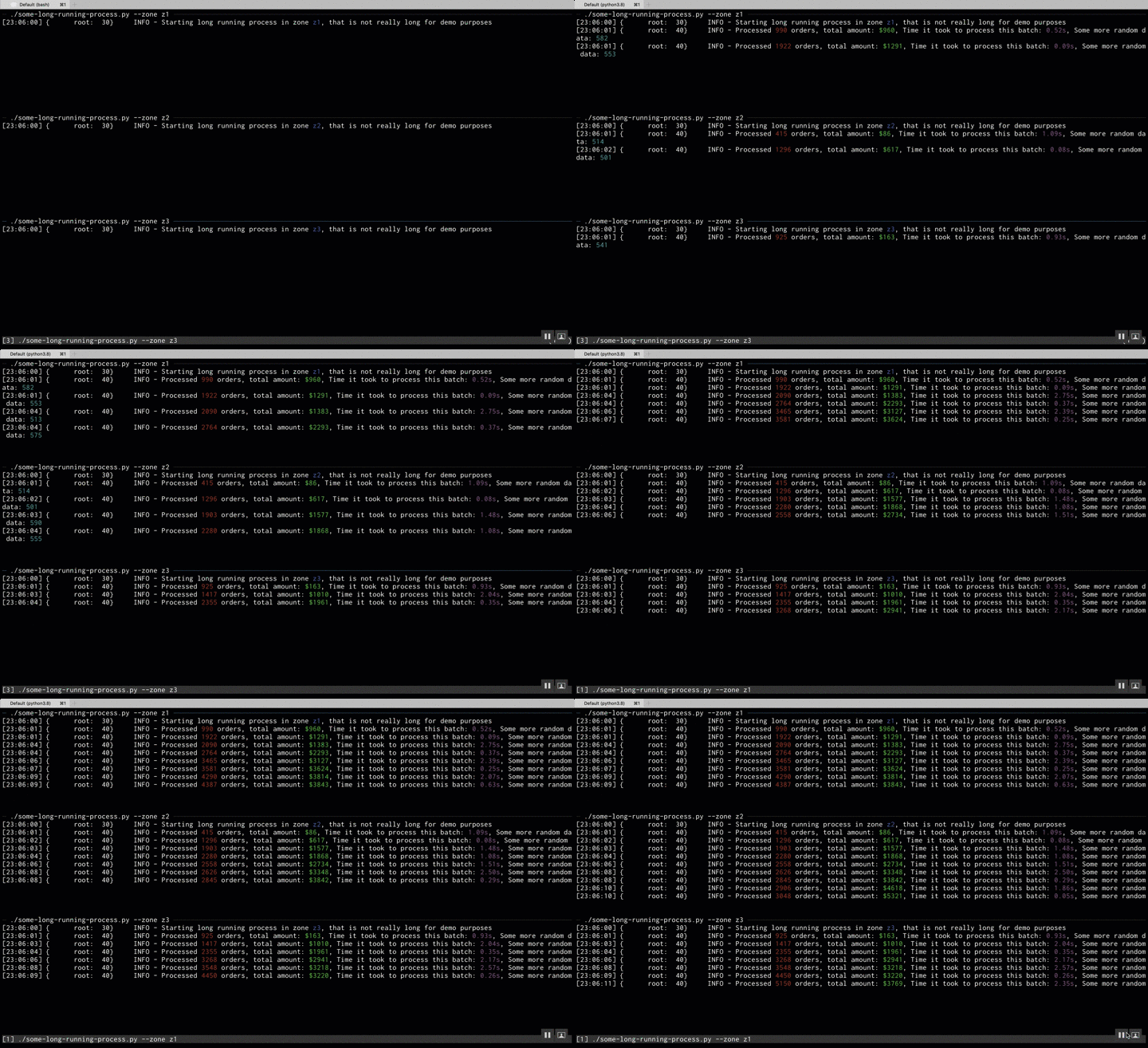
You can achive the same effect using Python API like this:
from multiplex import Multiplex

mp = Multiplex()
for zone in ['z1', 'z2', 'z3']:
    mp.add(f"./some-long-running-process.py --zone {zone}")
mp.run()
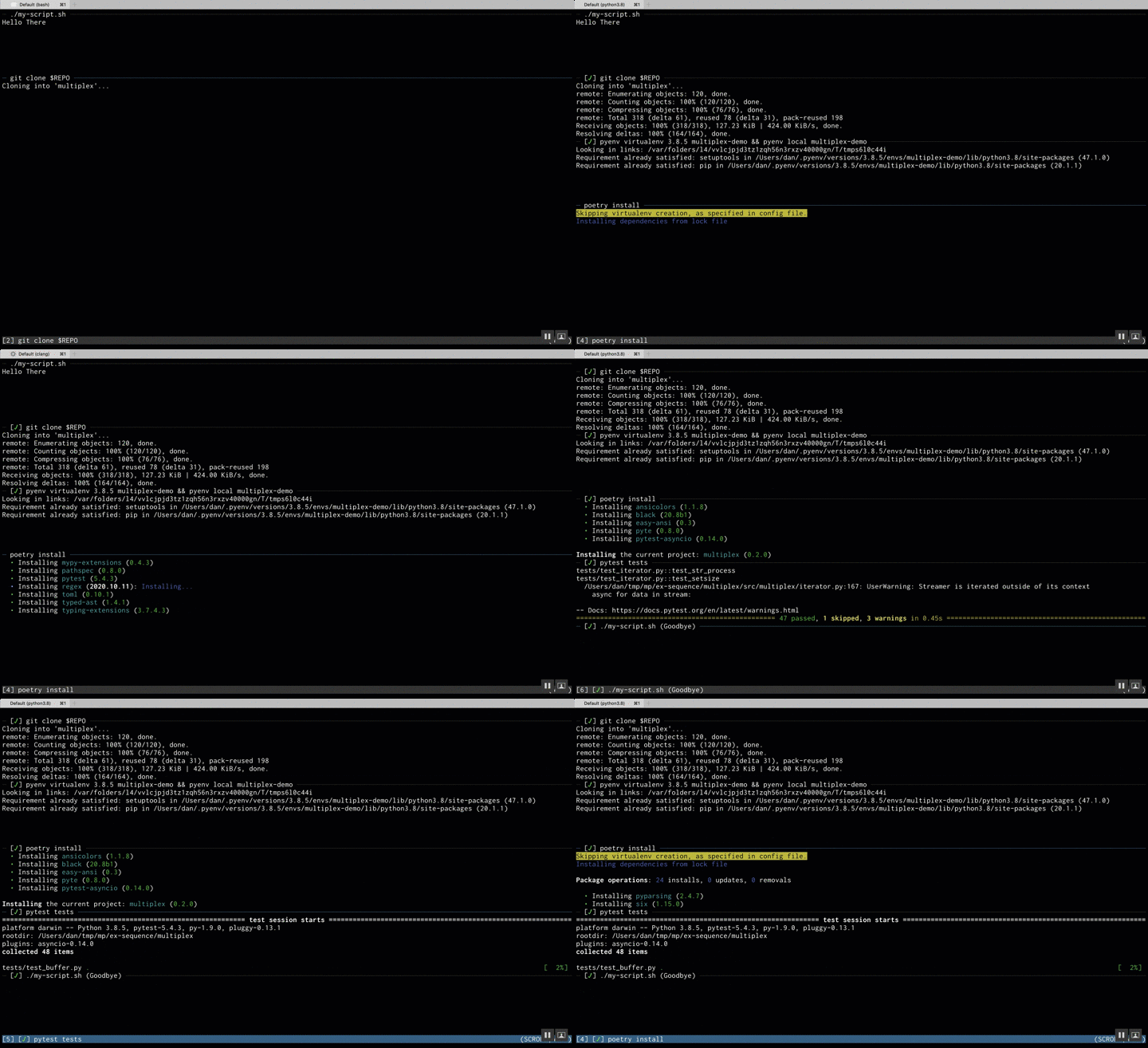
Dynamically Add Commands
my-script.sh:
#!/bin/bash -e
echo Hello There

export REPO='git@github.com:dankilman/multiplex.git'

mp 'git clone $REPO'
mp 'pyenv virtualenv 3.8.5 multiplex-demo && pyenv local multiplex-demo'
cd multiplex
mp 'poetry install'
mp 'pytest tests'

mp @ Goodbye -b 0
And then running:
mp ./my-script.sh -b 7
Python Controller
An output similar to the first example can be achieved from a single process using the Python Controller API.
import random
import time
import threading

from multiplex import Multiplex, Controller

CSI = "\033["
RESET = CSI + "0m"
RED = CSI + "31m"
GREEN = CSI + "32m"
BLUE = CSI + "34m"
MAG = CSI + "35m"
CYAN = CSI + "36m"

mp = Multiplex()

controllers = [Controller(f"zone z{i+1}", thread_safe=True) for i in range(3)]

for controller in controllers:
    mp.add(controller)

def run(index, c):
    c.write(
        f"Starting long running process in zone {BLUE}z{index}{RESET}, "
        f"that is not really long for demo purposes\n"
    )
    count1 = count2 = 0
    while True:
        count1 += random.randint(0, 1000)
        count2 += random.randint(0, 1000)
        sleep = random.random() * 3
        time.sleep(sleep)
        c.write(
            f"Processed {RED}{count1}{RESET} orders, "
            f"total amount: {GREEN}${count2}{RESET}, "
            f"Time it took to process this batch: {MAG}{sleep:0.2f}s{RESET}, "
            f"Some more random data: {CYAN}{random.randint(500, 600)}{RESET}\n"
        )

for index, controller in enumerate(controllers):
    thread = threading.Thread(target=run, args=(index+1, controller))
    thread.daemon = True
    thread.start()

mp.run()

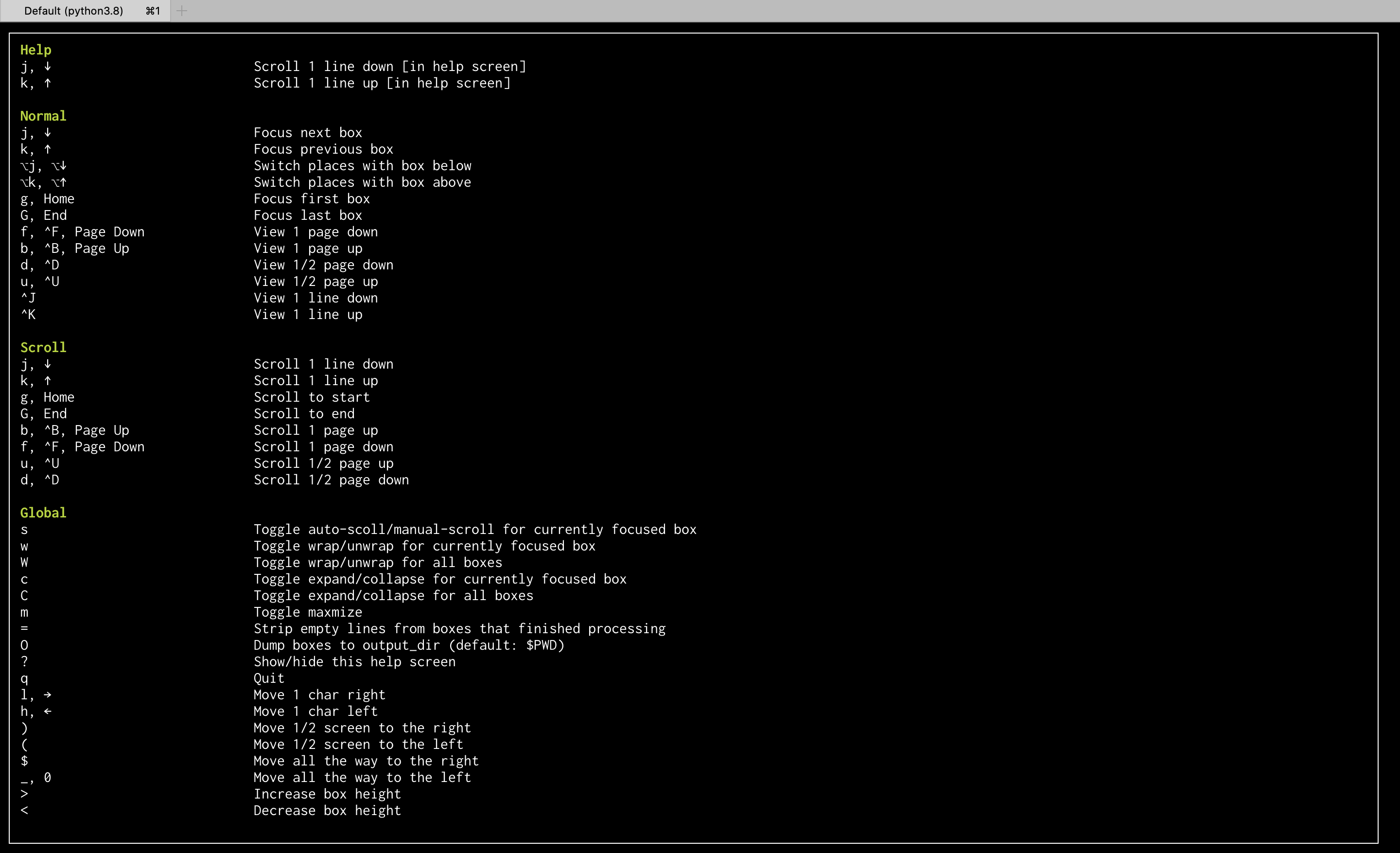
Help Screen
Type ? to toggle the help screen.
Why Not Tmux?
In short, they solve different problems.
tmux is a full blown terminal emulator multiplexer.
multiplex on the other hand, tries to optimize for a smooth experience in navigating output from several sources.
tmux doesn't have any notion of scrolling panes. That is to say, the layout contains all panes at any
given moment (unless maximized).
In multiplex, current view will display boxes that fit current view, but you can have many more,
and move around boxes using less inspired keys such as j, k, g, G, etc...
Another aspect is that keybindigs for moving around are much more ergonomic (as they are in less) because
multiplex is not a full terminal emulator, so it can afford using single letter keyboard bindings (e.g. g for
go to beginning)
1 maintainer

Metadata
1 maintainer
Release files for multiplex 0.6.1
For a detailed explanation of source distributions (sdists) and built distributions (wheels), please see the package formats documentation.
Source distribution (sdist)
| File | Size | Uploaded | |
|---|---|---|---|
| multiplex-0.6.1.tar.gz | 28.3 kB | Details |
Built distribution (wheel)
| File | Interpreter | ABI | Platform | Reset |
|---|---|---|---|---|
| multiplex-0.6.1-py3-none-any.whl | Python 3 | none | any | Details |
Total release size: 60.2 kB
Release files / multiplex-0.6.1.tar.gz
| Download URL | multiplex-0.6.1.tar.gz |
|---|---|
| Size | 28.3 kB |
| Tags | Source |
|
SHA-256 checksum How to use checksums |
4fe4a89eaeae6b33d199e772dda211ac1c3de10438c4534b790860a291c722dc
|
|
BLAKE2b-256 checksum How to use checksums |
f7fd4a15d1cf50e47e6d14698a2c2171f40cba2fbd9d14075dd6e87e057bbe46
|
| Upload date | |
|
Uploaded using Trusted Publishing? What is trusted publishing? |
No |
| Uploaded via |
twine/4.0.2 CPython/3.7.11
|
Release files / multiplex-0.6.1-py3-none-any.whl
| Download URL | multiplex-0.6.1-py3-none-any.whl |
|---|---|
| Size | 31.9 kB |
| Tags | Python 3 |
|
SHA-256 checksum How to use checksums |
23dc044fd84367a0b6953480c0a266c73bf57892e12067a682d42171f158757c
|
|
BLAKE2b-256 checksum How to use checksums |
57f796e894de861ba265fdc95365219dfaf27d0c09648451b38a25b0bea88236
|
| Upload date | |
|
Uploaded using Trusted Publishing? What is trusted publishing? |
No |
| Uploaded via |
twine/4.0.2 CPython/3.7.11
|














