
THIS REPOSITORY COMES WITH ZERO GUARANTEES! USE AT YOUR OWN RISK!
GUI version of CLI multiwallet.
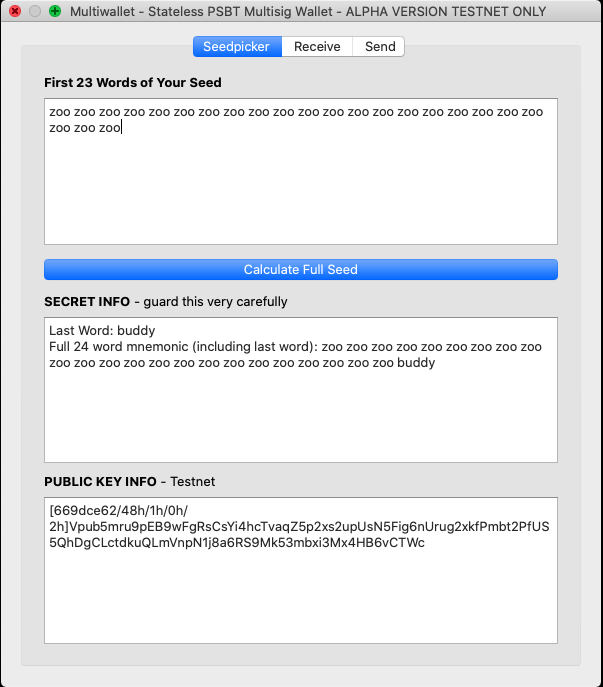
Seedpicker
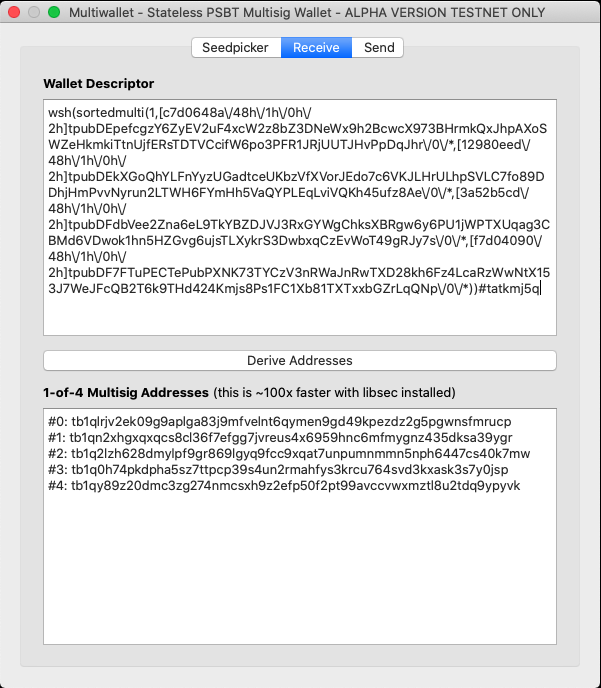
Recieve
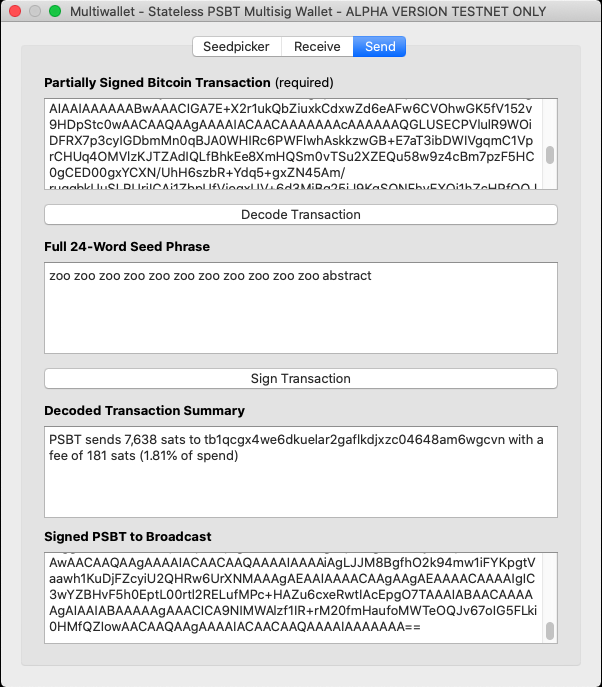
Send
Install
Telegram Community Chat Group
Ask Qs here: https://t.me/multiwallet
Pillow (for QR Codes)
Mac:
$ brew install libtiff libjpeg webp little-cms2
Ubuntu:
$ sudo apt-get install python3-dev python3-setuptools apt-get install libtiff5-dev libjpeg8-dev libopenjp2-7-dev zlib1g-dev libfreetype6-dev liblcms2-dev libwebp-dev tcl8.6-dev tk8.6-dev python3-tk libharfbuzz-dev libfribidi-dev libxcb1-dev
For more see instructions here
Multiwallet
Easy
Downloadable binary link here (MacOS only):
https://github.com/mflaxman/multiwallet/releases
Medium
$ pip3 install multiwallet
$ multiwallet_gui
Advanced
git clone https://github.com/mflaxman/multiwallet.git
cd multiwallet
python3 -m virtualenv .venv3
source .venv3/bin/activate
python3 setup.py develop
python3 multiwallet_gui/app.py
Roadmap:
- Add support for choosing other checksum words
- Add detailed TX view (not just summary) to UI
- Add QR encode on address verification
- Add QR gifs
- Add units (sats/BTC) toggle
- Test/release on multiple OS
- Better form handling/validation
- Support arbitrary paths
- Add libsec
- Add webcam on receive/send for qrdecode
- Sign binaries
- Dark mode
- Reproducible build
Maintainer Notes for Releases
Make a new release branch:
$ git checkout -b v0.x.x
Commit your changes, being sure to bump the version number in setup.py.
Basic tests:
$ black --check . && flake8 .
Make a downloadable MacOS binary to upload to GitHub:
$ ./make_macos_release.sh
Go to GitHub release page and use tag version v0.x.x and target v0.x.x (target is the branch name which is independent of the tag).
Write a title, description, and drag the binary from the previous step.
Hit Publish release.
Update PyPI:
$ ./update_pypi.sh
Merge into main:
$ git checkout main
$ git merge v0.x.x
TODO: better to merge into main first?
1 maintainer

Metadata
1 maintainer
Release files for multiwallet 0.3.10
For a detailed explanation of source distributions (sdists) and built distributions (wheels), please see the package formats documentation.
Source distribution (sdist)
| File | Size | Uploaded | Provenance | Actions |
|---|---|---|---|---|
| multiwallet-0.3.10.tar.gz | 15.2 kB | Without provenance | Details for multiwallet-0.3.10.tar.gz |
Built distributions (wheels)
| File | Interpreter | ABI | Platform | Actions Reset |
|---|---|---|---|---|
| multiwallet-0.3.10-py3.6.egg | Legacy Egg format | - | - | Details for multiwallet-0.3.10-py3.6.egg |
| multiwallet-0.3.10-py3-none-any.whl | Python 3 | none | any | Details for multiwallet-0.3.10-py3-none-any.whl |
Total release size: 67.3 kB
Release files / multiwallet-0.3.10.tar.gz
| Download URL | multiwallet-0.3.10.tar.gz |
|---|---|
| Size | 15.2 kB |
| Tags | Source |
|
SHA-256 checksum How to use checksums |
4e933f685c178037eed59f8f01ac8b32914b43401f5d0ff41b211a6b42a56cd8
|
|
BLAKE2b-256 checksum How to use checksums |
6893f857e0fb0218999b67c4ce15affa8df5b9e22b7c8eec5f742114fe7f3387
|
| Upload date | |
|
Uploaded using Trusted Publishing? What is trusted publishing? |
No |
| Uploaded via |
twine/3.2.0 pkginfo/1.6.1 requests/2.25.0 setuptools/50.3.2 requests-toolbelt/0.9.1 tqdm/4.52.0 CPython/3.6.12
|
Release files / multiwallet-0.3.10-py3.6.egg
| Download URL | multiwallet-0.3.10-py3.6.egg |
|---|---|
| Size | 35.0 kB |
| Tags | Egg |
|
SHA-256 checksum How to use checksums |
d38b6acf86e7e932bfbbbf3808ee12b8bba77ca1aa95125f3577d77a70578227
|
|
BLAKE2b-256 checksum How to use checksums |
fbe55511b23bee09e7a128d9125bbf85c91575898b84fa0a82f1420697298f2c
|
| Upload date | |
|
Uploaded using Trusted Publishing? What is trusted publishing? |
No |
| Uploaded via |
twine/3.2.0 pkginfo/1.6.1 requests/2.25.0 setuptools/50.3.2 requests-toolbelt/0.9.1 tqdm/4.52.0 CPython/3.6.12
|
Release files / multiwallet-0.3.10-py3-none-any.whl
| Download URL | multiwallet-0.3.10-py3-none-any.whl |
|---|---|
| Size | 17.1 kB |
| Tags | Python 3 |
|
SHA-256 checksum How to use checksums |
e023fa15197f55756908b820656d31db2e896166c5c4b2361a944f7ef404d637
|
|
BLAKE2b-256 checksum How to use checksums |
a6b9e334276ca41a69b91ecd7204c68d32e6c863b69781a721c9daadc9d5963f
|
| Upload date | |
|
Uploaded using Trusted Publishing? What is trusted publishing? |
No |
| Uploaded via |
twine/3.2.0 pkginfo/1.6.1 requests/2.25.0 setuptools/50.3.2 requests-toolbelt/0.9.1 tqdm/4.52.0 CPython/3.6.12
|
Security for multiwallet 0.3.10
Provenance
Provenance describes where a file came from. On PyPI, provenance is shared via attestations, which provide a verifiable record of the build or publishing details. View details, limitations and caveats.
No provenance found
None of the files in this release were uploaded with provenance metadata.
A note on package security
PyPI is a repository for distributing packages, not a service for auditing them. While third-party security researchers and our staff do their best to detect and remove malicious packages, PyPI cannot guarantee the quality, security or suitability of any given package.
To learn more about protecting yourself from malicious actors, visit our package security documentation.














