





Mutation Motif
mutation_motif provides capabilities for analysis of point mutation counts data. It includes commands for preparing sequence data, log-linear analyses of the resulting counts and sequence logo style visualisations. Two different analysis approaches are supported:
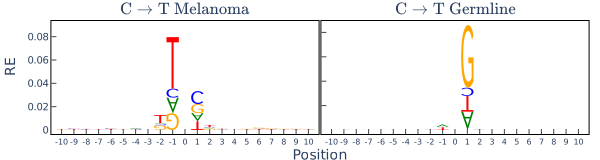
- log-linear analysis of neighbourhood base influences on mutation coupled with a sequence logo like representation of influences (illustrated above)
- log-linear analysis of mutation spectra, the relative proportions of different mutation directions from a starting base. A logo-like visualisation of the latter is also supported.
The description of the models and applications of them are described in Zhu, Neeman, Yap and Huttley 2017 Statistical methods for identifying sequence motifs affecting point mutations.
Installation
$ pip install mutation_motif
Note: In order to write Plotly figures to static image files you will need to install Chrome.
The commands
The primary tool is installed as a command line executable, mm.
Preparing data for analyses
The input sequence file format
At present, mm reads in a fasta formatted file where each sequence has identical length. The length is an odd number and where the mutation occurred at the middle base. mm assumes each sequence file contains sequences that experienced the same point mutation at this central position, e.g. seqs-CtoT.fasta contains only sequences that have experienced a C → T mutation at the central position and the sequences have a C at that position. The sequence flanking the mutated base is used to derive a paired "unmutated" reference. The details of this sampling are in Zhu et al.
Two data preparatory subcommands are available: prep-nbr and prep-spectra.
prep-nbr: converts aligned sequences to counts
prep-nbr converts a fasta formatted alignment of equal length sequences to the required counts table format.
Usage: mm prep-nbr [OPTIONS]

  Export tab delimited counts table from alignment centred on SNP position.

  Output file is written to the same path with just the file suffix changed from
  fasta to txt.

Options:
  -a, --align_path TEXT           fasta aligned file centred on mutated
                                  position.  [required]
  -o, --output_path TEXT          Path to write data.  [required]
  -f, --flank_size INTEGER        Number of bases per side to include.
                                  [required]
  --direction [AtoC|AtoG|AtoT|CtoA|CtoG|CtoT|GtoA|GtoC|GtoT|TtoA|TtoC|TtoG]
                                  Mutation direction.  [required]
  -S, --seed TEXT                 Seed for random number generator (e.g. 17, or
                                  2015-02-13). Defaults to system time.
  -R, --randomise                 Randomises the observed data, observed and
                                  reference counts distributions should match.
  --step [1|2|3]                  Specifies a "frame" for selecting the random
                                  base.  [default: 1]
  -D, --dry_run                   Do a dry run of the analysis without writing
                                  output.
  -F, --force_overwrite           Overwrite existing files.
  --help                          Show this message and exit.
prep-spectra: combining mutation counts from multiple files
This command combines the separate counts tables of prep-nbr into a larger table suitable for analyses by ll-spectra.
Usage: mm prep-spectra [OPTIONS]

  export tab delimited combined counts table by appending the 12 mutation
  direction tables, adding a new column ``direction``.

Options:
  -c, --counts_pattern TEXT  glob pattern uniquely identifying all 12 mutation
                             counts files.
  -o, --output_path TEXT     Path to write combined_counts data.
  -s, --strand_symmetric     produces table suitable for strand symmetry test.
  -p, --split_dir TEXT       path to write individual direction strand symmetric
                             tables.
  -D, --dry_run              Do a dry run of the analysis without writing
                             output.
  -F, --force_overwrite      Overwrite existing files.
  --help                     Show this message and exit.
The output counts table format
The counts table format has a simple structure, illustrated by the following:
| count | pos0 | pos1 | pos2 | pos3 | mut |
|---|---|---|---|---|---|
| 5663 | C | T | T | T | M |
| 2639 | G | C | A | T | M |
| 2425 | G | C | A | G | M |
| ... | ... | ... | ... | ... | ... |
| 882 | G | G | G | T | R |
| 6932 | A | G | T | G | R |
| 10550 | A | A | A | A | R |
The mutation status must be indicated by R (reference) and M (mutated). In this instance, the flank size is 2 and mutation was between pos1 and pos2. Tables with this format are generated by prep-nbr.
Statistical analyses of mutations
The log-linear analyses requires a counts table from the prep steps. The table contains counts for a specified flank size (maximum of 2 bases, assumed to be either side of the mutated base). It assumes the counts all reflect a specific mutation direction (e.g. AtoG) and that counts from a control distribution are also included.
Two subcommands are available: ll-nbr and ll-spectra.
ll-nbr: for detecting the influence of neighbouring bases on mutation
The first examines the influence of neighbouring bases up to fourth order interactions.
Usage: mm ll-nbr [OPTIONS]

  log-linear analysis of neighbouring base influence on point mutation

  Writes estimated statistics, figures and a run log to the specified directory
  outpath.

  See documentation for count table format requirements.

Options:
  -1, --countsfile TEXT   tab delimited file of counts.
  -o, --outpath TEXT      Directory path to write data.
  -2, --countsfile2 TEXT  second group motif counts file.
  --first_order           Consider only first order effects. Defaults to
                          considering up to 4th order interactions.
  -s, --strand_symmetry   single counts file but second group is strand.
  -g, --group_label TEXT  second group label.
  -r, --group_ref TEXT    reference group value for results presentation.
  -v, --verbose           Display more output.
  -D, --dry_run           Do a dry run of the analysis without writing output.
  --help                  Show this message and exit.
ll-spectra: detect differences in mutation spectra between groups
Contrasts the mutations from specified starting bases between groups.
Usage: mm ll-spectra [OPTIONS]

  log-linear analysis of mutation spectra between groups

Options:
  -1, --countsfile TEXT   tab delimited file of counts.
  -o, --outpath TEXT      Directory path to write data.
  -2, --countsfile2 TEXT  second group motif counts file.
  -s, --strand_symmetry   single counts file but second group is strand.
  -F, --force_overwrite   Overwrite existing files.
  -D, --dry_run           Do a dry run of the analysis without writing output.
  -v, --verbose           Display more output.
  --help                  Show this message and exit.
Visualisation of mutation motifs, or mutation spectra, in a grid is provided by the draw-
subcommands.
Evaluating the effect of neighbours on mutation
Sample data files are included as tests/data/counts-CtoT.txt and tests/data/counts-CtoT-ss.txt with the latter being appropriate for analysis of the occurrence of strand asymmetric neighbour effects.
The simple analysis is invoked as:
$ mm ll-nbr -1 path/to/tests/data/counts-CtoT.txt -o path/for/results/
This will write 11 files into the results directory. Files such as 1.pdf and 2.pdf are the mutation motifs for the first and second order effects from the log-linear models. Files ending in .json contain the raw data used to produce these figures and may be used for subsequent analyses, such as generating grids of mutation motifs. The summary files include the full log-linear modelling hierarchy. The .log files track the command used to generate these files, including
the input files and the settings used.
Testing for strand symmetry (or asymmetry) is done as:
$ mm ll-nbr -1 path/to/tests/data/counts-CtoT.txt -o path/for/results/ --strand_symmetry
Similar output to the above is generated. The difference here is that the reference group for display are bases on the + strand.
If comparing between groups, such as patient cohorts or chromosomal regions, then there are two separate counts files and the second count file is indicated using a -2 command line option.
Testing Full Spectra
Testing for strand symmetry requires the combined counts file, produced using the provided all_counts script. A sample such file is included as tests/data/counts-combined.txt. In this instance, a test of consistency in mutation spectra between strands is specified.
This analysis is run as:
$ mm ll-spectra -1 path/to/tests/data/counts-combined.txt -o another/path/for/results/ --strand_symmetry
Drawing
mm provides support for drawing either spectra or neighbour mutation motif logos.
Interpreting logo's
If the plot is derived from a group comparison, the relative entropy terms (which specify the stack height, letter size and orientation) are taken from the mutated class belonging to group 1 (which is the counts file path assigned to the -1 option). For example, if you specified -1 file_a.txt -2 file_b.txt, then large upright letters in the display indicate an excess in the mutated class from file_a.txt relative to file_b.txt.
1 maintainer

Metadata
1 maintainer
Release files for mutation-motif 2026.3.23
For a detailed explanation of source distributions (sdists) and built distributions (wheels), please see the package formats documentation.
Source distribution (sdist)
| File | Size | Uploaded | Provenance | Actions |
|---|---|---|---|---|
| mutation_motif-2026.3.23.tar.gz | 36.5 kB | With provenance | Details for mutation_motif-2026.3.23.tar.gz |
Built distribution (wheel)
| File | Interpreter | ABI | Platform | Actions Reset |
|---|---|---|---|---|
| mutation_motif-2026.3.23-py3-none-any.whl | Python 3 | none | any | Details for mutation_motif-2026.3.23-py3-none-any.whl |
Total release size: 74.9 kB
Release files / mutation_motif-2026.3.23.tar.gz
| Download URL | mutation_motif-2026.3.23.tar.gz |
|---|---|
| Size | 36.5 kB |
| Tags | Source |
|
SHA-256 checksum How to use checksums |
65592b2baaccc941616f5501dbb17f22191bdeda08e1e2564e2c72271b4d4706
|
|
BLAKE2b-256 checksum How to use checksums |
101ff28f21c468c761b4340f6037e5b9855de88eef869abfab8d56e9c37e9564
|
| Upload date | |
|
Uploaded using Trusted Publishing? What is trusted publishing? |
Yes |
| Uploaded via |
twine/6.1.0 CPython/3.13.7
|
Provenance
Provenance describes where a file came from. On PyPI, provenance is shared via attestations, which provide a verifiable record of the build or publishing details. View details, limitations and caveats.


PyPI Publish Attestation
PyPI verified that this artifact, at this checksum, originated from the publisher listed below.
Signed by GitHub Actions, verified by PyPI on Mar 23, 2026.
Transparency logRelease files / mutation_motif-2026.3.23-py3-none-any.whl
| Download URL | mutation_motif-2026.3.23-py3-none-any.whl |
|---|---|
| Size | 38.5 kB |
| Tags | Python 3 |
|
SHA-256 checksum How to use checksums |
2383034ad7a6915db646d590cf4f4e0ef560ac66b5c8a5611cc1d1089028a430
|
|
BLAKE2b-256 checksum How to use checksums |
6c95e0e0526caaa66f36c186c2d23f74cb9c5c85e520fcb04267cfbd29ed5c12
|
| Upload date | |
|
Uploaded using Trusted Publishing? What is trusted publishing? |
Yes |
| Uploaded via |
twine/6.1.0 CPython/3.13.7
|
Provenance
Provenance describes where a file came from. On PyPI, provenance is shared via attestations, which provide a verifiable record of the build or publishing details. View details, limitations and caveats.
PyPI Publish Attestation
PyPI verified that this artifact, at this checksum, originated from the publisher listed below.
Signed by GitHub Actions, verified by PyPI on Mar 23, 2026.
Transparency logSecurity for mutation-motif 2026.3.23
Provenance
Provenance describes where a file came from. On PyPI, provenance is shared via attestations, which provide a verifiable record of the build or publishing details. View details, limitations and caveats.
Full provenance
All 2 files in this release have been uploaded with provenance metadata.
Attestation for mutation_motif-2026.3.23.tar.gz
PyPI Publish Attestation
PyPI verified that this artifact, at this checksum, originated from the publisher listed below.
Signed by GitHub Actions, verified by PyPI on Mar 23, 2026.
Transparency logA note on package security
PyPI is a repository for distributing packages, not a service for auditing them. While third-party security researchers and our staff do their best to detect and remove malicious packages, PyPI cannot guarantee the quality, security or suitability of any given package.
To learn more about protecting yourself from malicious actors, visit our package security documentation.














