
mvc4kivy (m4k)
Borrowed from the kivymd's MVC tool project creator but with some features added like lazy loading of kv file and lazy adding of screen to improve application speed at startup.
To install run
pip install mvc4kivy
To create a project
### Template command:
m4k-createproject name_pattern path_to_project name_project python_version kivy_version

# Example command:
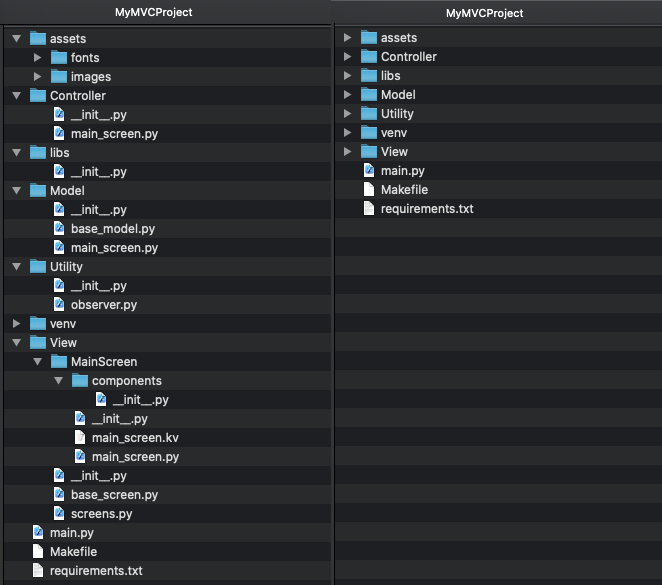
m4k-createprojectt MVC /home/kengoon/PycharmProjects MyMVCProject python3.10 2.1.0
This command will by default create a project with an MVC pattern. Also, the project will create a virtual environment with Python 3.10, Kivy version 2.1.0 and KivyMD master version.
Creating a project using a database
# Template command:
m4k-createproject \
    name_pattern \
    path_to_project \
    name_project \
    python_version \
    kivy_version \
    --name_database

# Example command:
m4k-createproject \
    MVC \
    /home/kengo/PycharmProjects \
    MyMVCProject \
    python3.10 \
    2.1.0 \
    --name_database firebase
This command will create a project with an MVC template by default. The project will also create a virtual environment with Python 3.10, Kivy version 2.1.0, KivyMD master version and a wrapper for working with the database restdb.io.
Create project with responsive view
When creating a project, you can specify which views should use responsive behavior. To do this, specify the name of the view/views in the –-use_responsive argument:
# Template command:
m4k-createproject \
    name_pattern \
    path_to_project \
    name_project \
    python_version \
    kivy_version \
    --name_screen FirstScreen SecondScreen ThirdScreen \
    --use_responsive FirstScreen SecondScreen
To add a view
The script creates a new View package in an existing project with an MVC template created using the create_project utility.
Use a clean architecture for your applications.
To add a new view to an existing project that was created using the create_project utility, use the following command:
# Template Command:
m4k-addview \
    name_pattern \
    path_to_project \
    name_view

# Example Command
m4k-addview \
    MVC \
    /home/kengo/PycharmProjects \
    NewScreen
You can also add new views with responsive behavior to an existing project:
m4k-addview \
    MVC \
    /home/kengoon/PycharmProjects \
    NewScreen \
    --use_responsive yes
To remove a view
# Template Command:
m4k-rmview \
    name_pattern \
    path_to_project \
    name_view

# Example Command
m4k-rmview \
    MVC \
    /home/kengo/PycharmProjects \
    NewScreen
1 maintainer

Release files for mvc4kivy 1.1.1
For a detailed explanation of source distributions (sdists) and built distributions (wheels), please see the package formats documentation.
Source distribution (sdist)
| File | Size | Uploaded | |
|---|---|---|---|
| mvc4kivy-1.1.1.tar.gz | 19.4 kB | Details |
Built distribution (wheel)
| File | Interpreter | ABI | Platform | Reset |
|---|---|---|---|---|
| mvc4kivy-1.1.1-py3-none-any.whl | Python 3 | none | any | Details |
Total release size: 43.2 kB
Release files / mvc4kivy-1.1.1.tar.gz
| Download URL | mvc4kivy-1.1.1.tar.gz |
|---|---|
| Size | 19.4 kB |
| Tags | Source |
|
SHA-256 checksum How to use checksums |
c3af47e372b2a7b46bb10058d907523af1083961de3d2bca79826d1cb739a8f2
|
|
BLAKE2b-256 checksum How to use checksums |
6fa09af00b0f21aff60a1bb281fc4cb70fb8ce2558d89fc7d4f395561ca7ce30
|
| Upload date | |
|
Uploaded using Trusted Publishing? What is trusted publishing? |
No |
| Uploaded via |
poetry/1.8.3 CPython/3.10.12 Linux/5.15.0-107-generic
|
Release files / mvc4kivy-1.1.1-py3-none-any.whl
| Download URL | mvc4kivy-1.1.1-py3-none-any.whl |
|---|---|
| Size | 23.8 kB |
| Tags | Python 3 |
|
SHA-256 checksum How to use checksums |
32cbbfc51a260446521d37377af76a97d37d6326a1630546d498add96dabbbd7
|
|
BLAKE2b-256 checksum How to use checksums |
7ef10e1e5ff4a594024606df428f4184b61a4631adc140780d6f27be7da13ae2
|
| Upload date | |
|
Uploaded using Trusted Publishing? What is trusted publishing? |
No |
| Uploaded via |
poetry/1.8.3 CPython/3.10.12 Linux/5.15.0-107-generic
|














