






My Python Toolkit
This is just a miscellaneous collection of some tools I use regularly that I decided to compile into one package for easy use by mainly me. All examples will assume the package has been imported as kit.
Install from PyPi: pip install mypytoolkit.
import mypytoolkit as kit
Dates and Times
Time Now
kit.time_now() returns a string of the current time in the format "%H-%M". Midnight is "00-00" and 8:35 a.m. is "08-35". 10 p.m. is "22-00". That's without optional parameters.
The optional parameter int_times: bool will allow the function to return a tuple instead of a string. If you call kit.time_now(int_times = True), and if the time is 8:35 a.m., you will receive a tuple (8, 35) where each element is an integer. This is useful for performing relative time actions within a program that are hour/minute independent.
kit.today_date() returns a string of the current date in the format "%Y-%M-%D", where Feb 22, 2022, is "2022-02-22".
kit.time_decimal() returns a float of the time. For example, if it is 8:45 a.m., the function will return 8.75.
kit.weekly_time_decimal() returns a float of how far you're in a week. For example, midnight on Monday is 0, noon on Wednesday is 2.5, and 4 p.m. on Sunday is 6.66.
kit.time_seconds() returns the current number of seconds past the minute. For example, if the time is 06:35:23, the function will return '23' as a string. Passing in the optional parameter int_output: bool = False as int_output = True will output 23 as an integer instead of a string. This is useful for timing programs.
For example, a function like kit.time_seconds() enables logic such as:
import mypytoolkit as kit
import time

while True:
    if kit.time_seconds(True) == 0:
        # do some task on the minute.

    time.sleep(1)
Python Tools
Simple Python-specific tools to make life easier, from print options to functions for working with iterables.
Threaded List Processing
the kit.threadtools module comes with a function, list_process, that makes it easy to send a list of items to an operation to be processed in threads. The return value of a thread cannot be accessed directly, and using a queue.Queue doesn't guarantee the resulting list comes back in the right order. kit.threadtools.list_process will take an operation function and items (list of items to process) and will send them to individual threads for processing, then collect all the results and return them in the same order.
This is useful for API calls, file operations, and other I/O-bound tasks.
Type Printing
kit.tprint() displays the contents of an object along with its type. I got fed up of constantly writing print(obj, type(obj)) when debugging so I found myself constantly defining a tprint() function:
def tprint(obj):
    print(obj, type(obj))
    return [obj, type(obj)]
Super simple but it makes a night and day difference when debugging in lightspeed.
Iterable Counting
kit.count() will accept an iterable item and a value. It returns an integer of the exact number of occurrences of the value in the iterable. Many iterable objects have in-built class methods for counting values (iterable_object.count() for example). But many iterables returned by APIs, for example, don't, so it makes sense to have some global method for counting values.
This way, many objects can be passed to the method, too.
DataFrame NaN Values
kit.remove_nan_df_rows() takes a pd.DataFrame input and returns a new DataFrame without any rows that contained a NaN value.
Files
Tools for working with files.
Same Document Contents
kit.are_docs_same() will tell you if two documents (of any type) have the exact same contents. It takes two parameters.
kit.are_docs_same(original_dir: str, new_dir: str)
It returns a boolean, True or False, depending on whether the contents of the two files are identical. There is no grey area.
Appending Content to Files
kit.append_by_query() will append content to a file in a line below the first occurrence of a query.
See a demonstration:
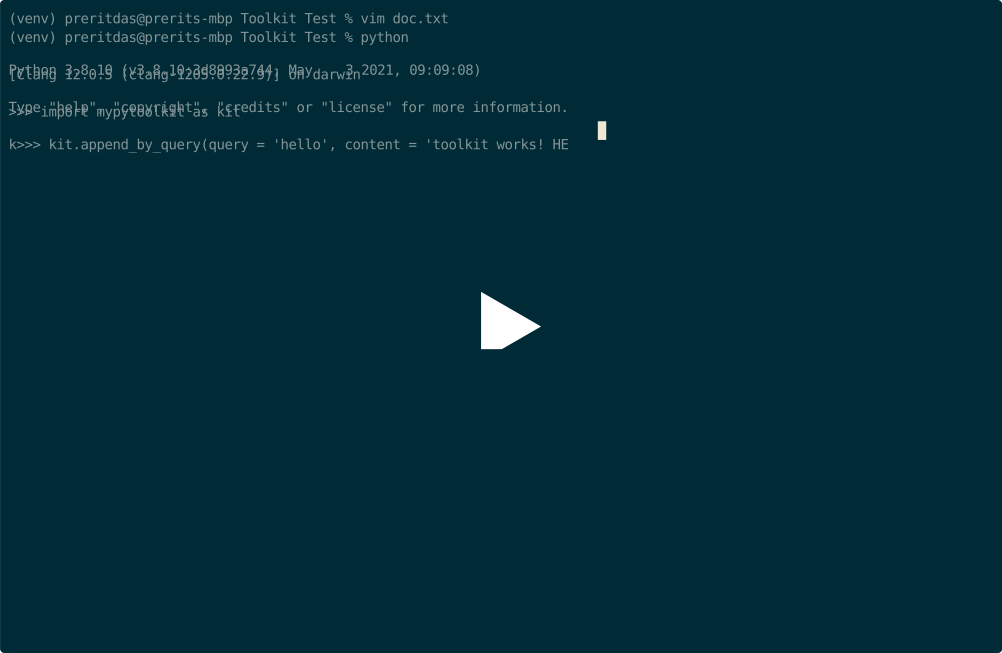
Here is a written example. If test.txt has the contents:
this is line 1!
line 2 is here.
hello people!
line number 4.
And we run:
import mypytoolkit as kit

kit.append_by_query(
    query = 'hello',
    content = 'Just added this.',
    file_path = 'test.txt',
    insert_above = False # unnecessary, it is by default
)
test.txt is modified in place and is now:
this is line 1!
line 2 is here.
hello people!
Just added this.
line number 4.
| Parameter | Necessity | Behavior |
|---|---|---|
query |
Required | The first occurrence of this string is where the toolkit will look to insert content (above or below depending on insert_above). |
content |
Required | The content inserted above or below the first occurrence of query in the document. |
file_path |
Required | A string of the path to the file the toolkit will search through and write in. |
insert_above |
Optional | Boolean. By default, insert_above = False, and the toolkit will insert content the line below the first occurrence of query. If True, the toolkit will insert content in a line above instead. |
Math
Added a LinearEquation class that takes attributes of slope and intercept on instantiation. It has a plot() method which plots the linear graph. For example:
import mypytoolkit as kit

equation = kit.LinearEquation(slope = 4, intercept = 10)
equation.plot(interval = 1000)
This will output a matplotlib plot of the linear equation from 0 to 1000.
Finance
The finance module must be called directly. It's contents are not imported to the main namespace like the other modules. To call finance functions you have to use kit.finance.function().
Sharpe Ratio
Given a list of returns (each item of numeric format, not percentage), and a risk-free rate, kit.finance.sharpe_ratio() will return the Sharpe Ratio of the investment.
| Parameter | Format | Necessity | Behavior |
|---|---|---|---|
returns |
list |
Required | Is used to compute the standard deviation and mean, necessary to result a Sharpe Ratio. |
risk_free |
float |
Required | Is used to compare statistics on the return with the best risk-free investment at the time. Necessary as Sharpe Ratio is a risk-factored metric. |
1 maintainer

Release files for mypytoolkit 1.6.1
For a detailed explanation of source distributions (sdists) and built distributions (wheels), please see the package formats documentation.
Source distribution (sdist)
| File | Size | Uploaded | |
|---|---|---|---|
| mypytoolkit-1.6.1.tar.gz | 12.9 kB | Details |
Built distribution (wheel)
| File | Interpreter | ABI | Platform | Reset |
|---|---|---|---|---|
| mypytoolkit-1.6.1-py3-none-any.whl | Python 3 | none | any | Details |
Total release size: 24.4 kB
Release files / mypytoolkit-1.6.1.tar.gz
| Download URL | mypytoolkit-1.6.1.tar.gz |
|---|---|
| Size | 12.9 kB |
| Tags | Source |
|
SHA-256 checksum How to use checksums |
3fde2ee206609e75b74a34107b598a71d61b22ffef87150293e3ffd058fc370b
|
|
BLAKE2b-256 checksum How to use checksums |
6e1ffb71f7614dc403cdc55d47bec96427014c807f955c6ab0d9ee9d9d8a9908
|
| Upload date | |
|
Uploaded using Trusted Publishing? What is trusted publishing? |
No |
| Uploaded via |
twine/4.0.2 CPython/3.9.16
|
Release files / mypytoolkit-1.6.1-py3-none-any.whl
| Download URL | mypytoolkit-1.6.1-py3-none-any.whl |
|---|---|
| Size | 11.5 kB |
| Tags | Python 3 |
|
SHA-256 checksum How to use checksums |
cc6457fd33d9b4b1226dd41d7dc3116101c15ddfb709058279c5c68fbad34f7e
|
|
BLAKE2b-256 checksum How to use checksums |
7ec15a2c9f17bed8da482ccfa9d30efe7eed430eae71c0205d3a0d8911ad3301
|
| Upload date | |
|
Uploaded using Trusted Publishing? What is trusted publishing? |
No |
| Uploaded via |
twine/4.0.2 CPython/3.9.16
|














