
napari-simpleannotate






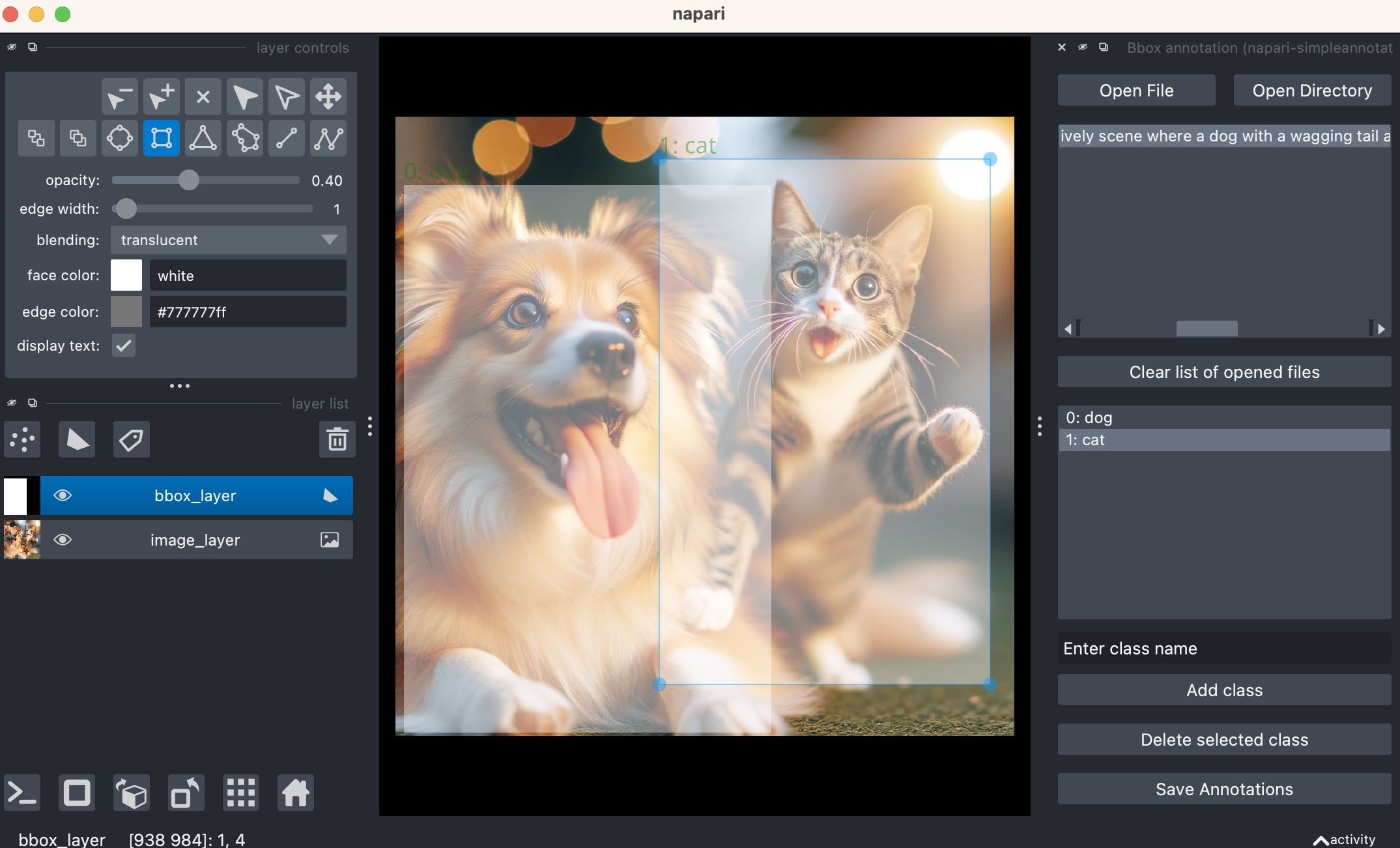
A napari plugin for simple image and video annotation that provides three main annotation workflows:
- Bounding Box Annotation (YOLO format): For object detection training data on images
- Video Bounding Box Annotation: For object detection training data on video files
- Image Classification Labeling: For image classification training data
This napari plugin was generated with Cookiecutter using @napari's cookiecutter-napari-plugin template.
Installation
You can install napari-simpleannotate via pip:
pip install napari-simpleannotate
To install latest development version :
pip install git+https://github.com/hiroalchem/napari-simpleannotate.git
How to use
Getting Started
After installing napari-simpleannotate, launch napari and navigate to Plugins > Add dock widget to find three annotation widgets:
- Bbox annotation: For bounding box annotation on images
- Bbox video annotation: For bounding box annotation on video files
- Label image classification: For image classification labeling
Bounding Box Annotation (Images)
Prerequisites: None required
-
Opening Files:
- Single file: Click
Open Fileto select an image file - Directory: Click
Open Directoryto select a folder containing images - If a
class.yamlfile exists in the directory, you'll be prompted to load existing classes
- Single file: Click
-
Class Management:
- Enter class names in the text box and click
Add class - Classes are automatically assigned sequential IDs (0, 1, 2, ...)
- Select a class and click
Delete selected classto remove it - Classes are saved to
class.yamlalongside annotations
- Enter class names in the text box and click
-
Creating Annotations:
- Select a class from the list (becomes your active class)
- Use napari's rectangle tool (shortcut: R) to draw bounding boxes
- New rectangles automatically inherit the selected class
- Change existing rectangles: select the shape, then click a different class
-
Saving Work:
- Click
Save Annotationsto export in YOLO format - Files saved:
image_name.txt(YOLO coordinates) +class.yaml(class definitions) - YOLO format:
class_id x_center y_center width height(normalized 0-1)
- Click
Video Bounding Box Annotation
Prerequisites: Install PyAV for video support: pip install av
-
Opening Videos:
- Click
Open Videoto select MP4, AVI, MOV, MKV, WMV, FLV, or WebM files - Frames load through a cached reader that keeps recently viewed frames ready for scrubbing
- Click
-
Navigation & Frame Tools:
- Use napari's time slider; the widget shows
Frame: current/totalalongside live cache usage - Jump between annotated frames with the
Prev (Q)andNext (W)buttons or keyboard shortcuts - Nearby frames are prefetched in the background to keep playback smooth during review
- Use napari's time slider; the widget shows
-
Annotating Frames:
- Draw rectangles after selecting a class; each shape stores its frame index automatically
- Bounding boxes are only visible on the frame where they were created
- Class management matches the image workflow, and
class.yamlis written in YOLOnames:format
-
Automatic Tracking:
- Use
Startto launch trackers for the boxes in the current frame andStopto halt processing - Keep
Track all bounding boxesenabled to follow every box, or disable it to track only selected shapes - Choose between the default OpenCV
CSRTtracker and the experimentalTrackerVit
- Use
-
Saving & Exports:
Save Annotationswrites per-frame YOLO files (imgNNN.txt) in a video-specific folder next to the source- Annotated frames are saved once as
imgNNN.pngso you can review what was labeled later - Enable
Enable crop on saveto export fixed-size crops plus matching YOLO labels undercrops/ - Existing exports are reused when present so repeated saves only write new annotations

Image Classification Labeling
Prerequisites: None required
-
Opening Directory:
- Click
Open Directoryto select image folder - Recursively finds all images (PNG, TIF, JPG, JPEG, TIFF)
- Automatically loads existing
labels.csvandclass.txtif present
- Click
-
Display Options:
- Split Channels: Check to display multi-channel images as separate layers
- Contrast settings preserved when switching between images
- Navigate images using the file list on the left
-
Labeling Workflow:
- Add classes: Type in text box and press Enter (or click
Add class) - Remove classes: Type existing class name and press Enter
- Assign labels: Select image → Click class name to label it
- Real-time auto-save to
labels.csvandclass.txt
- Add classes: Type in text box and press Enter (or click
-
Resume Sessions:
- Previous work automatically loaded when reopening directories
- Continue labeling from where you left off
Performance Notes
- Video annotation: Optimized with frame caching and parallel prefetching for smooth playback
- Large datasets: Classification widget handles thousands of images efficiently
- Memory management: LRU cache prevents memory overflow during long annotation sessions
Output Formats
| Widget | Annotation File | Class File | Format |
|---|---|---|---|
| Bbox (Images) | image.txt |
class.yaml |
YOLO standard |
| Bbox (Video) | imgNNN.txt per frame (+ optional crops/*.txt) |
class.yaml |
YOLO normalized (per frame/crop) |
| Classification | labels.csv |
class.txt |
CSV with image-label pairs |
Contributing
Contributions are very welcome. Tests can be run with tox, please ensure the coverage at least stays the same before you submit a pull request.
License
Distributed under the terms of the BSD-3 license, "napari-simpleannotate" is free and open source software
Issues
If you encounter any problems, please file an issue along with a detailed description.
1 maintainer

Download files
Download the file for your platform. If you're not sure which to choose, learn more about installing packages.
Source Distribution
Built Distribution
Filter files by name, interpreter, ABI, and platform.
If you're not sure about the file name format, learn more about wheel file names.
Copy a direct link to the current filters
File details
Details for the file napari_simpleannotate-0.1.6.tar.gz.
File metadata
- Download URL: napari_simpleannotate-0.1.6.tar.gz
- Upload date:
- Size: 42.3 kB
- Tags: Source
- Uploaded using Trusted Publishing? No
- Uploaded via:
twine/6.1.0 CPython/3.13.12
File hashes
| Algorithm | Hash digest | |
|---|---|---|
| SHA256 |
12175d9e14a18777edd5286ed60df93b4839a88bc4a8540b3b0a27fc438c412f
|
|
| MD5 |
2491082067d0b3c16d9f6bdc03ac6297
|
|
| BLAKE2b-256 |
cfccd43cb84cbd4c65b0c5727fd192bd47572e87306a7c3efc6dc6e504407b3d
|
File details
Details for the file napari_simpleannotate-0.1.6-py3-none-any.whl.
File metadata
- Download URL: napari_simpleannotate-0.1.6-py3-none-any.whl
- Upload date:
- Size: 43.9 kB
- Tags: Python 3
- Uploaded using Trusted Publishing? No
- Uploaded via:
twine/6.1.0 CPython/3.13.12
File hashes
| Algorithm | Hash digest | |
|---|---|---|
| SHA256 |
a8b6f783378b309bbaa8d3076cadc18d09bd810fb57072bd1f45d3340c789378
|
|
| MD5 |
c3aca9f7b588f60e7bfd0a6758f806f3
|
|
| BLAKE2b-256 |
7eeaded3fd06616aba853ef2f050e111f114aeae8c5ffedc54aac8da699dbd68
|














