
napari-skimage-regionprops (nsr)







A napari plugin for measuring properties of labeled objects based on scikit-image
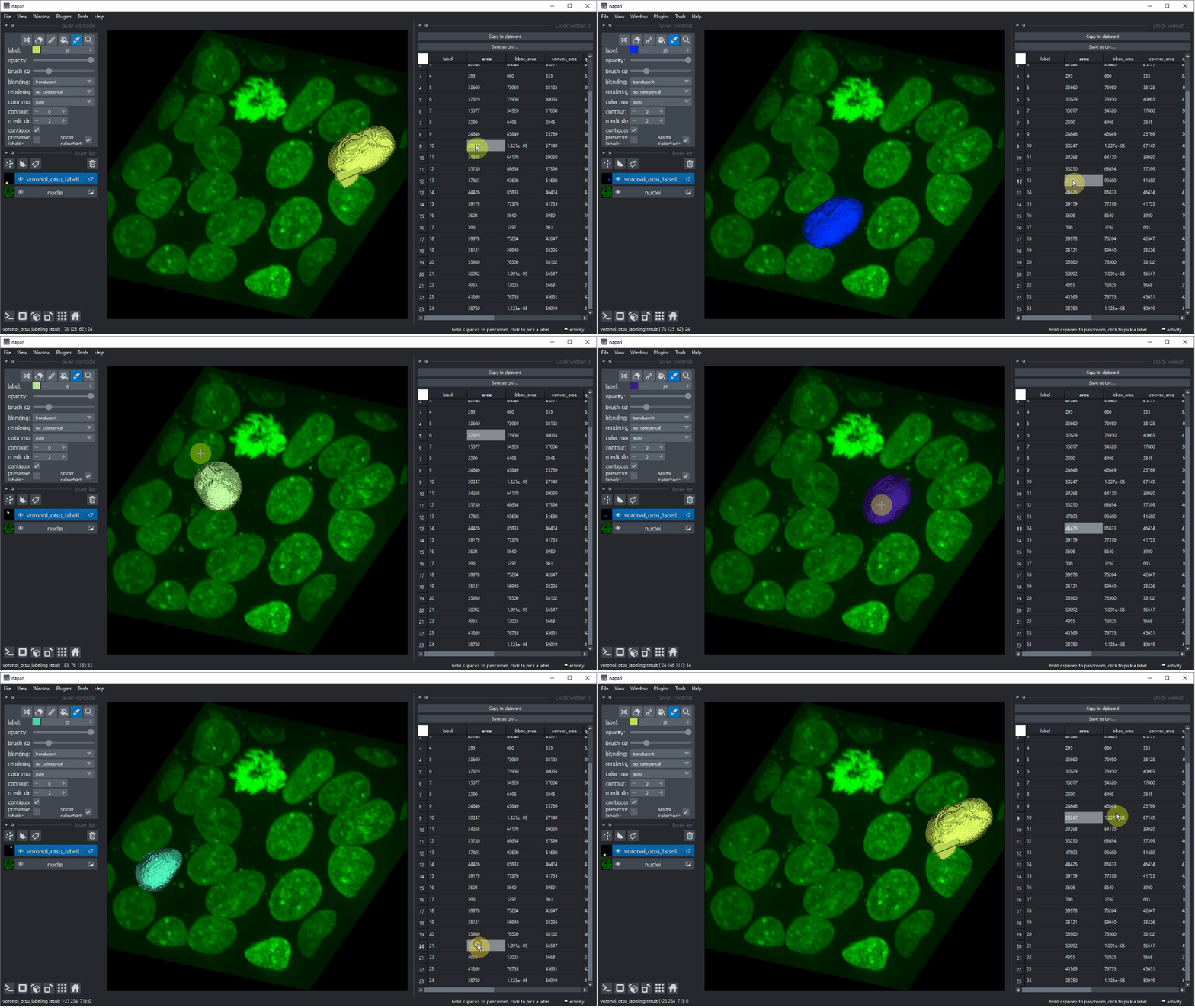
Usage: measure region properties
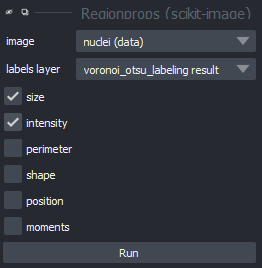
From the menu Tools > Measurement > Regionprops (nsr) you can open a dialog where you can choose an intensity image, a corresponding label image and the features you want to measure:
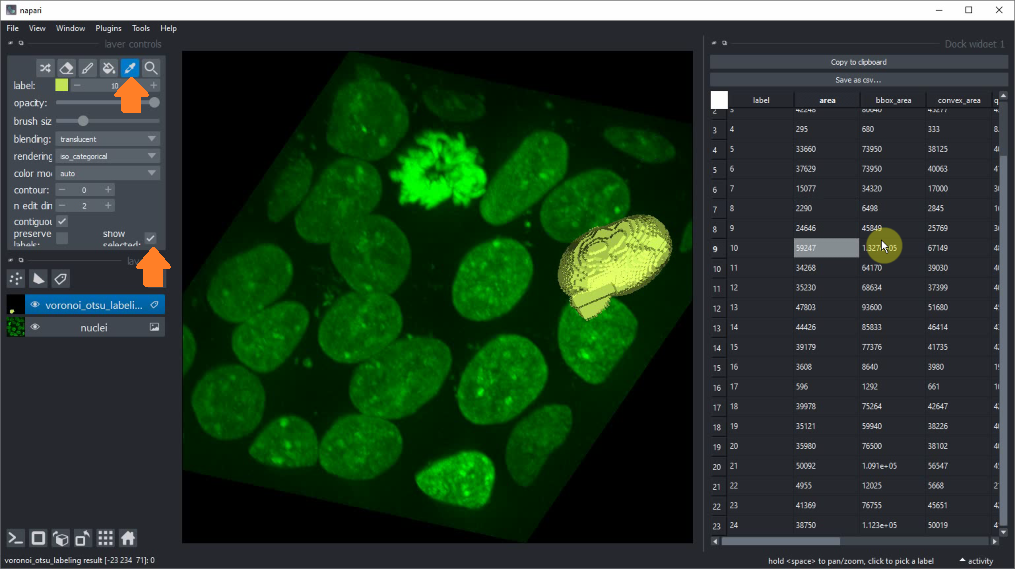
If you want to interface with the labels and see which table row corresponds to which labeled object, use the label picker and
activate the show selected checkbox.
If you closed a table and want to reopen it, you can use the menu Tools > Measurements > Show table (nsr) to reopen it.
You just need to select the labels layer the properties are associated with.
For visualizing measurements with different grey values, as parametric images, you can double-click table headers.
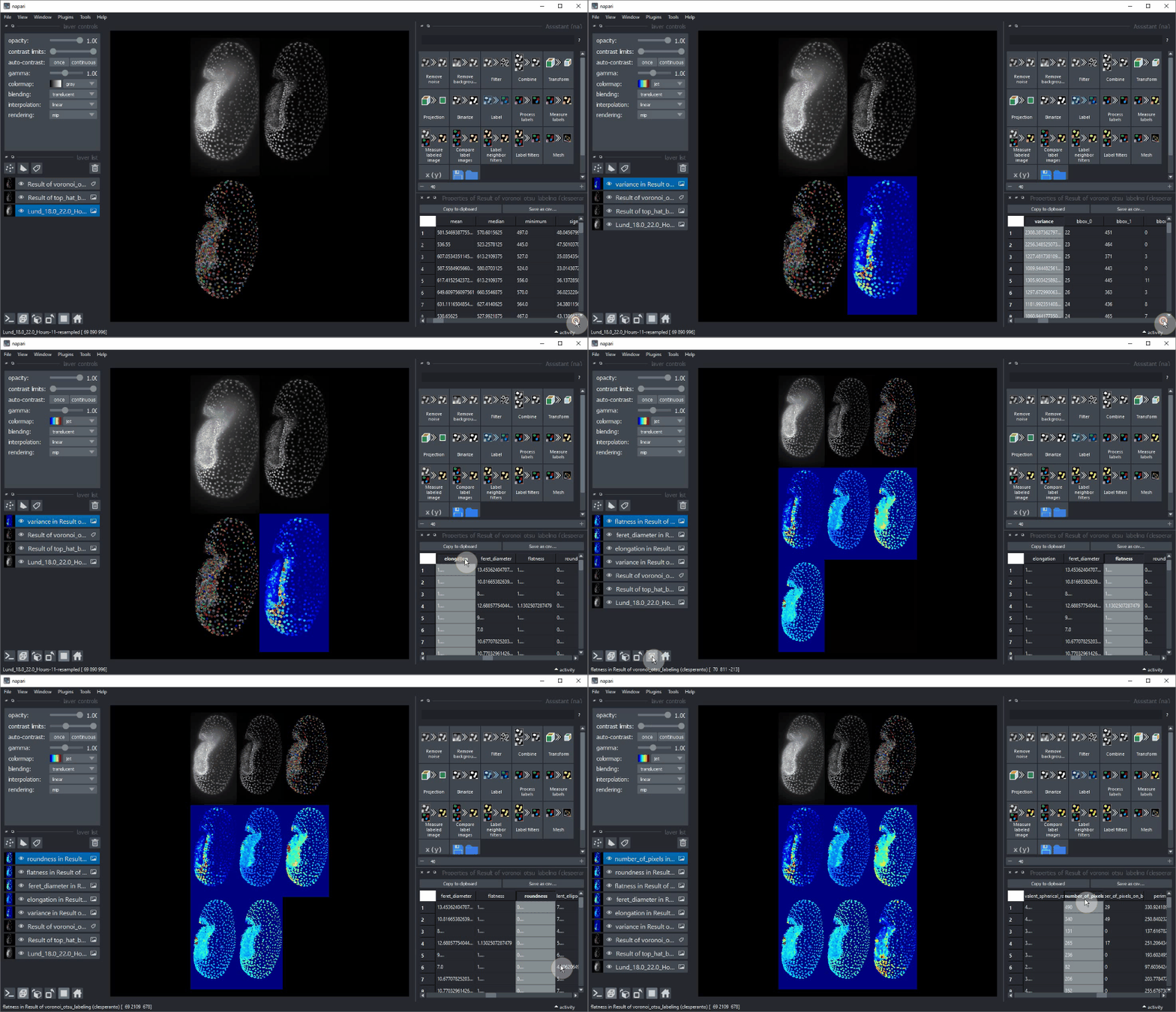
Usage: measure point intensities
Analogously, also the intensity and coordinates of point layers can be measured using the menu Tools > Measurement > Measure intensity at point coordinates (nsr).
Also these measurements can be visualized by double-clicking table headers:


Working with time-lapse and tracking data
Note that tables for time-lapse data should include a column named "frame", which indicates which slice in
time the given row refers to. If you want to import your own csv files for time-lapse data make sure to include this column.
If you have tracking data where each column specifies measurements for a track instead of a label at a specific time point,
this column must not be added.
In case you have 2D time-lapse data you need to convert it into a suitable shape using the function: Tools > Utilities > Convert 3D stack to 2D time-lapse (time-slicer),
which can be found in the napari time slicer.
Last but not least, make sure that in case of time-lapse data the label image has labels that are subsquently labeled per timepoint.
E.g. a dataset where label 5 is missing at timepoint 4 may be visualized incorrectly.
Usage: multichannel or multi-label data
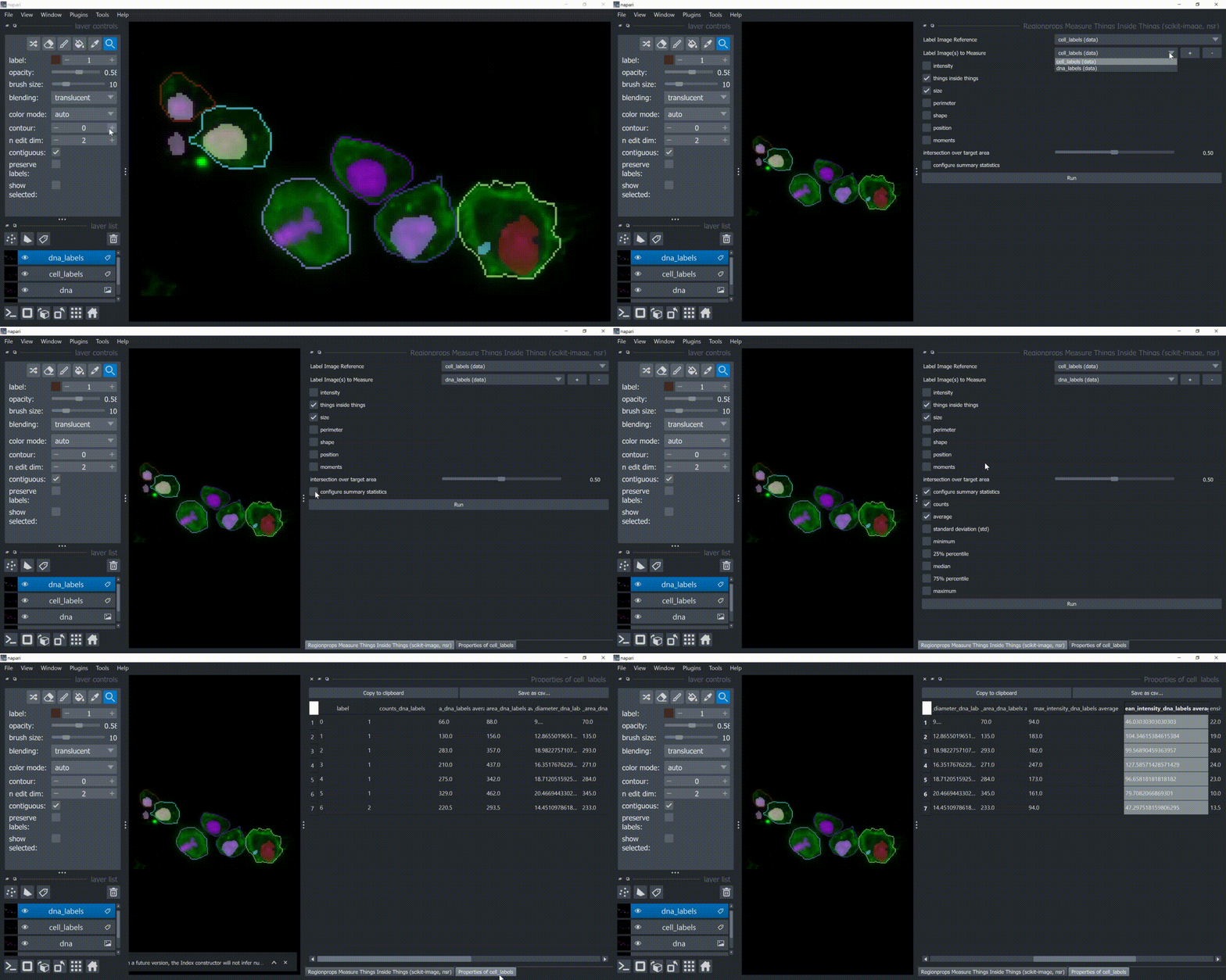
If you want to relate objects from one channels to objects from another channel, you can use Tools > Measurement tables > Object Features/Properties (scikit-image, nsr).
This plugin module allos you to answer questions like:
-
how many objects I have inside other objects?
-
what is the average intensity of the objects inside other objects?
For that, you need at least two labeled images in napari. You can relate objects along with their features.
If intensity features are also wanted, then you also need to provide two intensity images.
Below, there is a small example on how to use it.
Also, take a look at this example notebook.
Usage, programmatically
You can also control the tables programmatically. See this
example notebook for details on regionprops and
this example notebook for details on measuring intensity at point coordinates. For creating parametric map images, see this notebook.
Features
The user can select categories of features for feature extraction in the user interface. These categories contain measurements from the scikit-image regionprops list of measurements library:
-
size:
-
area
-
bbox_area
-
convex_area
-
equivalent_diameter
-
-
intensity:
-
max_intensity
-
mean_intensity
-
min_intensity
-
standard_deviation_intensity (
extra_propertiesimplementation using numpy)
-
-
perimeter:
-
perimeter
-
perimeter_crofton
-
-
shape
-
position:
-
centroid
-
bbox
-
weighted_centroid
-
-
moments:
-
moments
-
moments_central
-
moments_hu
-
moments_normalized
-
This napari plugin was generated with Cookiecutter using with @napari's cookiecutter-napari-plugin template.
See also
There are other napari plugins with similar functionality for extracting features:
Furthermore, there are plugins for postprocessing extracted measurements
Installation
You can install napari-skimage-regionprops via pip:
pip install napari-skimage-regionprops
Or if you plan to develop it:
git clone https://github.com/haesleinhuepf/napari-skimage-regionprops

cd napari-skimage-regionprops

pip install -e .
If there is an error message suggesting that git is not installed, run conda install git.
Contributing
Contributions are very welcome. Tests can be run with tox, please ensure
the coverage at least stays the same before you submit a pull request.
License
Distributed under the terms of the BSD-3 license,
"napari-skimage-regionprops" is free and open source software
Issues
If you encounter any problems, please create a thread on image.sc along with a detailed description and tag @haesleinhuepf.
1 maintainer

Metadata
1 maintainer
Release files for napari-skimage-regionprops 0.10.1
For a detailed explanation of source distributions (sdists) and built distributions (wheels), please see the package formats documentation.
Source distribution (sdist)
| File | Size | Uploaded | Provenance | Actions |
|---|---|---|---|---|
| napari-skimage-regionprops-0.10.1.tar.gz | 431.3 kB | Without provenance | Details for napari-skimage-regionprops-0.10.1.tar.gz |
Built distribution (wheel)
| File | Interpreter | ABI | Platform | Actions Reset |
|---|---|---|---|---|
| napari_skimage_regionprops-0.10.1-py3-none-any.whl | Python 3 | none | any | Details for napari_skimage_regionprops-0.10.1-py3-none-any.whl |
Total release size: 464.9 kB
Release files / napari-skimage-regionprops-0.10.1.tar.gz
| Download URL | napari-skimage-regionprops-0.10.1.tar.gz |
|---|---|
| Size | 431.3 kB |
| Tags | Source |
|
SHA-256 checksum How to use checksums |
a25f8a84ad78f5d09074a32d84996fb6ff900bf82369dfb50501872d23dc22bc
|
|
BLAKE2b-256 checksum How to use checksums |
0168b016a3a76e631bbf0b74104f0c073e1d5065a71ab4476a370e52e153450a
|
| Upload date | |
|
Uploaded using Trusted Publishing? What is trusted publishing? |
No |
| Uploaded via |
twine/4.0.2 CPython/3.9.15
|
Release files / napari_skimage_regionprops-0.10.1-py3-none-any.whl
| Download URL | napari_skimage_regionprops-0.10.1-py3-none-any.whl |
|---|---|
| Size | 33.6 kB |
| Tags | Python 3 |
|
SHA-256 checksum How to use checksums |
d9c3fb65c7a47a4f68eb577e901759826ca5b0f6669279f50b93441709766264
|
|
BLAKE2b-256 checksum How to use checksums |
28ba4d38178cc15721eec82634d34e94b386e3f830f6f6c9d9bee10b4c6fb6a3
|
| Upload date | |
|
Uploaded using Trusted Publishing? What is trusted publishing? |
No |
| Uploaded via |
twine/4.0.2 CPython/3.9.15
|
Security for napari-skimage-regionprops 0.10.1
Provenance
Provenance describes where a file came from. On PyPI, provenance is shared via attestations, which provide a verifiable record of the build or publishing details. View details, limitations and caveats.
No provenance found
None of the files in this release were uploaded with provenance metadata.
A note on package security
PyPI is a repository for distributing packages, not a service for auditing them. While third-party security researchers and our staff do their best to detect and remove malicious packages, PyPI cannot guarantee the quality, security or suitability of any given package.
To learn more about protecting yourself from malicious actors, visit our package security documentation.














