
napari-spacetx-explorer





A napari plugin for interactive visualization of decoded spots from spatial transcriptomic data stored as CSV
This napari plugin was generated with Cookiecutter using with @napari's cookiecutter-napari-plugin template.
The plugin code was written by Sebastian Gonzalez-Tirado.
Reader hookspec
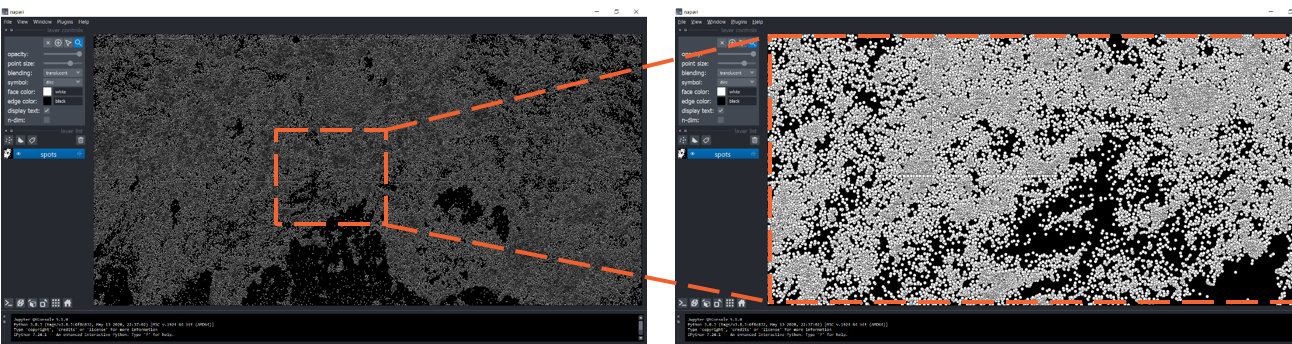
napari-spacetx-explorer allows the user to open and visualize CSV files that
have point-data stored in a given format. The main target is for users who
want to analyze decoded spot maps from spatial omics experiments but it can
used as well for any other type of coordinate data where each point has assigned
a label (e. g. a gene) as a string and the x and y-coordinates of the point's center.
The header for these data must be 'target', 'xc', and 'yc', respectively.
Selecting genes
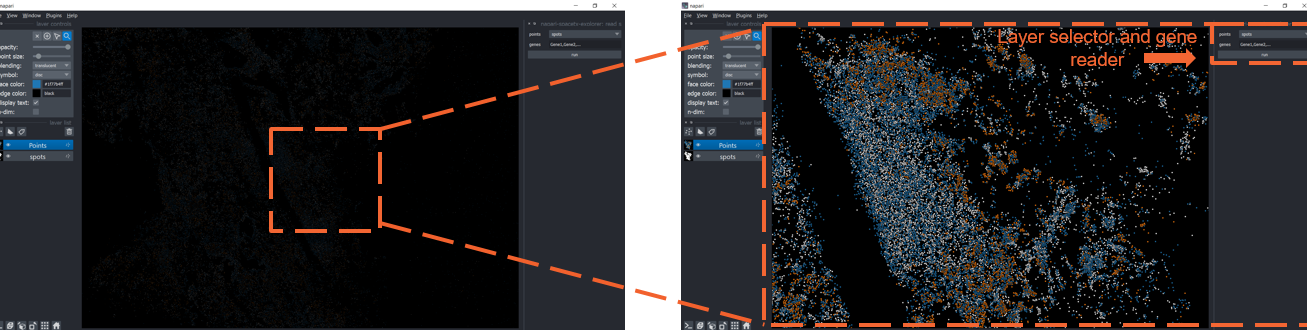
After loading the gene/target maps it is possible to select specific groups for better visualization. This creates a new "Points" layer in napari with the selected groups displayed in different colors.
Loading data in OME.ZARR format
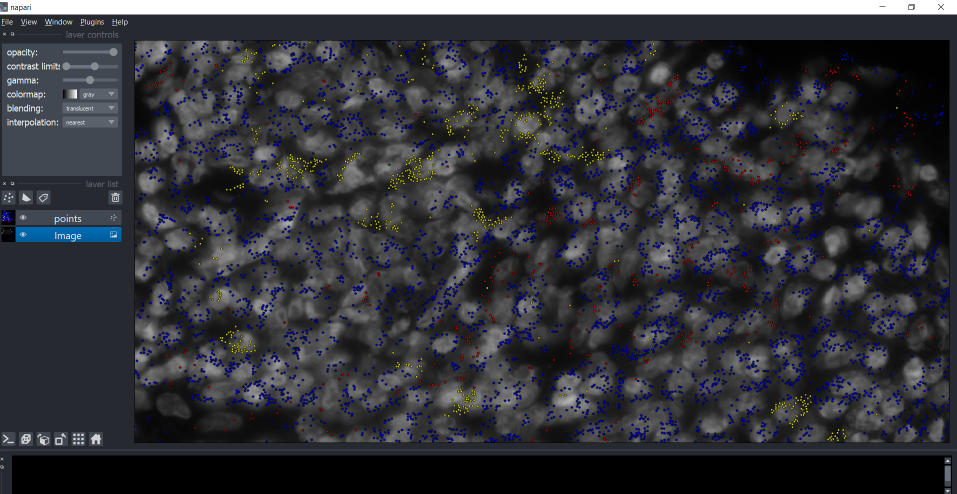
The plugin napari-ome-zarr can be used to display whole-tissue images in addition to the spot maps produced with the
napari-spacetx-explorer plugin.
Installation
The easiest installation is via the "Install/Uninstall Plugins..." under the Plugins menu in napari.
Another way is through pip
pip install napari-spacetx-explorer
Contributing
Contributions are very welcome. Tests can be run with tox, please ensure the coverage at least stays the same before you submit a pull request.
License
Distributed under the terms of the BSD-3 license, "napari-spacetx-explorer" is free and open source software
Issues
If you encounter any problems or would like some support, please file an issue along with a detailed description.
1 maintainer

Metadata
1 maintainer
Release files for napari-spacetx-explorer 0.1.8
For a detailed explanation of source distributions (sdists) and built distributions (wheels), please see the package formats documentation.
Source distribution (sdist)
| File | Size | Uploaded | Provenance | Actions |
|---|---|---|---|---|
| napari-spacetx-explorer-0.1.8.tar.gz | 1.8 MB | Without provenance | Details for napari-spacetx-explorer-0.1.8.tar.gz |
Built distribution (wheel)
| File | Interpreter | ABI | Platform | Actions Reset |
|---|---|---|---|---|
| napari_spacetx_explorer-0.1.8-py3-none-any.whl | Python 3 | none | any | Details for napari_spacetx_explorer-0.1.8-py3-none-any.whl |
Total release size: 1.8 MB
Release files / napari-spacetx-explorer-0.1.8.tar.gz
| Download URL | napari-spacetx-explorer-0.1.8.tar.gz |
|---|---|
| Size | 1.8 MB |
| Tags | Source |
|
SHA-256 checksum How to use checksums |
dabe4565d8f62255945ce7edfcab00f4c9e4b8a727c72915ec7faf22a1b89628
|
|
BLAKE2b-256 checksum How to use checksums |
d340ed7848a0c5b51724308e996861a5a10d5c585c9f098e3d2ad3cd5780ec5f
|
| Upload date | |
|
Uploaded using Trusted Publishing? What is trusted publishing? |
No |
| Uploaded via |
twine/3.7.1 importlib_metadata/4.8.2 pkginfo/1.8.2 requests/2.26.0 requests-toolbelt/0.9.1 tqdm/4.62.3 CPython/3.10.0
|
Release files / napari_spacetx_explorer-0.1.8-py3-none-any.whl
| Download URL | napari_spacetx_explorer-0.1.8-py3-none-any.whl |
|---|---|
| Size | 8.4 kB |
| Tags | Python 3 |
|
SHA-256 checksum How to use checksums |
f4e1278d22416a658f098d1ad37f420de3fc2938502bcb52b560215266501be4
|
|
BLAKE2b-256 checksum How to use checksums |
142460476cb6c5116d2909dda265b37319703f82b3bcc005e4d5e0521e326ba4
|
| Upload date | |
|
Uploaded using Trusted Publishing? What is trusted publishing? |
No |
| Uploaded via |
twine/3.7.1 importlib_metadata/4.8.2 pkginfo/1.8.2 requests/2.26.0 requests-toolbelt/0.9.1 tqdm/4.62.3 CPython/3.10.0
|
Security for napari-spacetx-explorer 0.1.8
Provenance
Provenance describes where a file came from. On PyPI, provenance is shared via attestations, which provide a verifiable record of the build or publishing details. View details, limitations and caveats.
No provenance found
None of the files in this release were uploaded with provenance metadata.
A note on package security
PyPI is a repository for distributing packages, not a service for auditing them. While third-party security researchers and our staff do their best to detect and remove malicious packages, PyPI cannot guarantee the quality, security or suitability of any given package.
To learn more about protecting yourself from malicious actors, visit our package security documentation.














