
Jupyter notebooks from/to Python or R scripts






Jupyter notebooks are complex files, that contain source code, metadata, and rich outputs. Here we offer a simple and complementary format for Jupyter notebooks, as pure python (or R) companion scripts.
The resulting python scripts are perfect candidates for keeping notebooks under version control. They can be edited outside of Jupyter, using your favorite text editor, or even standard merge tools if you wish to merge multiple contributions to a notebook.
With the nbsrc package, any python or R script can be loaded as a notebook
in Jupyter. If a classical ipynb notebook with a matching name exists,
outputs for matching inputs are reconstructed. And, if you associate python
and jupyter files as recommended below, when a ipynb notebook opens, the
corresponding inputs are taken from the py file, which you may have updated
outside of Jupyter.
Can I have a demo?
Sure. Try our package on binder! There, you will be able
- to open and execute arbitrary python files as notebooks (give a try to
the matplotlib demo named
filled_step.py) - to open a notebook, then edit the companion python script, and reload the notebook, to find up-to-date inputs in Jupyter.
How does the python version look like?
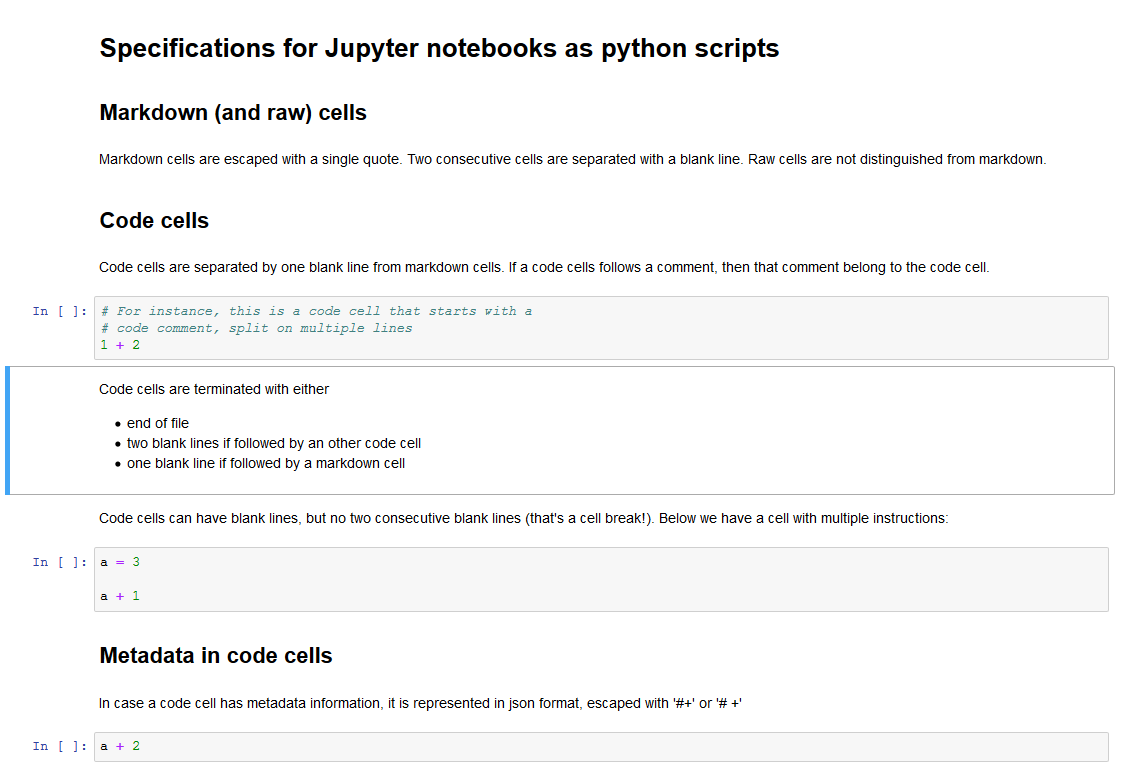
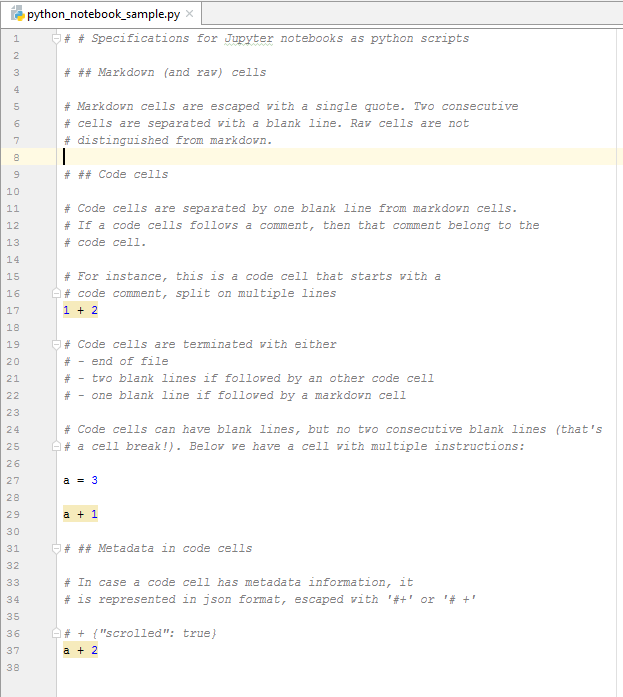
Below is an example of a Jupyter notebook, together with its python representation.
We have hundreds of tests that ensure that
- Round trip conversion: python to notebook to python, is identity
- Round trip conversion, starting from a Jupyter notebook, preserves source and metadata, not outputs. In some occasions (consecutive blank lines in code cells), cells may be splitted into smaller ones.
| Python notebook in Jupyter | Python script |
|---|---|
 |
 |
The representation of notebooks as R scripts follows the standard for that language.
How do I activate the companion script?
- generate a jupyter config, if you don't have one yet, with
jupyter notebook --generate-config - edit the config and include the below:
c.NotebookApp.contents_manager_class = 'nbrmd.RmdFileContentsManager'
c.ContentsManager.default_nbrmd_formats = 'ipynb,py'
Then, make sure you have the nbrmd
package up-to-date, and re-start jupyter, i.e. run
pip install nbrmd --upgrade
jupyter notebook
With the above configuration, every Jupyter notebook will have a companion
.py script. And every .py script that you edit in Jupyter
will have a companion .ipynb notebook.
If you prefer the .ipynb notebook not to be created by Jupyter when a .py
script is edited, set
c.ContentsManager.default_nbrmd_formats = ''
(as the default value is ipynb). Outputs for scripts, however,
will not be saved any more.
Per notebook configuration
With the above configuration, every notebook will have a companion .py file.
If you prefer that the companion script be generated only for a few notebooks,
then remove the c.ContentsManager.default_nbrmd_formats line from Jupyter's
configuration, and instead edit the notebook metadata as follows:
{
  "kernelspec": {
    "name": "python3",
    (...)
  },
  "language_info": {
    (...)
  },
  "nbrmd_formats": "ipynb,py"
}
Accepted formats are: .ipynb, .Rmd, .py and .R.
In case you want both .py and .Rmd, please note that the
order matters: the first non-.ipynb extension
is the one used as the reference source for notebook inputs.
What is the difference between nbsrc and nbrmd?
nbrmd
is a python package that represents Jupyter notebooks as R markdown
files. It is also where notebooks as python scripts are implemented. But
I felt notebooks as scripts deserved a standalone documentation, and
that's the main reason for having the nbsrc package.
You don't actually need the nbsrc package unless you want the command line
conversion tools.
Command line conversion
The nbsrc package provides a nbsrc script that converts Jupyter notebooks
to R or python scripts, and vice-versa.
Install it with
pip install nbsrc --upgrade
and then use it as:
nbsrc jupyter.ipynb         # this prints the `.py` or `.R` alternative
nbsrc jupyter.ipynb -i      # this creates a jupyter.py or jupyter.R file
nbsrc jupyter.py    -i      # and this, a jupyter.ipynb file
nbsrc jupyter.py    -i -p   # update the jupyter.ipynb file and preserve outputs that correspond to unchanged inputs
Alternatively, the nbsrc package provides two nbconvert exporters that you can use with
nbconvert jupyter.ipynb --to pynotebook
nbconvert jupyter.ipynb --to rnotebook
1 maintainer

Metadata
1 maintainer
Release files for nbsrc 0.4.5
For a detailed explanation of source distributions (sdists) and built distributions (wheels), please see the package formats documentation.
Source distribution (sdist)
| File | Size | Uploaded | |
|---|---|---|---|
| nbsrc-0.4.5.tar.gz | 8.0 kB | Details |
Release files / nbsrc-0.4.5.tar.gz
| Download URL | nbsrc-0.4.5.tar.gz |
|---|---|
| Size | 8.0 kB |
| Tags | Source |
|
SHA-256 checksum How to use checksums |
a8b0ca6a48cd2fbcdda7e74ccf5532a36dc66537b82b3fb509c772f48e331715
|
|
BLAKE2b-256 checksum How to use checksums |
0f2238564fd59d7ad928942dcb442597c5b392e12b6d39c51beb3717826705bc
|
| Upload date | |
|
Uploaded using Trusted Publishing? What is trusted publishing? |
No |














