
ndx-survey-data Extension for NWB
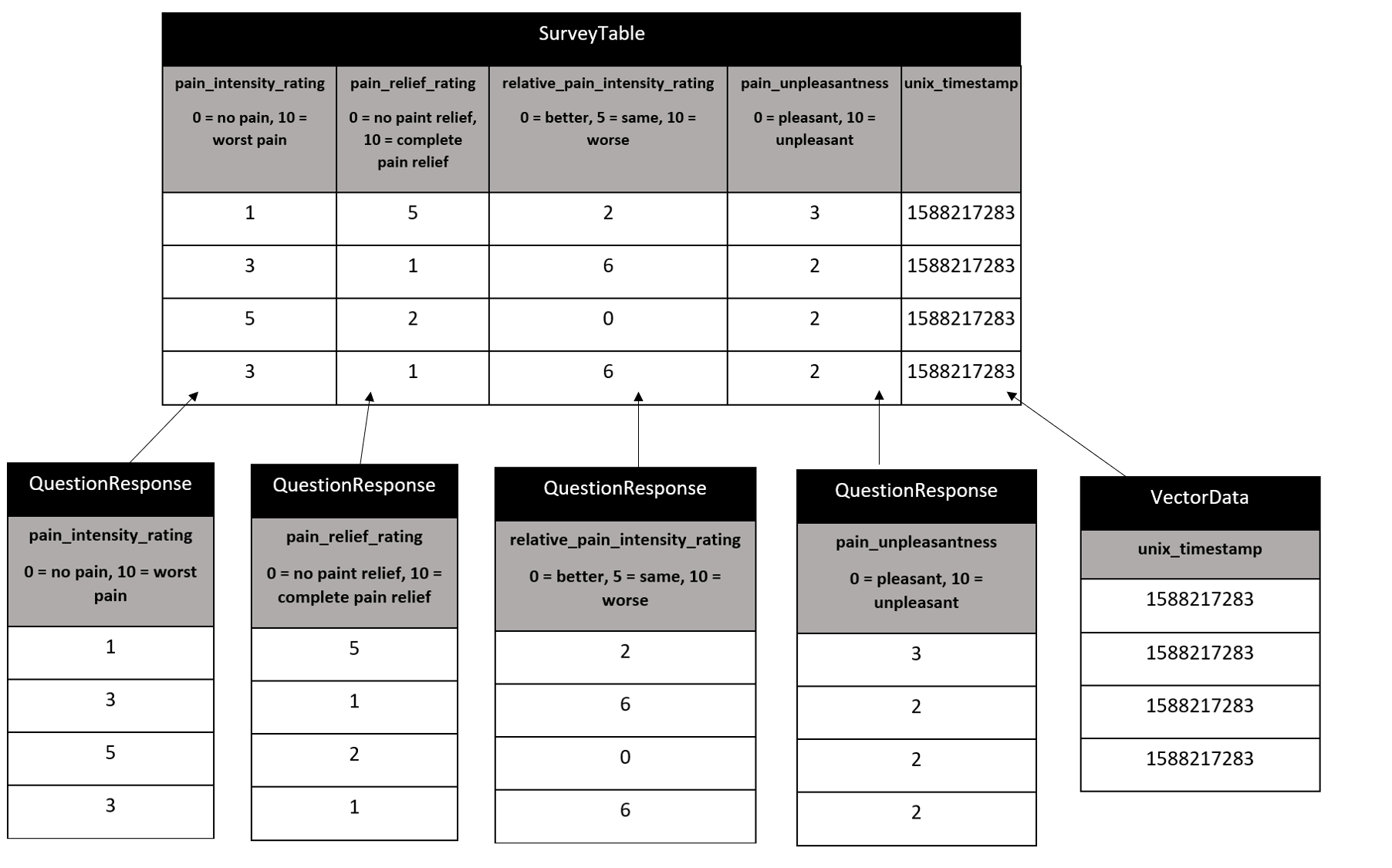
Structure for storing the survey data in a NWB file.



Installation
$ pip install ndx-survey-data
Usage
from pynwb import NWBHDF5IO, NWBFile
from datetime import datetime
from ndx_survey_data.survey_definitions import nrs_survey_table
import numpy as np


nrs_survey_table.add_row(
    pain_intensity_rating=1.1,
    pain_relief_rating=5.5,
    relative_pain_intensity_rating=np.nan,
    pain_unpleasantness=np.nan,
    unix_timestamp=1588217283
)

nrs_survey_table.add_row(
    pain_intensity_rating=np.nan,
    pain_relief_rating=1,
    relative_pain_intensity_rating=6,
    pain_unpleasantness=2.7,
    unix_timestamp=1588217283
)

nrs_survey_table.add_row(
    pain_intensity_rating=5.3,
    pain_relief_rating=np.nan,
    relative_pain_intensity_rating=0.8,
    pain_unpleasantness=2.1,
    unix_timestamp=1588217283
)

nrs_survey_table.add_row(
    pain_intensity_rating=3.7,
    pain_relief_rating=np.nan,
    relative_pain_intensity_rating=6,
    pain_unpleasantness=np.nan,
    unix_timestamp=1588217283
)
nwbfile = NWBFile('description', 'id', datetime.now().astimezone())

nwbfile.create_processing_module(name='behavior', description='survey/behavioral data')

nwbfile.processing['behavior'].add(nrs_survey_table)

with NWBHDF5IO('test_nwb.nwb', 'w') as io:
    io.write(nwbfile)

with NWBHDF5IO('test_nwb.nwb', 'r', load_namespaces=True) as io:
    nwbfile = io.read()
    print(nwbfile.processing['behavior'].data_interfaces['nrs_survey_table'].to_dataframe().to_html())
| pain_intensity_rating | pain_relief_rating | relative_pain_intensity_rating | pain_unpleasantness | unix_timestamp | |
|---|---|---|---|---|---|
| id | |||||
| 0 | 1.1 | 5.5 | NaN | NaN | 1588217283 |
| 1 | NaN | 1.0 | 6.0 | 2.7 | 1588217283 |
| 2 | 5.3 | NaN | 0.8 | 2.1 | 1588217283 |
| 3 | 3.7 | NaN | 6.0 | NaN | 1588217283 |
To add a custom survey:
from ndx_survey_data import QuestionResponse, SurveyTable

q1 = QuestionResponse(name='question1',
                      description='desc',
                      options=['option 1', 'option 2', 'option 3'])

q2 = QuestionResponse(name='question2',
                      description='desc',
                      options=['option 1', 'option 2', 'option 3'])

q3 = QuestionResponse(name='question3',
                      description='desc',
                      options=['option 1', 'option 2', 'option 3'])


custom_survey_table = SurveyTable(name='custom_survey_table',
                               description='desc',
                               columns=[q1, q2, q3])

custom_survey_table.add_row(question1=1.3, question2=3.9, question3=0.2, unix_timestamp=1588217283)
custom_survey_table.add_row(question1=3.3, question2=1.4, question3=0.6, unix_timestamp=1588217283)
custom_survey_table.add_row(question1=2.5, question2=2.1, question3=2.8, unix_timestamp=1588217283)
3 maintainers


Metadata
3 maintainers
Release files for ndx-survey-data 0.2.0
For a detailed explanation of source distributions (sdists) and built distributions (wheels), please see the package formats documentation.
Source distribution (sdist)
| File | Size | Uploaded | |
|---|---|---|---|
| ndx-survey-data-0.2.0.tar.gz | 14.7 kB | Details |
Built distribution (wheel)
| File | Interpreter | ABI | Platform | Reset |
|---|---|---|---|---|
| ndx_survey_data-0.2.0-py2.py3-none-any.whl | Python 2, Python 3 | none | any | Details |
Total release size: 22.2 kB
Release files / ndx-survey-data-0.2.0.tar.gz
| Download URL | ndx-survey-data-0.2.0.tar.gz |
|---|---|
| Size | 14.7 kB |
| Tags | Source |
|
SHA-256 checksum How to use checksums |
93dfc2aace4e1a00bca96468ad854cd9f91af38f945649870a2810edbbda2d5a
|
|
BLAKE2b-256 checksum How to use checksums |
bd3c5d4ee67fea041b4f3e9a61a3b7faff8fe55f2309e197471b867c2e530e3b
|
| Upload date | |
|
Uploaded using Trusted Publishing? What is trusted publishing? |
No |
| Uploaded via |
twine/3.2.0 pkginfo/1.5.0.1 requests/2.24.0 setuptools/49.1.0.post20200710 requests-toolbelt/0.9.1 tqdm/4.47.0 CPython/3.7.7
|
Release files / ndx_survey_data-0.2.0-py2.py3-none-any.whl
| Download URL | ndx_survey_data-0.2.0-py2.py3-none-any.whl |
|---|---|
| Size | 7.6 kB |
| Tags | Python 2 Python 3 |
|
SHA-256 checksum How to use checksums |
87fb2869ba81e9f27a3bdb567e29bd3ccedf51cfcc35188b39be99abd1a3fe8f
|
|
BLAKE2b-256 checksum How to use checksums |
00023fdf343056ac8b5d626ab8f90a4a4ba875c69ea99d3ef62cef14846392f0
|
| Upload date | |
|
Uploaded using Trusted Publishing? What is trusted publishing? |
No |
| Uploaded via |
twine/3.2.0 pkginfo/1.5.0.1 requests/2.24.0 setuptools/49.1.0.post20200710 requests-toolbelt/0.9.1 tqdm/4.47.0 CPython/3.7.7
|














