
nef
simple command line client for aws cloudwatch logs.
in the search for a cloudwatch CLI, you will find several other (3 as of writing this) tools:
https://github.com/jorgebastida/awslogs
https://github.com/winebarrel/cwli
https://github.com/knqyf263/utern
while these tools are great, they all have more features than i needed, and those i've tried are kind of complicated to figure out.
my goal in writing nef was to have a command line tool that lets me view logs and log groups easily and quickly without logging into the aws web console. it amounts to a thin wrapper for the aws cli log command, which simplifies both the input and the output.
see below for installation and usage info. see the project homepage for more info: https://gitlab.com/shindagger/nef
installation
pip install nef
dependencies
- aws cli
- python 3.6
flags
positional arguments:
  log            Which log group to view

optional arguments:
  -h, --help     show this help message and exit
  --start START  optional. give a start date and time.
                 format: YYYY-MM-DD HH:MM:SS
                 example: nef /path/to/log-group --start 2019-11-25
                 example 2: nef /path/to/log-group --start "2019-11-25 10:24"
                 example 3: nef /path/to/log-group --start "2019-11-25 10:24:32"
                 default (if arg not given): 2019-11-25 15:26:50
  --end END      optional. define an end date/time.
                 see --start for formatting info
  -c, --columns  show log groups in columns
  -j, --json     display output as json
  -v, --version  show program's version number and exit
usage
$ nef -h
show help message and exit.
$ nef
print out all log groups.
$ nef -c
print log groups in concise columnar format.
$ nef /path/to/log_group
show info (the last 24 hours) of the log group /path/to/log_group
$ nef /path/to/log_group --start 2019-11-25
show logs since the 25th of Nov 2019.
$ nef /path/to/log_group --start "2019-11-25 10:30"
optionally include a time part (be sure to wrap the string in quotes for the space).
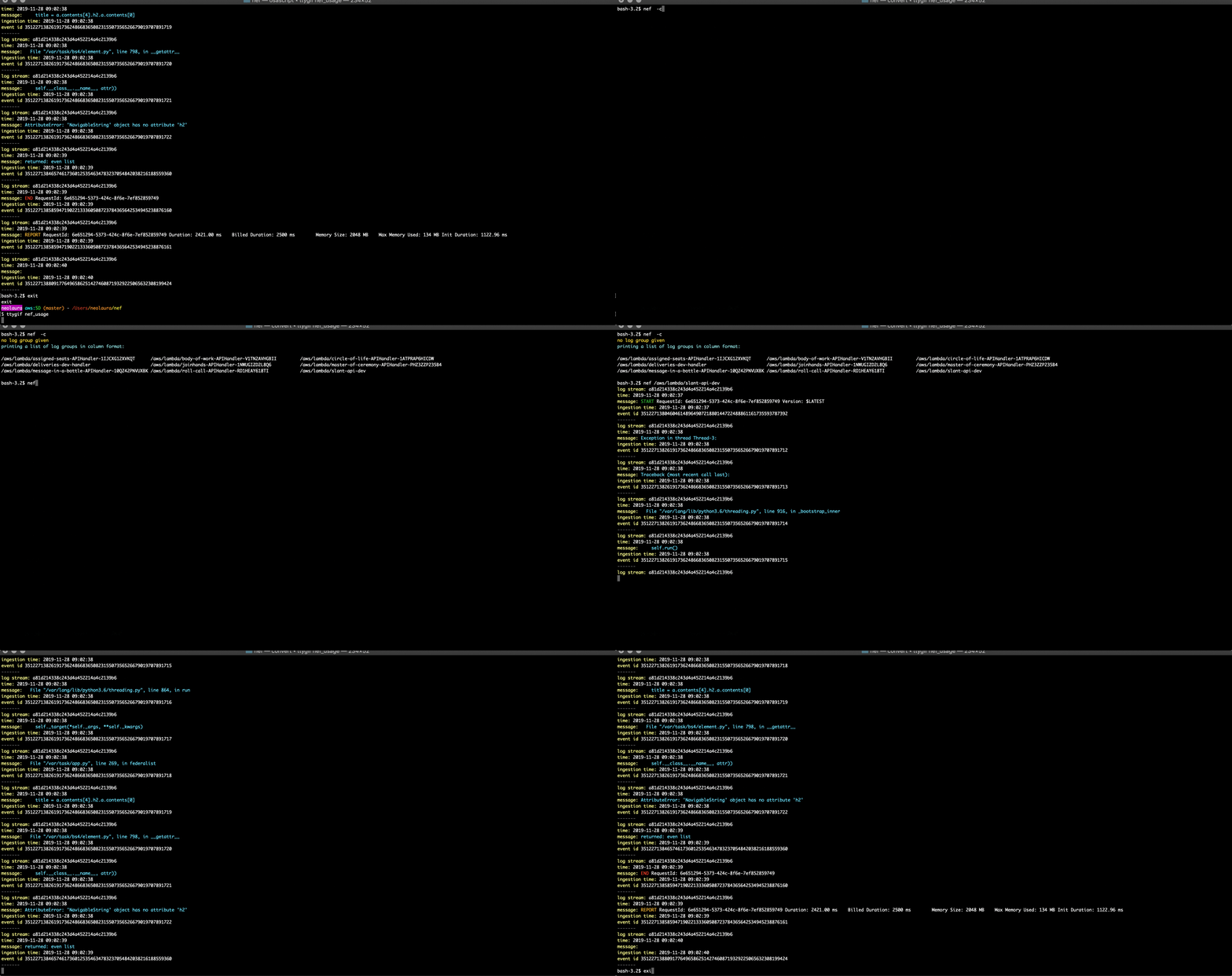
example
1 maintainer

Download files
Download the file for your platform. If you're not sure which to choose, learn more about installing packages.
Source Distribution
Built Distribution
Filter files by name, interpreter, ABI, and platform.
If you're not sure about the file name format, learn more about wheel file names.
Copy a direct link to the current filters
File details
Details for the file nef-1.2.0.tar.gz.
File metadata
- Download URL: nef-1.2.0.tar.gz
- Upload date:
- Size: 5.0 kB
- Tags: Source
- Uploaded using Trusted Publishing? No
- Uploaded via:
twine/6.1.0 CPython/3.11.3
File hashes
| Algorithm | Hash digest | |
|---|---|---|
| SHA256 |
f1446cb61ee395460a9f5e5e1283a2bf354b7b772968bfabf6c90679c3b5ea5c
|
|
| MD5 |
f2a5ad29eb77175127529d91fb76691a
|
|
| BLAKE2b-256 |
a84e97f8d85128dd971ab53eece72604f65fd7b5dc3b13cdc76883b9db6f019c
|
File details
Details for the file nef-1.2.0-py3-none-any.whl.
File metadata
- Download URL: nef-1.2.0-py3-none-any.whl
- Upload date:
- Size: 5.4 kB
- Tags: Python 3
- Uploaded using Trusted Publishing? No
- Uploaded via:
twine/6.1.0 CPython/3.11.3
File hashes
| Algorithm | Hash digest | |
|---|---|---|
| SHA256 |
bbe0839fa1d17de7e74db02ede234ecba4558eaa145e8ad67777d0ea9bc7c2f9
|
|
| MD5 |
51bbd4b56c74cf3513ef50e38a3ae1ac
|
|
| BLAKE2b-256 |
b939392e33b09440d820fb6fdabb9677ae81c473875b2d8b828806c4c807729b
|














