
neofetch_win
neofetch, but for Windows
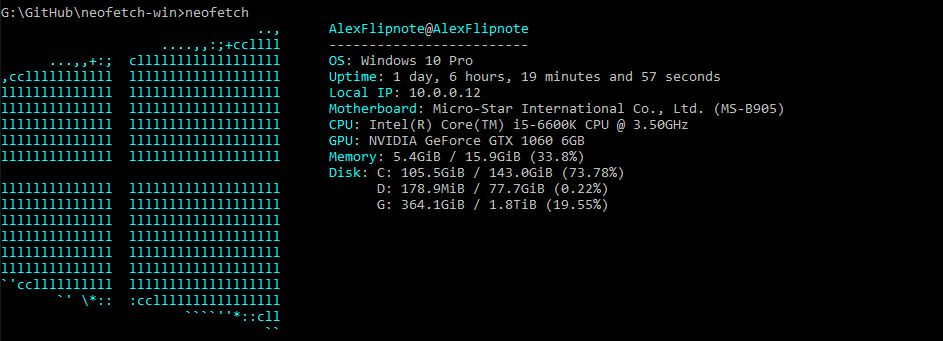
This was made to have the command neofetch available on the Windows CMD. If you wish to contribute, feel free to do so.
Requirement
- Python 3.11 or up
Install
- Open CMD as admin
- Type the following command:
pip install neofetch-win - Now you can type
neofetchin CMD to see results
Available colours
black, red, green, yellow, blue, magenta, cyan, white, windows_10_blue, windows_11_blue
Using ASCII art
- File has to be readable
- When targeting file from different path, replace
\with\\in order for Windows to understand it
NOTE: Remember to use entire path, example:neofetch --art C:\\Users\\AlexFlipnote\\art.txt - Magic happens, yey
Usage
$ neofetch --help
usage:  [-h] [-v] [-c COLOUR [COLOUR ...]] [-l] [--stdout] [-ac ARTCOLOUR [ARTCOLOUR ...]]
                   [-a ART [ART ...]] [-na] [-i IGNORE [IGNORE ...]]

neofetch, but for Windows

options:
  -h, --help            show this help message and exit
  -v, --version         Show the version number and exit
  -c COLOUR [COLOUR ...], --colour COLOUR [COLOUR ...], --color COLOUR [COLOUR ...]
                        Change colour of the text
  -l, --logo            Hide the info text and only show the ascii logo
  --stdout              Turn off all colors
  -ac ARTCOLOUR [ARTCOLOUR ...], --artcolour ARTCOLOUR [ARTCOLOUR ...], --artcolor ARTCOLOUR [ARTCOLOUR ...]
                        Change colour of the ascii
  -a ART [ART ...], --art ART [ART ...]
                        Change the ascii art
  -na, --noart          Turn off ascii art
  -i IGNORE [IGNORE ...], --ignore IGNORE [IGNORE ...]
                        Ignore components (title, underline, os, uptime, ip, motherboard, cpu, gpu, ram, disk,
                        linebreak, colours_1, colours_2)
1 maintainer

Metadata
1 maintainer
Release files for neofetch-win 1.4.4
For a detailed explanation of source distributions (sdists) and built distributions (wheels), please see the package formats documentation.
Source distribution (sdist)
| File | Size | Uploaded | Provenance | |
|---|---|---|---|---|
| neofetch_win-1.4.4.tar.gz | 8.7 kB | Without provenance | Details |
Built distribution (wheel)
| File | Interpreter | ABI | Platform | Reset |
|---|---|---|---|---|
| neofetch_win-1.4.4-py3-none-any.whl | Python 3 | none | any | Details |
Total release size: 17.0 kB
Release files / neofetch_win-1.4.4.tar.gz
| Download URL | neofetch_win-1.4.4.tar.gz |
|---|---|
| Size | 8.7 kB |
| Tags | Source |
|
SHA-256 checksum How to use checksums |
71cf4554b761b75ed47243cb4987d522d269084d26e0c080db1358a8f48c0ba7
|
|
BLAKE2b-256 checksum How to use checksums |
ff2fda85ec2332e11394f6ac7849a6a256f647862321bfb719e2ea937cb4e35c
|
| Upload date | |
|
Uploaded using Trusted Publishing? What is trusted publishing? |
No |
| Uploaded via |
twine/6.1.0 CPython/3.11.4
|
Release files / neofetch_win-1.4.4-py3-none-any.whl
| Download URL | neofetch_win-1.4.4-py3-none-any.whl |
|---|---|
| Size | 8.3 kB |
| Tags | Python 3 |
|
SHA-256 checksum How to use checksums |
71fdc51c78bc863ac50dea5821772abdb54d0b78424da27680e4b8fe1025ad04
|
|
BLAKE2b-256 checksum How to use checksums |
f537e8c71a5cb703847bc310a8f6b5d4e60703cddece762deff175504d870c5e
|
| Upload date | |
|
Uploaded using Trusted Publishing? What is trusted publishing? |
No |
| Uploaded via |
twine/6.1.0 CPython/3.11.4
|
Security for neofetch-win 1.4.4
Provenance
Provenance describes where a file came from. On PyPI, provenance is shared via attestations, which provide a verifiable record of the build or publishing details. View details, limitations and caveats.
No provenance found
None of the files in this release were uploaded with provenance metadata.
A note on package security
PyPI is a repository for distributing packages, not a service for auditing them. While third-party security researchers and our staff do their best to detect and remove malicious packages, PyPI cannot guarantee the quality, security or suitability of any given package.
To learn more about protecting yourself from malicious actors, visit our package security documentation.














