
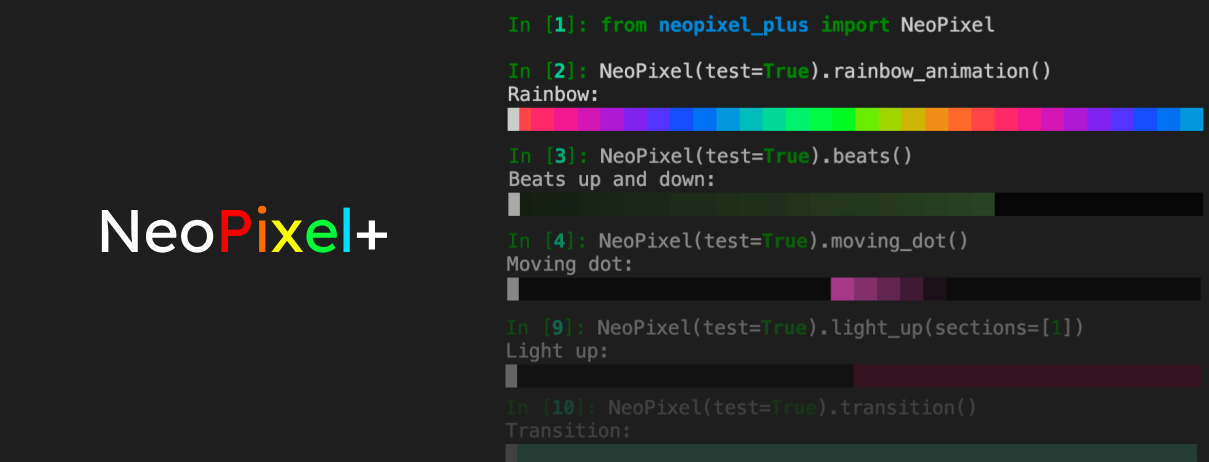
The NeoPixel library plus animations and terminal testing mode - so you can see how your LEDs would behave directly in the terminal, without any microcontroller.
Want to support the development and stay updated?


Overview
-
NeoPixel functions (animations)
4.2 beats()
4.3 moving_dot()
4.4 light_up()
4.5 transition()
-
5.1 get_sections()
5.3 write()
5.4 get_led()
5.5 off()
5.6 on()
5.7 color()
5.9 get_pin()
Installation
Make sure Python 3 is installed.
Recommended: always create a Python Virtual Environment for your project and install neopixel_plus in that environment.
pip install neopixel_plus
Example
IMPORTANT:
To use NeoPixel+ on Raspberry Pi (using target='adafruit'), you need to make sure you execute python with sudo. For example:
sudo python
or from a virtual environment
sudo ./pyvenv/bin/python
from neopixel_plus import NeoPixel

# Example 1 - Changing the color of a physical LED
pixel = NeoPixel(pin=5, n=30)
pixel.leds[0] = (219,100,222)
pixel.write()

# Example 2 - Testing a rainbow animation in the terminal
NeoPixel(test=True).rainbow_animation()

# Example 3 - Playing a rainbow animation on physical LEDs
NeoPixel(pin=5, n=30).rainbow_animation()
NeoPixel class
Input:
NeoPixel(pin=...)
type = int
default = 10
purpose = 'The GPIO pin the data wire of the LED strip is connected to'
NeoPixel(n=...)
type = int
default = 30
purpose = 'The number of RGB LEDs on your LED strip'
NeoPixel(start_led=...)
type = int
default = 0
purpose = 'With which LED should the animation start'
NeoPixel(test=...)
type = bool
default = False
purpose = 'If True: show LED simulation in terminal output. If False: connect to real LED strip and play animation.'
NeoPixel(overwrite_line=...)
type = bool
default = True
purpose = 'If False: show all steps of LED animation in terminal ouput. Useful for debugging.'
NeoPixel(debug=...)
type = bool
default = False
purpose = 'If True: prints all function calls and their input variables, for better debugging.'
NeoPixel(target=...)
type = str
default = 'micropython'
options = ['micropython','adafruit']
purpose = 'Defines what kind of NeoPixel library is targeted: the default micropython NeoPixel or adafruits NeoPixel for Raspberry Pi.'
NeoPixel functions (animations)
rainbow_animation()

Input:
rainbow_animation(brightness=...)
type = float
default = 1.0
purpose = 'Set the maximum brightness of the LEDs. 0 == off, 1.0 == 100%'
rainbow_animation(loop_limit=...)
type = int
default = None
purpose = 'If set, defines how often animation should repeat, else: animation runs in infinite loop.'
rainbow_animation(duration_ms=...)
type = int
default = 1000
purpose = 'Defines many ms should the animation last'
rainbow_animation(pause_ms=...)
type = int
default = None
purpose = 'If set, defines if a pause should be made after animation and how long that lasts.'
rainbow_animation(customization_json=...)
type = dict
default = {}
purpose = 'If you like, you can also give the customization options via a dict as an imput. Example: {"duration_ms":2000}'
beats()

Input:
beats(brightness=...)
type = float
default = 1.0
purpose = 'Set the maximum brightness of the LEDs. 0 == off, 1.0 == 100%'
beats(brightness_fixed=...)
type = bool
default = False
purpose = 'If False: the brightness will start low and become high at the end. If True: the brightness stays the same during the animation, for all LEDs.'
beats(loop_limit=...)
type = int
default = None
purpose = 'If set, defines how often animation should repeat, else: animation runs in infinite loop.'
beats(duration_ms=...)
type = int
default = 200
purpose = 'Defines many ms should the animation last'
beats(pause_ms=...)
type = int
default = 300
purpose = 'If set, defines if a pause should be made after animation and how long that lasts.'
beats(start=...)
type = str
default = 'start'
options = ['start','end','start + end','center']
purpose = 'Defines from where the animation should start'
beats(rgb_colors=...)
type = list
default = list of randomly selected RGB colors (example: [[140,140,144],[240,100,0]])
purpose = 'Define what RGB colors the animation will use'
beats(num_random_colors=...)
type = int
default = 5
purpose = 'Defines how many random RGB colors the animation will switch between, if no RGB colors are manually defined'
beats(max_height=...)
type = float
default = 1.0
purpose = 'Defines how high the beat animation can go. 1.0 == 100% of all LEDs, 0 == no LEDs.'
beats(customization_json=...)
type = dict
default = {}
purpose = 'If you like, you can also give the customization options via a dict as an imput. Example: {"duration_ms":2000}'
moving_dot()

Input:
moving_dot(brightness=...)
type = float
default = 1.0
purpose = 'Set the maximum brightness of the LEDs. 0 == off, 1.0 == 100%'
moving_dot(loop_limit=...)
type = int
default = None
purpose = 'If set, defines how often animation should repeat, else: animation runs in infinite loop.'
moving_dot(duration_ms=...)
type = int
default = 200
purpose = 'Defines many ms should the animation last'
moving_dot(pause_a_ms=...)
type = int
default = 0
purpose = 'Defines if pause A should be made and how long that lasts.'
moving_dot(pause_b_ms=...)
type = int
default = 300
purpose = 'Defines if pause B should be made and how long that lasts.'
moving_dot(start=...)
type = str
default = 'start'
options = ['start','end']
purpose = 'Defines from where the animation should start'
moving_dot(rgb_colors=...)
type = list
default = list of randomly selected RGB colors (example: [[140,140,144],[240,100,0]])
purpose = 'Define what RGB colors the animation will use'
moving_dot(num_random_colors=...)
type = int
default = 5
purpose = 'Defines how many random RGB colors the animation will switch between, if no RGB colors are manually defined'
moving_dot(customization_json=...)
type = dict
default = {}
purpose = 'If you like, you can also give the customization options via a dict as an imput. Example: {"duration_ms":2000}'
light_up()

Input:
light_up(brightness=...)
type = float
default = 1.0
purpose = 'Set the maximum brightness of the LEDs. 0 == off, 1.0 == 100%'
light_up(loop_limit=...)
type = int
default = None
purpose = 'If set, defines how often animation should repeat, else: animation runs in infinite loop.'
light_up(duration_ms=...)
type = int
default = 200
purpose = 'Defines many ms should the animation last'
light_up(pause_ms=...)
type = int
default = 200
purpose = 'Defines if pause should be made and how long that lasts.'
light_up(sections=...)
type = str or list
default = 'all'
options = ['all',0,1,2,3]
purpose = 'Defines what sections of the LED strip should glow up (one section is 15 LEDs).'
light_up(rgb_colors=...)
type = list
default = list of randomly selected RGB colors (example: [[140,140,144],[240,100,0]])
purpose = 'Define what RGB colors the animation will use'
light_up(num_random_colors=...)
type = int
default = 5
purpose = 'Defines how many random RGB colors the animation will switch between, if no RGB colors are manually defined'
light_up(customization_json=...)
type = dict
default = {}
purpose = 'If you like, you can also give the customization options via a dict as an imput. Example: {"duration_ms":2000}'
transition()

Input:
transition(brightness=...)
type = float
default = 1.0
purpose = 'Set the maximum brightness of the LEDs. 0 == off, 1.0 == 100%'
transition(loop_limit=...)
type = int
default = None
purpose = 'If set, defines how often animation should repeat, else: animation runs in infinite loop.'
transition(duration_ms=...)
type = int
default = 200
purpose = 'Defines many ms should the animation last'
transition(pause_ms=...)
type = int
default = 200
purpose = 'Defines if pause should be made and how long that lasts.'
transition(sections=...)
type = str or list
default = 'all'
options = ['all',0,1,2,3]
purpose = 'Defines what sections of the LED strip should glow up (one section is 15 LEDs).'
transition(rgb_colors=...)
type = list
default = list of randomly selected RGB colors (example: [[140,140,144],[240,100,0]])
purpose = 'Define what RGB colors the animation will use'
transition(num_random_colors=...)
type = int
default = 5
purpose = 'Defines how many random RGB colors the animation will switch between, if no RGB colors are manually defined'
transition(customization_json=...)
type = dict
default = {}
purpose = 'If you like, you can also give the customization options via a dict as an imput. Example: {"duration_ms":2000}'
NeoPixel functions (other)
get_sections()
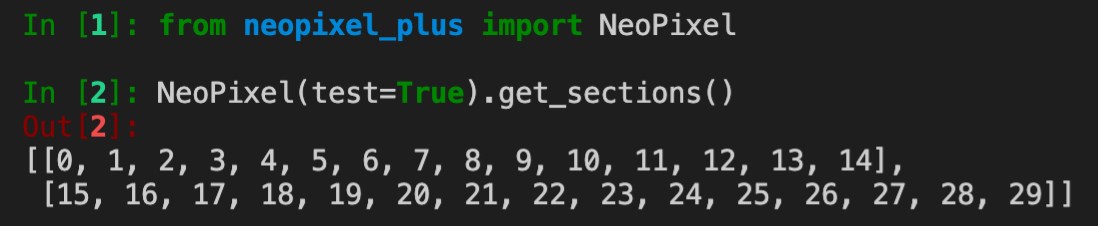
get_led_selectors()

Input:
get_led_selectors(sections=...)
type = str or list
default = 'all'
options = ['all','random',0,1,2,3]
purpose = 'Defines what sections should be returned.'
write()
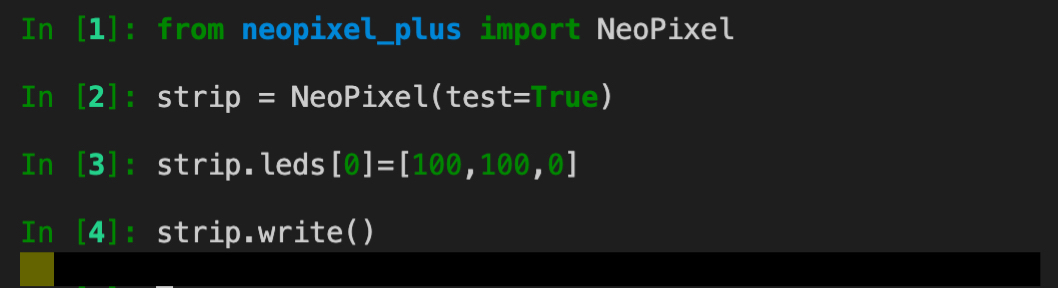
Input:
write(s_after_wait=...)
type = float
default = 1.0/36.0
purpose = 'Defines how many seconds the code should wait after writing the LED status.'
get_led()
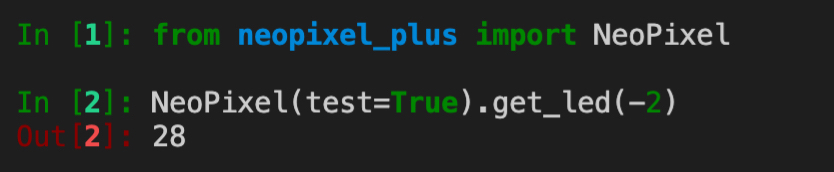
Input:
get_led(i=...)
type = int
purpose = 'Defines which LED you want to get. If <0: LED from the end will be selected.'
get_led(start=...)
type = str
default = None
purpose = 'Defines from where your animation starts. If start==end: LEDs will be counted from the end of the LED strip.'
off()

on()

Input:
on(num=...)
type = int
default = None
purpose = 'Turn on only one specific LED.'
color()

Input:
color(rgb_color=...)
type = list
purpose = 'Define an [r,g,b] list with the red, green and blue values (from 0-255).'
color(customization_json=...)
type = dict
default = {}
purpose = 'If you like, you can also give the customization options via a dict as an imput. Example: {"rgb_color":[100,200,200]}'
test_animations()
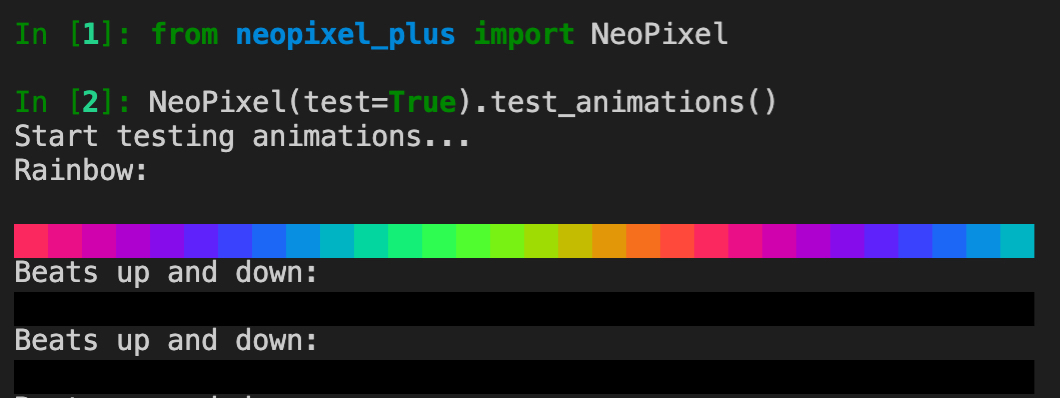
get_pin()
Returns the class object for the GPIO pin (micropython's and adafruit's NeoPixel use different classes for that).
Terminal commands
You can also start an animation by calling the neopixel_plus.py file directly via your terminal.
Example:
python3 neopixel_plus.py -t <test> -d <target> -n <n> -a <animation>
1 maintainer

Metadata
1 maintainer
Release files for neopixel-plus 1.7
For a detailed explanation of source distributions (sdists) and built distributions (wheels), please see the package formats documentation.
Source distribution (sdist)
| File | Size | Uploaded | |
|---|---|---|---|
| neopixel_plus-1.7.tar.gz | 16.1 kB | Details |
Built distribution (wheel)
| File | Interpreter | ABI | Platform | Reset |
|---|---|---|---|---|
| neopixel_plus-1.7-py3-none-any.whl | Python 3 | none | any | Details |
Total release size: 32.1 kB
Release files / neopixel_plus-1.7.tar.gz
| Download URL | neopixel_plus-1.7.tar.gz |
|---|---|
| Size | 16.1 kB |
| Tags | Source |
|
SHA-256 checksum How to use checksums |
33c23a65d5c0cc80f0a8b16fe0be90de5f9b6321e47cf124a878b614f4eb2855
|
|
BLAKE2b-256 checksum How to use checksums |
5afee0a728f2dc394acfd05947cb454c81f8799268f7c17f1d846852882d720c
|
| Upload date | |
|
Uploaded using Trusted Publishing? What is trusted publishing? |
No |
| Uploaded via |
twine/3.2.0 pkginfo/1.6.1 requests/2.25.0 setuptools/41.2.0 requests-toolbelt/0.9.1 tqdm/4.54.1 CPython/3.8.2
|
Release files / neopixel_plus-1.7-py3-none-any.whl
| Download URL | neopixel_plus-1.7-py3-none-any.whl |
|---|---|
| Size | 16.0 kB |
| Tags | Python 3 |
|
SHA-256 checksum How to use checksums |
85fec86b6208f9bc35dfb7681fd5cba6c5769e5e4d81f9e12b828dd1b426cb82
|
|
BLAKE2b-256 checksum How to use checksums |
f754b6aebb6a73114f761f83305509a224ccbc0ab4fe0d0f99760a733c139b09
|
| Upload date | |
|
Uploaded using Trusted Publishing? What is trusted publishing? |
No |
| Uploaded via |
twine/3.2.0 pkginfo/1.6.1 requests/2.25.0 setuptools/41.2.0 requests-toolbelt/0.9.1 tqdm/4.54.1 CPython/3.8.2
|














