
NewRelic Synthetics (unofficial) CLI (NeReS)


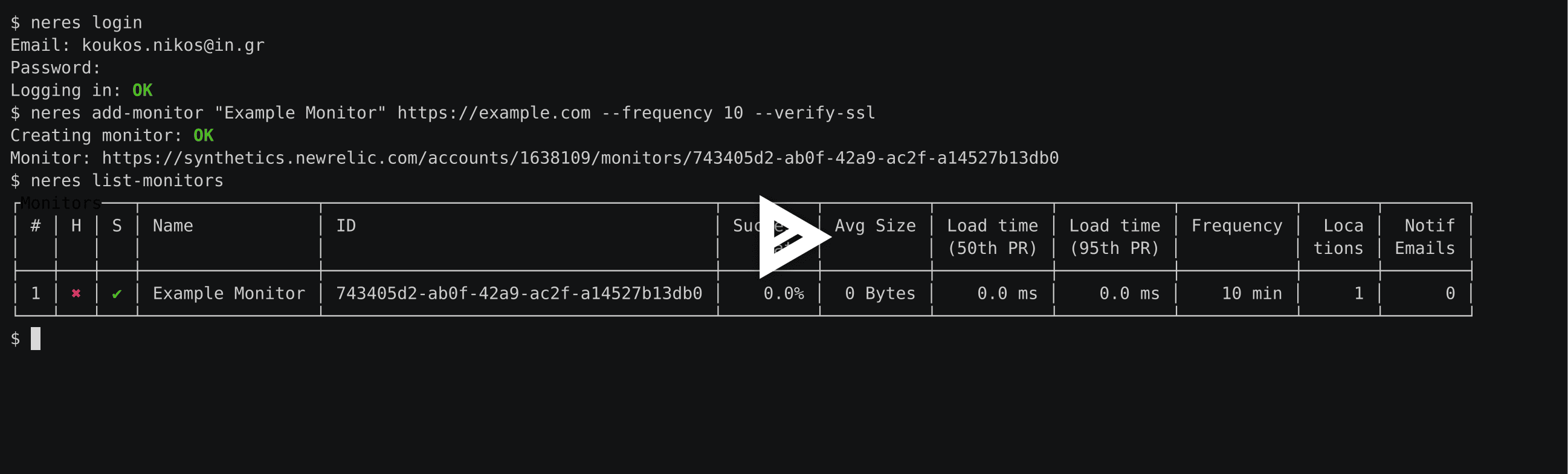
NeReS is a cli tool to manage NewRelic Synthetics monitors with a Synthetics Lite account (Pro should work too). The tool emulates the actions of a user in the browser and doesn’t use the Synthetics API since that’s only available to the Pro accounts.
With this tool you can:
List all your monitors, including their success rate, locations, notifications etc.
Create, update and delete monitors
List available locations for monitor installation and
everything else available though the Web console.
Installation
$ pip install neresConfiguration
You will need a newrelic account
Start by using the login command
Read the docs or run –help
Use
Login to NewRelic
Login to NewRelic with the login command:
$ neres loginIf you have multiple NewRelic accounts you can have different environments:
$ neres --environment work loginList Accounts
You can list all the accounts connected to the email you used to connect using:
$ neres list-accountsBy default neres will act on the first account listed. This command will help you select a different account by using the ID of the account in combination with the –account option or by setting NERES_ACCOUNT in your environment.
List Locations
Lists available monitor locations:
$ neres list-locationsList Monitors
Lists available monitors:
$ neres list-monitorsYou can only list IDs of the monitors:
$ neres list-monitors --ids-onlyOr get the raw JSON output from NewRelic:
$ neres list-monitors --rawAdd Monitor
Adds a Synthetics monitor:
$ neres add-monitor monitorName http://example.comUse –help to get a full list of supported options for the command. All options are optional.
Get Monitor
Get details on a monitor
$ neres get-monitor de310b69-3195-435e-b1ef-3a0af67499deUpdate Monitor
Update an existing monitor
$ neres update-monitor de310b69-3195-435e-b1ef-3a0af67499de --name "Foobar"Use –help to get a full list of supported options for the command. All options are optional.
Open Monitor
Open monitor in the browser
$ neres open de310b69-3195-435e-b1ef-3a0af67499deGet state of all monitors of account
Export the state of all monitors of account in YAML format with
$ neres get-stateSave the output into a file, edit and use in combination with the update-from-statefile command to update multiple monitors at once.
$ neres get-state > state.yamlUpdate monitors from statefile
Update monitors from statefile with
$ neres update-from-statefile state.yamlCredits
This package was created with Cookiecutter and the audreyr/cookiecutter-pypackage project template.
History
0.4.0 (2017-06-02)
Use NewRelic’s “stoplight” to determine monitor health.
0.3.0 (2017-05-25)
Multiple monitors management with get-state and update-from-statefile
Bug fixes
0.2.0 (2017-05-11)
Python 3 fixes
Bugfixes
Tests!
0.1.1 (2017-04-27)
First release on PyPI.
0.1.0 (2017-04-12)
Cookiecutter import
1 maintainer

Metadata
1 maintainer
Release files for neres 0.5.1
For a detailed explanation of source distributions (sdists) and built distributions (wheels), please see the package formats documentation.
Source distribution (sdist)
| File | Size | Uploaded | Provenance | Actions |
|---|---|---|---|---|
| neres-0.5.1.tar.gz | 25.0 kB | Without provenance | Details for neres-0.5.1.tar.gz |
Built distribution (wheel)
| File | Interpreter | ABI | Platform | Actions Reset |
|---|---|---|---|---|
| neres-0.5.1-py2.py3-none-any.whl | Python 2, Python 3 | none | any | Details for neres-0.5.1-py2.py3-none-any.whl |
Total release size: 38.1 kB
Release files / neres-0.5.1.tar.gz
| Download URL | neres-0.5.1.tar.gz |
|---|---|
| Size | 25.0 kB |
| Tags | Source |
|
SHA-256 checksum How to use checksums |
f1e40ec1218e98249f7e240979ad98241ea545161dec76d7a7ff620a4bd2bcb2
|
|
BLAKE2b-256 checksum How to use checksums |
85b4d368d3a9c7b432b1d5e8a103917fb546132107ad8937e3cea93a0d2a0891
|
| Upload date | |
|
Uploaded using Trusted Publishing? What is trusted publishing? |
No |
| Uploaded via |
twine/1.13.0 pkginfo/1.5.0.1 requests/2.22.0 setuptools/41.0.1 requests-toolbelt/0.9.1 tqdm/4.32.2 CPython/3.7.1
|
Release files / neres-0.5.1-py2.py3-none-any.whl
| Download URL | neres-0.5.1-py2.py3-none-any.whl |
|---|---|
| Size | 13.1 kB |
| Tags | Python 2 Python 3 |
|
SHA-256 checksum How to use checksums |
fd0bbffb557d62e18906dabf25315f20da59b74e558597967ec9543242fd2080
|
|
BLAKE2b-256 checksum How to use checksums |
a55fbd38bf3e86d1d592d8be206daf559c1fa70df2e622bbe0edbc655ea78053
|
| Upload date | |
|
Uploaded using Trusted Publishing? What is trusted publishing? |
No |
| Uploaded via |
twine/1.13.0 pkginfo/1.5.0.1 requests/2.22.0 setuptools/41.0.1 requests-toolbelt/0.9.1 tqdm/4.32.2 CPython/3.7.1
|
Security for neres 0.5.1
Provenance
Provenance describes where a file came from. On PyPI, provenance is shared via attestations, which provide a verifiable record of the build or publishing details. View details, limitations and caveats.
No provenance found
None of the files in this release were uploaded with provenance metadata.
A note on package security
PyPI is a repository for distributing packages, not a service for auditing them. While third-party security researchers and our staff do their best to detect and remove malicious packages, PyPI cannot guarantee the quality, security or suitability of any given package.
To learn more about protecting yourself from malicious actors, visit our package security documentation.














