
Overview
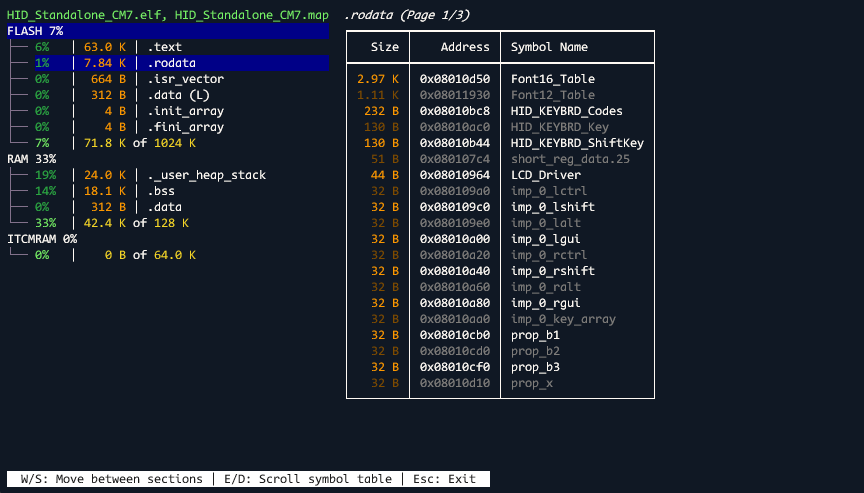
Nesiac is a terminal tool for visualising memory usage in embedded programs.
As an example when run on the STM32 "HID_Standalone" project for STM32H747I-DISCO board:
Installation
Nesiac may be installed with pip via:
python -m pip install nesiac
The nesiac executable will then be made available in your python executables directory, which should be on your path.
Usage
Nesiac requires two files to do its analysis:
- An ELF file for section and symbol info
- A map file (in GCC style) for memory region info
If Nesiac is given a single path as argument, that path should be a directory containing exactly one .elf and one .map file. In that case, Nesiac will use those files for analysis.
Alternatively those paths may be overriden with the -e,--elf-file and -m,--map-file arguments.
Exporting a map file from GCC may be enabled with the -Wl,-Map=<FILE> flag.
If you are using a linker that cannot generate GCC style map files, then you can provide a dummy map file with the region info in the correct format:
Memory Configuration

Name             Origin             Length             Attributes
FLASH            0x0000000008000000 0x0000000000100000 xr
RAM              0x0000000024000000 0x0000000000020000 xrw
ITCMRAM          0x0000000000000000 0x0000000000010000 xrw
*default*        0x0000000000000000 0xffffffffffffffff
Languages
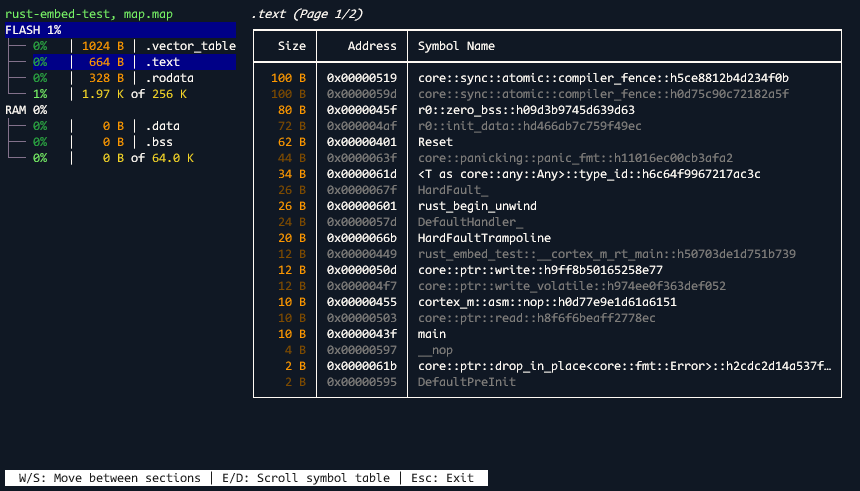
Nesiac will demangle C++ and Rust symbols when it finds them.
1 maintainer

Metadata
1 maintainer
Release files for nesiac 0.4.4
For a detailed explanation of source distributions (sdists) and built distributions (wheels), please see the package formats documentation.
Source distribution (sdist)
| File | Size | Uploaded | |
|---|---|---|---|
| nesiac-0.4.4.tar.gz | 7.5 kB | Details |
Built distribution (wheel)
| File | Interpreter | ABI | Platform | Reset |
|---|---|---|---|---|
| nesiac-0.4.4-py3-none-any.whl | Python 3 | none | any | Details |
Total release size: 17.6 kB
Release files / nesiac-0.4.4.tar.gz
| Download URL | nesiac-0.4.4.tar.gz |
|---|---|
| Size | 7.5 kB |
| Tags | Source |
|
SHA-256 checksum How to use checksums |
8eb36a4c60e27cdc430f8561446f4da67761017f7766e7411b666d77906aefb4
|
|
BLAKE2b-256 checksum How to use checksums |
b8633d6bf7fb6d88566e519fa043741d749269c9a36c5e972f473b942fbae589
|
| Upload date | |
|
Uploaded using Trusted Publishing? What is trusted publishing? |
No |
| Uploaded via |
poetry/2.0.0 CPython/3.11.5 Windows/10
|
Release files / nesiac-0.4.4-py3-none-any.whl
| Download URL | nesiac-0.4.4-py3-none-any.whl |
|---|---|
| Size | 10.1 kB |
| Tags | Python 3 |
|
SHA-256 checksum How to use checksums |
ea6d01af23b4941871f0ad2c2a2253805bb8ef965b82dd51bddafaea58e7e9a0
|
|
BLAKE2b-256 checksum How to use checksums |
be8b4db4f8e88c7390f5bd22efd783c0cd6da6cdea362045fb68edcd07a51538
|
| Upload date | |
|
Uploaded using Trusted Publishing? What is trusted publishing? |
No |
| Uploaded via |
poetry/2.0.0 CPython/3.11.5 Windows/10
|














