
Neighborhood Structure Configuration Model
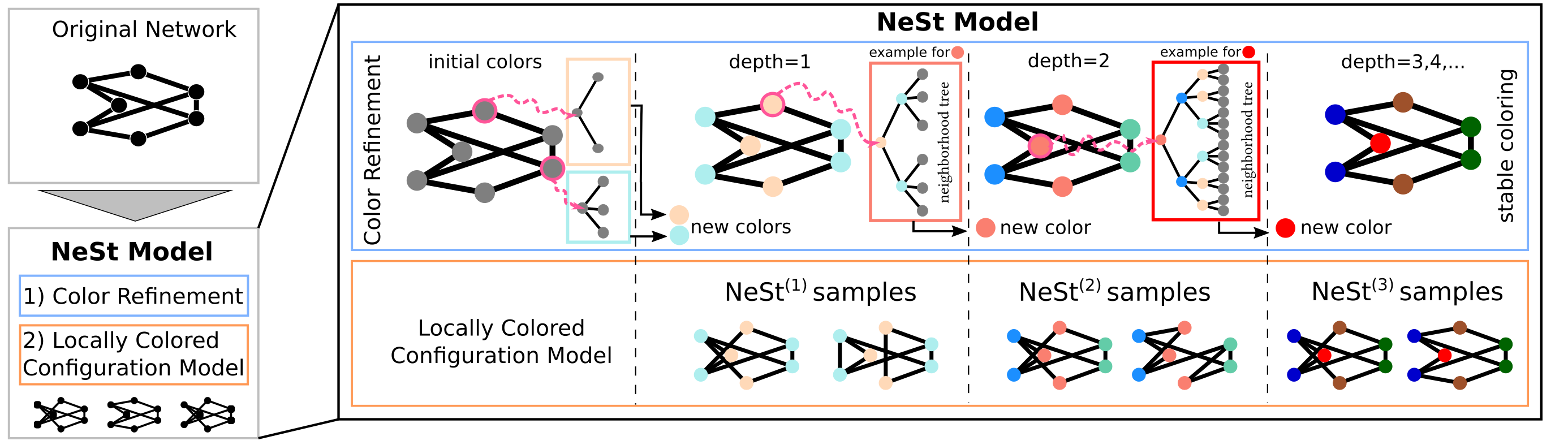

Neighborhood Structure Configuration Models (short NeSt-models) allow to generate random graphs that preserved the neighborhood structure of a given graph for arbitrary depth d.
This package provides the implementation as used in our paper.
Installation instructions
You can install this library like any other python package, depending packages are also installed along with it.
Installing nestmodel
Nestmodel is available on pypi thus you can simply install it via:
pip install nestmodel
Installing nestmodel from source
git clone https://github.com/Feelx234/nestmodel.git
pip install nestmodel
The installation should take less than a minute.
If you also want to notebooks in the scripts folder please install jupyter as outlined below.
pip install jupyter
Making sure the installation went smoothly
To make sure the installation has succeeded we need to install pytest as well and then run the tests
pip install pytest
python -m pytest nestmodel
If you do not have the graph tools library installed, the tests will emit a warning that it is not installed which can be ignored for now.
Reproducing the results from the paper
Before reproducing the results you need to get the datasets. We provide a download script /scripts/get_datasets.py which will download all datasets for you.
cd nestmodel
python ./scripts/get_datasets.py
To reproduce the results from the paper we provided different scripts. The detailed convergence results on HepPh are available in /scripts/convergence2_example.ipynb.
This file can be opened in jupyter and should work out of the box.
The convergence results in sum absolute error (SAE) can all be produced by using
python ./scripts/convergence2_runner.py -all
The runtime of this script is about 1 day.
The script will first convert the notebook files into .py files and then run tests on the karate network which will only take about 1 min.
Once the script is run, plots can be created by opening the convergence2_plot.ipynb file in jupyter. The plot file requires the time of completion for the different centrality calculations which can be read of from the result files which appear in ./scripts/results/ and are also stored in a file: ./scripts/convergence2_run_results.txt.
If you are interested in convergence results for individual centralities you can also checkout any of the ./scripts/convergence2_XXXXX.ipynb (for example ./scripts/convergence2_pagerank.ipynb) in jupyter.
The runtime results comparing NeSt with ERGM and Erdös Renyi models can be reproduced using
python ./scripts/Baselines.ipynb
Notice that the runtime of the Baselines file for the phonecalls is several days because the ERGM is so slow! The baseline results can be visualized in the ./scripts/Baselines_plot.ipynb notebook.
System requirements
The package should run on any modern standard computer.
Software requirements
OS Requirements
This package has been tested on Linux.
Python Dependencies
The package was tested with various version of python (>=3.8). It depends on other packages that are automatically installed along with nestmodel and can be looked up at the setup.py file.
Parts of it also depend on the just-in-time compiler numba we used version 0.56.4 but should work on other versions as well.
1 maintainer

Release files for nestmodel 0.1.2
For a detailed explanation of source distributions (sdists) and built distributions (wheels), please see the package formats documentation.
Source distribution (sdist)
| File | Size | Uploaded | |
|---|---|---|---|
| nestmodel-0.1.2.tar.gz | 33.2 kB | Details |
Built distribution (wheel)
| File | Interpreter | ABI | Platform | Reset |
|---|---|---|---|---|
| nestmodel-0.1.2-py3-none-any.whl | Python 3 | none | any | Details |
Total release size: 72.6 kB
Release files / nestmodel-0.1.2.tar.gz
| Download URL | nestmodel-0.1.2.tar.gz |
|---|---|
| Size | 33.2 kB |
| Tags | Source |
|
SHA-256 checksum How to use checksums |
0202d616aa7c6f67e8eca6fd76a39020ecad583fd0bc0fc8746bc2eb2cd74519
|
|
BLAKE2b-256 checksum How to use checksums |
15b85f65e712cacf7bdc3aab5c991772be10622a636c0d3dc3d11dbe4273ad70
|
| Upload date | |
|
Uploaded using Trusted Publishing? What is trusted publishing? |
No |
| Uploaded via |
twine/4.0.1 CPython/3.11.2
|
Release files / nestmodel-0.1.2-py3-none-any.whl
| Download URL | nestmodel-0.1.2-py3-none-any.whl |
|---|---|
| Size | 39.4 kB |
| Tags | Python 3 |
|
SHA-256 checksum How to use checksums |
72005af7926f6cb9a617a452a772e010d5ed89bc36ae75d188abd649d7221da9
|
|
BLAKE2b-256 checksum How to use checksums |
7e9b94636a9e434fe4c44d285963b41fd6d1f99fa6156a03767e6e0ed60e2d7b
|
| Upload date | |
|
Uploaded using Trusted Publishing? What is trusted publishing? |
No |
| Uploaded via |
twine/4.0.1 CPython/3.11.2
|














