




Netmeasure
A CLI tool and Python library for measuring Internet connection quality in a structured and consistent way.
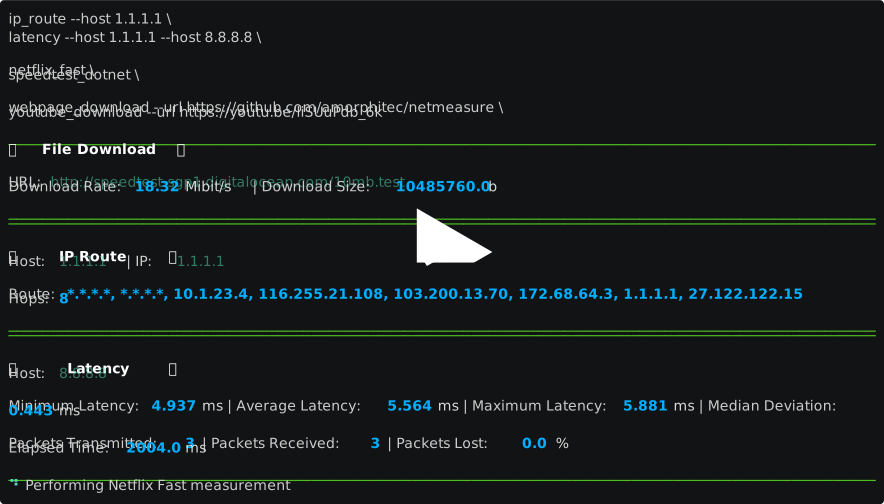
Purpose
Many services, clients, tools, and methodologies exist to measure Internet connection quality. Each of these has particular advantages, flaws, biases and units of measurement.
netmeasure brings together a variety of Internet connection quality measurements in a single package, with a consistent interface and explicitly-defined units.
An open-source license ensures methodology is transparent and open to ongoing community improvement.
Requirements
netmeasure supports Python 3.8 to Python 3.11 inclusively.
CLI tool
netmeasure can be used to run measurements directly from the command line.
Installation
Install with pipx:
$ pipx install netmeasure
Usage
Use netmeasure --help to see a list of available measurements:
Usage: netmeasure [OPTIONS] COMMAND1 [ARGS]... [COMMAND2 [ARGS]...]...

  Internet connection quality measurements.

Options:
  -v, --verbose
  --help         Show this message and exit.

Commands:
  file_download     Perform a file download measurement.
  ip_route          Perform an ip route measurement.
  latency           Perform a latency measurement.
  netflix_fast      Perform a Netflix fast.com measurement.
  speedtest_dotnet  Perform a speedtest.net measurement.
  webpage_download  Perform a webpage download measurement.
  youtube_download  Perform a youtube download measurement.
Use netmeasure <measurement> --help for details for a specific measurement:
netmeasure netflix_fast --help
Usage: netmeasure netflix_fast [OPTIONS]

  Perform a Netflix fast.com measurement.

Options:
  --help  Show this message and exit.
$ netmeasure netflix_fast

─────────────────────────────────────────────────────────────────────────────────────────────────────────────
🍿   Netflix Fast   🍿
Host 0: ipv4-c003-syd001-superloop-isp.1.oca.nflxvideo.net | Country: AU | City: Alexandria
Host 1: ipv4-c004-syd002-superloop-isp.1.oca.nflxvideo.net | Country: AU | City: Sydney
Host 2: ipv4-c001-meb002-superloop-isp.1.oca.nflxvideo.net | Country: AU | City: Port Melbourne
Download Rate: 25393008.677629545 bit/s | Download Size: 54657024.0 B
─────────────────────────────────────────────────────────────────────────────────────────────────────────────
Measurements can be performed sequentially by chaining commands:
$ netmeasure \
netflix_fast \
latency --host 1.1.1.1
speedtest_dotnet

─────────────────────────────────────────────────────────────────────────────────────────────────────────────
🍿   Netflix Fast   🍿
Host 0: ipv4-c003-syd001-superloop-isp.1.oca.nflxvideo.net | Country: AU | City: Alexandria
Host 1: ipv4-c004-syd002-superloop-isp.1.oca.nflxvideo.net | Country: AU | City: Sydney
Host 2: ipv4-c001-meb002-superloop-isp.1.oca.nflxvideo.net | Country: AU | City: Port Melbourne
Download Rate: 25393008.677629545 bit/s | Download Size: 54657024.0 B
─────────────────────────────────────────────────────────────────────────────────────────────────────────────
─────────────────────────────────────────────────────────────────────────────────────────────────────────────
🏓     Latency     🏓
Host: 1.1.1.1
Minimum Latency: 4.403 ms | Average Latency: 107.408 ms | Maximum Latency: 313.408 ms |Median Deviation:
145.663 ms
Packets Transmitted: 3 | Packets Received: 3 | Packets Lost: 0.0 %
Elapsed Time: 2002.0 ms
─────────────────────────────────────────────────────────────────────────────────────────────────────────────
─────────────────────────────────────────────────────────────────────────────────────────────────────────────
⚡ Speedtest Dotnet ⚡
Host: st-syd-02.gcomm.com.au:8080 | Name: Sydney | ID: 29570 | Sponsor: Nexon Asia Pacific
Download Rate: 25007776.530098625 bit/s | Upload Rate: 19202829.854627796 bit/s
─────────────────────────────────────────────────────────────────────────────────────────────────────────────
Library
netmeasure can be used as a library to run measurements and obtain structured results from within your application.
Installation
Install from PyPI:
$ pip install -U netmeasure
Usage
import uuid
from pprint import pprint

# Import the required measurement.
from netmeasure.measurements.latency.measurements import LatencyMeasurement

# Create a measurement.
# Note: A measurement requires an id. This id will be added to all results
# generated by this measurement instance.
my_latency_measurement = LatencyMeasurement(id=str(uuid.uuid4()), host='1.1.1.1')

# Run the measurement.
my_result = my_latency_measurement.measure()

# Print the measurement result(s)
pprint(my_result)
[LatencyMeasurementResult(id='fb6f0c59-e6dc-4f3f-8139-c8b4b2d94871'),
	errors=[],
	host='1.1.1.1',
	minimum_latency=3.939,
	average_latency=4.195,
	maximum_latency=4.361,
	median_deviation=0.164,
	packets_transmitted=4,
	packets_received=4,
	packets_lost=0.0,
	packets_lost_unit=<RatioUnit.percentage: '%'>,
	elapsed_time=3004.0,
	elapsed_time_unit=<TimeUnit.millisecond: 'ms'>)]
Take a look at the commands defined in netmeasure/cli.py for more examples.
Measurements
The following measurements are currently available:
file_download- measures download of a file from a given endpoint using the wget application.ip_route- measures network hops to a given endpoint using the scapy library.latency- measures latency to a given endpoint using the ping application.netflix_fast- measures download from the netflix fast service using the requests library.speedtest_dotnet- measures download from, upload to and latency to the speedtest.net service using the speedtest-cli library.webpage_download- measures download of a given web page and its associated assets using the requests library.youtube_download- measures download of a given youtube video using the youtube-dl library.
Note: Some measurements require particular cli tools to be installed
Development
Git hooks
pre-commit hooks are included to ensure code quality
on commit and push. Install these hooks like so:
$ pre-commit install && pre-commit install -t pre-push
1 maintainer

Metadata
1 maintainer
Release files for netmeasure 1.4.0
For a detailed explanation of source distributions (sdists) and built distributions (wheels), please see the package formats documentation.
Source distribution (sdist)
| File | Size | Uploaded | Provenance | Actions |
|---|---|---|---|---|
| netmeasure-1.4.0.tar.gz | 42.8 kB | Without provenance | Details for netmeasure-1.4.0.tar.gz |
Built distribution (wheel)
| File | Interpreter | ABI | Platform | Actions Reset |
|---|---|---|---|---|
| netmeasure-1.4.0-py3-none-any.whl | Python 3 | none | any | Details for netmeasure-1.4.0-py3-none-any.whl |
Total release size: 98.7 kB
Release files / netmeasure-1.4.0.tar.gz
| Download URL | netmeasure-1.4.0.tar.gz |
|---|---|
| Size | 42.8 kB |
| Tags | Source |
|
SHA-256 checksum How to use checksums |
041d7f92d610ccfecd19a24368e94d84331de8190e058bbfb7ead5422de33ea9
|
|
BLAKE2b-256 checksum How to use checksums |
f37f76e3cb56ae4d1fcbc68b900af1329d93f3a93ad6112531c875a136d9818b
|
| Upload date | |
|
Uploaded using Trusted Publishing? What is trusted publishing? |
No |
| Uploaded via |
poetry/1.6.1 CPython/3.11.0 Linux/6.2.0-1012-azure
|
Release files / netmeasure-1.4.0-py3-none-any.whl
| Download URL | netmeasure-1.4.0-py3-none-any.whl |
|---|---|
| Size | 55.9 kB |
| Tags | Python 3 |
|
SHA-256 checksum How to use checksums |
23f9b602ec769b8a8cd8e554bb26ca3dbaf2d6ba3e861d92c50cd555da42828b
|
|
BLAKE2b-256 checksum How to use checksums |
da32fe157f453e5c74c31b16bce3c4288f8dd72098077b961828a71307e7bd6b
|
| Upload date | |
|
Uploaded using Trusted Publishing? What is trusted publishing? |
No |
| Uploaded via |
poetry/1.6.1 CPython/3.11.0 Linux/6.2.0-1012-azure
|
Security for netmeasure 1.4.0
Provenance
Provenance describes where a file came from. On PyPI, provenance is shared via attestations, which provide a verifiable record of the build or publishing details. View details, limitations and caveats.
No provenance found
None of the files in this release were uploaded with provenance metadata.
A note on package security
PyPI is a repository for distributing packages, not a service for auditing them. While third-party security researchers and our staff do their best to detect and remove malicious packages, PyPI cannot guarantee the quality, security or suitability of any given package.
To learn more about protecting yourself from malicious actors, visit our package security documentation.














